
1. Okwu mmalite
The EPEVER 20A MPPT Solar Charge Controller, model Tracer2210AN, is an advanced Maximum Power Point Tracking (MPPT) device designed for 12V/24V automatic work solar systems. It efficiently manages power flow from solar panels to batteries, ensuring optimal charging and extending battery life. This controller features high conversion efficiency, supports various battery types, and offers comprehensive protection functions. This manual provides essential information for the safe installation, operation, and maintenance of your solar charge controller.

Image 1.1: EPEVER 20A MPPT Solar Charge Controller (Tracer2210AN). This image shows the front view of the solar charge controller with its LCD display and control buttons.
2. Ntuziaka nchekwa
- Always connect the battery to the charge controller mbụ, then the solar panel, and finally the load. Disconnect in the reverse order: load, then solar panel, then battery.
- Ensure proper ventilation around the controller to prevent overheating.
- Use appropriate wire gauges for all connections to prevent voltage drop and overheating. Refer to the specifications section for recommended cable sizes.
- Avoid short circuits at all terminals.
- Install the controller in a dry, well-ventilated area, away from direct sunlight and moisture.
- Do not attempt to repair or modify the controller yourself. Refer to qualified personnel for service.
- Wear appropriate personal protective equipment (PPE) during installation, including eye protection and insulated gloves.
3. Ngwaahịa gafereview
The Tracer2210AN controller incorporates advanced features for efficient solar power management:
- Teknụzụ MPPT dị elu: Ensures maximum power extraction from solar panels with tracking efficiency not less than 99.5% and a maximum conversion efficiency of 98%.
- Ngwa dị oke mma: Utilizes international famous brands of ST and IR components for reliability and durability.
- Ndakọrịta batrị: Supports various battery types including lead-acid (sealed, gel, flooded) and lithium-ion (LiFePO4, Li(NiCoMn)O2), with user-defined settings.
- Nkwụghachi okpomọkụ: Includes battery temperature compensation function for lead-acid batteries.
- Nleba anya oge: Provides real-time energy statistics and supports communication via RS-485 bus with Modbus protocol for monitoring and parameter setting via mobile APP or PC software (requires optional accessories like MT50, WiFi, or BLE adapters).
- Ọrụ nchedo: Features multiple safety protections including overheating power reduction.
3.1 Controller Components

Foto 3.1: N'ihu view of the EPEVER Tracer2210AN controller with labeled components. Key components include the LCD display, SELECT and ENTER buttons, remote temperature sensor port, solar panel terminals, battery terminals, load terminals, and an RJ45 communication port.

Image 3.2: Top and bottom views of the EPEVER Tracer2210AN controller. The top view shows the model information and certifications, while the bottom view displays the terminal connections and communication port.
4. Nhazi
4.1 Ịkwanye njikwa
Mount the controller vertically on a wall or a stable surface. Ensure there is sufficient space around the controller for proper air circulation to dissipate heat. The dimensions of the controller are 220mm x 154mm x 52mm.

Image 4.1: EPEVER MPPT 20A Solar Charge Controller with its physical dimensions indicated. The controller measures 220mm in length, 154mm in width, and 52mm in height.
4.2 Njikọ njikọ
Follow the connection order carefully to avoid damage to the controller or other components. Always connect the battery first, then the solar panel, and finally the load. Disconnect in the reverse order.
- Jikọọ batrị: Connect the positive and negative terminals of the battery to the corresponding battery terminals on the controller. Ensure correct polarity.
- Jikọọ ogwe anyanwụ: Connect the positive and negative terminals of the solar panel to the corresponding PV terminals on the controller. Ensure correct polarity.
- Connect the Load: Connect the positive and negative terminals of the DC load to the corresponding load terminals on the controller. Ensure correct polarity.
- Connect Remote Temperature Sensor (Optional): If using, connect the RTS300R47K3.81A temperature sensor to the designated port on the controller and attach the sensor to the battery for accurate temperature compensation.

Image 4.2: Connection diagram illustrating the proper wiring sequence for the EPEVER solar charge controller. It shows connections from the solar panel, battery (with fuse), and DC load, as well as an optional inverter for AC loads.
5. Ntuziaka ọrụ
Ngosipụta na bọtịnụ LCD 5.1
The controller features an LCD display that shows system status, charging parameters, and error codes. The 'SELECT' and 'ENTER' buttons are used to navigate through menus and adjust settings.
5.2 Battery Type Settings
The controller supports various battery types. It is crucial to select the correct battery type for optimal charging and battery longevity. The default setting is 'Sealed' for lead-acid batteries.
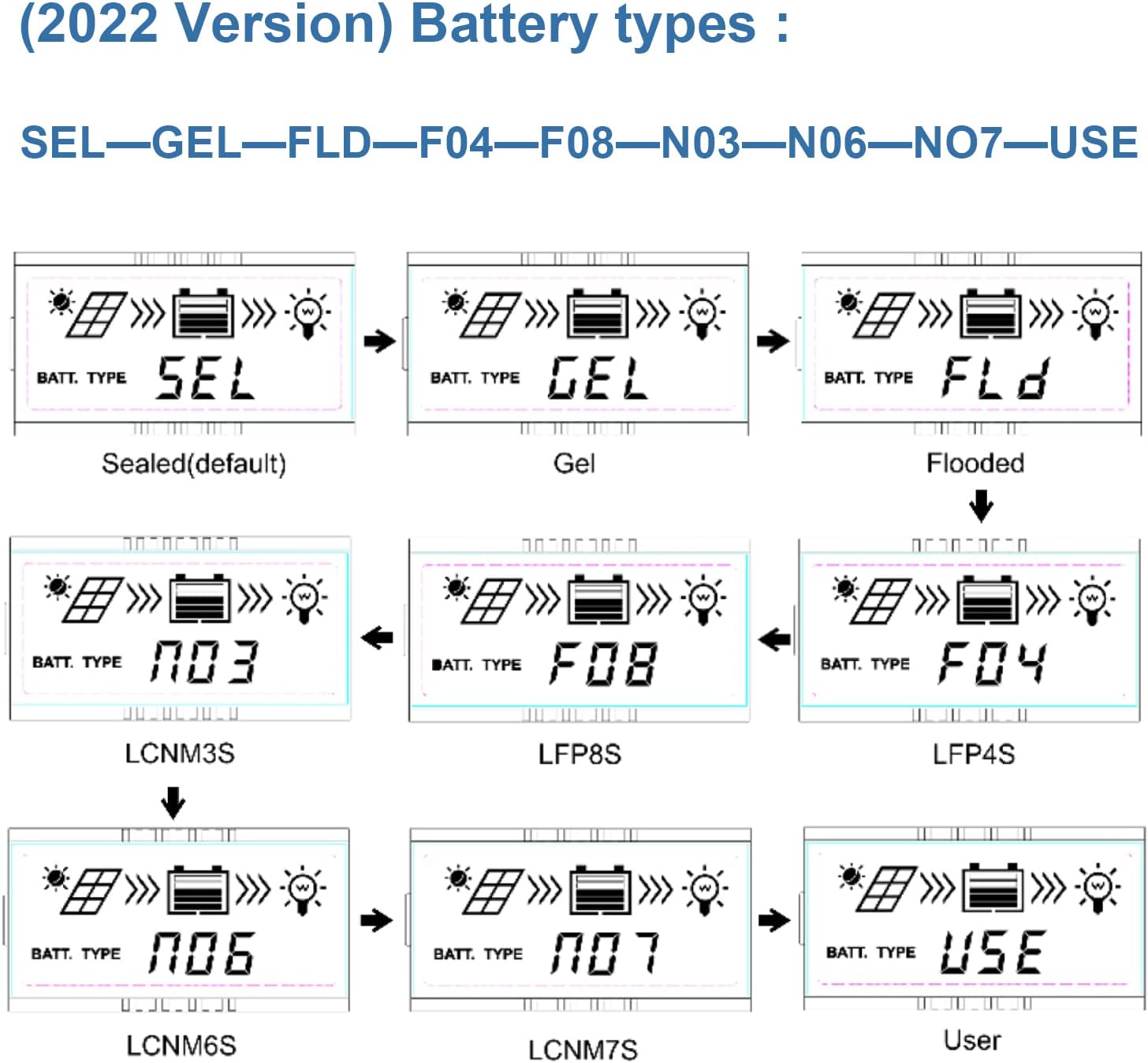
Image 5.1: LCD display showing various battery type selections. Options include Sealed (SEL), Gel (GEL), Flooded (FLD), LiFePO4 (LFP4S, LFP8S), Li(NiCoMn)O2 (LCNM3S, LCNM6S, LCNM7S), and User-defined (USE).
Ka ịgbanwee ụdị batrị:
- Press the 'SELECT' button to cycle through the main display screens until you reach the battery type setting.
- Press and hold the 'ENTER' button to enter the setting modification mode.
- Use the 'SELECT' button to choose the desired battery type (e.g., GEL, FLD, LFP4S, USE).
- Press 'ENTER' again to confirm and save the selection.
5.3 Nlekota na Nkwukọrịta
The Tracer2210AN controller can be monitored and configured remotely using optional accessories:
- MT50 Remote Meter: Connects via RJ45 cable to display real-time data and modify parameters.
- WiFi/BLE Adapters (eBox-WIFI-01, eBox-BLE-01): Connects to the RS-485 port to enable wireless monitoring and control via a mobile application.
- PC Communication Cable (CC-RS485-USB-150U): Connects to a PC for monitoring and parameter setting using EPEVER PC software.
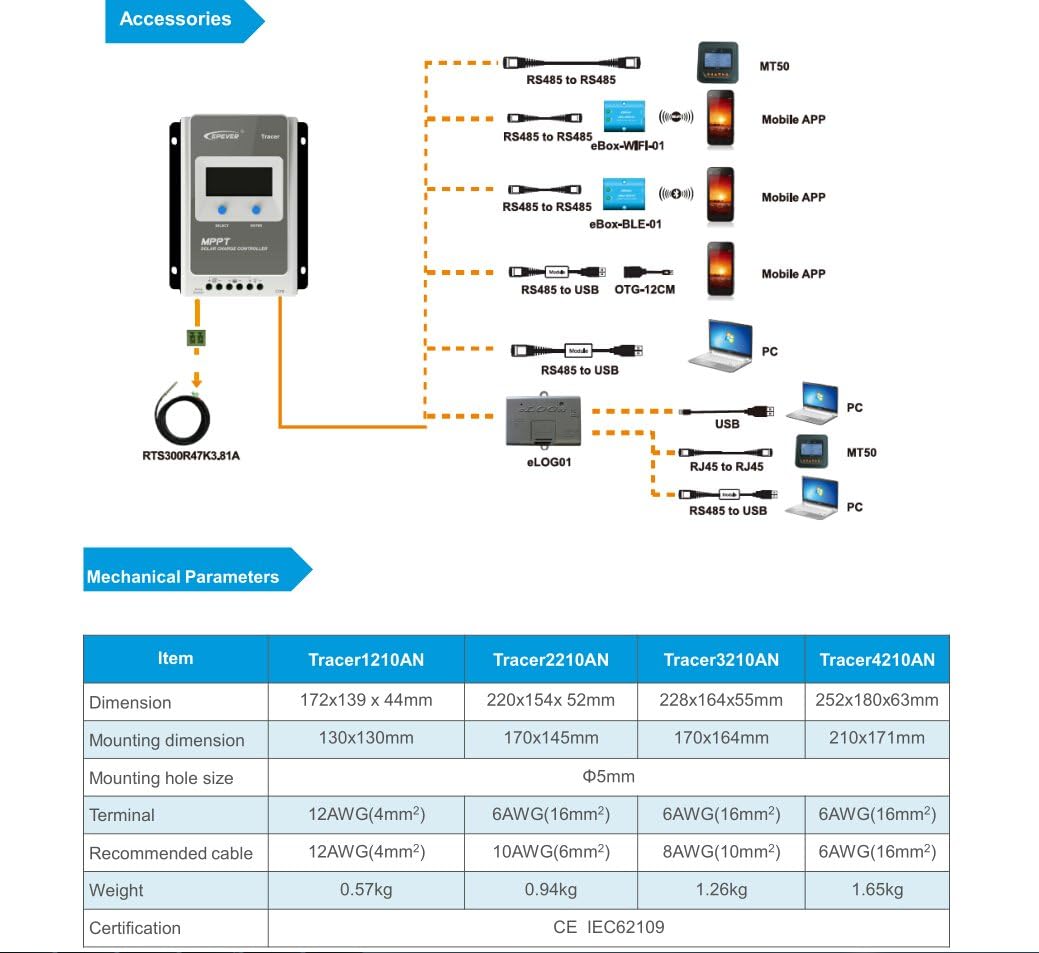
Image 5.2: Diagram showing the EPEVER solar charge controller and its compatible accessories. These include the RTS300R47K3.81A temperature sensor, MT50 remote meter, eBox-WIFI-01, eBox-BLE-01, OTG-12CM, and eLOG01 for various monitoring and communication options.

Image 5.3: The EPEVER Tracer2210AN solar charge controller connected to an MT50 remote meter, displaying system information. This setup allows for convenient monitoring and control.
6. Nlekọta
Regular maintenance ensures the longevity and optimal performance of your EPEVER solar charge controller:
- Lelee njikọ: Periodically inspect all wiring connections for tightness and corrosion. Loose connections can cause voltage na-ada ma na-ekpo oke ọkụ.
- Hichaa ihe njikwa ahụ: Keep the controller clean and free from dust and debris. Use a dry cloth to wipe the surface. Ensure ventilation openings are not blocked.
- Lelee maka mmebi: Check for any physical damage to the controller, cables, or terminals.
- Nyocha batrị: For lead-acid batteries, check electrolyte levels (if applicable) and terminal condition. Ensure lithium batteries are within their recommended operating parameters.
- Ọnọdụ gburugburu: Ensure the installation environment remains within the specified operating temperature and humidity ranges.
7. Nchọpụta nsogbu
If you encounter issues with your solar charge controller, refer to the following common troubleshooting steps:
- Enweghị Ngosipụta/Ike:
- Check battery connections and ensure the battery voltage is within the controller's operating range.
- Verify that the battery fuse (if installed) is intact.
- Enweghị Nchaji site na Panel Anyanwụ:
- Ensure solar panel connections are secure and correct polarity is observed.
- Check the solar panel's open-circuit voltage (Voc) and short-circuit current (Isc) to ensure it is producing power.
- Verify that the solar panel voltage is within the controller's input voltage oke.
- Check for shading on the solar panels.
- Ibu Anaghị arụ ọrụ:
- Lelee njikọ ibu ma hụ na polarity ziri ezi.
- Verify that the battery has sufficient charge. The controller may disconnect the load if the battery voltage dị oke ala.
- Check load settings on the controller to ensure the load output is enabled.
- ekpo oke ọkụ:
- Ensure the controller is installed in a well-ventilated area and its heat sinks are not obstructed.
- Reduce the load or solar input if operating in extreme temperatures.
For more detailed troubleshooting or specific error codes, please refer to the comprehensive manual provided by EPEVER or contact their customer support.
8. Nkọwapụta
The following table outlines the key electrical and mechanical parameters for the Tracer2210AN MPPT Solar Charge Controller:

Image 8.1: Table detailing the electrical parameters for Tracer series controllers, including the Tracer2210AN. This table provides specific values for system voltage, currents, power, and environmental conditions.
| Oke | Value (Tracer2210AN) |
|---|---|
| Sistemụ ọnụ ala Voltage | 12V/24V Auto Work |
| Egopụtara ụgwọ dị ugbu a | 20A |
| Egotara nchụpụ ugbu a | 20A |
| Oke. Ike ntinye PV | 260W (12V Battery System) 520W (24V Battery System) |
| Oke. PV Open Circuit Voltage | 100V (at min. operating temp) 92V (at 25℃ ambient temp) |
| Batrị Voltage Oke | 8-32V |
| MPP Voltage Oke | V(BAT+2V) ~ 72V |
| Nda ala | Ihe ọjọọ na-emekarị |
| Ịrụpụta arụmọrụ | ≥99.5% |
| Oke. Ntugharị arụmọrụ | 98% |
| Okpomọkụ gburugburu na-arụ ọrụ | -25 ℃ ~ +50 ℃ |
| Oke Okpomọkụ Nchekwa | -20 ℃ ~ +70 ℃ |
| Iru mmiri dị nso | ≤95%, NC |
| Mkpuchi | IP30 |
| Akụkụ (L x W x H) | 220 x 154 x 52 mm |
| Ibu | 0.94 n'arọ |
| Ogo njedebe | #6 AWG (16 mm²) |
| Cable akwadoro | #10 AWG (6 mm²) |
9. Akwụkwọ ikike na nkwado
For warranty information, please refer to the documentation provided with your purchase or contact your authorized EPEVER dealer. EPEVER products typically come with a manufacturer's warranty covering defects in materials and workmanship.
For technical support, product inquiries, or service, please visit the official EPEVER website or contact an authorized EPEVER service center. Ensure you have your product model (Tracer2210AN) and serial number available when seeking support.