
1. Ngwaahịa gafereview
The Zerone Multi-Language Translator Bluetooth Earphone is a portable wireless device designed for real-time language translation and audio playback. It features Bluetooth 4.1 connectivity, high-fidelity audio output, and a compact in-ear design for comfortable use during various activities.

Image 1.1: Main view of the Zerone Multi-Language Translator Bluetooth Earphone.
2. Ihe ngwugwu
Biko chọpụta na agụnyere ihe niile edepụtara n'okpuru na ngwugwu gị:
- Zerone Multi-Language Translator Bluetooth Earphone
- Igwe nchaji USB
- Additional Ear Tips (various sizes)
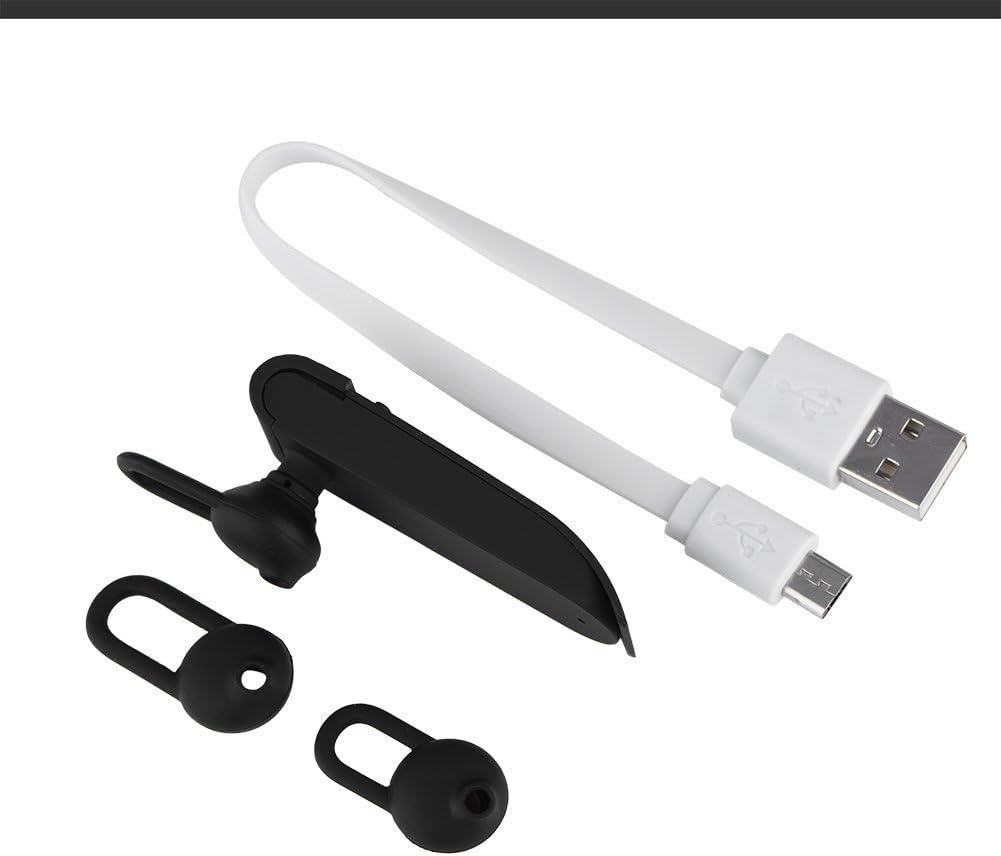
Image 2.1: The earphone with its charging cable and two additional ear tips.
3. Akụrụngwa Ngwaahịa
- Multi-Language Translation: Supports up to 16 languages for real-time translation. Speak into the earphone, and it will translate into the desired language.
- High Fidelity Audio Output: Equipped with an 8mm moving coil speaker for clear, smooth audio and enhanced bass.
- True Wireless In-Ear Design: Mini and compact, offering a stable and comfortable fit without tangled wires, suitable for various activities.
- Njikọ Bluetooth 4.1: Optimized Bluetooth 4.1 version ensures a stable and fast wireless connection with a range of up to 10 meters.
- Ndụ batrị agbatịkwuru: Built-in 90mAh rechargeable lithium battery provides approximately 5-8 hours of playback time and up to 13 hours of talk time.

Image 3.1: Visual representation of the 16 languages translation feature.

Image 3.2: Illustration of the high fidelity audio output with an 8mm moving coil speaker.

Image 3.3: Visual representation of the Bluetooth true wireless connection with a 10-meter transmission range.

Image 3.4: Details on the earphone's 90mAh rechargeable lithium battery and extended usage times.
4. Nhazi
4.1 Charging the Earphone
Before initial use, fully charge the earphone. Connect the provided USB charging cable to the earphone's charging port and the other end to a USB power source (e.g., computer, wall adapter). The charging time is approximately 2 hours.
4.2 Njikọ Bluetooth
- Ensure the earphone is fully charged and powered off.
- Press and hold the multi-function button on the earphone until the indicator light flashes red and blue alternately, indicating pairing mode.
- Na ekwentị gị ma ọ bụ ngwaọrụ Bluetooth, gaa na ntọala Bluetooth.
- Chọọ maka available devices and select "Zerone Translator Earphone" (or similar name) from the list.
- Once connected, the indicator light will typically turn solid blue or flash blue slowly.
4.3 Companion Application (for Translation)
To utilize the multi-language translation feature, you will need to download and install a compatible companion application on your smartphone. Refer to the packaging or product documentation for the specific app name and download instructions. Ensure your phone is connected to the internet for translation services.
5. Ntuziaka ọrụ
5.1 Gbanyụọ ma ọ bụ gbanyụọ
- Ike Na: Press and hold the multi-function button for approximately 3 seconds until the indicator light turns blue.
- Gbanyụọ: Press and hold the multi-function button for approximately 5 seconds until the indicator light turns red.
5.2 Nghaghachi egwu
- Gwuo/kwụsịtụ: Mkpirisi pịa bọtịnụ ọtụtụ ọrụ.
- Track na-esote: Pịa bọtịnụ ọtụtụ ọrụ ugboro abụọ.
- Gara aga Track: Pịa bọtịnụ ọrụ ọtụtụ ugboro ugboro atọ.
5.3 Njikwa oku
- Azịza/Kwụsị Oku: Mkpirisi pịa bọtịnụ ọtụtụ ọrụ.
- Jụ oku: Pịa ma jide bọtịnụ ọtụtụ ọrụ maka sekọnd 2.
5.4 Using the Translation Function
After successfully pairing the earphone with your device and setting up the companion application:
- Open the translation application on your smartphone.
- Select the source and target languages within the app.
- Activate the translation mode as instructed by the application (this may involve pressing a button on the earphone or within the app).
- Speak clearly into the earphone's microphone. Your speech will be translated and played back through the earphone or your phone's speaker, depending on the app's settings.

Image 5.1: A conceptual image demonstrating the earphone's translation capability between two languages.
6. Nlekọta
- Nhicha: Use a soft, dry cloth to clean the earphone. Do not use abrasive cleaners or immerse the device in water.
- Nchekwa: Store the earphone in a cool, dry place away from direct sunlight and extreme temperatures.
- Nlekọta batrị: To prolong battery life, avoid fully discharging the earphone frequently. Charge it regularly, even if not in use for extended periods.
7. Nchọpụta nsogbu
| Nsogbu | Ihe nwere ike ime | Ngwọta |
|---|---|---|
| Earphone does not power on | Batrị dị ala | Charge the earphone for at least 30 minutes. |
| Enweghị ike ijikọ na ngwaọrụ | Earphone not in pairing mode; Bluetooth off on device; device too far | Ensure earphone is in pairing mode (flashing red/blue). Turn on Bluetooth on your device. Move device closer to earphone (within 10m). |
| No sound during playback/calls | Volume too low; earphone not connected; media output not selected | Increase volume on both earphone and connected device. Re-pair the earphone. Check device's audio output settings. |
| Translation function not working | Companion app not open/configured; no internet connection; microphone blocked | Ensure the companion app is open and correctly configured. Verify internet connectivity. Check if the earphone's microphone is clear. |
8. Nkọwapụta
| Njirimara | Nkọwa |
|---|---|
| Nọmba nlereanya | 4351510494 |
| Teknụzụ Njikọta | Ikuku (Bluetooth) |
| Ụdị Bluetooth | 4.1 |
| Oke Bluetooth | Ruo mita 10 |
| Ike batrị | 90mAh batrị lithium |
| Oge egwu | 5-8 awa |
| Oge ikwu okwu | Ruo awa iri abụọ |
| Oge Nchaji | Ihe dị ka awa 2 |
| Jack ekweisi | USB (maka ịchaji) |
| Ihe onwunwe | Plastic |
| Ntinye ntị | Na Ntị |
| Ụdị Ihe | Na Ntị |
| Ụdị njikwa | Njikwa Mgbasa Ozi, Metụ Aka |
| Njikwa mkpọtụ | Nkagbu mkpọtụ nọ n'ọrụ |
| Ibu Ibu | 2.39 ounces |
9. Akwụkwọ ikike na nkwado
For warranty information and technical support, please refer to the documentation included with your purchase or visit the official Zerone websaịtị. Debe ihe akaebe nke ịzụrụ maka akwụkwọ ikike.