
Bytech BCAUBS134BK
Akwụkwọ ntuziaka Onye ọrụ Bytech Massive Bluetooth Long Bar Speaker-BK
Model: BCAUBS134BK
1. Okwu mmalite
Daalụ maka ịzụrụasing the Bytech Massive Bluetooth Long Bar Speaker-BK. This manual provides essential information for the proper setup, operation, and maintenance of your new speaker. Please read this manual thoroughly before using the product to ensure optimal performance and longevity.
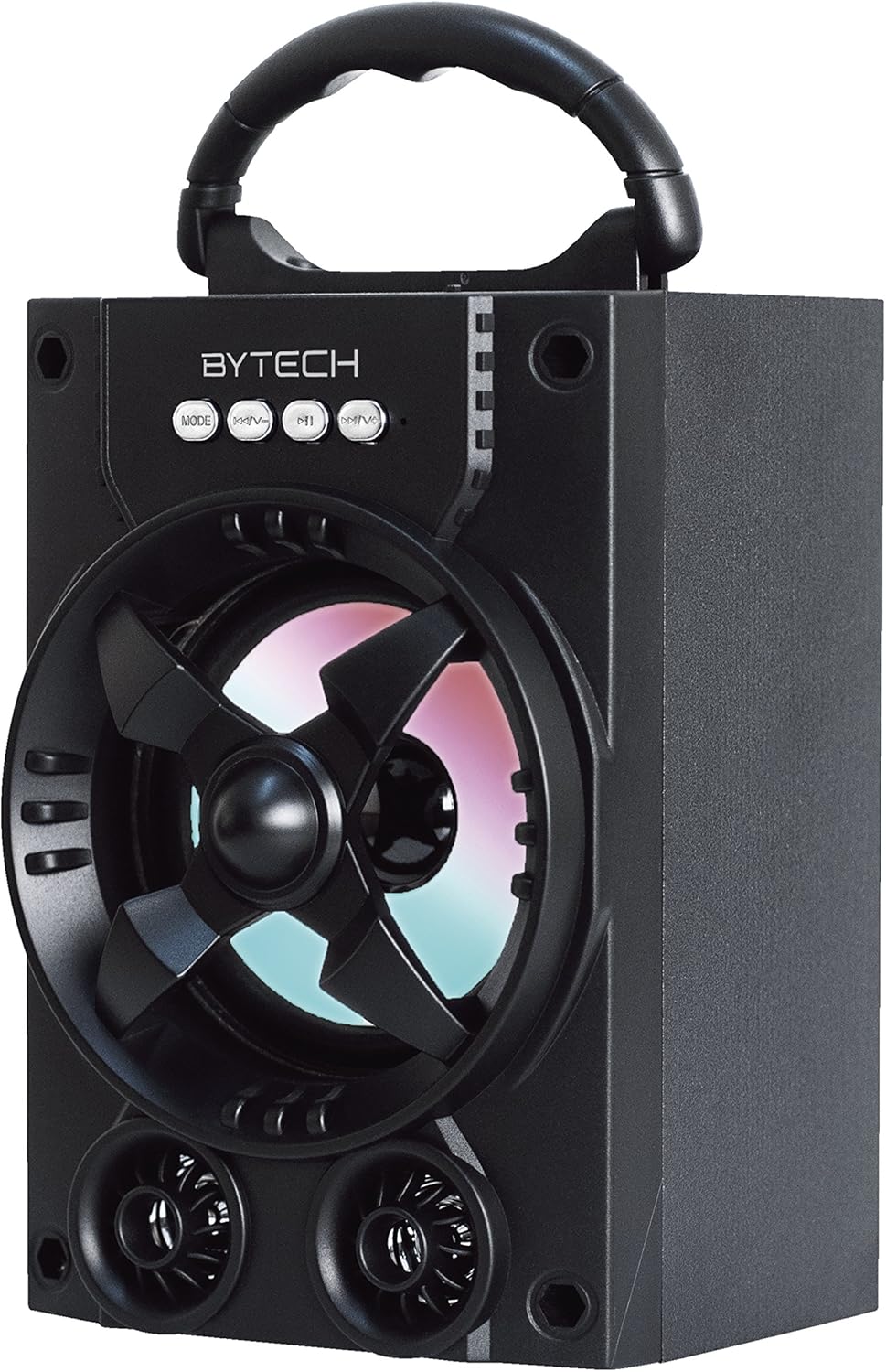
Foto 1.1: N'ihu view of the Bytech Massive Bluetooth Long Bar Speaker-BK, showcasing its design, handle, and speaker grille with LED lights.
2. Ihe ngwugwu
Biko lelee ngwungwu maka ihe ndị a:
- Bytech Massive Bluetooth Long Bar Speaker-BK
- Igwe nchaji USB
- Akwụkwọ ntuziaka (akwụkwọ a)
Ọ bụrụ na ihe ọ bụla efuo ma ọ bụ mebie, biko kpọtụrụ ndị ọrụ nkwado ndị ahịa.
3. Akụrụngwa Ngwaahịa
- LED Performance Lights: Dynamic LED lights that synchronize with your music for an enhanced audio-visual experience.
- Convenient Carrying Handle: Integrated handle for easy portability, allowing you to take your music anywhere.
- Universal Bluetooth Connectivity: Seamlessly connect wirelessly to your smartphone, tablet, or other Bluetooth-enabled devices.
- Ụda Gburugburu: Designed to deliver a high-quality surround sound experience.
- Enwere ike ibugharị: Ideal for various settings, including parties, outdoor gatherings, and personal use.

Figure 1.2: The speaker shown with its retail packaging, illustrating its key features such as multi-color LED lights, Bluetooth connectivity, and surround sound capability.
4. Njikwa na egosi
The speaker features intuitive controls and indicators for easy operation:
- Bọtịnụ MODE: Press to switch between available input modes (e.g., Bluetooth).
- V- bọtịnụ: Press to decrease volume. Long press to skip to the previous track.
- Bọtịnụ V+: Press to increase volume. Long press to skip to the next track.
- M bọtịnụ: (Function not explicitly detailed, typically for mode or mute)
- Ọkụ LED: Indicate power status, charging status, and provide dynamic light effects during audio playback.
5. Ntuziaka Nhazi
5.1 Ịchaji ọkà okwu
- Jikọọ obere nsọtụ nke eriri chaja USB na ọdụ chaja dị na ọkà okwu.
- Jikọọ nnukwu njedebe nke eriri USB na nkwụnye ọkụ USB (anaghị etinye ya) ma ọ bụ ọdụ ụgbọ USB nke kọmputa.
- Ihe ngosi LED ga-egosi ọnọdụ chajị (dịka ọmụmaatụ, ọbara ọbara maka chajị, gbanyụọ mgbe chajị zuru oke).
- Hapụ ihe dị ka awa 3-4 ka i wee chajịa ya nke ọma tupu i jiri ya na mbụ.
5.2 Gbanyụọ/ gbanyụọ
- To power on, press and hold the Power button (location not specified, typically near charging port or on control panel) for a few seconds until you hear an audible prompt or see the LED lights activate.
- Iji gbanyụọ ọkụ, pịa ma jide bọtịnụ Ike ọzọ ruo mgbe ọkà okwu ahụ kwụsịrị.
5.3 Njikọ Bluetooth
- Ensure the speaker is powered on and in Bluetooth pairing mode (indicated by a flashing LED light or audible prompt).
- Na ama ma ọ bụ mbadamba gị, gaa na ntọala Bluetooth.
- Chọọ maka available devices. The speaker will appear as "BYTECH" or a similar name.
- Họrọ ọkà okwu site na ndepụta ahụ iji malite njikọta.
- Once successfully paired, the LED indicator will typically become solid, and you may hear a confirmation tone.
6. Ntuziaka ọrụ
6.1 Ịkpọ ụda site na Bluetooth
- After successful Bluetooth pairing, open your preferred music application on your connected device.
- Select and play your desired audio. The sound will be streamed wirelessly to the speaker.
- Use the V+ and V- buttons on the speaker or your connected device to adjust the volume.
- Long press V+ or V- to skip tracks.
6.2 LED Performance Lights
The speaker features integrated LED lights that enhance your listening experience. These lights typically activate automatically when the speaker is powered on and playing audio. Specific controls for light modes are not detailed, but they are designed to provide dynamic visual effects.
6.3 Ngbanwe ọnọdụ
Pịa MODE button to cycle through available input modes. While Bluetooth is the primary connectivity, other modes (if available, such as FM radio or AUX input) can be accessed via this button.
7. Nlekọta na nlekọta
- Nhicha: Jiri akwa dị nro dị nro hichaa mpụta ọkà okwu. Ejila ihe nchacha abrasive, waxes, ma ọ bụ ihe mgbaze.
- Nchekwa: Mgbe a naghị eji ya mee ihe ruo ogologo oge, chekwaa ọkà okwu n'ebe dị jụụ, nke kpọrọ nkụ na-adịghị na ìhè anyanwụ kpọmkwem na oke okpomọkụ.
- Nlekọta batrị: Ka ịgbatị ndụ batrị ogologo, zere ịchaji batrị ugboro ugboro. Tinyegharịa igwe okwu mgbe niile, ọbụlagodi na ejighị ya, iji kwado ahụike batrị.
- Nguzogide mmiri: Ngwaahịa a bụ Ọ BỤGHỊ waterproof. Avoid exposure to water, rain, or excessive moisture to prevent damage.
8. Nchọpụta nsogbu
Ọ bụrụ na ị na-enwe nsogbu na ọkà okwu gị, rụtụ aka na nsogbu na ngwọta ndị a na-emekarị:
| Nsogbu | Ihe nwere ike ime | Ngwọta |
|---|---|---|
| Ọkà okwu anaghị agba ọkụ. | Batrị dị ala. | Chajie ọkà okwu zuru ezu. |
| Enweghị ụda sitere na ọkà okwu. | Volume too low; Not paired; Incorrect mode. | Increase volume on speaker and device; Ensure successful Bluetooth pairing; Press MODE button to select correct input. |
| Njikọ Bluetooth adịghị akwụsi ike ma ọ bụ daa ada. | Device too far; Interference; Pairing issue. | Move device closer to speaker (within 33 ft/10m); Avoid obstacles; Forget device on your phone and re-pair. |
| Ọkụ LED anaghị arụ ọrụ. | Speaker not powered on or playing audio. | Ensure speaker is on and audio is playing. |
9. Nkọwapụta
| Njirimara | Nkọwa |
|---|---|
| Ụdị | Bytech |
| Aha Nlereanya | BYTECH |
| Nọmba Nlereanya ihe | BCAUBS134BK |
| Ụdị Ọkà Okwu | Gburugburu ụda |
| Teknụzụ Njikọta | Bluetooth |
| Teknụzụ nzikọrịta ozi ikuku | Bluetooth |
| Ngwa dakọtara | Ekwentị mkpanaaka |
| Ike Nwepu kacha elu | 20 Watt |
| Nzaghachi ugboro ugboro | 20 kHz |
| Mgbochi | 1 Ohm |
| Nha Ọkà Okwu | 5 sentimita asatọ |
| Isi Iyi Ike | Igwe ọkụ eletrik (maka ịchaji) |
| Ụdị batrị | 1 Lithium ion batrị achọrọ |
| Agba | Nwa |
| Akụkụ ngwaahịa | 4.75 x 5.5 x 8.5 sentimita asatọ |
| Ibu Ibu | 1.3 pound |
| Enweghị mmiri | Mba |
| Mba onye si | China |
| UPC | 805112038121 |
10. Akwụkwọ ikike Ozi
Bytech products are manufactured to the highest quality standards. For specific warranty terms and conditions, please refer to the warranty card included with your purchase or visit the official Bytech websaịtị. Debe ihe akaebe nke ịzụrụ maka akwụkwọ ikike.
11. Nkwado ndị ahịa
For technical assistance, troubleshooting, or general inquiries, please contact Bytech customer support. Contact information can typically be found on the product packaging, the official Bytech websaịtị, ma ọ bụ risit ịzụrụ ihe gị.
Note: No official product videos from the seller were available for embedding based on the provided data.
Ask a question about this manual
Ask about setup, troubleshooting, compatibility, parts, safety, or missing instructions. Manuals+ will review the question and use this page’s manual context to help answer it.