
GPS Tracking Mart GL300W
GTM Queclink GL300W 3G GPS Tracker User Manual
Model: GL300W | Brand: GPS Tracking Mart
Okwu mmalite
This manual provides comprehensive instructions for the GTM Queclink GL300W 3G GPS Tracker. The GL300W is a robust, water-resistant GPS locator designed for a variety of tracking applications, including lone worker safety, vehicle monitoring, pet tracking, and asset management. It features a highly sensitive built-in GPS receiver and UMTS technology for real-time location monitoring. Its integrated 3-axis accelerometer enables motion detection and efficient power management.
Please read this manual thoroughly before operating the device to ensure proper setup, usage, and maintenance.
Ngwaahịa gafereview
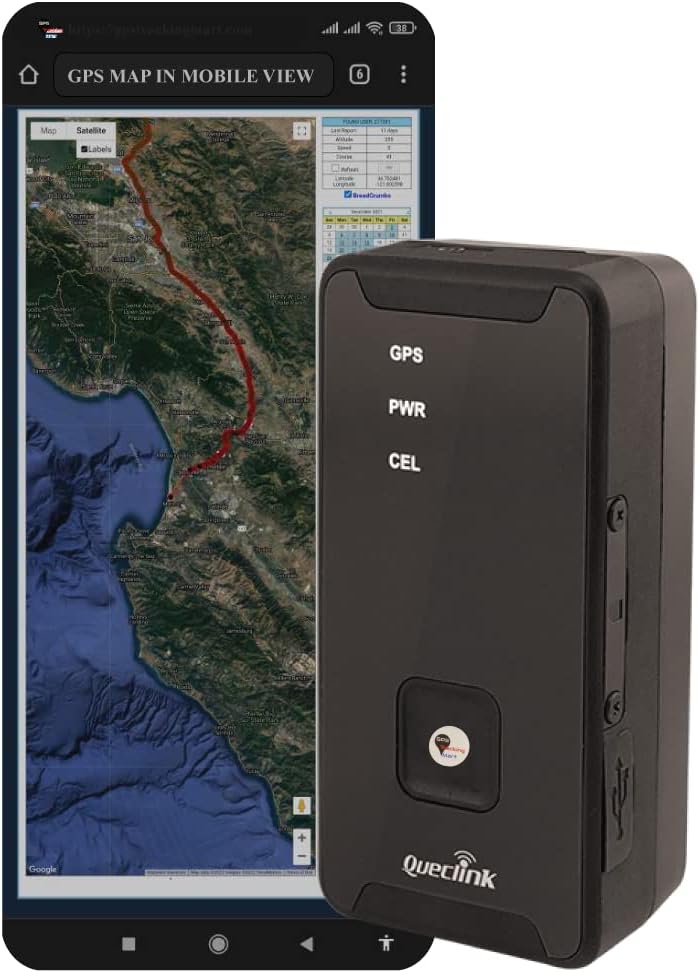
Foto 1: The GTM Queclink GL300W GPS Tracker shown alongside a smartphone displaying a real-time GPS map, illustrating its primary function for location tracking.

Foto 2: A zuru ezu view of the GL300W device, highlighting its compact design and the front panel with GPS, PWR, and CEL indicators, and the emergency button.
Atụmatụ igodo
- Multi-purpose tracking for vehicles, pets, assets, and lone workers.
- Water-resistant (IPX5 compliant) design for durability.
- Highly sensitive built-in GPS receiver for fast and accurate positioning.
- UMTS/HSPA/GSM triple-band and quad-band support for worldwide connectivity.
- Integrated 3-axis accelerometer for motion detection and intelligent power management.
- Thumb-sized emergency button for rapid alerts and geo-fence setting.
- LED indicators for GPS, Power, and Cellular status.
- Mini USB interface for charging and configuration.
- Supports TCP, UDP, and SMS transmit protocols.
- CE and FCC certified.
Kedu ihe gụnyere
Chọpụta na ihe niile edepụtara n'okpuru dị na ngwugwu gị:

Foto 3: The complete set of items included with the GTM Queclink GL300W GPS Tracker.
- GTM Queclink GL300W GPS Tracker
- Nkwụnye mgbidi
- Charging Cable (Mini USB)
- Obere screwdriver
- kposara
- Lithium Polymer Battery (pre-installed or included)
Melite
1. Ịchaji ngwaọrụ
Before first use, fully charge the GL300W. Connect the provided charging cable to the Mini USB port on the device and the wall plug. The PWR LED indicator will show charging status.
- Nchaji Voltage: 5V DC
- Batrị dị n'ime: Li-Polymer 2600 mAh
2. Activating Tracking Service
To activate your tracking service, refer to the note/instruction insert that came with your GPS tracker. This typically involves registering the device with a service provider and configuring it for your specific tracking needs.
3. Initial Placement Considerations
For optimal GPS signal reception, place the device in an area with a clear view of the sky. Avoid placing it directly under large metal objects or in enclosed spaces that could obstruct the signal.

Foto 4: Recommended locations for discreet placement of the GPS tracker within a vehicle, such as inside the trunk, dashboard, or undercarriage.
Recommended places to hide the GPS Tracker:
- Inside the trunk
- N'ime dashboard
- On the undercarriage
- In the front or rear bumper
- Inside the brake lights
- Inside a car seat cushion
- In the sun visors
- Behind the glove compartment
- Above the pedals
- Behind the back seats
Ntuziaka ọrụ
Ihe ngosi LED
The GL300W features three LED indicators on its front panel:
- GPS: Indicates GPS signal status.
- PWR: Indicates power and charging status.
- CEL: Indicates cellular network connectivity.
Bọtịnụ ihe mberede
The thumb-sized button on the front of the device serves as an emergency alert trigger. Pressing this button can send an SOS alarm to pre-configured contacts or the tracking platform. It also allows for instant geo-fence setting based on the current location. The device provides vibration feedback to confirm successful button presses.
Ndepụta na nlekota oru
The GL300W's location can be monitored in real-time or periodically tracked via a backend server and mobile devices. The @Track protocol supports various reports, including:
- Ngosipụta ihe mberede
- Geo-fence boundary crossings
- Batterydọ aka ná ntị batrị dị ala
- Scheduled GPS position reports
- Power On/Off reports
- Motion detection alarms
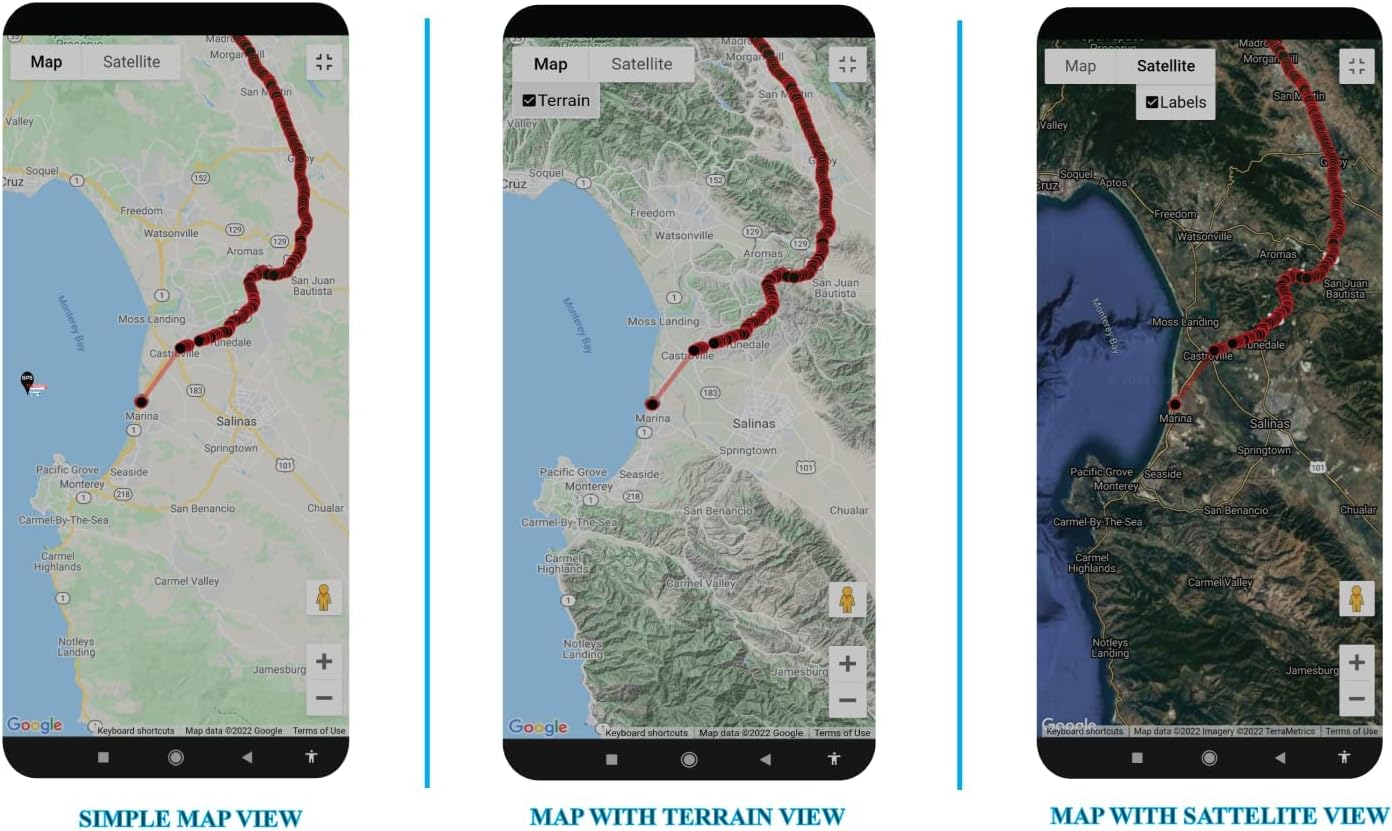
Foto 5: Examples of mobile application interfaces displaying different map views (Simple, Terrain, Satellite) for tracking the GL300W.

Foto 6: Examples of desktop application interfaces displaying various map views (Satellite, Geo-Fenced, Simple) for comprehensive tracking and monitoring.
Nlekọta
Nhicha
Wipe the device with a soft, dry cloth. Do not use harsh chemicals or abrasive cleaners. While the device is water-resistant (IPX5), avoid submerging it in water or exposing it to high-pressure water jets.
Nlekọta batrị
The GL300W uses an internal Li-Polymer 2600 mAh battery. To maximize battery life:
- Zere oke okpomọkụ.
- Chaji ngwaọrụ ahụ mgbe niile, mana zere ịchaji ya gabiga ókè ruo ogologo oge.
- If storing the device for a long time, charge it to about 50% before storage.
Firmware mmelite
Periodically check with your service provider or the manufacturer's website for available firmware updates. Updates can improve performance, add new features, or fix bugs.
Nchọpụta nsogbu
| Nsogbu | Ihe nwere ike ime | Ngwọta |
|---|---|---|
| Ngwaọrụ anaghị agbanye ọkụ. | Batrị dị ala ma ọ bụ mebie. | Connect the device to the charger and allow it to charge for at least 30 minutes before attempting to power on. |
| Enweghị mgbama GPS. | gbochiri view of the sky; device indoors or under heavy cover. | Move the device to an open outdoor area with a clear view of the sky. Ensure the GPS LED is active. |
| No cellular connectivity. | Out of network coverage; SIM card issue; service not activated. | Move to an area with better cellular reception. Verify SIM card installation and service activation with your provider. Ensure the CEL LED is active. |
| Inaccurate location data. | Weak GPS signal; environmental interference. | Gbaa mbọ hụ na ngwaọrụ ahụ nwere nke doro anya view of the sky. Avoid placing it near large metal objects or strong electromagnetic fields. |
| Emergency button not responding. | Device not powered on; software issue. | Ensure the device is powered on. If the issue persists, contact customer support. |
Nkọwapụta
Foto 7: Detailed technical specifications for the GL300W, including dimensions, weight, battery, and operating bands.
| Njirimara | Nkọwa |
|---|---|
| Nlereanya | GTM GL300W |
| Nkà na ụzụ | UMTS/HSPA/GSM (850/1900/2100 MHz & 850/900/1800/1900 MHz) |
| Akụkụ (L×W×H) | 77.9mm × 39.9mm × 26.7mm (approx. 3.07 × 1.57 × 1.05 inches) |
| Ibu | 93g (ihe dị ka 3.28 ounces) |
| Batrị dị n'ime | Li-Polymer 2600 mAh |
| Oge Njikere | Without reporting: 400 hours; 5 minutes reporting: 140 hours |
| Mmiri Nguzogide | IPX5 Compliant |
| Nchaji Voltage | 5V DC |
| Okpomọkụ na-arụ ọrụ | -20℃ ruo +55℃ (-4°F ruo +131°F) |
| Ụdị GNSS | u-blox All-in-One GPS receiver |
| Geo-Fence Support | Up to 5 geo-fence regions |
| Asambodo | CE, FCC |
Ozi akwụkwọ ikike
Specific warranty details for the GTM Queclink GL300W GPS Tracker are typically provided with your purchase documentation or by your service provider. Please refer to the warranty card or contact the vendor from whom you purchased the device for precise terms and conditions. Generally, products are covered against manufacturing defects for a specified period from the date of purchase.
Nkwado na kọntaktị
For technical support, service activation, or any inquiries regarding your GTM Queclink GL300W GPS Tracker, please contact your tracking service provider or the vendor from whom you purchased the device.
I nwekwara ike ịga leta onye ọrụ gọọmentị ahụ website of GPS Tracking Mart for general information and resources related to their products.
Rịba ama: Akwụkwọ ntuziaka a bụ maka ebumnuche ozi naanị. Nkọwapụta na atụmatụ nwere ike ịgbanwe na-enweghị ọkwa.
Ask a question about this manual
Ask about setup, troubleshooting, compatibility, parts, safety, or missing instructions. Manuals+ will review the question and use this page’s manual context to help answer it.