
1. Ozi nchekwa dị mkpa
Read all instructions carefully before assembling, installing, operating, or maintaining this fan. Failure to follow these instructions may result in electric shock, fire, or serious personal injury.
- Nchekwa Eletriki: Ensure the fan is connected to a properly grounded 120 Volt AC outlet. Do not operate the fan with a damaged cord or plug. Do not run the power cord under carpeting or cover it with throw rugs, runners, or similar coverings. Arrange the cord away from traffic areas where it will not be tripped over.
- Ọrụ izugbe: Always place the fan on a stable, level surface to prevent tipping. Keep hands, hair, clothing, and other objects away from the fan blades during operation. Do not insert fingers or foreign objects into the grille.
- gburugburu: This fan is designed for indoor use. Do not use outdoors or in wet locations. Keep the fan away from water and excessive humidity.
- Nlekọta: Kwụpụ fan mgbe ọ bụla na oghere ọkụ tupu ihicha ma ọ bụ rụọ ọrụ ọ bụla.
- Atụmatụ ịdọ aka ná ntị 65: Ngwaahịa a nwere ike ịnwe kemịkal mara Steeti California iji bute ọrịa kansa na ntụpọ ọmụmụ ma ọ bụ mmerụ ahụ ndị ọzọ.
2. Atụmatụ Ngwaahịa na Ihe Ndị Ọzọview
The Master 24-Inch Oscillating Industrial High Velocity Pedestal Fan is designed for powerful air circulation in various indoor environments such as shops, garages, and warehouses. It features durable all-metal construction and OSHA-compliant safety guards.
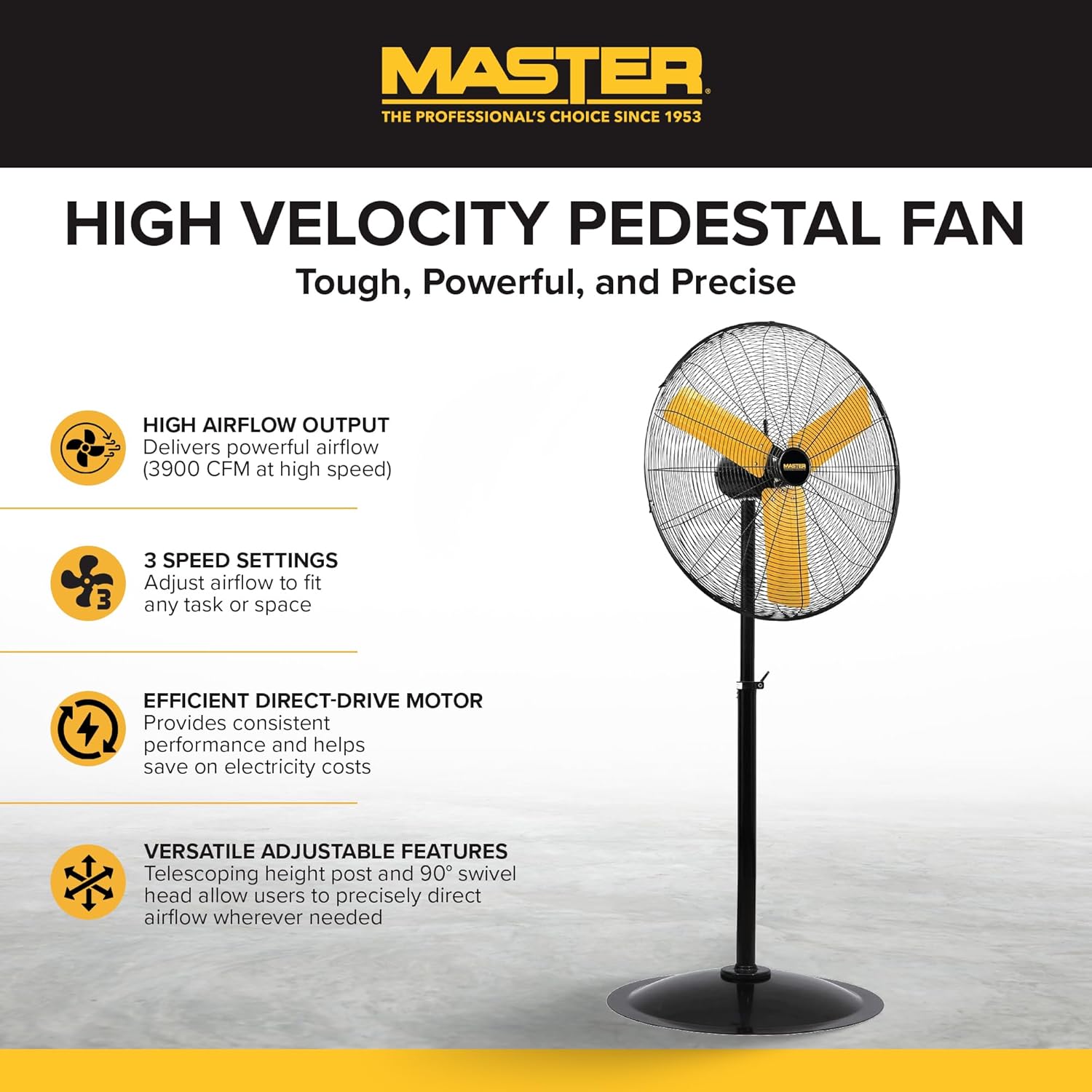
A zuru view of the Master 24-Inch Oscillating Pedestal Fan, showcasing its black metal construction and yellow fan blades.

Akụkụ view of the Master 24-Inch Oscillating Pedestal Fan, showing its adjustable height post and stable base.
Akụkụ ndị bụ isi:
- High Airflow Output: Delivers powerful airflow up to 3900 CFM.
- Ntọala ọsọ ọsọ 3: Allows adjustment of airflow to suit various needs.
- Efficient Direct-Drive Motor: Provides consistent performance and helps conserve electricity.
- Ndozi nke ọma: Features a telescoping adjustable height post for customized positioning.
- Mgbanwe: The fan head oscillates to cool a wide area.
- Ebe siri ike: A wide, heavy-duty pedestal base prevents the fan from tipping over.
- Ihe owuwu ọla niile: Na-eme ka o doo anya na ọ ga-adịgide adịgide ma dịgide ogologo oge.
3. Ntọala na Mgbakọ
Assembly is required for this fan. Follow these steps to ensure proper setup:
- Wepu akụrụngwa: Jiri nlezianya wepụ akụkụ niile dị na ngwugwu ahụ. Hụ na ihe niile edepụtara na ndepụta ngwugwu dị.
- Mgbakọ ntọala: Attach the main support pole to the sturdy pedestal base. Ensure it is securely fastened.
- Attach Motor Assembly: Secure the fan motor assembly to the top of the support pole. This typically involves attaching the motor to a bolt that connects to the pole via a bracket. Ensure all screws and fasteners are tightened.
- Install Grilles and Blades: Mount the fan blades onto the motor shaft, followed by the front and rear safety grilles. Ensure the grilles are properly aligned and secured to prevent accidental contact with the blades.
- Gbanwee Ogologo: Adjust the telescoping height post to your desired operating height. Secure it in place using the provided locking mechanism.
- Onye ofufe ọnọdụ: Place the assembled fan on a firm, level surface in the desired location.

A close-up of the fan's wide, heavy-duty round base designed for stability.

A close-up showing the bolt and knob used to adjust the fan head's tilt angle.
4. Ntuziaka ọrụ
Once assembled and placed, the fan is ready for operation.
- Njikọ ike: Plug the fan's power cord into a standard 120 Volt AC electrical outlet.
- Turn On/Adjust Speed: Locate the push-button switch, typically on the rear of the motor housing. Rotate the knob to select one of the three available speed settings (1, 2, or 3). Position '0' is off.
- Adjust Oscillation: The fan head is designed to oscillate automatically. To stop oscillation, consult the fan's specific mechanism, which may involve disengaging a drive arm or a dedicated switch.
- Dezie akụkụ tilt: Loosen the adjustment knob on the side of the fan head to tilt the fan up or down to direct airflow. Tighten the knob securely once the desired angle is set.
- Usoro njikwa: This model may support app control. Refer to the manufacturer's website or additional documentation for details on connecting and using the fan with a compatible application.
- Gbanyụọ: Rotate the speed control knob to the '0' position to turn off the fan. Unplug the fan from the outlet when not in use for extended periods.

A close-up of the fan's rotary switch, indicating three speed settings (0-1-2-3).

A zuru ezu view of the fan's yellow blades and protective metal grille.
5. Nlekọta
Nlekọta mgbe niile na-eme ka arụmọrụ kachasị mma ma na-agbatị ndụ nke onye na-efe efe gị.
- Nhicha: Kwupuo fan mgbe niile tupu ihicha ya. Jiri nwayọọ, damp cloth to wipe down the exterior surfaces. For the fan blades and grilles, hand wash with mild soap and water if necessary, ensuring they are completely dry before reassembly and operation. Do not use abrasive cleaners or solvents.
- Mmanya moto: A na-ete mmanụ ọkụ na-adịgide adịgide ma ọ dịghị achọ mmanụ ọzọ.
- Nchekwa: If storing the fan for an extended period, cover it to protect against dust and store in a dry location.
6. Nchọpụta nsogbu
If you encounter issues with your fan, refer to the following common troubleshooting steps:
- Onye ofufe anaghị agbanwu:
- Gbaa mbọ hụ na etinyere eriri ọkụ na nchekwa n'ime oghere 120V na-arụ ọrụ.
- Lelee igbe sekit ma ọ bụ fuse.
- Verify the speed control knob is set to a speed setting (1, 2, or 3) and not '0' (off).
- Mbelata ikuku ikuku:
- Check for any obstructions around the fan grilles.
- Clean any dust or debris from the fan blades and grilles.
- Mkpọtụ ma ọ bụ ịma jijiji na-adịghị ahụkebe:
- Gbaa mbọ hụ na etinyere fan ahụ n'elu kwụsiri ike, dịkwa larịị.
- Check that all assembly screws and fasteners are tight.
- Inspect fan blades for any damage or imbalance.
- Oscillation anaghị arụ ọrụ:
- Verify that the oscillation mechanism is engaged (if applicable).
- Check for any obstructions preventing the fan head from moving.
If these steps do not resolve the issue, contact Master customer support for further assistance. Availability of replacement parts may vary; inquire with customer support.
7. Nkọwapụta
| Aha Nlereanya | MAC-24POSC |
| Ụdị | Nna-ukwu |
| Ụdị | 24-Inch Oscillating Pedestal Fan |
| Agba | Nwa |
| Igwe ọkụ eletrik | Ugbo ala |
| Isi Iyi Ike | Igwe ọkụ eletrik |
| Akụkụ ngwaahịa | 7"D x 35"W x 31.5"H |
| Njirimara Pụrụ Iche | Na -ama jijiji |
| Wattage | 2.2 kW |
| Ọnụọgụ agụba | 3 |
| Ike ikuku | 3900 Cubic Feet kwa nkeji |
| Voltage | 120 volts |
| Ngbanwe Ụdị | Pịa bọtịnụ |
| Ibu Ibu | 52.9 pound |
| Ojiji ime ime/n'èzí | Ime ụlọ |
| Nkọwapụta Met | OSHA |
| Usoro njikwa | App (refer to manufacturer for details) |
| Ọnụọgụ nke ọkwa ike | 3 |
| Mgbakọ chọrọ | Ee |
| Dayameta | 24 sentimita asatọ |
8. Akwụkwọ ikike na nkwado
Ozi akwụkwọ ikike:
This Master 24-Inch Oscillating Industrial High Velocity Pedestal Fan (MAC-24POSC) comes with a Akwụkwọ ikike dị afọ 1. Akwụkwọ ikike a na-ekpuchi ntụpọ dị na ngwa na arụ ọrụ n'okpuru ojiji nkịtị. Biko dowe ihe akaebe nke ịzụrụ ihe maka akwụkwọ ikike.
Nkwado ndị ahịa:
For technical assistance, warranty claims, or inquiries regarding replacement parts, please contact Master customer support. Refer to the product packaging or the official Master websaịtị maka ozi kọntaktị kacha ugbu a.