
Okwu mmalite
This manual provides detailed instructions for the setup, operation, maintenance, and troubleshooting of your Dual DT 450 manual turntable. Designed for optimal audio quality, this belt-driven turntable features a high-quality wooden housing, a balanced tonearm with adjustable tracking force, and an integrated switchable phono pre-amplifier. Please read these instructions carefully before using your turntable to ensure proper function and longevity.
Ngwaahịa gafereview
The Dual DT 450 turntable is engineered to deliver an exceptional vinyl listening experience. Its robust construction and thoughtful features ensure stable playback and clear sound reproduction.
Akụkụ ndị bụ isi:
- Nhazi: High-quality wooden housing for stable operation and a puristic aesthetic.
- Mgbanwe: Connects to traditional HiFi systems via phono or AUX input; supports two speeds (33/45 RPM).
- Tupu-ampntughari: Built-in switchable phono pre-amplifier for easy connection.
- Magnetic Pickup System: Features an Audio Technica AT 3600 cartridge with pre-set tracking force and a damped tonearm ebuli.
- Ngwa gụnyere: Turntable unit, platter with drive belt, counterweight, platter mat, dust cover, center puck, and user manual.
Ngwaahịa Views:
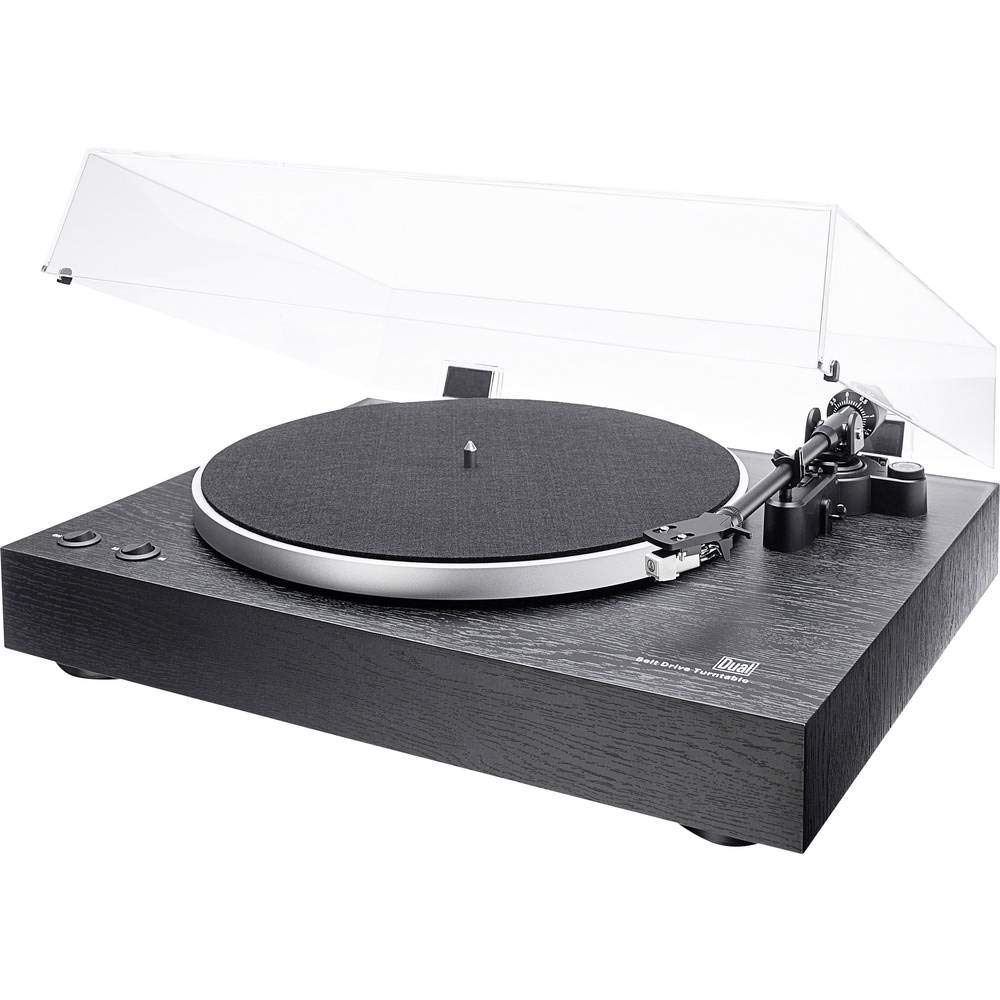
N'ozuzu view of the Dual DT 450 Turntable with its dust cover.

Zuru ezu view of the Audio Technica AT 3600 magnetic pickup system on the tonearm.

The Dual DT 450 Turntable with its transparent dust cover in the open position.

The Dual DT 450 Turntable with its transparent dust cover in the closed position, protecting the platter and tonearm.
Ntuziaka nhazi
Follow these steps to correctly set up your Dual DT 450 turntable.
- Iwepu: Carefully remove all components from the packaging. Ensure all accessories listed in the product overview dịnụ.
- Nkwanye: Place the turntable on a stable, level surface away from direct sunlight, heat sources, and strong vibrations.
- Platter and Belt Installation: Place the platter onto the spindle. Carefully install the drive belt around the inner rim of the platter and around the motor pulley.
- Ntinye ibu arọ: Slide the counterweight onto the rear of the tonearm. Rotate it until the tonearm is balanced and floats freely. Then, adjust the counterweight to the recommended tracking force (refer to cartridge specifications, typically around 2-3 grams for the AT3600).
- Ndozi mgbochi Skating: Set the anti-skating dial to match the tracking force you set. This helps prevent the stylus from skipping across the record.
- Dust Cover Installation: Attach the dust cover hinges to the rear of the turntable unit.
- Njikọ ike: Connect the power adapter to the DC input on the rear of the turntable, then plug it into a wall outlet.
- Njikọ Audio: Connect the RCA cables from the turntable to your amplifier or receiver. Use the PHONO input if your amplifier has one and switch the turntable's internal pre-amplifier to 'OFF'. If your amplifier only has AUX/LINE inputs, switch the turntable's internal pre-amplifier to 'ON' and connect to an available AUX/LINE input. Ensure the ground wire is connected to your amplifier's ground terminal if available.
Vidiyo Ngosipụta Ntọala:
This video demonstrates the general setup and operation of a turntable. While it may feature a different model, the basic principles of assembly and connection are applicable to the Dual DT 450.
Ntuziaka ọrụ
Once your Dual DT 450 is set up, follow these steps to play your vinyl records.
- Ike Na: Turn the power switch to the 'ON' position. The platter will begin to rotate.
- Ebe Ndekọ: Carefully place your vinyl record onto the platter. If playing a 45 RPM single, use the included center puck.
- Họrọ Ọsọ: Choose the correct playback speed (33 or 45 RPM) using the speed selector switch.
- Ogwe aka ebuli: Jiri eriri ebuli ụda olu bulie ụda olu.
- Ogwe aka ọnọdụ: Gently move the tonearm over the desired starting groove of the record.
- Ogwe aka dị ala: Slowly lower the tonearm using the tonearm lift lever. The stylus will descend onto the record, and playback will begin.
- Gbanwee olu: Adjust the volume on your connected amplifier or receiver to your desired listening level.
- Kwụsị ịkpọghachi: At the end of the record, or when you wish to stop, use the tonearm lift lever to raise the tonearm, then return it to its rest. Turn the power switch to 'OFF'.
Nlekọta
Regular maintenance ensures optimal performance and extends the life of your turntable.
- Mkpuchi uzuzu: Clean the dust cover with a soft, dry cloth. Avoid abrasive cleaners that may scratch the surface.
- Nlekọta Stylus: Gently clean the stylus regularly using a soft brush designed for stylus cleaning, brushing from back to front. A dirty stylus can degrade sound quality and damage records.
- Nhicha ndekọ: Keep your records clean to prevent dust and debris from accumulating on the stylus and affecting playback. Use a dedicated record cleaning brush or solution.
- Nchacha izugbe: Wipe the turntable chassis with a soft, slightly damp akwa . Ejila kemịkalụ siri ike.
- Nyocha eriri: Na-elele eriri draịva ahụ mgbe ụfọdụ ma ọ bụrụ na ọ gbatịa ma ọ bụ na-emebi emebi. Gbanwee ya ma ọ bụrụ na ọ dị mkpa iji mee ka ọsọ egwuregwu ahụ dị mma.
Nchọpụta nsogbu
If you encounter issues with your Dual DT 450, refer to the following common problems and solutions:
| Nsogbu | Ihe nwere ike ime | Ngwọta |
|---|---|---|
| Enweghị ụda ma ọ bụ ụda dị ala nke ukwuu | Incorrect audio connection; Pre-amplifier switch setting; Amplifier input selection; Stylus not properly seated. | Check RCA cable connections. Ensure pre-amplifier switch is set correctly (ON for AUX, OFF for PHONO). Select the correct input on your amplifier. Verify stylus is securely attached to the cartridge. |
| Distorted or muffled sound | Dirty stylus; Incorrect tracking force; Damaged stylus; Worn record. | Clean the stylus. Re-adjust tracking force. Replace the stylus if damaged. Try a different record. |
| Turntable platter not spinning | Power not connected; Drive belt dislodged or broken; Motor issue. | Ensure power adapter is connected and plugged in. Check if the drive belt is properly seated around the platter and motor pulley. If the issue persists, contact customer support. |
| Mwụfu ndekọ | Dust/debris on record or stylus; Incorrect tracking force or anti-skating; Turntable not level; Damaged record. | Clean record and stylus. Re-adjust tracking force and anti-skating. Ensure turntable is on a level surface. Inspect record for damage. |
Nkọwa nka nka
| Njirimara | Nkọwapụta |
|---|---|
| Ụdị | Abụọ |
| Aha Nlereanya | DT 450 |
| Nọmba nlereanya | 75268 |
| Ụdị | Ntụgharị akwụkwọ ntuziaka |
| Agba | Nwa |
| Ihe onwunwe | Osisi |
| Akụkụ ngwaahịa | 43.5 x 36.7 x 14.4 cm |
| Ibu Ibu | 6 kilogram |
| Ọsọ ntụgharị kachasị elu | 45 RPM |
| Atụmatụ pụrụ iche | Ewunyere tupu-amplifier, Dust cover, Adjustable speed |
| Voltage | 12 Volt |
| Isi Iyi Ike | DC (Gleichstrom) |
| Oke mgbaàmà na mkpọtụ (dB) | 60 dB |
Akwụkwọ ikike na nkwado
For warranty information and customer support, please refer to the documentation included with your product or visit the official Dual websaịtị. Debe ihe akaebe nke ịzụrụ ihe maka akwụkwọ ikike ọ bụla.