
1. Okwu mmalite
This user manual provides comprehensive instructions for the installation, operation, and maintenance of the Secukey SK4-W Standalone Access Control System. Please read this manual carefully before installation and use to ensure proper functionality and safety.
The Secukey SK4-W is a robust, IP66-rated access control device designed for outdoor use, featuring RFID card and PIN code access. It is an ideal solution for securing doors, gates, and other entry points.
2. Ngwaahịa gafereview
2.1 Atụmatụ
- IP66 Waterproof and Anti-Vandal Design: Suitable for harsh outdoor environments.
- Ụdị nnweta ọtụtụ: Supports RFID card only, PIN code only, or Card + PIN for enhanced security.
- High User Capacity: Manages up to 1000 users.
- Relay agbakwunyere: Built-in NO, NC, Com relay for direct door lock control.
- Adjustable Output Times: Programmable lock output time (1-99 seconds) and alarm output time (1-3 minutes).
- Wiegand 26-bit Interface: Supports external Wiegand readers, exit buttons, and alarms.
- Latch Mode: Allows the door or gate to remain open.
- Obosara Voltage Oke: Operates on 12~28V AC/DC.
- Ahụigodo backlit: Na-eme ka a hụ na ọ na-apụta ìhè n'ọnọdụ ìhè dị ala.
- Ihe owuwu na-adịgide adịgide: Zinc alloy casing with powder coating.
2.2 Ngwa gụnyere
- 1 x Secukey SK4-W Standalone Access Control Device (RFID/PIN)
- 1 x Master Add Card
- 1 x Master Delete Card
- 1 x Akwụkwọ ntuziaka onye ọrụ
2.3 ngwaahịa Views

Foto 1: N'ihu view of the SK4-W unit, highlighting the keypad and Secukey branding.

Ọgụgụ 2: N'akuku view of the SK4-W, providing a perspective of its slim profile.

Foto 3: Akụkụ view of the SK4-W unit.
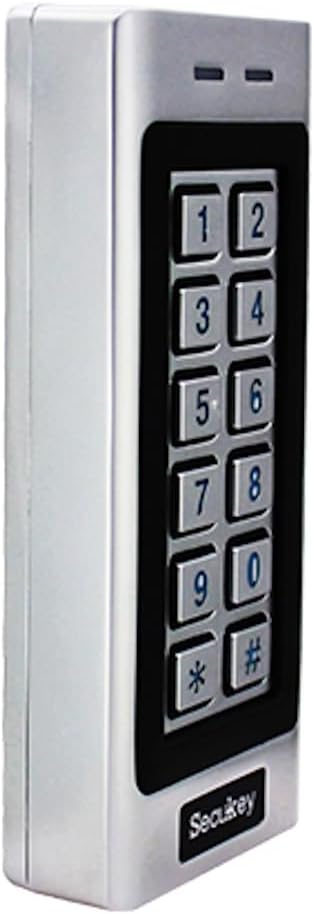
Ọgụgụ 4: Akụkụ ọzọ view of the SK4-W unit.

Ọgụgụ 5: Azụ view of the SK4-W unit, displaying the integrated wiring for installation.
3. Ntọala na nwụnye
3.1 Ịtinye ngwaọrụ
The SK4-W is designed for surface mounting. Choose a secure location near the door or gate, ensuring it is within reach for users and protected from direct impact. Use appropriate screws and wall plugs for the mounting surface.
3.2 eserese waya
The device requires a 12~28V AC/DC power supply (not included). Connect the wires according to the diagram provided in the full manual. Ensure all connections are secure and insulated to prevent short circuits.
- Ntinye ike: Connect to 12~28V AC/DC power source.
- Lock Output (NO/NC/COM): Connect to your electric lock.
- Mmepụta Oti mkpu: Connect to an external alarm system (if applicable).
- Wiegand In/Out: For connecting external Wiegand readers or other Wiegand devices.
- Wepụ bọtịnụ: Connect a push-to-exit button for convenient egress.
For detailed wiring schematics, please refer to the comprehensive wiring diagram included in the product packaging.
4. Ntuziaka ọrụ
4.1 Initial Setup and Master Cards
Upon first power-up, the device will be in factory default mode. Use the included Master Add Card and Master Delete Card to manage user access.
- Na-agbakwunye ndị ọrụ: Present the Master Add Card, then present the new user's RFID card or enter their PIN.
- Na-ehichapụ ndị ọrụ: Present the Master Delete Card, then present the user's RFID card or enter their PIN to be deleted.
4.2 Access Modes
The SK4-W supports three primary access modes:
- Card Only Mode: Users gain access by presenting a valid RFID card.
- PIN Only Mode: Users gain access by entering a valid 4-6 digit PIN code.
- Card + PIN Mode: Users must present a valid RFID card and then enter their corresponding PIN code for access. This mode offers the highest security.
Refer to the full programming guide for instructions on how to switch between access modes and manage user PINs.
4.3 Visitor PINs
The SK4-W supports up to 10 visitor PINs, which can be set to be valid for 1 to 10 uses. This feature is useful for temporary access for guests or service personnel.

Figure 6: The SK4-W supports visitor PINs and is IP66 waterproof, suitable for outdoor installation.
4.4 Latch Mode
The latch mode allows the door or gate to remain unlocked for an extended period, which can be useful during peak hours or for maintenance. Consult the programming manual for activation and deactivation procedures.
5. Nlekọta
The Secukey SK4-W is designed for minimal maintenance due to its robust construction and IP66 rating. However, regular checks can prolong its lifespan and ensure optimal performance.
- Nhicha: Wipe the keypad and casing jiri nwayọ, damp akwa . Zere ihe nhicha ma ọ bụ ihe mgbaze.
- Lelee njikọ: Periodically inspect wiring connections for any signs of wear, corrosion, or loosening.
- Mmelite femụwe: Lelee onye nrụpụta websaịtị maka mmelite firmware ọ bụla dị.

Figure 7: The SK4-W is designed to withstand extreme operating temperatures, from -40°C to 60°C.
6. Nchọpụta nsogbu
| Nsogbu | Ihe nwere ike ime | Ngwọta |
|---|---|---|
| Ngwaọrụ anaghị agbanye ọkụ. | No power supply; incorrect voltage; loose wiring. | Check power connections and ensure correct 12~28V AC/DC supply. Verify wiring. |
| RFID card not recognized. | Card not enrolled; incorrect card type (not 125 KHz EM); damaged card. | Ensure the card is properly enrolled. Verify it is a 125 KHz EM card. Try another card. |
| Koodu PIN anaghị arụ ọrụ. | Incorrect PIN; PIN not enrolled; device in card-only mode. | Double-check the PIN. Ensure the PIN is enrolled. Verify the access mode setting. |
| Door lock not activating. | Incorrect lock wiring (NO/NC); lock power issue; relay output time too short. | Check lock wiring and power. Adjust the lock output time in settings. |
| Wiegand output issues. | Incorrect Wiegand wiring; incompatible Wiegand device. | Verify Wiegand 26-bit wiring. Ensure external device compatibility. |
If the problem persists, please contact Secukey technical support for assistance.

Figure 8: Wiegand 26-bit input and output signal timing diagram.
7. Nkọwapụta
| Njirimara | Uru |
|---|---|
| Nọmba nlereanya | SK4-W |
| Ụdị | Secukey |
| Akụkụ (L x W x H) | 13.0 x 5.6 x 2.3 cm |
| Ibu | 500 grams |
| Agba | Ọlaọcha |
| Ịnye ọkụ | 12-28V AC / DC |
| Nleba Nchedo (IP). | IP66 (Waterproof, Anti-Vandal) |
| Ike onye ọrụ | Ruo ndị ọrụ 1000 |
| Ogologo koodu PIN | 4 ruo 6 mkpụrụọnụọgụ |
| Ụdị kaadị | 125 KHz EM Card |
| Okwu Wiegand | Wiegand 26-bit Input & Output |
| Mkpọchi mmepụta Ibu Ibu | 3A Max |
| Oti mkpu na mmepụta ibu | 3A Max |
| Okpomọkụ na-arụ ọrụ | -40 Celsius ruo 60 Celsius (-40 F ruo 140 F) |
| Iru mmiri na-arụ ọrụ | 10% ruo 90% (na-abụghị condensing) |
| Casing ihe | Zinc Alloy with Powder Coating |
8. Akwụkwọ ikike na nkwado
Secukey products are manufactured to high quality standards. For warranty information and technical support, please refer to the warranty card included with your product or visit the official Secukey websaịtị.
Ozi mkpọtụrụ:
- Onye nrụpụta: Secukey
- Websaịtị: www.secukey.com (Ọpụample njikọ, ezigbo njikọ nwere ike ịdị iche)
- Ndị ọrụ nlekọta ndị ahịa: Rụtụ aka na nkwakọ ngwaahịa ma ọ bụ websaịtị maka kọntaktị nkwado mpaghara.
Biko dowe ihe akaebe nke ịzụrụ ihe maka akwụkwọ ikike.