
1. Okwu mmalite
Thank you for choosing the ELECDER i37 Kids On-Ear Headphones. These headphones are designed for children and teens, offering a comfortable and adjustable listening experience. They feature a foldable design for portability and connect via a standard 3.5mm audio jack, compatible with a wide range of devices.

Image: Child wearing ELECDER i37 headphones.
2. Ozi nchekwa
- Nchedo Ntị: Iji gbochie mmebi ntị, zere ịge ntị n'ogo dị elu ruo ogologo oge.
- Mmata gburugburu: Do not use headphones in situations where the inability to hear ambient sounds could be dangerous, such as while driving, cycling, or walking in traffic.
- Nchekwa eriri: Keep the headphone cable away from sharp objects or moving parts to prevent damage. Ensure the cable does not pose a tripping hazard.
- No Volume Control: Please note that these headphones do not feature an integrated volume control. Adjust the volume directly on the connected audio device.
- Ihe egwu na-akụda: This product contains small parts and a cable which could pose a choking or strangulation hazard for very young children. Adult supervision is recommended.
3. Ihe ngwugwu
Chọpụta na ihe niile dị na ngwugwu gị:
- ELECDER i37 Kids On-Ear Headphones
- Akwụkwọ ntuziaka (akwụkwọ a)
4. Ngwaahịa gafereview
The ELECDER i37 headphones are designed for ease of use and comfort. Key features include:
- Ihe mkpuchi isi nwere ike idozi: Allows for a secure and comfortable fit for various head sizes.
- Soft Ear Cushions: Designed for comfort during extended listening sessions.
- Nhazi a na-agbanwe agbanwe: Enables compact storage and easy portability.
- Cable na-enweghị Tangle: The durable cloth-covered cable resists tangling.
- Jack Audio: 3.5mm Standard connector for broad compatibility.

Ultra Soft Ear Cushions

Ihe mmịfe nwere ike idozi

Ụdọ na-enweghị Tangle

Atụmatụ igodo
5. Nhazi
- Unfold the Headphones: Gently unfold the earcups from their collapsed position until the headband forms a complete arc.
- Hazie eriri isi: Extend or retract the adjustable sliders on each side of the headband to fit your head comfortably. The earcups should rest fully over your ears.
- Jikọọ na ngwaọrụ ọdịyo: Insert the 3.5mm audio jack firmly into the headphone port of your smartphone, computer, laptop, MP3/4 player, Kindle, or tablet.
Note on Device Compatibility: For devices like iPhone 7 and newer, or iPad Pro 11 and newer, a separate Lightning to 3.5mm jack adapter (not included) is required.

Image: 3.5mm jack compatibility with various devices.
6. Ntuziaka ọrụ
Once connected, you can begin using your ELECDER i37 headphones:
- Kpọọ ọdịyo: Malite ịkpọ egwu ọdịyo site na ngwaọrụ ejikọtara gị.
- Gbanwee olu: Control the listening volume directly from your audio source device. These headphones do not have built-in volume controls.
- Comfortable Listening: Ensure the earcups are positioned comfortably over your ears for optimal sound and noise isolation.
Video: Demonstration of ELECDER i37 headphones in use, highlighting their features and comfort.

Enjoying audio

Ejikọrọ na ngwaọrụ

Kwesịrị ekwesị maka njem
7. Nlekọta
- Nhicha: Use a soft, dry cloth to wipe the headphones. Do not use liquid cleaners or solvents.
- Nchekwa: When not in use, fold the headphones to their compact size and store them in a clean, dry place away from extreme temperatures.
- Nlekọta USB: Zere ịgbagọ nke ọma ma ọ bụ ịdọpụ eriri ahụ iji gbochie mmebi dị n'ime.
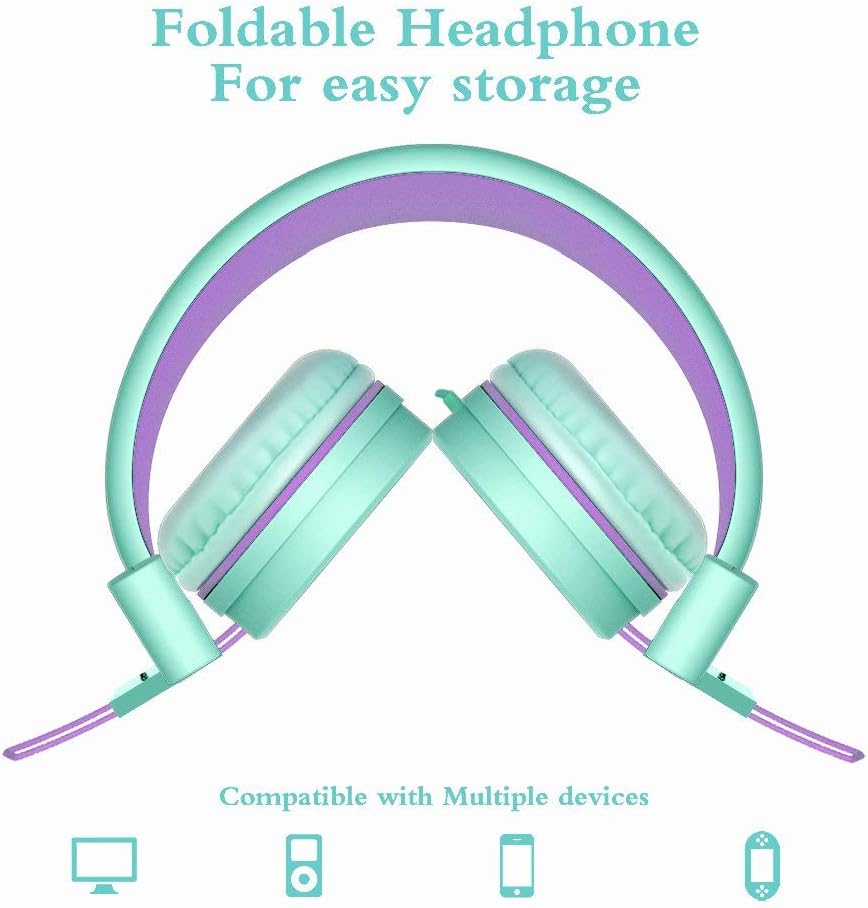
Image: Foldable design for easy storage.
8. Nchọpụta nsogbu
| Nsogbu | Ihe nwere ike ime | Ngwọta |
|---|---|---|
| Enweghị ụda | 1. Headphone jack not fully inserted. 2. Device volume is too low or muted. 3. Ọdịyo ezighi ezi ahọpụtara na ngwaọrụ ahụ. | 1. Ensure the 3.5mm jack is fully inserted into the device. 2. Increase the volume on your audio device and check for mute settings. 3. Verify that the correct audio output (e.g., "Headphones") is selected in your device's sound settings. |
| Ụda agbagọ | 1. Volume too high on device. 2. Audio source quality is poor. 3. Eriri ma ọ bụ njikọ mebiri emebi. | 1. Lower the volume on your audio device. 2. Try a different audio source or file. 3. Inspect the cable and jack for visible damage. If damaged, contact support. |
| Ekweisi anaghị enwe ahụ iru ala | Nhazi eriri isi na-ekwesịghị ekwesị. | Adjust the headband sliders to find a comfortable and secure fit. Ensure earcups are centered over the ears. |
9. Nkọwapụta
| Njirimara | Nkọwa |
|---|---|
| Aha Nlereanya | i37 |
| Teknụzụ Njikọta | Ekwenyere (Jack 3.5mm) |
| Njikwa mkpọtụ | Mwepu ụda |
| Nha ọkwọ ụgbọ ala ọdịyo | 40 millimeters |
| Mgbochi | 32 ohms |
| Njirimara USB | Tangle Free (Cloth) |
| Atụmatụ pụrụ iche | Foldable, Lightweight, Adjustable |
| Ihe onwunwe | Plastic, Cloth |
| Ibu Ibu | 5.6 ounces (158.7 grams) |
| Akụkụ ngwaahịa | 8.9 x 2.8 x 6.1 sentimita asatọ |
| Ogologo afọ (Nkọwa) | Kid Teen |
10. Akwụkwọ ikike na nkwado
ELECDER provides a 1-Year Hassle-Free Protection for your i37 headphones. This warranty covers manufacturing defects and ensures customer satisfaction.
For any questions, concerns, or support needs regarding your ELECDER i37 headphones, please contact us:
- Site na Amazon: Use the Amazon messaging system to reach our customer service team.
- Ozi mkpọtụrụ: Refer to the contact details provided on the product packaging or included instruction leaflet for direct support options.
Our customer service team is committed to providing a quick response to assist you.