
Sephia A11
Sephia A11 Portable Bluetooth Speaker
Akwụkwọ ntuziaka onye ọrụ
Okwu mmalite
Thank you for choosing the Sephia A11 Portable Bluetooth Speaker. This manual provides essential information for setting up, operating, and maintaining your speaker to ensure optimal performance and longevity. The Sephia A11 offers versatile connectivity options, including Bluetooth, USB, Micro SD, and AUX input, delivering clear and powerful audio in a compact design.
Kedu ihe dị na Igbe ahụ
- Sephia A11 Bluetooth Speaker
- Ịchaji eriri
- USB Aux
- Akwụkwọ ntuziaka (akwụkwọ a)

Image: The Sephia A11 Portable Bluetooth Speaker, showcasing its sleek black design and front grille.
Ngwaahịa gafereview
Familiarize yourself with the buttons and ports on your Sephia A11 speaker.
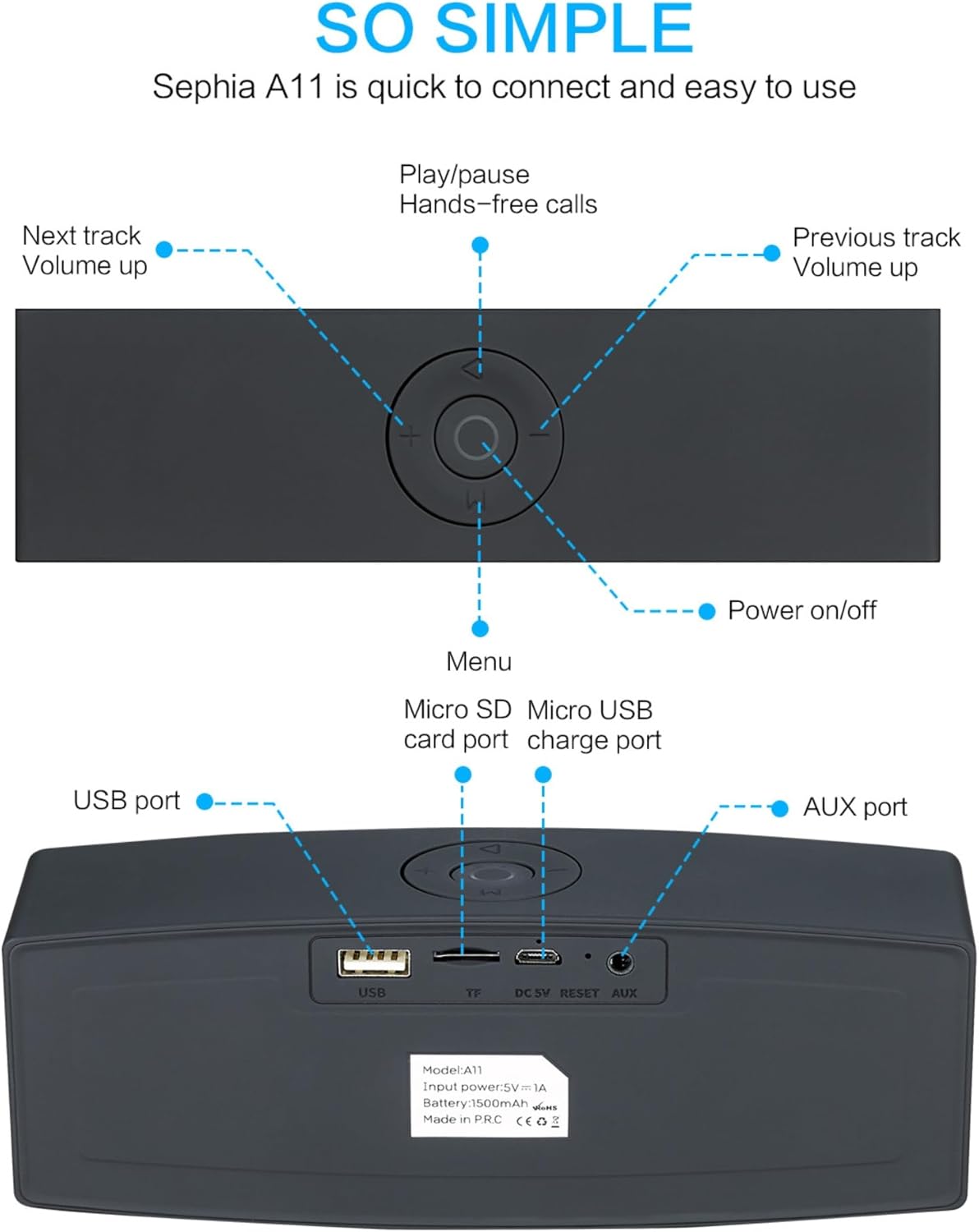
Image: Detailed diagram illustrating the top control panel and rear input/output ports of the Sephia A11 speaker.
Top Controls:
- Ike On / Gbanyụọ Button: Pịa ma jide iji gbanye ma ọ bụ gbanyụọ ọkà okwu.
- Bọtịnụ Kwụsị/Kwụsị: Press to play or pause audio. Also used for hands-free calls (answer/end).
- Previous Track / Volume Down Button (-): Pịa obere oge maka egwu gara aga, pịa ogologo oge iji belata olu.
- Next Track / Volume Up Button (+): Pịa obere oge maka egwu na-esote, pịa ogologo oge iji bulie olu.
- Bọtịnụ Ndepụta (M): Press to switch between input modes (Bluetooth, USB, Micro SD, AUX).
Ọdụ ụgbọ mmiri azụ:
- Ọdụ ụgbọ mmiri USB: For playing audio from a USB drive or charging external devices.
- Micro SD Card Slot (TF): For playing audio from a Micro SD card.
- Micro USB Charge Port (DC 5V): Maka ịchaji ọkà okwu.
- Tọgharịa bọtịnụ: Small pinhole for resetting the device if needed.
- Ọdụ ụgbọ mmiri AUX: For wired audio connection using the provided 3.5mm AUX cable.
Melite
1. gingchaji Okwu Okwu
- Connect the supplied charging cable to the Micro USB Charge Port (DC 5V) on the rear of the speaker.
- Jikọọ nsọtụ nke ọzọ nke eriri chaja ahụ na ihe nkwụnye ike USB (anaghị etinye ya) ma ọ bụ ọdụ USB nke kọmputa.
- The charging indicator light will illuminate. Once fully charged, the light will change or turn off (refer to specific model behavior if indicated by LED). A full charge provides up to 8 hours of playtime.
2. Ịgbanye / gbanyụọ
- To power on, press and hold the Power On/Off button on the top panel until you hear an audible prompt or see an indicator light.
- To power off, press and hold the Power On/Off button again until the speaker shuts down.
3. Njikọ Bluetooth
- Ensure the speaker is powered on and in Bluetooth mode. If not, press the 'M' (Menu) button to switch to Bluetooth mode. The speaker will enter pairing mode, indicated by a flashing LED light and an audible prompt.
- Na ekwentị mkpanaaka gị (ama, mbadamba, laptọọpụ), mee ka Bluetooth rụọ ọrụ ma chọọ ngwaọrụ dị.
- Select "Sephia A11" from the list of found devices.
- Once successfully paired, the speaker will provide an audible confirmation, and the LED indicator will stop flashing.
- The speaker has a Bluetooth range of up to 10 meters (33 feet).
4. Wired Connections (AUX, USB, Micro SD)
- Ntinye AUX: Connect one end of the supplied 3.5mm AUX cable to the AUX port on the speaker and the other end to the audio output of your device (e.g., MP3 player, computer). The speaker will automatically switch to AUX mode or can be selected using the 'M' button.
- USB playback: Fanye draịva USB nwere ọdịyo files into the USB port. The speaker will automatically detect and play the audio files.
- Mkpọghachi kaadị Micro SD: Fanye kaadị Micro SD nke nwere ọdịyo files into the Micro SD (TF) slot. The speaker will automatically detect and play the audio files.
Onye na-arụ ọrụ
Ngwugharị ọdịyo
- Gwuo/kwụsịtụ: Press the Play/Pause button to toggle between playing and pausing audio.
- Ndozi olu: Long press the '+' button to increase volume, and long press the '-' button to decrease volume.
- Next / Gara aga Track: Short press the '+' button for the next track, and short press the '-' button for the previous track.

Image: A hand demonstrating how to interact with the top control buttons of the Sephia A11 speaker.
Ịkpọ oku na-enweghị aka
- When a call comes in while connected via Bluetooth, press the Play/Pause button to answer the call.
- Pịa bọtịnụ Play/Pause ọzọ iji kwụsị oku ahụ.
- Igwe okwu dị n'ime ya na-enye ohere maka nkwurịta okwu doro anya.
Nlekọta
- Nhicha: Jiri ákwà dị nro ma kpọọ nkụ hichaa elu okwu ahụ. Ejila ihe nhicha ihe nhicha, mmanya na-aba n'anya, ma ọ bụ ihe mgbaze kemịkalụ, n'ihi na ihe ndị a nwere ike imebi njedebe ya.
- Nchekwa: Chekwaa ọkà okwu n'ebe dị jụụ, kpọrọ nkụ na-adịghị na ìhè anyanwụ kpọmkwem na oke okpomọkụ.
- Nlekọta batrị: To prolong battery life, avoid fully discharging the speaker frequently. Charge the speaker regularly, even if not in use for extended periods.
- Nguzogide mmiri: Igwe okwu a anaghị egbochi mmiri. Zere ikpughe na mmiri ma ọ bụ oke mmiri.
Nchọpụta nsogbu
| Nsogbu | Ihe nwere ike ime | Ngwọta |
|---|---|---|
| Ọkà okwu anaghị agbanwuo. | Batrị dị ala; bọtịnụ ike anaghị ejide ogologo oge. | Chajie ọkà okwu ahụ nke ọma. Pịa ma jide bọtịnụ Ike maka sekọnd 3-5. |
| Enweghị ụda sitere na ọkà okwu. | Olu dị oke ala; Ụdị ntinye ezighi ezi; Ejikọtaghị ngwaọrụ nke ọma. | Increase speaker and device volume. Press 'M' button to select correct input mode. Re-pair Bluetooth or re-connect AUX/USB/SD. |
| Njikọ Bluetooth ada ada. | Ọkà okwu adịghị n'ụdị njikọta; Ngwaọrụ dị anya; Ntinye aka. | Ensure speaker is in Bluetooth pairing mode (flashing LED). Move speaker closer to device. Turn off other Bluetooth devices. Try forgetting "Sephia A11" on your device and re-pairing. |
| Ogo ụda adịghị mma. | Low battery; Device volume too high (distortion); Interference. | Charge the speaker. Adjust volume on both speaker and device. Move away from sources of interference. |
Nkọwapụta
| Aha Nlereanya | A11 |
| Akụkụ | 18 x 7 x 5 cm |
| Ibu | 426 g |
| Teknụzụ Njikọta | Bluetooth, USB, Micro SD, AUX |
| Ike mmepụta okwu | 6 Watts (ndị ọkwọ ụgbọala 2 x 3W) |
| Nzaghachi ugboro ugboro | 20 Hz - 20 kHz |
| Ụdị batrị | Lithium ion |
| Oge egwuregwu | Ruo awa iri abụọ |
| Oke Bluetooth | Ruo mita 10 (ụkwụ 33) |
| Atụmatụ pụrụ iche | Bass Boost, Portable, Hi-Res Audio, Built-in Microphone, Shockproof |

Image: Visual representation of the Sephia A11 speaker's dimensions.
Akwụkwọ ikike na nkwado
The Sephia A11 Portable Bluetooth Speaker comes with a Akwụkwọ ikike nke ọnwa 12 site na ụbọchị ịzụrụ, na-ekpuchi ntụpọ nrụpụta. Biko dowe ihe akaebe nke ịzụrụ ihe maka akwụkwọ ikike.
For technical support, warranty inquiries, or further assistance, please refer to the contact information provided with your purchase or visit the official Sephia websaịtị.
Ask a question about this manual
Ask about setup, troubleshooting, compatibility, parts, safety, or missing instructions. Manuals+ will review the question and use this page’s manual context to help answer it.