
Okwu mmalite
Thank you for choosing Symphonized Wireless Sport Earbuds. These headphones are designed to provide a high-fidelity audio experience with the convenience of wireless connectivity, ideal for sports, exercise, and daily use. This manual will guide you through the setup, operation, maintenance, and troubleshooting of your new earbuds.
Ihe ngwugwu
Biko chọpụta na ihe niile dị na ngwugwu gị:
- Symphonized Wireless Sport Earbuds
- Additional Ear Tips (S/M/L)
- Eriri Nchaji (USB)
- Akwụkwọ ntuziaka onye ọrụ
Ngwaahịa gafereview


Isi ihe:
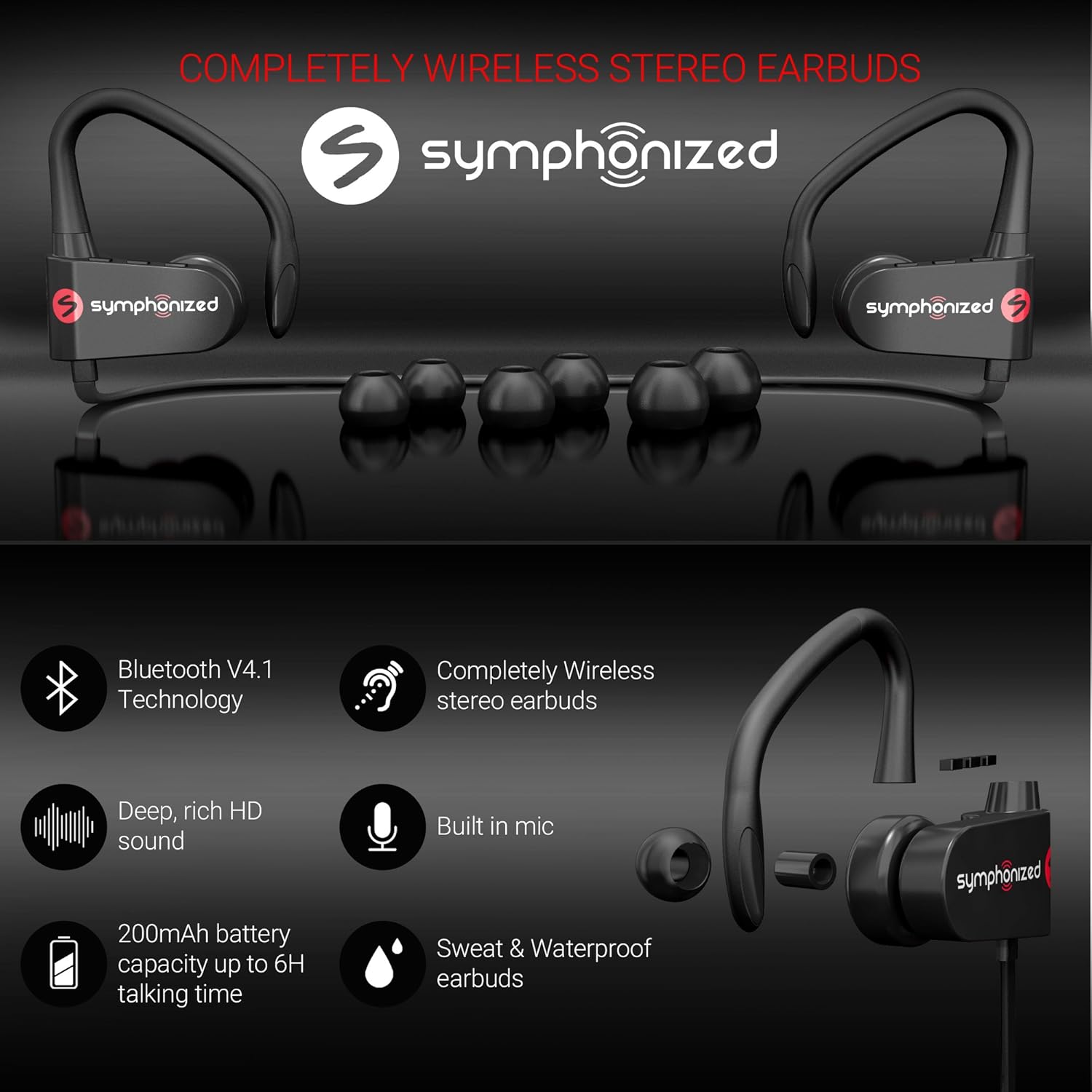
- Akpa ntị: Left and right earpieces with integrated ear hooks.
- Neckband Cable: Connects the two earbuds and houses the battery and main controls.
- Ogwe njikwa: Located on one of the earbuds, typically includes Power/Multi-function button, Volume Up/Next Track, Volume Down/Previous Track.
- Igwe okwu: Ewuru maka oku na-enweghị aka.
- Nchaji ọdụ ụgbọ mmiri: Micro USB ọdụ ụgbọ mmiri maka ịchaji.
Melite
1. Ịchaji ekwe ntị
Before first use, fully charge your earbuds. Connect the provided USB charging cable to the charging port on the earbuds and the other end to a USB power source (e.g., computer USB port, wall adapter). The charging time is approximately awa 2 maka ụgwọ zuru oke.
An indicator light will typically show red during charging and turn blue or off when fully charged.
2. Njikọ Bluetooth
Iji jikọọ ekweisi gị na ngwaọrụ:
- Ensure the earbuds are turned off.
- Press and hold the Multi-function button (usually the power button) for approximately 5-7 seconds until the indicator light flashes red and blue alternately. This indicates pairing mode.
- Na ngwaọrụ gị (ama, mbadamba, laptọọpụ), mee ka Bluetooth rụọ ọrụ ma chọọ ngwaọrụ ọhụrụ.
- Select "Symphonized PWR" or a similar name from the list of available devices.
- Once connected, the indicator light on the earbuds will typically flash blue slowly or turn off. You will also hear an audible confirmation.
The earbuds use Bluetooth V4.1 technology and have a wireless range of up to 10 mita (33 ụkwụ) in an open environment.

3. Yiri ekwe ntị
For optimal sound quality and comfort, choose the correct size ear tips from the included options (S/M/L). The ear hooks are designed to provide a secure fit, especially during physical activity.
- Select the ear tips that create a comfortable seal in your ear canal.
- Place the earbud into your ear, ensuring the ear hook goes over the top of your ear.
- Adjust the earbud and hook until it feels secure and comfortable.

Ntuziaka ọrụ
Gbanyụọ/ Gbanyụọ
- Ike Na: Press and hold the Multi-function button for approximately 3 seconds until the indicator light flashes blue and you hear a power-on prompt.
- Gbanyụọ: Press and hold the Multi-function button for approximately 3-5 seconds until the indicator light flashes red and you hear a power-off prompt.
Egwu Egwu
- Gwuo/kwụsịtụ: Pịa obere bọtịnụ ọrụ dị iche iche.
- Olu elu: Pịa bọtịnụ "+" nkenke.
- Olu ala: Pịa bọtịnụ "-".
- Track na-esote: Long press the "+" button.
- Gara aga Track: Long press the "-" button.
Njikwa Oku
- Azịza/Kwụsị Oku: Pịa obere bọtịnụ ọrụ dị iche iche.
- Jụ oku: Long press the Multi-function button.
- Nọmba Ikpeazụ emegharịgharịrị: Pịa bọtịnụ Multi-function ugboro abụọ.
Voice Assistant (Siri/Google Assistant)
If supported by your device, a quick triple-press of the Multi-function button may activate your device's voice assistant.
Nlekọta & Nlekọta
- Nhicha: Use a soft, dry cloth to clean the earbuds. Do not use harsh chemicals or abrasive materials. Regularly clean ear tips to prevent wax buildup.
- Nchekwa: Debe ntị ntị n'ebe dị jụụ ma kpọọ nkụ, ebe okpomọkụ na anwụ na-anaghị apụta oke.
- Nguzogide mmiri: The earbuds bụ Mmiri na-eguzogide, making them suitable for workouts and light rain. Do not submerge them in water or expose them to heavy downpours. Ensure the charging port cover is securely closed when not charging.
- Nlekọta batrị: To prolong battery life, avoid fully discharging the battery frequently. Charge the earbuds regularly, even if not in use for extended periods.
Nchọpụta nsogbu
| Nsogbu | Ihe nwere ike ime | Ngwọta |
|---|---|---|
| Earbuds won't power on. | Batrị dị ala. | Chajie ntị ntị nke ọma. |
| Enweghị ike ijikọ na ngwaọrụ. | Ekwe ntị adịghị n'ụdị njikọta; Bluetooth agbanyụrụ na ngwaọrụ; ngwaọrụ ahụ dị oke anya. | Ensure earbuds are in pairing mode (flashing red/blue). Turn on Bluetooth on your device. Move device closer to earbuds (within 10m). Forget previous pairings on your device and try again. |
| Enweghị ụda ma ọ bụ obere olu. | Volume too low on earbuds or device; earbuds not connected. | Increase volume on both earbuds and your device. Reconnect the earbuds to your device. |
| Njikọ na-adịte aka. | Interference; device too far; obstacles. | Move closer to your device. Avoid environments with strong Wi-Fi or other Bluetooth signals. Remove obstacles between earbuds and device. |
Nkọwapụta
| Njirimara | Nkọwa |
|---|---|
| Aha Nlereanya | pwr_black |
| Teknụzụ Njikọta | Ikuku (Bluetooth) |
| Ụdị Bluetooth | 4.1 |
| Oke Bluetooth | 10 mita |
| Ndụ batrị | Up to 6 Hours (Playtime) |
| Oge Nchaji | Awa 2 |
| Oke ugboro ugboro | 18Hz-22kHz |
| Ọkwa Nguzogide mmiri | Mmiri na-eguzogide |
| Ụdị njikwa | Njikwa olu, metụ |
| Ụdị ntị | In-Ear with Ear Hooks |
| Ihe onwunwe | Metal, silicon |
| Ibu Ibu | 3.2 ounces |
| UPC | 700600921889 |
Akwụkwọ ikike & Nkwado
Symphonized products are designed for durability and performance. For information regarding product warranty, please refer to the documentation included with your purchase or visit the official Symphonized website. For customer support, troubleshooting assistance, or to inquire about returns, please contact Symphonized directly through their official channels.
You can visit the Symphonized brand store on Amazon for more information: Symphonized Store
Ihe ndetu dị mkpa
No official product videos from the seller were available for embedding based on the provided data.