
1. Okwu mmalite
This manual provides essential information for the safe and efficient operation of your InFocus IN3148HD 1080p 5000 Lumen Professional Projector. Please read these instructions thoroughly before using the projector and retain them for future reference. The InFocus IN3148HD is designed for professional environments, offering high brightness, full HD resolution, and versatile connectivity for various presentation needs.

Foto 1: N'ihu view of the InFocus IN3148HD Projector.
2. Atụmatụ igodo
The InFocus IN3148HD projector offers a range of features designed for high-performance presentations:
- 1080p (1920 x 1080) Native Resolution: Delivers crisp, high-definition images.
- 5000 Lumen ihie: Ensures clear visibility in well-lit rooms.
- Mbugharị anya 1.5x: Provides flexibility in projector placement and image sizing.
- Nkwado 3D: Compatible with Blu-ray and other 3D content sources.
- 10W Speaker: Integrated audio for presentations.
- Nhọrọ njikọta ọtụtụ: Includes two HDMI 1.4 ports, VGA, and more.
- Nleba anya netwọkụ: Allows for remote management and control.
Vidiyo nke 1: Mwepuview of the InFocus IN3148HD projector's features and capabilities.
3. Ntọala na nwụnye
3.1 Nwepu
Carefully remove the projector and all accessories from the packaging. Verify that all components listed in the packing list are present and undamaged. Keep the original packaging for future transport or storage.
3.2 Ntinye
Position the projector on a stable, flat surface or mount it securely. Ensure adequate ventilation around the unit to prevent overheating. Consider the throw distance and screen size for optimal image quality. The projector supports both tabletop and ceiling mount installations.

Figure 2: Projector dimensions for installation planning.
4. Njikọta
The IN3148HD offers a variety of input and output ports for connecting to different devices.
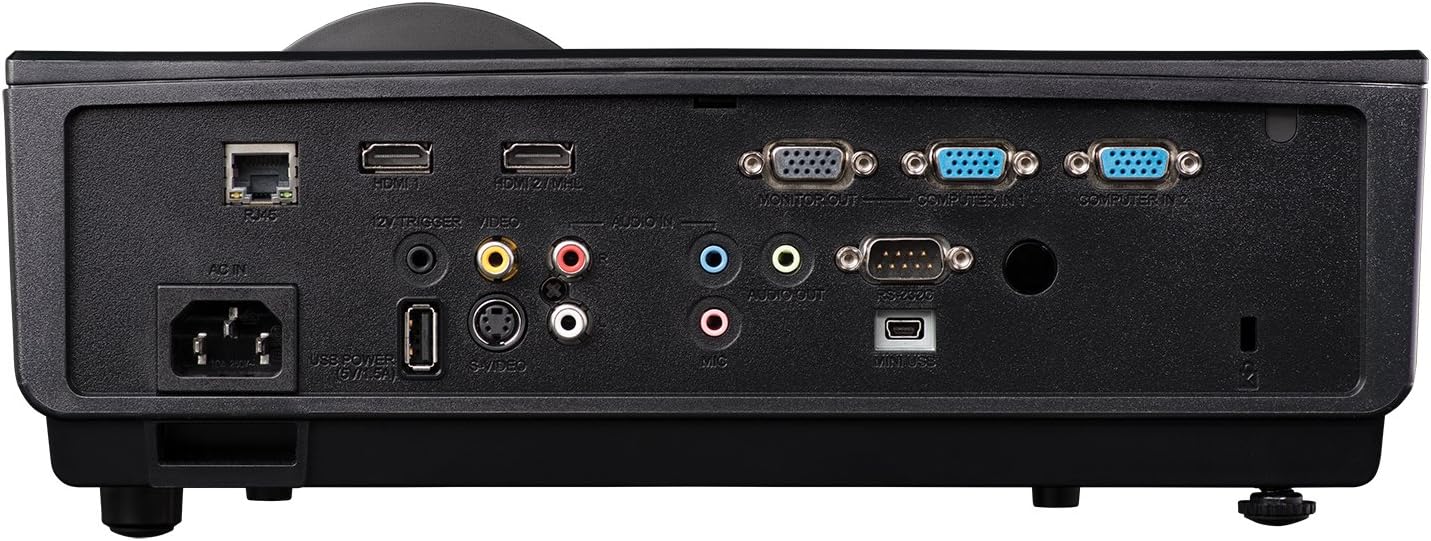
Foto nke 3: Pane azụ na-egosi ọdụ njikọ dị.
- HDMI (x2): For digital video and audio input from computers, Blu-ray players, and other HDMI-enabled devices.
- VGA (x2): Maka ntinye vidiyo analọg sitere na kọmpụta.
- USB: Maka mmelite ọrụ ma ọ bụ firmware.
- Netwọk (RJ45): Maka njikwa na nlekota netwọk.
- Ntinye/Ọnụnụ: 3.5mm jacks for external audio sources or output to external speakers.
- Vidiyo (RCA): Maka ntinye vidiyo mejupụtara.
5. Ọrụ
5.1 Gbanyụọ ma ọ bụ gbanyụọ
- Ike Na: Connect the power cord and press the power button on the projector or remote control. The power indicator light will turn blue.
- Gbanyụọ: Pịa bọtịnụ ike ugboro abụọ. Ihe ngosi ahụ ga-abanye na usoro oyi tupu ọ gbanyụọ kpamkpam.
5.2 Ịgbanwe Foto ahụ
- Gbado anya: Rotate the focus ring on the lens until the image is sharp.
- Bugharịa: Gbanwee mgbanaka mbugharị na oghere ka ịgbanwe nha onyonyo.
- Ndozi isi okwu: Use the keystone correction function in the OSD (On-Screen Display) menu to correct trapezoidal image distortion.
6. 3D Functionality
The InFocus IN3148HD projector supports 3D content from compatible sources, such as Blu-ray players. To experience 3D, you will need active 3D glasses (sold separately) and a 3D-enabled source device.
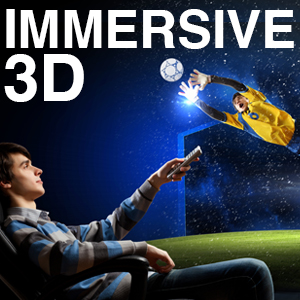
Figure 4: Visual representation of 3D content viewing.
7. Nlekọta
Nlekọta anya mgbe niile na-eme ka ọ dị mma ma na-agbatị ndụ nke projector gị.
- Lamp Ndochi: Ndị lamp has a limited lifespan. Refer to the OSD menu for lamp hour information. Replace the lamp when its brightness significantly decreases or when the lamp indicator light illuminates. Always use genuine InFocus replacement lamps.
- Nchacha ihe nzacha: Clean the air filter regularly to prevent dust buildup, which can affect cooling and image quality. Refer to the full user manual for specific instructions on accessing and cleaning the filter.
- Nchacha oghere: Use a soft, lint-free cloth and a specialized lens cleaning solution to gently clean the projector lens. Avoid abrasive materials.
8. Nchọpụta nsogbu
If you encounter issues with your projector, consult the table below for common problems and solutions.
| Nsogbu | Ihe nwere ike ime | Ngwọta |
|---|---|---|
| Ọnweghị onyonyo egosiri | Power cable disconnected, input source not selected, lamp ọdịda. | Check power connection, select correct input source, replace lamp ọ bụrụ na ọ dị mkpa. |
| Onyonyo na-agba agba | Lens out of focus, incorrect throw distance. | Adjust focus ring, reposition projector. |
| Enweghị ọdịyo | Volume too low, audio cable disconnected, incorrect audio source. | Increase volume, check audio cable connections, select correct audio input. |
| Projector na-ekpo oke ọkụ | Blocked ventilation, dirty air filter. | Ensure clear ventilation, clean air filter. |
9. Nkọwapụta
Detailed technical specifications for the InFocus IN3148HD projector.
| Njirimara | Nkọwapụta |
|---|---|
| Ụdị | Infocus |
| Aha Nlereanya | IN3148HD |
| Ngosipụta mkpebi | 1920 x 1080 (1080p) |
| Icha ọkụ | 5000 Lumens (ANSI) |
| Ọnụọgụ ọdịiche | 1000:1 |
| Ụdị ngosi | DLP |
| Teknụzụ Njikọta | HDMI, USB, VGA |
| Njirimara Pụrụ Iche | 3D gụgharia |
| Lamp Wattage | 310 Watt |
| Ndụ na-arụ ọrụ Light Source | Awa 4500 |
| Ibu Ibu | 4.47 kilogram |
10. Akwụkwọ ikike na nkwado
For warranty information, technical support, or service inquiries, please refer to the warranty card included with your product or visit the official InFocus websaịtị. Debe nnata nzụta gị dị ka ihe akaebe nke ịzụrụ maka nkwupụta ikike.