
1. Okwu mmalite
This manual provides essential information for the safe and efficient operation, installation, and maintenance of your TEMPO TI-70 TCA Hot Plate. Please read these instructions thoroughly before using the device to ensure proper function and to prevent injury or damage.
The TEMPO TI-70 TCA Hot Plate is designed for uniform heating applications in laboratory and industrial settings, featuring a grooved cast iron top and a thermostat for temperature control.
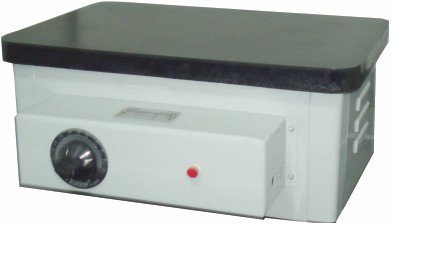
Foto 1: The TEMPO TI-70 TCA Hot Plate. This image displays the hot plate unit, featuring a dark cast iron top surface, a light-colored main body, and a control panel on the front. The control panel includes a rotary thermostat knob on the left and a red indicator light on the right. The side of the unit shows ventilation slots.
2. Ntuziaka nchekwa
Observe the following safety precautions to prevent electric shock, fire, or personal injury:
- Always connect the hot plate to a properly grounded electrical outlet.
- Do not operate the hot plate in the presence of flammable or explosive materials.
- Ensure adequate ventilation around the hot plate during operation.
- Avoid touching the hot plate surface during and immediately after operation, as it can reach temperatures up to 300°C. Use appropriate heat-resistant gloves.
- Do not immerse the hot plate in water or other liquids.
- Disconnect the power cord before cleaning or servicing the unit.
- Keep children and unauthorized personnel away from the operating hot plate.
- Inspect the power cord and plug for any damage before each use. Do not use if damaged.
3. Ihe ngwugwu
Chọpụta na ihe niile dị mgbe ị na-ebupụ:
- TEMPO TI-70 TCA Hot Plate Unit
- Akwụkwọ ntuziaka (akwụkwọ a)
4. Akụrụngwa Ngwaahịa
The TEMPO TI-70 TCA Hot Plate offers the following key features:
- Nrụpụta siri ike: Features a thick gauge Mild Steel (M.S.) body for durability.
- kpo oku Uniform: Equipped with a thick, well-machined, and smooth cast iron top, grooved from the bottom to circulate spiral heaters for consistent heat distribution.
- Thermostat agbakwunyere: Includes a temperature controller (thermostat) for precise temperature management, allowing a maximum surface temperature of 300°C.
- Efficient Heating Elements: Heating elements are securely housed into the grooves with porcelain beads underneath the cast iron for optimal performance and longevity.
- Akụkụ: Inner dimensions of the heating surface are 25 x 40 cm.
5. Nhazi
- Iwepu: Carefully remove the hot plate from its packaging and inspect for any shipping damage.
- Nkwanye: Place the hot plate on a stable, level, heat-resistant surface, away from flammable materials. Ensure there is sufficient clearance around the unit for proper ventilation.
- Njikọ ike: Ensure the thermostat knob is in the "OFF" position (or lowest setting). Plug the power cord into a grounded 230V AC electrical outlet.
6. Ọrụ
- Ike Na: Once connected to power, turn the thermostat knob clockwise to the desired temperature setting. The red indicator light will illuminate, indicating that the heating elements are active.
- Usoro ikpo oku: The hot plate will begin to heat. The thermostat will cycle the heating elements on and off to maintain the set temperature. The indicator light will turn off when the set temperature is reached and turn back on when heating resumes.
- Ndozi okpomọkụ: Adjust the thermostat knob as needed to increase or decrease the heating temperature.
- Gbanyụọ: To turn off the hot plate, rotate the thermostat knob counter-clockwise to the "OFF" or minimum setting. Disconnect the power cord from the outlet when not in use.
- Wetuo obi: Allow the hot plate to cool completely before handling or storing. The surface will remain hot for a significant period after being turned off.
7. Nlekọta
Regular maintenance ensures the longevity and optimal performance of your hot plate.
- Nhicha: Ensure the unit is unplugged and completely cool before cleaning. Wipe the cast iron top and exterior surfaces with a damp akwa . Ejila ihe nchacha abrasive ma ọ bụ tinye akụkụ ahụ n'ime mmiri.
- Nyocha: Periodically inspect the power cord for any signs of wear or damage. Check the hot plate surface for any cracks or deformities.
- Nchekwa: Store the hot plate in a dry, clean environment when not in use.
8. Nchọpụta nsogbu
If you encounter issues with your hot plate, refer to the following common problems and solutions:
- Hot Plate Not Heating:
- Lelee ma ọ bụrụ na e tinyere eriri ọkụ eletrik n'ime oghere dị ndụ.
- Ensure the thermostat knob is turned to a temperature setting above "OFF".
- Hụ na ihe mgbawa sekit ma ọ bụ fuse maka oghere ahụ agbaghị.
- Igwe kpo oku na-adịghị mma:
- Ensure the hot plate is placed on a level surface.
- Allow sufficient time for the cast iron top to reach a stable, uniform temperature.
- Indicator Light Not Illuminating:
- If the hot plate is heating but the light is off, the indicator bulb may need replacement. If the hot plate is not heating, refer to "Hot Plate Not Heating" above.
Maka okwu anaghị ekpuchi ebe a, biko kpọtụrụ nkwado ndị ahịa.
9. Nkọwapụta
| Njirimara | Nkọwa |
|---|---|
| Nọmba nlereanya | TI-70 TCA |
| Ụdị | TEMPO |
| Onye nrụpụta | Tempo Instruments Pvt Ltd |
| Ike | 1.2 kW |
| Voltage | 230 volts |
| Heating Surface Dimensions | 25 x 40 cm |
| Okpomọkụ dị elu | 300°C |
| Ihe dị n'elu ikpo ọkụ | Nkedo Ígwè |
| Akụrụngwa ahụ | Mild Steel (M.S.) |
| Ụdị njikwa | Thermostat |
| Ngwa gụnyere | Efere ọkụ |
10. Akwụkwọ ikike na nkwado
For warranty information or technical support, please contact Tempo Instruments Pvt Ltd directly. Keep your purchase receipt as proof of purchase.
Onye nrụpụta: Tempo Instruments Pvt Ltd
Biko kpọtụrụ onye ọrụ nke onye nrụpụta ahụ website or contact information provided at the time of purchase for the most current support details.