
Okwu mmalite
Daalụ maka ịzụrụasing the Max Power MPD125L Karaoke DJ Speaker System. This portable 12-inch speaker system is designed to deliver powerful sound and vibrant LED lighting for your entertainment needs. It features a built-in rechargeable battery, multiple connectivity options including USB, SD, AM/FM radio, and Bluetooth, along with a strong amplifier maka ahụmịhe ọdịyo imikpu.
Please read this manual thoroughly before operating the device to ensure proper use, optimal performance, and to prevent damage.
Ozi nchekwa
- Ewepụla unit ahụ na mmiri ozuzo ma ọ bụ mmiri iji gbochie ọkụ ma ọ bụ ujo eletrik.
- Emeghela casing. Enweghị akụkụ ndị ọrụ ga-arụ ọrụ n'ime. Kpọtụrụ ndị ọrụ ruru eru ọrụ niile.
- Debe ihe ahụ n'elu ebe kwụsiri ike ma dị larịị iji gbochie ya ịda.
- Debe ihe ahụ ka ọ ghara ịpụta ìhè n'anwụ, ebe okpomọkụ na-esi apụta, na ájá gabigara ókè.
- Gbaa mbọ hụ na ikuku ikuku dị mma. Akwụsịla oghere ikuku.
- Jiri naanị ihe nkwụnye ọkụ ewepụtara na unit ahụ.
- Kwupụ ngwaọrụ ahụ n'oge oke mmiri ozuzo ma ọ bụ mgbe ejighi ya ogologo oge.
- Zere itinye ihe ndị dị arọ na eriri ike.
- Do not insert any objects into the unit's openings.
Ihe ngwugwu
Biko lelee na ihe niile dị na ọ dịkwa mma:
- Max Power MPD125L Karaoke DJ Speaker System
- Igwe okwu ikuku
- Njikwa ime ikuku ikuku
- Ihe nkwụnye ọkụ / eriri ọkụ
- Akwụkwọ ntuziaka (akwụkwọ a)
Njirimara ngwaahịa
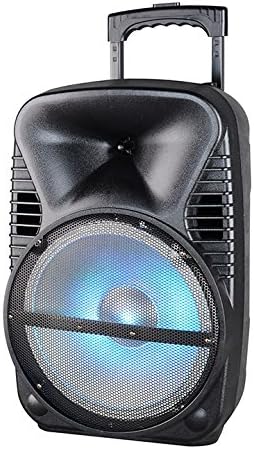
Foto: N'ihu view of the Max Power MPD125L Karaoke DJ Speaker System. It is a black, portable speaker with a retractable handle on top and wheels at the bottom. The front features a large speaker grille with blue LED lights illuminating the woofer, indicating its active state.
- Enwere ike ibugharị: 12-inch speaker with built-in retractable handle and wheels for easy transport.
- Ọdịda dị ike: 4000W peak power output for loud and clear sound with good bass.
- Batrị enwere ike ịchaji n'ime ya: Provides up to 4 hours of continuous playback. (Battery size: 12V/2.6A)
- LED Dance Lights: Integrated LED lights that flash, transforming any room into a disco club.
- Nhọrọ njikọta ọtụtụ:
- Bluetooth: Wireless streaming from compatible devices (laptops, smartphones).
- Oghere USB: Maka ịkpọ ụda files site na draịva USB.
- Oghere SD: Maka ịkpọ ụda files from SD cards.
- Radio AM/FM: Built-in tuner for radio broadcasts.
- Ọrụ Karaoke: Includes a wireless microphone for karaoke sessions.
- Full-Function Wireless Remote Control: Maka ọrụ dị mma site n'ebe dị anya.
- Mgbochi: 4 ohms.
- Nzaghachi ugboro ugboro: 40 Hz - 20 kHz.
Melite
1. gingchaji Okwu Okwu
- Locate the DC input port on the speaker (usually on the rear panel).
- Connect the supplied power adapter to the DC input port.
- Tinye ihe nkwụnye ọkụ n'ime oghere eletrik ọkọlọtọ.
- The charging indicator light (if present) will illuminate, typically red, during charging and turn green when fully charged.
- Allow approximately 4-6 hours for a full charge before first use. The speaker can be used while charging.
2. Ntọala Igwe okwu ikuku
- Insert appropriate batteries (not included, usually AA) into the wireless microphone.
- Turn on the microphone. It should automatically pair with the speaker.
- Adjust the microphone volume knob on the speaker's control panel to your desired level.
3. Remote Control Mbido
- Insert appropriate batteries (not included, usually AAA) into the wireless remote control.
- Point the remote control towards the speaker's IR receiver (usually on the front panel or near the controls) to operate.
Ntuziaka ọrụ
1. Gbanyụọ / gbanyụọ
Locate the Power switch (usually a rocker switch) on the speaker's control panel. Flip it to the "ON" position to power on the speaker. Flip it to "OFF" to power off.
2. Nhọrọ mode
Press the "MODE" button on the control panel or remote control to cycle through available input modes: Bluetooth, USB, SD, FM Radio, AM Radio, AUX (if available).
3. Njikọ Bluetooth
- Turn on the speaker and select Bluetooth mode. The speaker will typically announce "Bluetooth Mode" or display "BT" and enter pairing mode (indicated by a flashing Bluetooth indicator).
- On your smartphone, tablet, or laptop, enable Bluetooth and search for new devices.
- Select "MPD125L" (or similar name) from the list of available devices.
- Once paired, the speaker will confirm with an audible tone or a solid Bluetooth indicator light. You can now play audio wirelessly.
4. USB/SD Playback
- Insert a USB flash drive or SD card (pre-loaded with MP3 or compatible audio files) into the respective slot.
- The speaker should automatically switch to USB/SD mode and begin playing the first track. If not, press the "MODE" button to select USB or SD mode.
- Use the Play/Pause, Next Track, and Previous Track buttons on the control panel or remote to navigate.
5. AM/FM Radio Operation
- Select FM or AM radio mode using the "MODE" button.
- Press and hold the Play/Pause button (often labeled "SCAN") to automatically scan and save available radio stations.
- Use the Next Track and Previous Track buttons to switch between saved stations.
- Extend the telescopic antenna (if present) for better reception.
6. Karaoke arụ ọrụ
Ensure the wireless microphone is powered on and paired. Play your desired music through any input mode (Bluetooth, USB, etc.). Speak or sing into the microphone. Adjust the microphone volume and echo effects (if available) using the dedicated knobs on the control panel.
7. LED Dance Lights
The LED lights typically activate automatically when the speaker is powered on. There may be a dedicated button (e.g., "LIGHT" or "LED") on the control panel or remote to toggle them on/off or change patterns.
8. Njikwa olu
Adjust the master volume using the main volume knob on the speaker's control panel or the volume buttons on the remote control.
Nlekọta
- Nhicha: Use a soft, dry cloth to wipe the exterior of the speaker. Do not use liquid cleaners or abrasive chemicals.
- Nchekwa: Mgbe a naghị eji ya eme ihe ruo ogologo oge, chekwaa ọkà okwu n'ebe dị jụụ, nke kpọrọ nkụ, na-adịghị na ìhè anyanwụ kpọmkwem na oke okpomọkụ.
- Nlekọta batrị: To prolong battery life, avoid fully discharging the battery frequently. Recharge the battery at least once every 3 months if not in regular use.
- Igwe ikuku: Ensure the speaker's ventilation openings are clear of dust and debris to prevent overheating.
Nchọpụta nsogbu
| Nsogbu | Ihe nwere ike ime | Ngwọta |
|---|---|---|
| Ọkà okwu anaghị agba ọkụ. | Batrị agwụla. Power cable not connected properly. | Connect the speaker to a power outlet and allow it to charge. Ensure the power cable is securely plugged into both the speaker and the outlet. |
| Enweghị ụda sitere na ọkà okwu. | Olu dị oke ala. Incorrect input mode selected. Device not properly connected (Bluetooth/USB/SD). | Welie olu ukwu. Press the "MODE" button to select the correct input. Re-pair Bluetooth device, re-insert USB/SD, or check AUX cable connection. |
| Ngwa Bluetooth agaghị ejikọta. | Speaker not in pairing mode. Device too far from speaker. Agbanyụrụ Bluetooth na ngwaọrụ ahụ. | Ensure speaker is in Bluetooth mode and indicator is flashing. Bugharịa ngwaọrụ ahụ nso na ọkà okwu (n'ime mita 10). Kwado Bluetooth na ngwaọrụ gị. |
| Igwe okwu anaghị arụ ọrụ. | Microphone is off or batteries are dead. Microphone volume is too low. | Turn on the microphone and replace batteries if necessary. Increase the microphone volume knob on the speaker. |
| Nnabata redio adịghị mma. | Mgbama na -adịghị ike. Antenna not extended. | Relocate the speaker to an area with better signal. Gbatịa mpi telescopic ahụ. |
Nkọwapụta
| Nọmba nlereanya | MPD125L |
| Ụdị | Oke ike |
| Mpụta ike kacha elu | 4000 Watt |
| Mgbochi | 4 ohms |
| Nzaghachi ugboro ugboro | 40 Hz - 20 kHz |
| Ogo batrị | 12V / 2.6A |
| Ndụ batrị | Ruo awa iri abụọ |
| Akụkụ ngwaahịa (L x W x H) | 33.02 x 38.1 x 58.42 cm (13 x 15 x 23 inch) |
| Ibu ngwaahịa | 15.88 n'arọ (35 lbs) |
| Ngwa dakọtara | Laptọọpụ, Smartphone |
| Ụdị njikọ | USB |
| UPC | 703510623201 |
Akwụkwọ ikike na nkwado
Maka ozi akwụkwọ ikike na nkwado teknụzụ, biko rụtụ aka na akwụkwọ enyere n'oge ịzụrụ ma ọ bụ kpọtụrụ onye na-ere ahịa gị. Debe ihe akaebe nke ịzụrụ ihe maka akwụkwọ ikike ọ bụla.
For further assistance or inquiries, please visit the official MAX POWER websaịtị ma ọ bụ kpọtụrụ ngalaba ọrụ ndị ahịa ha.