
1. Okwu mmalite
Daalụ maka ịzụrụasing the Riptunes Portable CD Player with AM/FM Radio, Model CDB204. This device is designed for portable audio playback, offering versatile options including CD playback, AM/FM radio reception, and auxiliary input for external audio sources. Please read this manual thoroughly before operating the unit to ensure proper use and to maximize your listening experience.

Image 1.1: Riptunes Portable CD Player (Model CDB204) with an external device connected.
2. Ozi nchekwa
- Ewepụla unit ahụ na mmiri ozuzo ma ọ bụ mmiri iji gbochie ọkụ ma ọ bụ ujo eletrik.
- Emeghela kabinet. Tụtụ aka na naanị ndị ọrụ ruru eru.
- Zere idobe otu n'akụkụ ebe okpomọkụ dị ka radiators, ndekọ okpomọkụ, stovu, ma ọ bụ ngwa ndị ọzọ na-emepụta okpomọkụ.
- Jiri naanị mgbakwunye / ngwa ndị nrụpụta akọwapụtara.
- Kwụpụ otu a n'oge oke mmiri ozuzo ma ọ bụ mgbe ejighi ya ogologo oge.
- Tụfuo batrị nke ọma, na-agbaso iwu mpaghara. Ewepụla batrị na oke okpomọkụ.
3. Ihe ngwugwu
Biko lelee na agụnyere ihe ndị a na ngwugwu gị:
- Riptunes Portable CD Player (Model CDB204)
- Ada Ada AC
- Akwụkwọ ntuziaka
4. Ngwaahịa gafereview
Familiarize yourself with the controls and features of your Riptunes Portable CD Player.
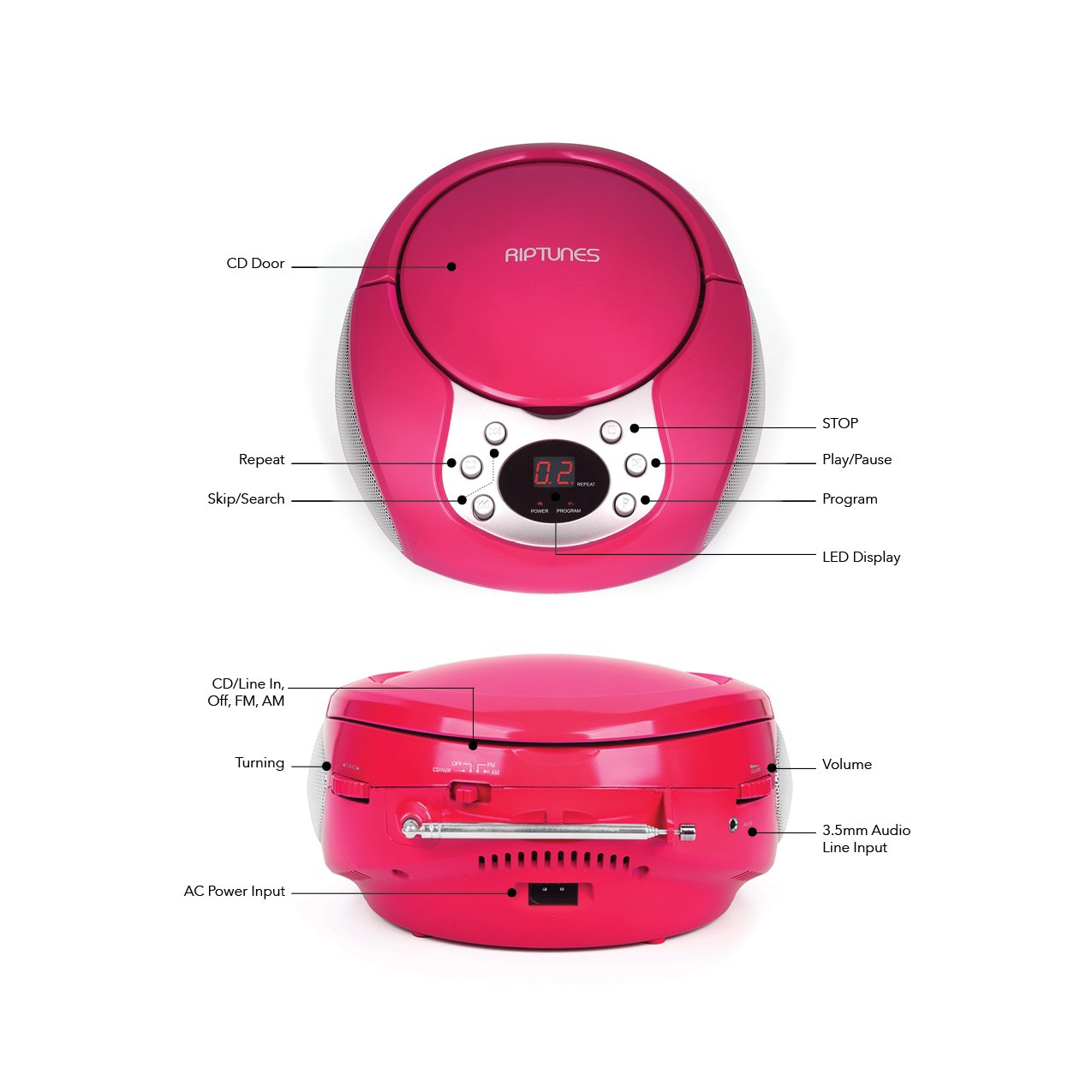
Image 4.1: Front and Side Panel Controls and Ports.
Njikwa akụkụ ihu:
- CD Door: Open to insert or remove a CD.
- Ikanam Display: Shows track number, radio frequency, or mode.
- POWER/PROGRAM Button: Press to turn the unit on/off. In CD mode, press to program tracks.
- PLAY/PAUSE (►/−−) Button: Press to start or pause CD playback.
- STOP (■) Button: Press to stop CD playback.
- SKIP/SEARCH (◀◀ / ►►) Buttons: Press to skip tracks on a CD. Hold to search within a track. In radio mode, press to tune.
- Bọtịnụ ikwughachi: Press to repeat the current track or all tracks on a CD.
Side Panel Controls/Ports:
- FUNCTION Switch (CD/Line In-Off, FM, AM): Selects the operating mode (CD/Aux, FM Radio, AM Radio) and turns the unit off.
- Ọkpọ oku olu: Na-emezi ọkwa mmepụta ọdịyo.
- TUNING Dial: Adjusts the radio frequency in AM/FM mode.
- AUX na Jack: Connects external audio devices using a 3.5mm audio cable.
- AC POWER INPUT Jack: Na-ejikọ ihe nkwụnye ike AC enyere.
- Antenna FM: Extend for optimal FM radio reception.
5. Nhazi
5.1 Ịkwado Ngalaba ahụ
The Riptunes Portable CD Player can be powered by either the included AC adapter or by batteries.
Ọrụ ike AC:
- Ensure the FUNCTION switch is in the 'OFF' position.
- Insert the small end of the AC adapter into the AC POWER INPUT jack on the side of the unit.
- Plug the other end of the AC adapter into a standard AC wall outlet (120V ~ 60Hz).
Ọrụ batrị:
For portable use, the unit requires 6 x 'C' size batteries (not included).
- Ensure the FUNCTION switch is in the 'OFF' position.
- Chọta ebe batrị dị na ala nke unit ahụ.
- Open the battery compartment cover by sliding it off.
- Tinye batrị nha 'C' isii, na-ele anya na polarity ziri ezi (+/-) dịka egosiri n'ime ngalaba ahụ.
- Dochie mkpuchi nke batrị batrị nke ọma.

Image 5.1: Battery Compartment on the underside of the unit.
5.2 mmezi nke antenna
For optimal FM radio reception, fully extend the telescopic FM antenna located on the side of the unit. For AM reception, the unit has a built-in antenna, so no external adjustment is needed, but you may need to reposition the unit for better signal.

Image 5.2: Unit with FM antenna extended.
6. Ntuziaka ọrụ
6.1 CD ịkpọghachi
- Slide the FUNCTION switch to the 'CD/Line In-Off' position.
- Press the 'OPEN' button on the CD door to open it.
- Place a CD into the compartment with the label side facing up.
- Close the CD door firmly. The LED display will show '00' or the total number of tracks.
- Press the PLAY/PAUSE (►/−−) button to start playback. The track number will appear on the display.
- Adjust the VOLUME dial to your desired listening level.
- To pause playback, press the PLAY/PAUSE (►/−−) button. Press again to resume.
- To stop playback, press the STOP (■) button.
- To skip to the next track, press the SKIP/SEARCH (►►) button.
- To go back to the beginning of the current track, press the SKIP/SEARCH (◀◀) button once. Press twice to go to the previous track.
- To search rapidly forward or backward within a track, hold down the respective SKIP/SEARCH button.
- Megharịa ọrụ: Press the REPEAT button once to repeat the current track. Press again to repeat all tracks. Press a third time to cancel repeat mode.
- Ọrụ mmemme: While the CD is stopped, press the PROGRAM button. The display will flash. Use the SKIP/SEARCH buttons to select your desired track, then press PROGRAM again to confirm. Repeat for up to 20 tracks. Press PLAY/PAUSE to start programmed playback.
Ọrụ redio 6.2 nke ụtụtụ/FM
- Slide the FUNCTION switch to either 'FM' or 'AM' position.
- Maka nnabata FM, gbasaa antenna telescopic ahụ nke ọma.
- Rotate the TUNING dial on the side of the unit to select your desired radio station. The frequency will be displayed on the LED screen.
- Adjust the VOLUME dial to your desired listening level.
- For optimal AM reception, you may need to rotate the entire unit to find the best signal.
6.3 Ntinye Enyemaka (AUX IN)
- Slide the FUNCTION switch to the 'CD/Line In-Off' position.
- Connect one end of a 3.5mm audio cable (not included) to the AUX IN jack on the side of the unit.
- Connect the other end of the audio cable to the headphone jack or line-out jack of your external audio device (e.g., smartphone, MP3 player).
- Turn on your external audio device and start playback.
- Adjust the VOLUME dial on the Riptunes unit and the volume on your external device to achieve the desired sound level.
7. Nlekọta
- Nhicha: Jiri akwa dị nro hichaa otu ahụ. Ejila ihe nchacha abrasive ma ọ bụ ihe mgbaze.
- Nlekọta CD: Handle CDs by their edges. Keep them clean and free of scratches. Use a soft, lint-free cloth to wipe CDs from the center outwards.
- Nchekwa: Mgbe a naghị eji ya ruo ogologo oge, wepụ batrị ma debe ya n'ebe dị jụụ ma kpọọ nkụ, ebe anwụ na-anaghị apụta kpọmkwem ma ọ bụ oke okpomọkụ.
8. Nchọpụta nsogbu
| Nsogbu | Ihe nwere ike ime | Ngwọta |
|---|---|---|
| Enweghị ike | AC adapter not connected; Batteries depleted or incorrectly inserted; FUNCTION switch in 'OFF' position. | Ensure AC adapter is securely plugged in; Replace batteries or check polarity; Slide FUNCTION switch to 'CD/Line In-Off', 'FM', or 'AM'. |
| CD anaghị egwu | CD inserted incorrectly; CD is dirty or scratched; CD door not closed; FUNCTION switch not in 'CD/Line In-Off' mode. | Insert CD with label side up; Clean or replace CD; Close CD door firmly; Set FUNCTION switch to 'CD/Line In-Off'. |
| Nnabata redio adịghị mma | FM antenna not extended; Unit position. | Fully extend FM antenna; Reposition the unit for better signal. |
| No sound from AUX IN | Audio cable not connected properly; External device volume too low; FUNCTION switch not in 'CD/Line In-Off' mode. | Check audio cable connections; Increase volume on external device; Set FUNCTION switch to 'CD/Line In-Off'. |
9. Nkọwapụta
- Ụdị: CDB204
- Isi mmalite ike: Batrị AC 120V ~ 60Hz ma ọ bụ batrị 6 x 'C' (DC 9V)
- ndakọrịta CD: CD, CD-R/RW
- Ugboro redio: FM, AM
- Njikọta: 3.5mm AUX IN
- Akụkụ (Ihe dị ka): 12.48 x 11.46 x 7.09 sentimita (31.7 x 29.1 x 18 cm)
- Ibu (Ihe dị ka): 2.68 pound (1.22 n'arọ)
10. Akwụkwọ ikike na nkwado
Riptunes products are designed for reliability and performance. For warranty information, technical support, or customer service inquiries, please refer to the contact information provided with your purchase documentation or visit the official Riptunes websaịtị. Biko dowe ihe akaebe nke ịzụrụ ihe maka akwụkwọ ikike.