
Eurom Alutherm 2000 Wi-Fi
Eurom Alutherm 2000 Wi-Fi Convection Heater User Manual
Model: Alutherm 2000 Wi-Fi (EUM360776)
1. Okwu mmalite
Thank you for choosing the Eurom Alutherm 2000 Wi-Fi convection heater. This manual provides essential information for the safe and efficient operation, installation, and maintenance of your new heater. Please read these instructions carefully before use and keep them for future reference.
The Eurom Alutherm 2000 Wi-Fi is an elegant convection heater designed to integrate seamlessly into any interior. With a power output of 2000 W, it is capable of heating spaces between 49-65 m³, making it suitable for living rooms, bedrooms, or offices. This heater can be wall-mounted for continuous heating and features a built-in thermostat to maintain your desired temperature. Control is made convenient through the free Eurom Smart app, which also allows for connecting multiple heaters.
2. Ntuziaka nchekwa
Na-agbaso ihe ndị a dị mkpa mgbe niile iji belata ihe egwu nke ọkụ, ọkụ eletrik, ma ọ bụ mmerụ ahụ:
- Gụọ ntụziaka niile tupu i jiri ikpo ọkụ a.
- Ejila ikpo ọkụ a n'akụkụ ebe ịsa ahụ, ịsa ahụ, ma ọ bụ ọdọ mmiri.
- Do not cover the heater. Covering the heater can lead to overheating and fire.
- Keep flammable materials such as furniture, curtains, and other combustible items at least 1 meter (3 feet) from the front and sides of the heater.
- Gbaa mbọ hụ na voltage egosiri na akara ọkwa ahụ kwekọrọ na isi vol gịtage.
- Ejila ihe na-ekpo ọkụ ọ bụla rụọ ọrụ na eriri ma ọ bụ plọg mebiri emebi, ma ọ bụ mgbe ihe na-ekpo ọkụ ahụ mebiri emebi ma ọ bụ mgbe ọ dasịrị ma ọ bụ mebie n'ụzọ ọ bụla.
- Ezubere ngwa a maka iji ndị mmadụ (gụnyere ụmụaka) nwere ike anụ ahụ, mmetụta uche ma ọ bụ nke uche, ma ọ bụ enweghị ahụmịhe na ihe ọmụma, ma ọ bụrụ na enyereghị ha nlekọta ma ọ bụ ntụziaka gbasara iji ngwa ahụ site n'aka onye na-ahụ maka nchekwa ha.
- Ekwesịrị ilekọta ụmụaka ka ha hụ na ha ejighi ngwa eji egwu egwu egwu.
3. Ngwaahịa gafereview
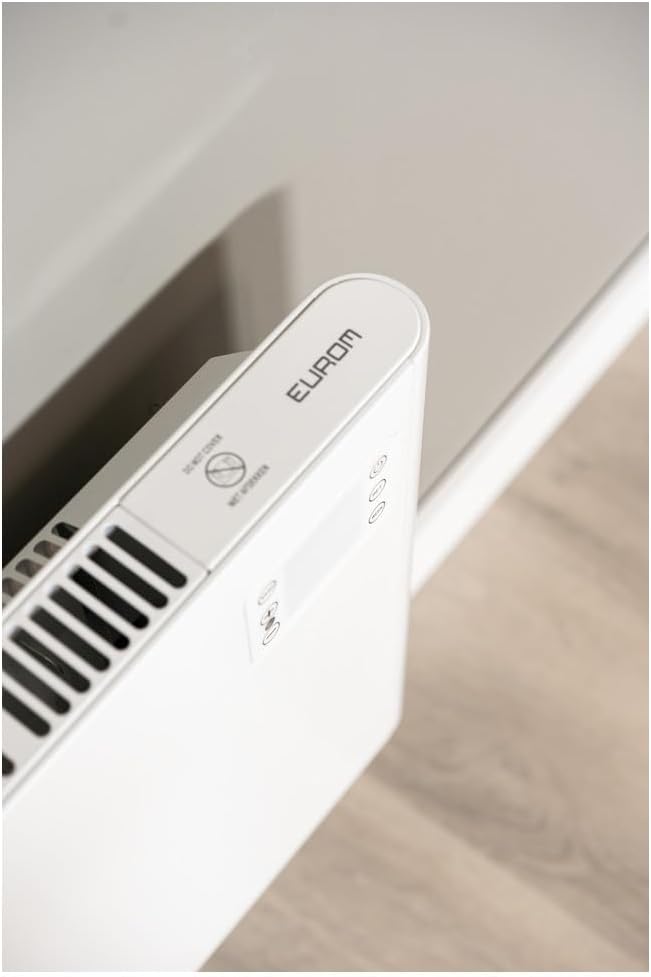
The Eurom Alutherm 2000 Wi-Fi heater features a sleek design and intuitive controls. Below are key components and their descriptions.



4. Ntọala na nwụnye
The Eurom Alutherm 2000 Wi-Fi heater offers flexible installation options: wall-mounted or freestanding.
4.1 Mgbidi Mgbidi
For permanent heating, the unit can be securely mounted to a wall. Refer to the included mounting template and hardware for precise installation. Ensure the heater is installed at a safe distance from flammable materials and that there is adequate clearance for air circulation.

4.2 Freestanding Placement
If you prefer a portable solution, attach the provided feet to the base of the heater. Place the heater on a stable, level surface, ensuring it is not obstructed and has sufficient space around it for proper operation.

4.3 Njikọ ike
Once installed, plug the heater into a suitable electrical outlet. Ensure the main power switch (Figure 3.4) is in the 'OFF' position before plugging in. After plugging in, switch the main power switch to 'ON'.
5. Ntuziaka ọrụ
The Alutherm 2000 Wi-Fi can be operated via its integrated control panel, the remote control, or the Eurom Smart app.
5.1 Ogwe njikwa
The control panel (Figure 3.6) allows direct adjustment of settings:
- Bọtịnụ ike: Turns the heater on or off.
- Bọtịnụ ụkpụrụ: Cycles through different operating modes (e.g., Comfort, ECO, Anti-frost).
- Bọtịnụ SET: Confirms selections or enters settings menus.
- Ndozi okpomọkụ (+/-): Increases or decreases the desired temperature.
- WEEK Button: Accesses weekly programming settings.
5.2 Ọrụ njikwa anya
The remote control (Figure 3.5) provides convenient access to all heater functions from a distance. Its buttons mirror the functions available on the control panel.
5.3 Eurom Smart App Control (Wi-Fi)
For advanced control and scheduling, download the free Eurom Smart app. This app allows you to:
- Turn the heater on/off remotely.
- Set and adjust the desired temperature.
- Program weekly heating schedules.
- Connect and manage multiple Eurom Wi-Fi heaters.
Follow the in-app instructions for pairing your heater with the app and connecting to your home Wi-Fi network.
6. Nlekọta
Nlekọta oge niile na-eme ka arụmọrụ dị mma na ogologo ndụ nke ikpo ọkụ gị.
- Nhicha: Na-ewepụ ihe ọkụ ọkụ mgbe niile ma kwe ka ọ dị jụụ kpamkpam tupu ihicha ya. Jiri nwayọọ, damp akwa iji hichaa elu elu. Ejila ihe nchacha abrasive ma ọ bụ ihe mgbaze.
- Nchekwa: Ọ bụrụ na ị na-echekwa ihe na-ekpo ọkụ ruo ogologo oge, hụ na ọ dị ọcha ma kpọọ nkụ. Debe ya n'ebe dị jụụ ma kpọọ nkụ, ọkachasị n'ime akpa mbụ ya.
- Nyocha: Periodically check the power cord and plug for any signs of damage. If damage is found, do not use the heater and contact qualified service personnel.
7. Nchọpụta nsogbu
If you encounter issues with your Eurom Alutherm 2000 Wi-Fi heater, refer to the following common problems and solutions:
| Nsogbu | Ihe nwere ike ime | Ngwọta |
|---|---|---|
| Igwe ọkụ anaghị agbanye. | No power supply; Main power switch off; Overheat protection activated. | Check power outlet and plug; Ensure main power switch (Figure 3.4) is ON; Unplug, allow to cool for 30 minutes, then restart. |
| Heater not heating to desired temperature. | Temperature setting too low; Room size exceeds heater capacity; Obstruction of air vents. | Increase temperature setting; Ensure heater is appropriate for room size; Clear any obstructions from air vents. |
| Nsogbu njikọ Wi-Fi. | Weak Wi-Fi signal; Incorrect app pairing; Router issues. | Ensure heater is within Wi-Fi range; Re-pair the heater with the Eurom Smart app; Restart your Wi-Fi router. |
| Heater overheats or runs continuously. | Thermostat malfunction; Air vents blocked; Software glitch. | Ensure vents are clear and heater is not covered; If issue persists, unplug and contact support. (Note: A user review mentioned potential overheating issues if the management module gets stuck. Always monitor the heater.) |
| Heater does not restart automatically after power outage. | Design limitation. | This model may require manual restart after a power interruption. |
If the problem persists after attempting these solutions, please contact Eurom customer support.
8. Nkọwapụta
| Njirimara | Nkọwapụta |
|---|---|
| Ụdị | Euro |
| Nọmba nlereanya | EUM360776 |
| Agba | Ọcha |
| Akụkụ ngwaahịa (L x W x H) | 101 x 46 x 12 cm |
| Ibu | 6 kilogram |
| Klas arụmọrụ ike | B |
| Atụmatụ pụrụ iche | Wi-Fi Compatible, Electronic Thermostat |
| Ụdị Ihe | Ụlọ elu |
| Ojiji ime ime/n'èzí | Ime ụlọ |
| Isi Iyi Ike | Igwe ọkụ eletrik |
| Usoro kpo oku | Okwuchi |
| Ụdị nkwụnye | Ugwu mgbidi |
9. Akwụkwọ ikike na nkwado
For warranty information, please refer to the documentation provided with your purchase or visit the official Eurom website. If you require technical assistance, spare parts, or have any questions regarding your Eurom Alutherm 2000 Wi-Fi heater, please contact Eurom customer support directly. Contact details can typically be found on the product packaging or the manufacturer's websaịtị.
Ask a question about this manual
Ask about setup, troubleshooting, compatibility, parts, safety, or missing instructions. Manuals+ will review the question and use this page’s manual context to help answer it.