Sulion Ceiling Fan Remote Control with Sleep Function - Model 078100
Akwụkwọ ntuziaka
Ngwaahịa gafereview
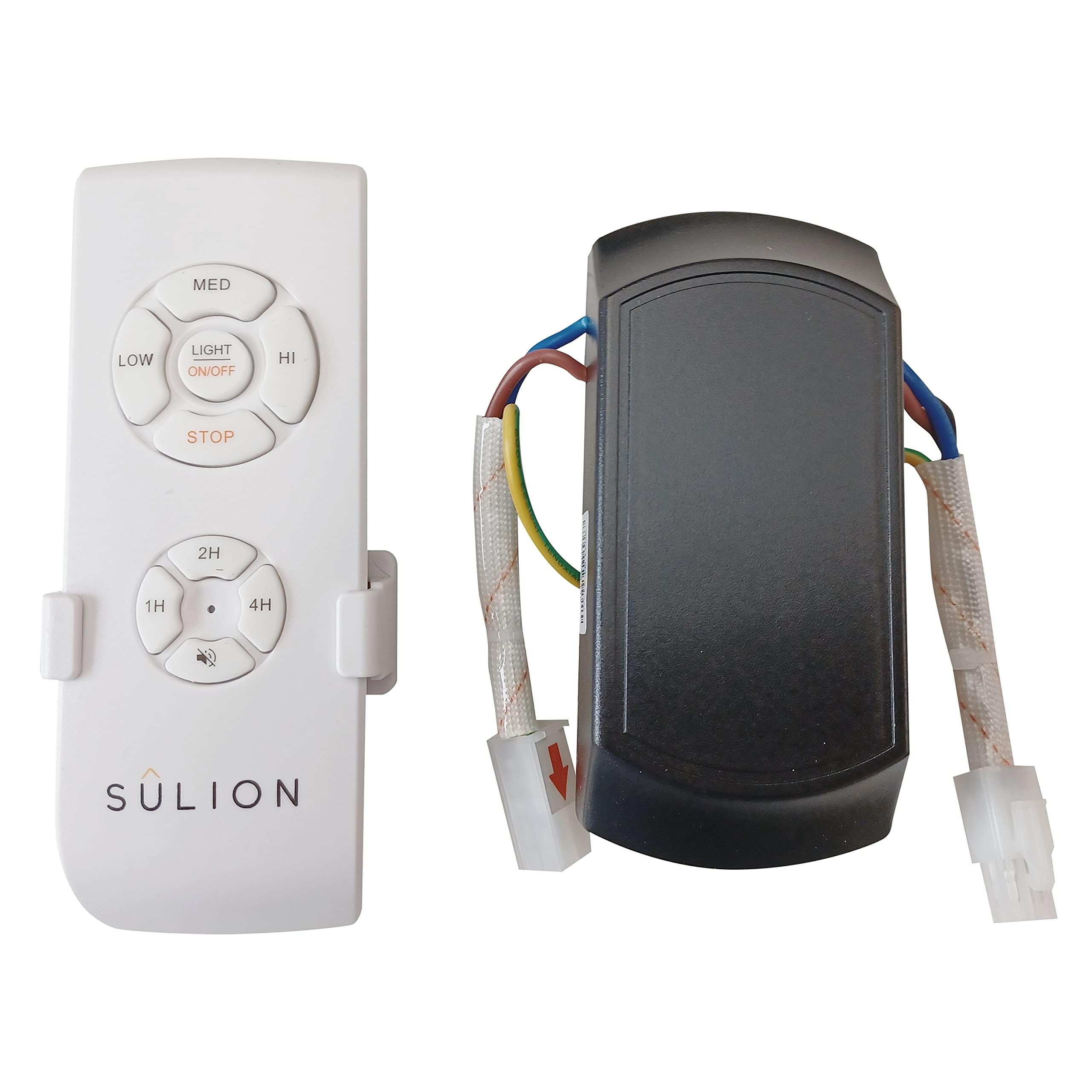
The Sulion Model 078100 is a wireless remote control system designed for ceiling fans. It offers convenient control over fan speeds and lighting, including a specialized sleep function. This system features 3 infrared fan speeds and a programmable shut-off timer, allowing users to set the fan to turn off automatically after 1/2 hour, 1 hour, or 3 hours.
Image: Sulion Ceiling Fan Remote Control Kit, showing the remote and receiver unit.
Ozi nchekwa
Always disconnect power at the main circuit breaker before installing or servicing the fan or remote control system.
Ekwesịrị ịrụ ọrụ nrụnye site n'aka onye ọrụ ọkụ eletrik ma ọ bụ dabere na koodu eletriki mpaghara.
Hụ na njikọ eletriki niile dị n'udo ma nwee mkpuchi kwesịrị ekwesị.
Do not use this product with dimmer switches or other variable speed controls not specified for ceiling fans.
Debe ihe njikwa dịpụrụ adịpụ ka mmiri ghara iru na oke okpomọkụ.
Ihe ngwugwu
Chọpụta na akụrụngwa niile dị tupu ịmalite nrụnye:
Ngalaba njikwa anya
Ngalaba nnata
Ihe nkwado mgbidi nke njikwa anya
Ịkwanye kposara
Njikọ waya
Akwụkwọ ntuziaka
Video: A close-up view of the remote control and receiver unit, demonstrating the components included in the package.
Ntọala na nwụnye
1. Wiring the Receiver Unit
Before proceeding, ensure the power supply to the ceiling fan is completely disconnected at the circuit breaker.
Identify the existing wiring from your ceiling fan and the main power supply.
Connect the receiver unit's wires to the corresponding fan and power supply wires using appropriate electrical connectors. Typically, this involves connecting the live (L) and neutral (N) wires from the power supply to the receiver's input, and the fan's light and motor wires to the receiver's output. Refer to the wiring diagram provided in the video for detailed connections.
Securely mount the receiver unit within the fan's canopy or junction box, ensuring it does not interfere with the fan's operation.
2. Ime njikwa njikọ
After wiring the receiver, you may need to pair the remote control with the receiver.
Restore power to the ceiling fan at the circuit breaker.
Within 30 seconds of restoring power, press and hold the "Light" button on the remote control for approximately 5 seconds.
The fan light should blink or the fan should briefly turn on/off to indicate successful pairing.
3. Smartphone App Pairing (if applicable)
Some models may support smartphone app control. Follow these general steps for pairing:
Download the recommended smart home app (e.g., Tuya Smart, Smart Life) from your device's app store.
Gbaa mbọ hụ na ejikọrọ ekwentị gị na netwọk Wi-Fi 2.4 GHz.
Open the app and select "Add Device" or "Auto Scan".
Follow the on-screen instructions to put the device into pairing mode (often involves cycling power or pressing a button on the receiver). The indicator light on the receiver should blink rapidly.
Confirm the indicator is blinking rapidly in the app and proceed with the pairing process.
Ntuziaka ọrụ
Ọrụ njikwa anya
Mgbanwu/ Gbanyụọ: Pịa Ìhè button to toggle the fan light on or off.
Gbanyụọ/ Gbanyụọ: Pịa Onye ofufe bọtịnụ iji gbanye ma ọ bụ gbanyụọ fan.
Njikwa ọsọ fan: Jiri ihe 1, 2, 3 buttons to select low, medium, or high fan speeds respectively.
Oge ụra: Pịa 1/2H, 1H, 3H buttons to set the fan to automatically turn off after 30 minutes, 1 hour, or 3 hours.
Laghachi azụ ọrụ: If your fan supports it, the reverse button (often depicted as two arrows forming a circle) changes the fan blade direction for summer or winter use.
Ọrụ Smartphone App
Njikwa ọkụ: Toggle the light on/off directly from the app interface.
Ndozi ọsọ onye ofufe: Adjust fan speed using a slider or predefined levels within the app.
Ntọala oge: Set custom timers for fan and light operation.
Njikwa olu: Integrate with smart assistants (e.g., Alexa, Google Assistant) for voice commands (if supported by the app and device).
Nlekọta
Nhicha: Jiri ákwà dị nro ma kpọọ nkụ hichaa ihe njikwa remote na receiver. Ejila ihe nhicha ma ọ bụ ihe mgbaze.
Ngbanwe batrị: Replace the remote control batteries when the indicator light dims or the remote's range decreases. Refer to the remote's battery compartment for battery type (typically AAA or similar).
Nlele anya mgbe niile: Na-elele njikọ waya niile mgbe niile maka ike na ihe ịrịba ama nke iyi.
Nchọpụta nsogbu
Nsogbu
Ihe nwere ike ime
Ngwọta
Fan/Light not responding to remote.
Low/dead remote battery.
Remote not paired with receiver.
Okwu ọkọnọ ike.
Dochie batrị ndị dịpụrụ adịpụ.
Re-pair the remote control (see Setup section).
Lelee ihe na-agbaji sekit na njikọ waya.
Fan operates but light does not.
Light bulb faulty.
Light wiring issue.
Dochie bọlbụ ọkụ.
Check light wiring connections to the receiver.
Ngwa enweghị ike ijikọ na ngwaọrụ ahụ.
Incorrect Wi-Fi network (5GHz vs 2.4GHz).
Ngwaọrụ adịghị na ọnọdụ njikọta.
Mgbama Wi-Fi na-adịghị mma.
Ensure phone is on 2.4GHz Wi-Fi.
Follow app pairing steps to reset device.
Move router closer or improve Wi-Fi signal.
Nkọwapụta
Nọmba nlereanya: 078100
Akara: Sulion
Akụkụ ngwaahịa: 12 x 5 x 3 cm; 170 grams
Teknụzụ Njikọta: Radio Frequency, Infrared
Njirimara Pụrụ Iche: Oke ọsọ
Ngwa dakọtara: Onye ofufe
Agba: Ọcha
Mba onye si: China
Akwụkwọ ikike na nkwado
This Sulion product is covered by a standard manufacturer's warranty. For specific warranty details, please refer to the documentation included with your purchase or contact Sulion customer support. For technical assistance, troubleshooting, or to inquire about replacement parts, please visit the official Sulion websaịtị ma ọ bụ kpọtụrụ ngalaba ọrụ ndị ahịa ha.
Ask a question about this manual
Ask about setup, troubleshooting, compatibility, parts, safety, or missing instructions. Manuals+ will review the question and use this page’s manual context to help answer it.