
1. Ngwaahịa gafereview
The LinQ W735 is a versatile dynamic microphone designed for both wired and wireless operation. It features a durable metal construction, an internal shock mount, a hum-compensating coil, and a neodymium magnet. The microphone includes an on/off switch with a locking mechanism. For wireless use, it offers a range of up to 30 meters with its included receiver, which connects directly to a karaoke machine or amplifier's 6.5 mm jack input. Alternatively, a 3-meter wired connection is possible using the provided cable. The microphone is powered by AA batteries, which are included. It is designed to be insensitive to acoustic noise, boasts a high sound pressure level of over 150 dB SPL, and features a silent switch. Its cardioid polar pattern focuses on sound from the front, minimizing background noise.
Ihe ngwugwu 1.1
- LinQ W735 Dynamic Microphone
- Wireless Receiver (6.5 mm Jack)
- 3-meter Audio Cable (6.5 mm Jack to 6.5 mm Jack)
- AA Batteries (for microphone and receiver)

Image 1.1: LinQ W735 microphone, wireless receiver, and product packaging.
2. Ozi nchekwa
- Do not expose the microphone or receiver to water or excessive moisture.
- Zere idobe ma ọ bụ idobe ngwaọrụ ahụ na mmetụta siri ike.
- Do not attempt to disassemble or modify the microphone or receiver. This will void the warranty.
- Use only the specified AA batteries. Ensure correct polarity when inserting batteries.
- Wepu batrị ma ọ bụrụ na agaghị eji ngwaọrụ ahụ ogologo oge iji gbochie ntapu.
- Debe batrị ebe ụmụaka na-apụghị iru.
3. Akụrụngwa Ngwaahịa
- Arụ Ọrụ Abụọ: Supports both wireless and wired connections.
- Unidirectional (Cardioid) Polar Pattern: Captures sound primarily from the front, reducing background noise.
- Ihe owuwu na-adịgide adịgide: Features a metal microphone body for longevity.
- Ugwu Shock nke dị n'ime: Minimizes handling noise.
- Hum-Compensating Coil & Neodymium Magnet: Enhances audio clarity.
- On/Off Switch with Lock: Prevents accidental power changes.
- Oke ikuku: Up to 30 meters (line of sight).
- Ijikwa SPL dị elu: Capable of handling sound pressure levels over 150 dB.
- Akwadoro batrị: Uses AA batteries for convenience.
4. Nhazi
4.1 Ntinye batrị
- Igwe okwu: Unscrew the bottom part of the microphone handle. Insert two AA batteries, ensuring correct polarity (+/-). Screw the handle back on securely.
- Nnata ikuku: Open the battery compartment on the receiver. Insert one AA battery, ensuring correct polarity (+/-). Close the compartment.
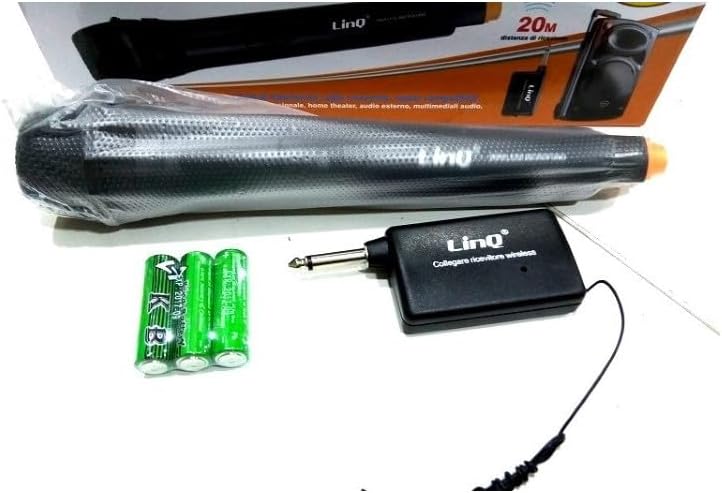
Image 4.1: LinQ W735 microphone, wireless receiver, audio cable, and AA batteries.
4.2 Njikọ ikuku
- Ensure batteries are correctly installed in both the microphone and the wireless receiver.
- Insert the 6.5 mm jack of the wireless receiver directly into the microphone input of your amplifier, karaoke machine, or mixer.
- Turn on the wireless receiver.
- Slide the ON/OFF switch on the microphone to the 'ON' position.
- The microphone and receiver should automatically pair. Adjust the volume on your audio device as needed.
4.3 Njikọ wired
- Ensure batteries are installed in the microphone. The microphone requires power even in wired mode for optimal performance.
- Connect one end of the 3-meter audio cable to the microphone's output port.
- Connect the other end of the audio cable to the microphone input of your amplifier, karaoke machine, or mixer.
- Slide the ON/OFF switch on the microphone to the 'ON' position.
- Adjust the volume on your audio device as needed.
5. Ntuziaka ọrụ
5.1 Gbanyụọ/ gbanyụọ
To power on the microphone, slide the switch located on the microphone body to the 'ON' position. To power off, slide the switch to the 'OFF' position. The switch also features a 'LOCK' position to prevent accidental power changes during use.
5.2 Atụmatụ ojiji
- Hold the microphone approximately 2-6 inches (5-15 cm) from your mouth for optimal sound capture.
- Point the top of the microphone directly towards the sound source.
- Avoid covering the microphone grille with your hand, as this can affect sound quality.
- When using wirelessly, ensure a clear line of sight between the microphone and the receiver for best performance and range.
- Adjust the volume on your connected audio device (amplifier, mixer) to achieve the desired sound level.
6. Nlekọta
- Nhicha: Wipe the microphone body with a soft, dry cloth. Do not use liquid cleaners or abrasive materials.
- Nchekwa: Store the microphone and receiver in a cool, dry place away from direct sunlight and extreme temperatures.
- Ngbanwe batrị: Replace batteries when the sound quality degrades or the microphone/receiver fails to power on. Always replace all batteries at the same time.
7. Nchọpụta nsogbu
| Nsogbu | Ihe nwere ike ime | Ngwọta |
|---|---|---|
| No sound output (Wireless) | Microphone/receiver off; Low batteries; Receiver not connected; Out of range; Volume too low. | Ensure microphone and receiver are ON. Replace batteries. Connect receiver securely. Move closer to receiver. Increase volume on audio device. |
| No sound output (Wired) | Microphone off; Cable not connected; Volume too low. | Ensure microphone is ON. Connect cable securely. Increase volume on audio device. |
| Poor sound quality/Interference | Low batteries; Obstructions in wireless path; Other electronic interference; Incorrect microphone placement. | Replace batteries. Ensure clear line of sight. Move away from other electronic devices. Adjust microphone position. |
| Igwe okwu anaghị agba ọkụ | Ịtinye batrị nwụrụ anwụ ma ọ bụ na-ezighi ezi. | Dochie batrị ọhụrụ, na-ahụ na polarity ziri ezi. |
8. Nkọwapụta
| Nlereanya | W735 |
| Ụdị | Igwe okwu dị ike |
| Ụkpụrụ Polar | Unidirectional (Cardioid) |
| Nzaghachi ugboro ugboro | 80-12,000 Hz |
| Mmetụta | 1.5 mV/PA |
| Mkpọchi ọnụ | 350 ohm |
| Mgbochi ibu kacha nta | 1000 ohm |
| Ọnụahịa kasị elu nke SPL | > 150 dB SPL |
| Ụdị njikọ | 6.5 mm Jack (for receiver and wired cable) |
| Ikuku iche | Ruo mita 30 |
| Isi Iyi Ike | AA Batteries (2 for microphone, 1 for receiver) |
| Akụkụ igweokwu | 48 x 180 mm |
| Ihe onwunwe | Metal (microphone body), ABS Plastic (receiver) |
| Eji akwadoro | Na-abụ abụ, Karaoke |
9. Akwụkwọ ikike na nkwado
For warranty information or technical support, please refer to the documentation provided at the time of purchase or contact your retailer. Keep your proof of purchase for any warranty claims.