
1. Okwu mmalite
This manual provides detailed instructions for the installation, operation, and maintenance of the Taida NRF51822 Bluetooth 4.0 Micro Module with Antenna. This compact module is designed for integration into various electronic projects requiring Bluetooth Low Energy (BLE) connectivity. Please read this manual thoroughly before using the module to ensure proper functionality and safe operation.
2. Atụmatụ
- Utilizes 1.27mm stamp hole patch welding for easy integration.
- Incorporates Murata inductance and capacitor components for stable performance.
- Integrated antenna design ensures superior high-frequency performance.
- Compact dimensions: 8.4 mm x 11.3 mm.
- Supports Bluetooth 4.0 (BLE) data link protocol.
- Includes 1 Analog Input Reference Voltage.
- Features 2 AD channels.
- Provides 10 General Purpose Input/Output (GPIO) pins.
- Reserved DC-DC power supply mode for flexible power management.
3. Nkọwapụta
| Nkọwapụta | Uru |
|---|---|
| Nọmba nlereanya | Yu-xldz770 |
| Onye nrụpụta | Taida |
| Ngwaọrụ Akụrụngwa | Bluetooth 4.0 |
| Protocol Njikọ Data | Bluetooth |
| Ngwa dakọtara | Desktop (for development/integration) |
| Module Dimensions (approx.) | 8.4 mm x 11.3 mm |
| Akụkụ ngwugwu | 1.97 x 1.57 x 1.18 sentimita asatọ |
| Ibu Ibu | 15.8 ounces |
| Ụbọchị mbụ dị | Jenụwarị 6, 2017 |
4. Modul gafereview

Foto 1: This image shows the compact size of the NRF51822 Bluetooth module, positioned beside a Chinese Yuan coin to illustrate its small dimensions.
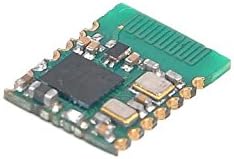
Foto 2: An angled perspective of the module, showcasing the integrated antenna on the right side and various surface-mount components, including the main chip and Murata capacitors.

Foto 3: N'okpuru view of the module reveals the stamp hole patch welding pads and the intricate circuit traces, designed for integration into a larger system.
5. Ntọala na Njikọta
The NRF51822 module is designed for integration into custom circuit boards. Due to its small form factor and stamp hole design, professional soldering equipment and expertise are recommended for mounting.
5.1 Pinout and Connections
While a detailed pinout diagram is not provided in the product information, the module features 10 GPIO pins, 2 AD channels, and 1 Analog Input Reference Voltage. Users should refer to the NRF51822 datasheet from Nordic Semiconductor for comprehensive pin configuration and electrical characteristics when designing their host PCB.
5.2 Ike inye
The module supports a reserved DC-DC power supply mode. Ensure the power supply voltage and current meet the NRF51822 specifications to prevent damage and ensure stable operation. Proper decoupling capacitors should be used near the module's power input pins.
5.3 Software Development
Development for the NRF51822 typically involves using the Nordic Semiconductor SDK (Software Development Kit) and a compatible development environment. This allows for programming custom Bluetooth Low Energy applications.
6. Ntuziaka ọrụ
Once integrated and programmed, the module operates as a Bluetooth Low Energy device. Its operation is dictated by the firmware loaded onto the NRF51822 chip. Typical operations include:
- Mgbasa ozi: Broadcasting its presence to other Bluetooth devices.
- Na-enyocha: Discovering other Bluetooth devices.
- Njikọ: Establishing a connection with another compatible Bluetooth device.
- Mgbanwe data: Sending and receiving data over the established BLE connection using GATT (Generic Attribute Profile) services and characteristics.
Refer to your specific application's documentation for detailed operational procedures.
7. Nlekọta
The NRF51822 Bluetooth module is a sealed electronic component and generally requires no user maintenance. However, observe the following guidelines to ensure its longevity:
- Ọnọdụ gburugburu: Operate and store the module within specified temperature and humidity ranges. Avoid extreme conditions.
- Ịdị ọcha: Keep the module free from dust, dirt, and moisture. Do not use liquid cleaners directly on the module.
- Nlekọta anụ ahụ: Handle the module with care to avoid physical damage to the components or solder joints. Use anti-static precautions when handling.
- Ịnye ọkụ: Ensure a stable and clean power supply to prevent electrical stress.
8. Nchọpụta nsogbu
If you encounter issues with the NRF51822 module, consider the following troubleshooting steps:
- Enweghị ike: Verify that the power supply is correctly connected and providing the specified voltage and current. Check for any short circuits on the host board.
- Modulu Anaghị aza: Ensure the module is correctly soldered to the host PCB. Check for proper programming and firmware integrity.
- Okwu njikọ Bluetooth:
- Verify that the module's antenna is not obstructed or damaged.
- Check for excessive interference from other 2.4 GHz devices.
- Ensure the firmware is correctly configured for advertising or scanning.
- Confirm that the device attempting to connect is compatible with Bluetooth 4.0 (BLE).
- Omume a na-atụghị anya ya: Review your firmware code for logical errors. Use debugging tools provided by the SDK to diagnose issues.
For complex issues, consult the Nordic Semiconductor NRF51822 documentation and relevant developer forums.
9. Akwụkwọ ikike na nkwado
Specific warranty information for this product is not provided in the available documentation. For details regarding warranty coverage, returns, or technical support, please contact the seller or manufacturer directly. It is recommended to retain your purchase receipt for any warranty claims.