
1. Okwu mmalite
The Focal Shape 50 is a versatile monitoring loudspeaker designed for professional audio environments. It offers extended low-frequency response and precise control, making it suitable for rooms up to 130 sq ft (12 sq m). This manual provides essential information for the proper setup, operation, and maintenance of your Shape 50 studio monitor.

Ọgụgụ 1.1: Akụkụ ihu view of the Focal Shape 50 Studio Monitor, showcasing its dark walnut finish and speaker components.
2. Ihe ngwugwu
Before proceeding with installation, please verify that all components are present in the packaging:
- Focal Shape 50 Studio Monitor (1 unit)
- Ụdọ ọkụ
- Akwụkwọ ntuziaka (akwụkwọ a)
3. Nhazi
3.1 Ntinye
The Shape 50 monitor is designed to be placed near a wall due to its port-less design. For optimal listening, position the monitor at a distance of approximately 30 inches (80 cm) from your listening position. Ensure the monitors are placed symmetrically in your room to achieve a balanced stereo image.
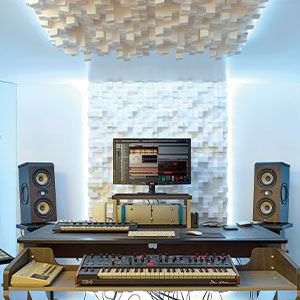
Ọgụgụ 3.1: Ọpụample of a studio setup with two Focal Shape 50 monitors positioned for optimal sound monitoring.
3.2 Njikọ
Connect your audio source to the Shape 50 monitor using an RCA cable. Ensure all connections are secure before powering on the unit.
- Ntinye odiyo: Use the RCA input for connecting your audio interface or mixer.
- Ike: Connect the provided power cord to the monitor's power inlet and then to a suitable electrical outlet.

Figure 3.2: Rear panel of the Focal Shape 50, showing the RCA input, power connection, and various adjustment controls.
3.3 Na-arịgo
The Shape 50 includes threads for ceiling and wall mount fastening. Mounting accessories are not supplied and must be purchased separately. Consult a professional for proper installation of wall or ceiling mounts.
4. Ntuziaka ọrụ
4.1 Gbanyụọ/ gbanyụọ
To power on the monitor, ensure all audio connections are made, then connect the power cord and flip the power switch located on the rear panel. To power off, reverse this process.
4.2 nhazi nhazi
The Shape 50 features numerous settings on its rear panel for optimal integration into various acoustic environments and for accurate control of sound reproduction. These include adjustments for high-frequency, mid-frequency, and low-frequency response, allowing you to tailor the sound to your specific room and preferences.
4.3 Flexible Listening Position
The monitor's low directivity tweeter design allows for a flexible listening position, providing consistent sound quality even when slightly off-axis from the monitor.
5. Nlekọta
To ensure the longevity and optimal performance of your Focal Shape 50 monitors, follow these maintenance guidelines:
- Nhicha: Use a soft, dry cloth to clean the exterior surfaces of the monitor. Avoid abrasive cleaners or solvents.
- Igwe ikuku: Ensure adequate airflow around the monitor to prevent overheating. Do not block the ventilation openings.
- gburugburu: Operate the monitor in a stable environment, away from extreme temperatures, humidity, and direct sunlight.
6. Nchọpụta nsogbu
If you encounter issues with your Focal Shape 50 monitor, refer to the following common troubleshooting steps:
- Enweghị ụda:
- Check if the monitor is powered on and the power cord is securely connected.
- Verify that the audio source is active and connected correctly to the monitor's input.
- Ensure the volume levels on both the monitor and the audio source are appropriately set.
- Ụda agbagọ:
- Reduce the input level from your audio source to prevent clipping.
- Check all cables for damage or loose connections.
- Ensure the monitor's rear panel settings are not causing excessive boosting of certain frequencies.
- Mkpọtụ Ụda ma ọ bụ Ụda Ụda:
- Ensure all audio cables are properly shielded.
- Try connecting the monitor to a different power outlet, preferably on a different circuit.
- Check for nearby electronic devices that might be causing interference.
If the issue persists after attempting these steps, please contact Focal customer support.
7. Nkọwapụta
| Njirimara | Nkọwapụta |
|---|---|
| Ụdị | Focal |
| Aha Nlereanya | Ụdị 50 |
| Nọmba nlereanya | 3544059801524DW001 |
| Ụdị Ọkà Okwu | Nyochaa |
| Ike Nwepu kacha elu | 1000 Watt |
| Nzaghachi ugboro ugboro | 35000 Hz |
| Teknụzụ Njikọta | RCA |
| Ọnọdụ mmepụta ọdịyo | Stereo, Gburugburu |
| Ụdị nkwụnye | Wall Mount (accessories not supplied) |
| Ihe mkpuchi | Ukpa |
| Dayameta nke subwoofer | 5 sentimita asatọ |
| Dayameta Woofer | 5 sentimita asatọ |
| Agba | Walnut gbara ọchịchịrị |
| Akụkụ ihe (D x W x H) | 9.5"D x 12.3"W x 7.5"H |
| Ibu Ibu | 14.33 pound |
| Isi Iyi Ike | Igwe ọkụ eletrik |
| Ọnụọgụ ọwa ọdịyo | 2.0 |
| Ngwa dakọtara | Smartphone, Mbadamba ụrọ, MP3 Player, Desktọpụ, Television, Projector, Laptọọpụ |
8. Akwụkwọ ikike Ozi
The Focal Shape 50 Studio Monitor is covered by a Akwụkwọ ikike onye nrụpụta afọ 2 site na ụbọchị ịzụrụ. Akwụkwọ ikike a na-ekpuchi ntụpọ dị na ngwa na arụ ọrụ n'okpuru ojiji nkịtị. Ọ naghị ekpuchi mmebi nke n'ụzọ na-ezighị ezi, ihe mberede, mgbanwe na-akwadoghị, ma ọ bụ nrụnye na-ekwesịghị ekwesị.
Please retain your proof of purchase for warranty claims. For detailed warranty terms and conditions, refer to the official Focal websaịtị ma ọ bụ kpọtụrụ nkwado ndị ahịa.
9. Nkwado
For technical assistance, troubleshooting beyond this manual, or warranty inquiries, please contact Focal customer support through their official websaịtị ma ọ bụ ozi kọntaktị enyere na akwụkwọ ngwaahịa gị.
Akụrụngwa dị n'ịntanetị: Visit the official Focal website for product registration, FAQs, and additional support materials.