
1. Okwu mmalite
Thank you for choosing the Severin KA 4497 Filter Coffee Machine. This manual provides essential information for the safe and efficient operation of your appliance. Please read these instructions carefully before first use and keep them for future reference.
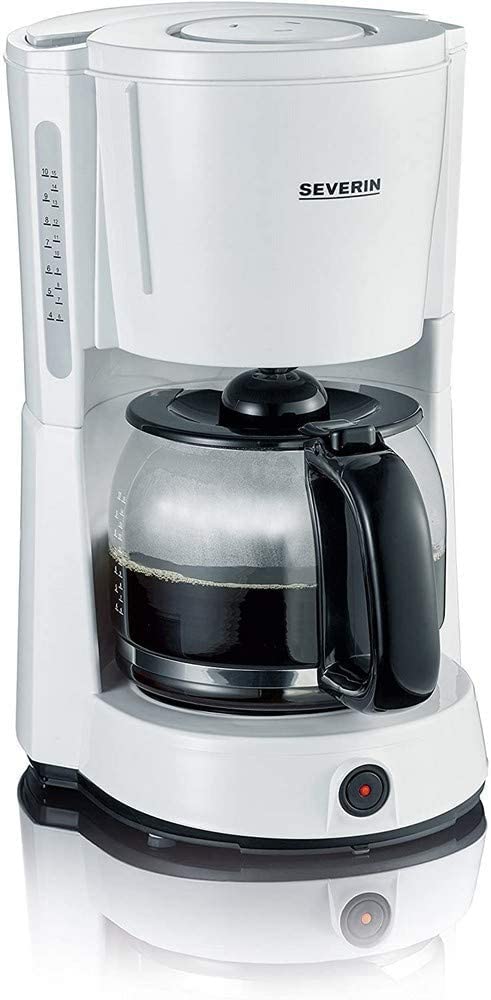
Image 1.1: Severin KA 4497 Filter Coffee Machine overview.
Akụkụ ndị bụ isi:
- Integrated aroma function for enhanced coffee enjoyment.
- Capacity: Up to 10 cups (1.4 Liters).
- Removable swivel filter holder with drip stop (size 1x4).
- Glass carafe with fresh water scale.
- Control switch with indicator light.
- Automatic shut-off function.
- Warming plate to keep coffee hot.
2. Ntuziaka nchekwa
Debe ntuziaka nchekwa ndị a mgbe niile iji gbochie ihe mberede na mmebi nke ngwa:
- Ezubere ngwa a maka naanị ụlọ.
- Ejila ngwa, eriri, ma ọ bụ nkwụnye n'ime mmiri ma ọ bụ ihe mmiri ndị ọzọ.
- Gbaa mbọ hụ na voltage indicated on the rating plate matches your mains supply.
- Debe ngwa ngwa ka ụmụaka ghara iru.
- Unplug the appliance from the mains socket when not in use, before cleaning, and in case of malfunction.
- Ejila eriri ma ọ bụ plọg mebiri emebi rụọ ngwa ahụ.
- Avoid contact with hot surfaces, especially the warming plate and glass carafe during and after operation.
- Only use cold, fresh water for brewing.
3. Nhazi
3.1 Nwepu
- Carefully remove all packaging materials from the coffee machine.
- Check the appliance for any signs of damage. Do not operate if damaged.
3.2 First Use Cleaning
Before using for the first time, clean the appliance by running two full cycles with cold water only, without coffee grounds. This removes any manufacturing residues.
3.3 Ntinye
Place the coffee machine on a stable, level, heat-resistant surface, away from water sources and heat-emitting appliances.
4. Ntuziaka ọrụ
4.1 Na-ejuputa mmiri
- Mepee mkpuchi nke tank mmiri.
- Fill the glass carafe with the desired amount of cold, fresh water. Refer to the cup markings on the carafe and the water level indicator on the side of the machine.
- Pour the water from the carafe into the water tank. Do not exceed the maximum fill level.
- Mechie mkpuchi ahụ nke ọma.
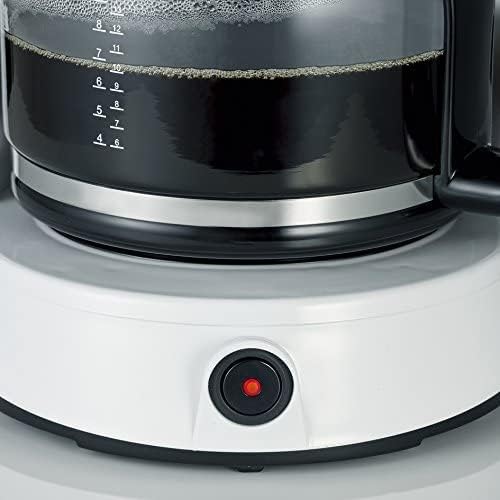
Image 4.1: Water level indicator for precise filling.
4.2 Adding Coffee Grounds
- Wepụ ihe njide nzacha.
- Insert a size 1x4 paper filter into the filter holder.
- Add the desired amount of ground coffee into the paper filter. A general guideline is one level tablespoon of coffee per cup. Adjust to personal preference.
- Swivel the filter holder back into position until it clicks.

Image 4.2: Inserting the filter basket with coffee grounds.
4.3 Ịkụ kọfị
- Place the glass carafe with its lid on the warming plate. Ensure it is correctly positioned to activate the drip stop.
- Tinye ngwa ahụ n'ime oghere mains dabara adaba.
- Press the ON/OFF switch. The indicator light will illuminate, and the brewing process will begin.
- Once all the water has passed through, the brewing process is complete. The warming plate will keep the coffee hot.

Image 4.3: Brewed coffee in the carafe and the illuminated power button.
4.4 Mkpuchi akpaaka
For safety and energy saving, the coffee machine will automatically switch off approximately 30-40 minutes after the brewing process is complete.
5. Nlekọta na nhicha
Nhicha mgbe niile na-eme ka arụmọrụ dị mma ma gbasaa ogologo oge nke igwe kọfị gị.
5.1 Nhicha kwa ụbọchị
- Mgbe niile, gbanyụọ ihe eji arụ ọrụ ahụ ma hapụ ya ka ọ jụọ oyi kpamkpam tupu e hichaa ya.
- Remove the used paper filter and coffee grounds.
- Wash the glass carafe and its lid, and the swivel filter holder in warm soapy water. Rinse thoroughly and dry. These parts are generally dishwasher safe (top rack), but hand washing is recommended for longevity.
- Jiri mgbasa ozi hichapụ mpụta igwe kọfịamp akwa . Ejila ihe nchacha abrasive ma ọ bụ tinye isi ihe n'ime mmiri.
5.2 calhapụ ịda
Depending on water hardness and frequency of use, limescale deposits may form. Descale your coffee machine regularly (e.g., every 2-4 weeks) to maintain brewing performance and flavor.
- Use a commercially available descaling agent suitable for coffee machines, following the manufacturer's instructions.
- Alternatively, a mixture of white vinegar and water (1:2 ratio) can be used.
- Run the descaling solution through the machine as if brewing coffee, without coffee grounds.
- After descaling, run at least two full cycles with fresh water to rinse out any descaling agent residues.
6. Nchọpụta nsogbu
| Nsogbu | Ihe nwere ike ime | Ngwọta |
|---|---|---|
| Kọfị anaghị apụta. | Appliance not plugged in; power switch not activated; water tank empty. | Check power connection; press ON/OFF switch; fill water tank. |
| Kọfị na-atọ ụtọ nke ukwuu ma ọ bụ nke na-adịghị ike. | Incorrect coffee-to-water ratio; coffee too finely/coarsely ground. | Adjust coffee amount; use appropriate grind size. |
| Water overflows from filter holder. | Too much coffee grounds; filter clogged; carafe not correctly placed. | Reduce coffee amount; clean filter holder; ensure carafe is centered. |
| Brewing process is slow. | Mwube nke limescale. | Wetuo igwe kọfị. |
7. Nkọwapụta
| Njirimara | Nkọwa |
|---|---|
| Ụdị | SVERIN |
| Nọmba nlereanya | KA 4497 |
| Agba | Ọcha / oji |
| Akụkụ ngwaahịa | 17 x 24 x 34 cm |
| Ibu | 2.14 kilogram |
| Ike | 1.4 lita (ihe dị ka iko 10) |
| Ike/Wattage | 1000 Watt |
| Ihe onwunwe | Glass (carafe) |
| Atụmatụ pụrụ iche | Glass Carafe, Drip Stop, Warming Plate, Automatic Shut-off |

Image 7.1: Product dimensions of the Severin KA 4497.
8. Akwụkwọ ikike na nkwado
This product is covered by a manufacturer's warranty. For detailed warranty information, please refer to the warranty card included with your purchase or visit the official Severin website. For technical support, spare parts, or service inquiries, please contact Severin customer service.