
Okwu mmalite
Thank you for choosing the Symphonized NXT 2.0 Portable Bluetooth Speaker. This manual provides essential information for setting up, operating, and maintaining your speaker to ensure optimal performance and longevity. Please read this manual thoroughly before using the product.
Kedu ihe dị na Igbe ahụ
- Symphonized NXT 2.0 Portable Bluetooth Speaker
- Igwe nchaji USB
- Akwụkwọ ntuziaka onye ọrụ
Ngwaahịa gafereview
The Symphonized NXT 2.0 speaker features a durable ABS plastic construction with elegant wood accents, providing both robust protection and a natural aesthetic. It is designed for portability and delivers a well-balanced, powerful sound experience.

N'ihu view of the Symphonized NXT 2.0 Portable Bluetooth Speaker, showcasing its dual speaker grilles and wood-grain finish.
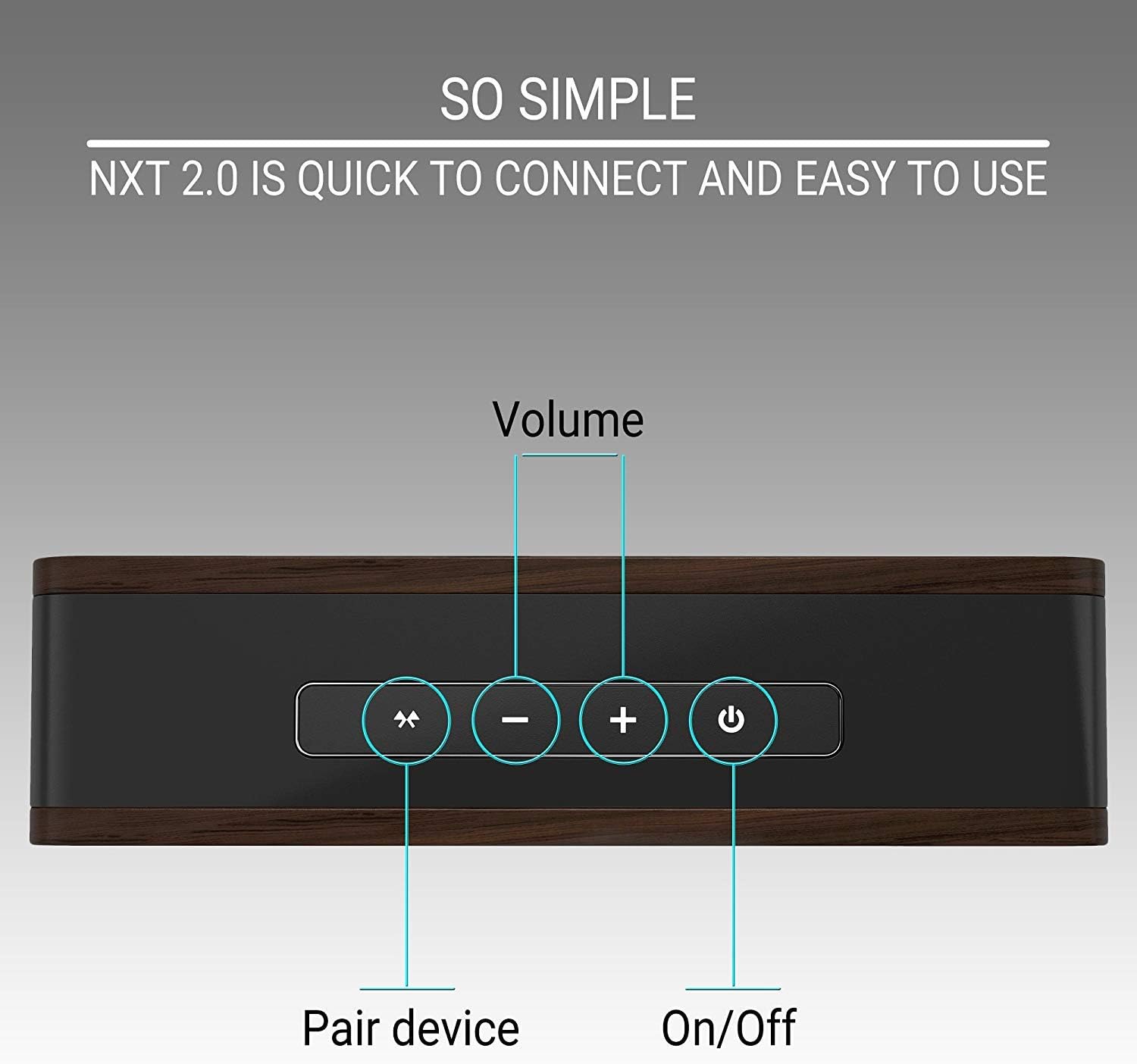
Top panel of the speaker showing the control buttons: Pair Device, Volume Down, Volume Up, and Power On/Off.
Melite
Ịchaji Ọkà Okwu
- Connect the micro USB end of the charging cable to the charging port on the speaker.
- Connect the USB-A end of the charging cable to a compatible USB power adapter (not included) or a computer's USB port.
- Ọkụ ihe ngosi chaja ga-enwu. Achaji zuru oke na-ewe ihe dị ka awa 6.
- Once fully charged, the indicator light may change color or turn off, depending on the model. Disconnect the charging cable.
A fully charged speaker provides up to 6 hours of playtime.
Njikọ Bluetooth
- Gbaa mbọ hụ na chajịrị ọkà okwu.
- Press and hold the Power On/Off button on the speaker until you hear an audible prompt or see an indicator light flashing, indicating it's in pairing mode.
- Na ngwaọrụ gị (smartphone, tabletị, laptọọpụ), gbanye Bluetooth wee chọọ ngwaọrụ dị.
- Select "Symphonized NXT 2.0" from the list of available devices.
- Once connected, you will hear a confirmation sound, and the indicator light will typically stop flashing and remain solid.
The speaker has a Bluetooth working distance of approximately 10 meters (32 feet).
Wired Connection (AUX Input)
For devices without Bluetooth capability, or if you prefer a wired connection:
- Connect one end of a 3.5mm auxiliary cable (not included) to the AUX input port on the speaker.
- Connect the other end of the 3.5mm auxiliary cable to the audio output jack of your device.
- The speaker will automatically switch to AUX mode, or you may need to select it manually if there is a mode button.
Ntuziaka ọrụ
Gbanyụọ/ Gbanyụọ
- To power on: Press and hold the Power On/Off button until the indicator light illuminates.
- To power off: Press and hold the Power On/Off button until the indicator light turns off.
Njikwa olu
- To increase volume: Press the '+' button.
- To decrease volume: Press the '-' button.
Bluetooth Device Pairing Button
- To initiate pairing mode or reconnect to a previously paired device, press the 'Pair Device' button.
Nlekọta
Nhicha
- Jiri ákwà dị nro ma kpọọ nkụ hichaa ọkà okwu ahụ.
- Do not use abrasive cleaners, solvents, or strong chemicals, as these may damage the finish or internal components.
Nchekwa
- Chekwaa ọkà okwu n'ebe dị jụụ, kpọrọ nkụ na-adịghị na ìhè anyanwụ kpọmkwem na oke okpomọkụ.
- If storing for an extended period, ensure the battery is partially charged (around 50%) to preserve battery health.
Nchọpụta nsogbu
| Nsogbu | Ihe nwere ike ime | Ngwọta |
|---|---|---|
| Ọkà okwu anaghị agbanwuo | Batrị dị ala | Chajie ọkà okwu zuru ezu. |
| Enweghị ike ijikọ site na Bluetooth | Speaker not in pairing mode; Device Bluetooth off; Out of range | Ensure speaker is in pairing mode. Turn on Bluetooth on your device. Move device closer to speaker (within 10m/32ft). |
| Enweghị ụda ma ọ bụ olu dị ala | Volume too low on speaker or device; Incorrect input mode | Increase volume on both speaker and connected device. Ensure correct input mode (Bluetooth/AUX) is selected. |
| Sound distortion at high volume | Esi elu | Reduce the volume on the speaker or your connected device. |
Nkọwapụta
| Njirimara | Nkọwa |
|---|---|
| Ụdị | Symphonized |
| Aha Nlereanya | NXT 2.0 |
| Ike Nwepu kacha elu | 25 Watt |
| Nzaghachi ugboro ugboro | 80 Hz - 20 kHz |
| Teknụzụ Njikọta | Enyemaka, Bluetooth, USB |
| Ọnọdụ mmepụta ọdịyo | Stereo |
| Ihe mkpuchi | ABS plastik |
| Ụdị Ọkà Okwu | N'èzí |
| Atụmatụ ndị ọzọ | Enwere ike ibugharị |
| Agba | Nwa |
| Enweghị mmiri | Ụgha |
| Usoro njikwa | Bọtịnụ |
| Nkezi Ndụ batrị | Awa 6 |
| Ọnụọgụ ọwa ọdịyo | 2.0 |
| Teknụzụ ikuku | Bluetooth |
| Protocol Njikọta | Bluetooth |
| Oge nchaji batrị | Awa 6 |
| Ibu Ibu | 0.68 kilogram |
| Ngwa dakọtara | Smartphone, Tablet, Laptop, Television |
| Isi Iyi Ike | Akwanyere batrị |
Ozi akwụkwọ ikike
The Symphonized NXT 2.0 Portable Bluetooth Speaker comes with a Limited Warranty. For specific details regarding warranty coverage, duration, and claims process, please refer to the warranty card included with your product or contact Symphonized customer support.
Nkwado
If you encounter any issues not covered in the troubleshooting section or require further assistance, please contact Symphonized customer support. Contact information can typically be found on the product packaging, the official Symphonized websaịtị, ma ọ bụ akwụkwọ ịzụrụ ihe gị.