
Okwu mmalite
Daalụ maka ịzụrụasing the ipega PG-9087S Wireless Game Controller. This device is designed to enhance your mobile gaming experience on Android and iOS smartphones and tablets. Please read this manual carefully before use to ensure proper operation and to maximize the lifespan of your controller.
Ozi nchekwa
- Ekwela ka ihe njikwa ahụ nọrọ n'ọnọdụ okpomọkụ dị oke njọ, iru mmiri dị elu, ma ọ bụ anwụ kpọmkwem.
- Zere ịda ma ọ bụ itinye ihe njikwa ahụ n'ọnọdụ siri ike.
- Do not attempt to disassemble or modify the controller. This will void the warranty and may cause damage.
- Keep the controller away from children and pets.
- Jiri naanị eriri chaja enyere maọbụ nke akwadoro.
Ihe ngwugwu
- ipega PG-9087S Wireless Game Controller
- Igwe nchaji USB
- Akwụkwọ ntuziaka (akwụkwọ a)
Ngwaahịa gafereview

Figure 1: Controller Layout. This image displays the ipega PG-9087S controller with its various buttons and components labeled, including the Left 3D joystick, D-Pad, TURBO button, battery/mode indicators, Home Button, R1/R2, ABXY Action buttons, Right 3D joystick, START, and SELECT buttons.

Onyonyo 2: Isi atụmatụ. This image highlights specific design elements: a textured rocker for improved grip, LED red button lights for visibility, scrub and non-slip trigger construction for precise control, and a classic cross key design for the D-Pad.
Akụkụ ndị bụ isi:
- Njikọ Bluetooth 4.0: Ensures stable and high-speed transmission.
- Ogwe aka nwere ike ịgbatị: Accommodates devices with a maximum extending size of 6.2 inches (70-158mm) and a thickness of up to 9mm.
- Nhazi Ergonomic: Provides comfort for extended gaming sessions.
- High Sensitivity Buttons: Designed for quick and accurate responses.
- Custom Function/Button Mapping: Allows users to customize button functions according to personal preferences for various games.
- Nkwado ọtụtụ Platform: Compatible with Android 6.0 and above, and iOS devices.
Melite
1. Ịchaji njikwa
Before first use, fully charge the controller. Connect the provided USB charging cable to the controller's charging port and to a USB power source (e.g., computer, USB wall adapter). The battery charging indicators (1, 2, 3, 4) will illuminate to show charging status and battery level.
2. Ịgbanye / gbanyụọ

Figure 3: Power Switch and Connection Methods. This image shows the physical on/off switch located at the bottom of the controller and provides visual instructions for Android and iOS direct connection methods.
- Iji gbanye: Locate the power switch (labeled 'switch:on/off' in Figure 3) on the bottom of the controller and slide it to the 'ON' position.
- Iji gbanyụọ: Slide the power switch to the 'OFF' position.
3. Njikọ Bluetooth
The PG-9087S supports direct connection without needing to download a separate application.
- Maka ngwaọrụ iOS: With the controller powered off, press and hold the Y button + HOME button simultaneously for 2 seconds until the indicator light flashes rapidly.
- Maka ngwaọrụ gam akporo: With the controller powered off, press and hold the A button + HOME button simultaneously for 2 seconds until the indicator light flashes rapidly.
Once the indicator light flashes, enable Bluetooth on your mobile device and search for "PG-9087S". Select it to pair. The indicator light will become solid once successfully connected.
4. Ntinye ngwaọrụ
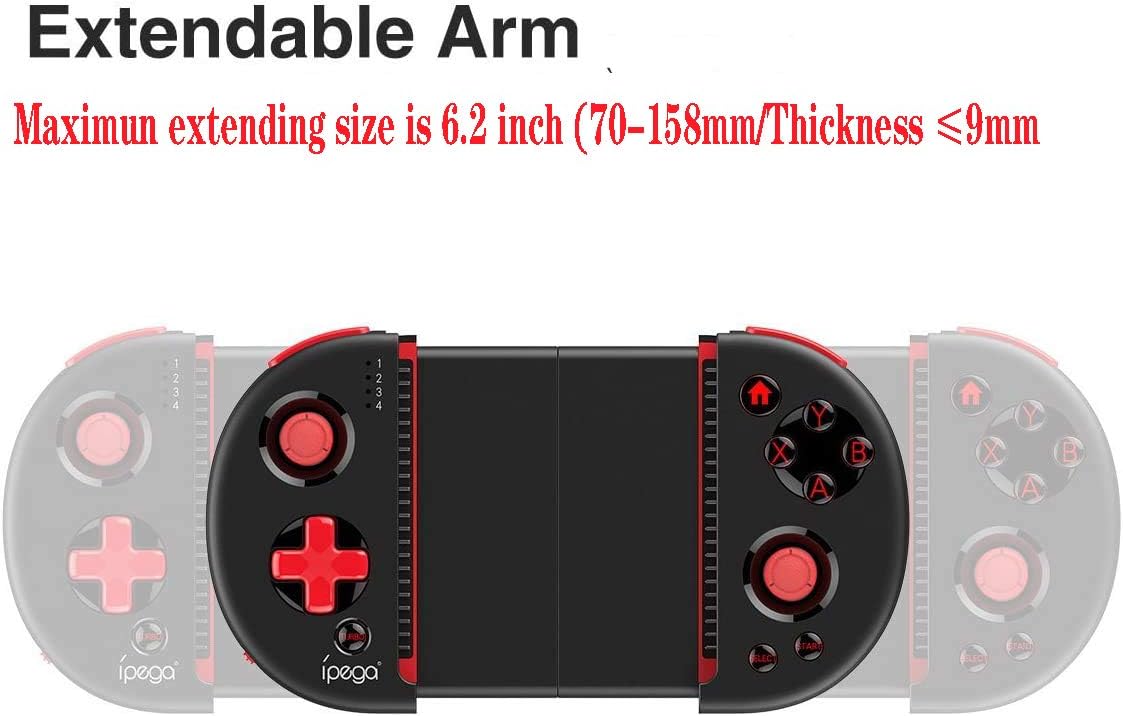
Figure 4: Extendable Arm. This image illustrates the extendable arm feature of the controller, showing its maximum extension size of 6.2 inches (70-158mm) and a maximum device thickness of 9mm.
Gently extend the arms of the controller to fit your smartphone or tablet. Ensure your device is securely seated within the extendable arm. The arm supports devices up to 6.2 inches (158mm) in length and 9mm in thickness.
Ntuziaka ọrụ
1. Njikwa ntọala
Refer to Figure 1 for the layout of the buttons and joysticks. The controller features:
- Left/Right 3D Joysticks: Maka njikwa mmegharị na njikwa igwefoto ziri ezi.
- D-Pad (Ntuziaka Pad): For directional input.
- ABXY Action Buttons: Standard gaming action buttons.
- L1/L2/R1/R2 Triggers: Shoulder buttons and triggers for various in-game actions.
- START/SELECT Buttons: For in-game menu navigation and selections.
- Bọtịnụ ụlọ: Returns to the device's home screen or controller menu.
- Bọtịnụ TURBO: Activates rapid-fire functionality for assigned buttons.
2. Button Mapping and Customization
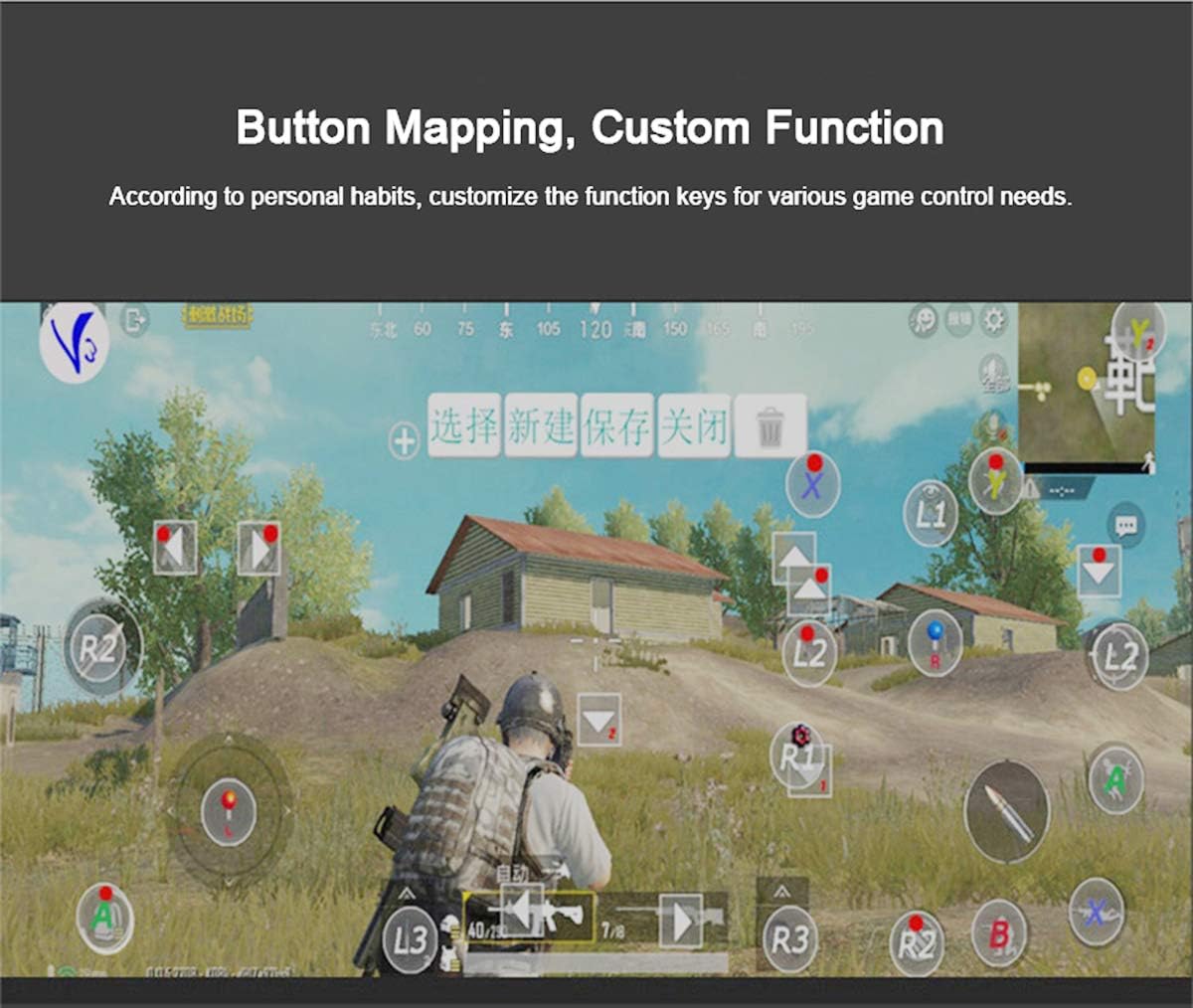
Figure 5: Button Mapping Interface. This image demonstrates the concept of button mapping within a game, allowing users to customize the function keys to suit their individual gaming preferences and needs.
The PG-9087S supports custom function key mapping. This feature allows you to assign specific in-game actions to the controller's buttons according to your personal habits. The method for customizing button functions typically depends on the game or emulator you are using. Refer to the specific game's settings or the emulator's configuration options for detailed instructions on how to remap controls.
3. Screen Orientation Support
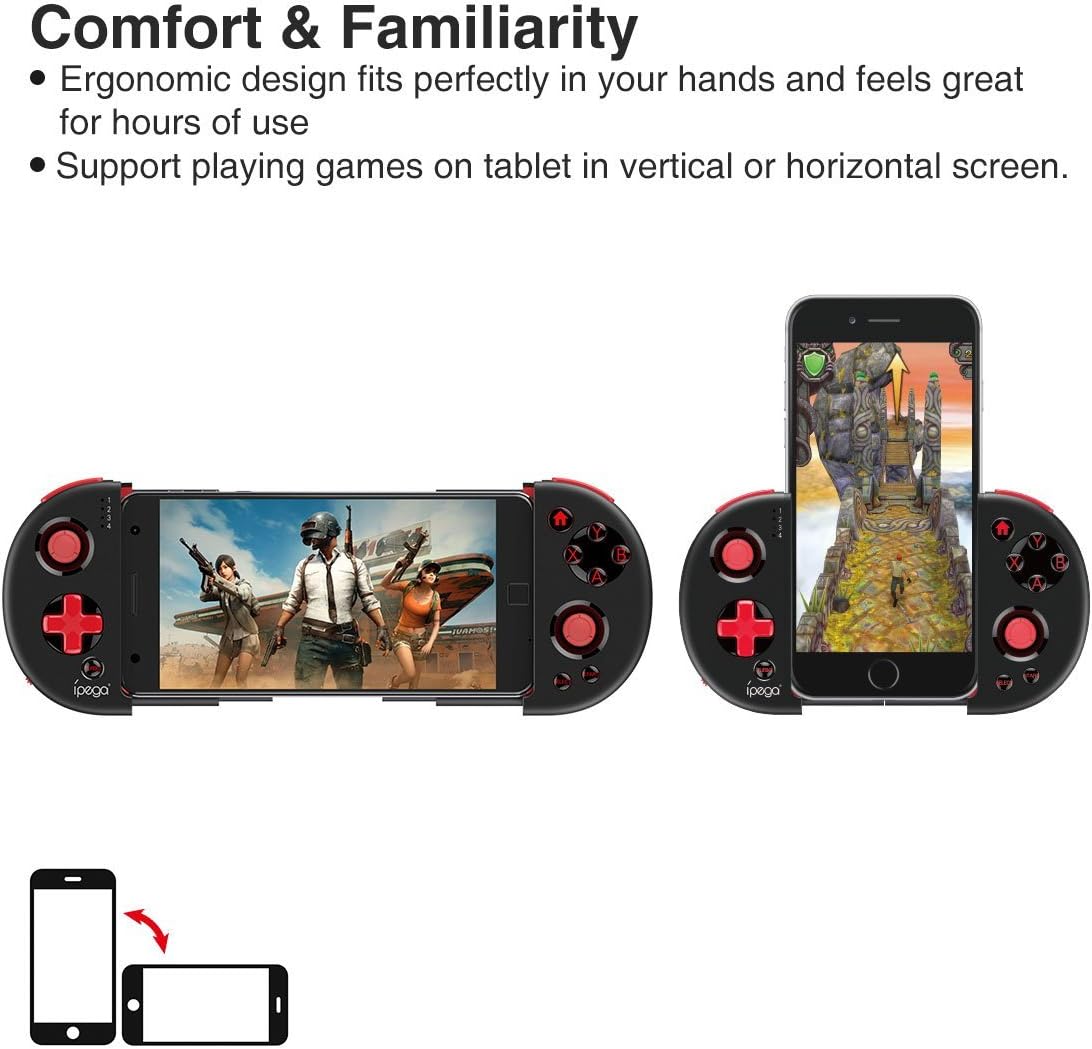
Figure 6: Orientation Support. This image illustrates the controller's ability to support gaming on tablets or smartphones in both vertical (portrait) and horizontal (landscape) screen orientations.
The controller supports playing games on your tablet or smartphone in both vertical (portrait) and horizontal (landscape) screen orientations, providing flexibility for various game types.
Nlekọta
- Nhicha: Use a soft, dry cloth to clean the controller. Do not use harsh chemicals or abrasive cleaners.
- Nchekwa: Store the controller in a cool, dry place away from direct sunlight when not in use.
- Nlekọta batrị: To prolong battery life, avoid fully discharging the battery frequently. Charge the controller regularly, even if not in constant use.
Nchọpụta nsogbu
- Controller does not power on: Ensure the battery is charged. Connect the controller to a power source using the USB cable.
- Controller does not pair with device:
- Ensure the controller is in pairing mode (indicator light flashing rapidly).
- Gbanyụọ ma gbanye Bluetooth nke ngwaọrụ gị.
- Chezọ ngwaọrụ dị na ntọala Bluetooth gị wee nwaa ijikọ ọzọ.
- Ensure you are using the correct pairing combination (Y+HOME for iOS, A+HOME for Android).
- Buttons are unresponsive or laggy:
- Ensure the controller is fully charged. Low battery can affect performance.
- Gaa nso na ngwaọrụ gị iji hụ na njikọ Bluetooth siri ike.
- Restart both the controller and your mobile device.
- Check the game's settings to ensure controller input is enabled and correctly configured.
- Device does not fit in the extendable arm: Check the dimensions of your device. The arm supports devices up to 6.2 inches (158mm) in length and 9mm in thickness. Remove any bulky cases from your device.
Nkọwapụta
| Nlereanya | PG-9087S |
| Ụdị | oku |
| Teknụzụ Njikọta | Bluetooth 4.0, USB (for charging) |
| Ụdị njikwa | Gamepad, Joystick |
| Ngwa dakọtara | Android (6.0 and above), iOS |
| Batrị | 1 batrị lithium ion (chọrọ) |
| Extendable Arm Max Size | 6.2 sentimita (158mm) |
| Extendable Arm Max Thickness | 9mm |
| Ibu Ibu | 6.9 ounces |
| Agba | Nwa |
| Akụkụ ngwugwu | 6.8 x 5.15 x 1.6 sentimita asatọ |
Akwụkwọ ikike na nkwado
Warranty information for the ipega PG-9087S Wireless Game Controller is typically provided with your purchase or can be found on the manufacturer's official websaịtị. Biko dowe ihe akaebe nke ịzụrụ ihe maka akwụkwọ ikike.
For technical support or further assistance, please refer to the contact information provided by your retailer or visit the official ipega support channels.