
Okwu mmalite
The Brookstone Pure-Ion Pro Air Purifier is designed to help improve indoor air quality by removing common airborne irritants. This unit effectively filters pollen, mold, pet dander, dust mites, bacteria, and smoke from the air that passes through its system. It features a user-friendly design with multiple cleaning speeds and a built-in timer for convenient operation.
The Pure-Ion Pro also incorporates an Ion Boost feature, which generates negative ions to mimic natural environments rich in these ions. This feature is intended to enhance the user experience. Please note, this product is not a medical device and meets voluntary UL867 guidelines for ozone emission, maintaining levels below 50 ppb.
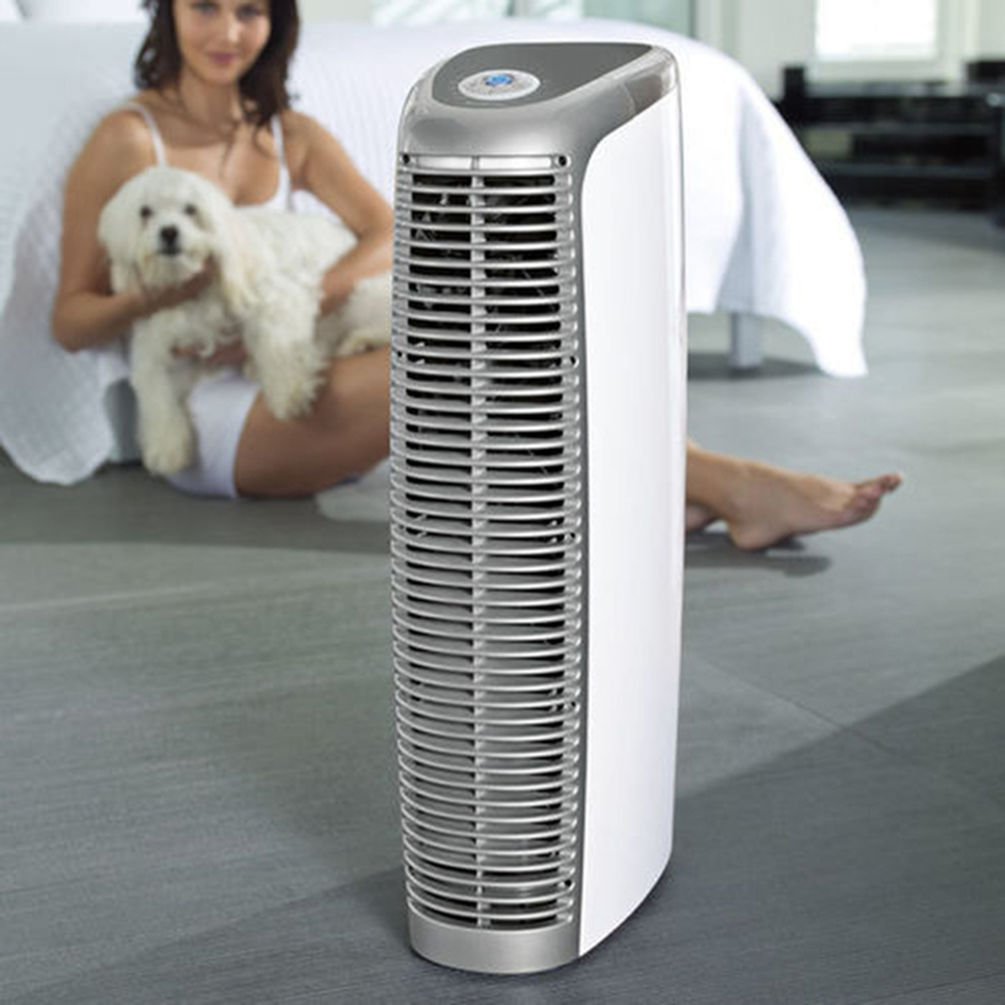
Image: The Brookstone Pure-Ion Pro Air Purifier, a tall, sleek white and silver unit designed for air purification.
Ntuziaka nchekwa dị mkpa
Iji belata ihe egwu nke ọkụ, ujo eletrik, ma ọ bụ mmerụ ahụ, na-agbaso usoro nchekwa nchekwa ndị a mgbe niile:
- Gụọ ntuziaka niile nke ọma tupu ị rụọ ngwa ahụ.
- Do not operate any appliance with a damaged cord or plug. If the cord or plug is damaged, contact customer service immediately.
- Do not use the air purifier near water or in damp environments, such as bathrooms or laundry areas.
- Debe ngwa ahụ pụọ na ebe okpomọkụ, ìhè anyanwụ kpọmkwem, na ihe ndị na-ere ọkụ.
- Always unplug the air purifier from the electrical outlet before cleaning, performing any maintenance, or when not in use for extended periods.
- Ensure that air vents are not blocked. Maintain adequate clearance around the unit for proper airflow.
- Jiri ngwa a naanị maka ebumnuche ya dị ka akọwara n'ime akwụkwọ ntuziaka a.
- This product is not a medical device. Consult a healthcare professional for any medical conditions.
- Etinyekwala ihe n'ime oghere ọ bụla.
- Na-elekọta ụmụaka mgbe ngwa a na-eji.
Ngwaahịa gafereview
Familiarize yourself with the components and controls of your Pure-Ion Pro Air Purifier.
Ogwe njikwa

Foto: nkọwa zuru ezu view of the control panel, showing the central power button, fan speed settings (Whisper, Low, Med, High, Turbo), timer settings (2, 4, 6, 8, 12 hours), and the ION button.
- Bọtịnụ ike: Located at the center, turns the unit on or off.
- Ntọala ọsọ fan: Select from Whisper, Low, Med, High, or Turbo for varying levels of air purification and noise.
- Ntọala oge: Set the unit to operate for 2, 4, 6, 8, or 12 hours before automatically shutting off.
- ION Button: Activates or deactivates the Ion Boost feature.
Ngwa ime

Image: An internal diagram illustrating the airflow path through the air purifier, highlighting the multiple fans and the filter system.
- Washable Aluminum Filter: The primary filtration component that captures airborne particles. This filter is designed for repeated cleaning and does not require replacement.
- Fans: Four powerful, quiet fans draw air into the unit and circulate purified air back into the room.
Melite
- Mepee ngalaba ahụ: Carefully remove the air purifier and all packaging materials from the box. Retain packaging for future storage or transport.
- Họrọ ebe: Place the air purifier on a firm, level surface. Ensure there is at least 6 inches (15 cm) of clearance around all sides of the unit to allow for proper air intake and output. Avoid placing it directly against walls or furniture that could obstruct airflow.
- Tinye: Tinye eriri ike ahụ n'ime oghere eletriki AC 120V ọkọlọtọ.

Image: The Brookstone Pure-Ion Pro Air Purifier positioned upright, ready for use in a room.
Ntuziaka ọrụ
- Gbanyụọ/ Gbanyụọ: Press the central Power Button on the control panel to turn the unit on. Press it again to turn the unit off.
- Họrọ Ọsọ Fan: Once powered on, use the fan speed buttons (Whisper, Low, Med, High, Turbo) to adjust the airflow and purification intensity. The Whisper setting provides the quietest operation, while Turbo offers maximum air circulation.
- Tọọ ngụ oge (Nhọrọ): To set an automatic shut-off time, press the Timer button repeatedly to cycle through the available options: 2, 4, 6, 8, or 12 hours. The corresponding indicator light will illuminate. The unit will operate for the selected duration and then power off automatically.
- Activate Ion Boost (Optional): Press the ION button to activate the Ion Boost feature. An indicator light will confirm activation. Press the button again to deactivate it.

Image: A visual representation of the air purification process, with arrows showing dirty air entering the unit and clean air being expelled.
Nlekọta
Regular cleaning of your Pure-Ion Pro Air Purifier ensures optimal performance and extends the life of the unit. Always unplug the unit before performing any maintenance.
Nchacha nzacha
The Pure-Ion Pro features a washable aluminum filter that never needs replacement. A crackling sound from the unit or an illuminated indicator light on the control panel will signal when the filter requires cleaning.
- Wepu ihe nzacha: Gently open the filter access panel and carefully pull out the aluminum filter assembly.
- Hichaa nzacha: The aluminum filter can be cleaned manually or in a dishwasher.
- Ncha akwụkwọ ntuziaka: Rinse the filter under warm running water until clean. For stubborn dirt, use a soft brush and mild detergent.
- Nchacha efere efere: Place the filter in the dishwasher on a gentle cycle.
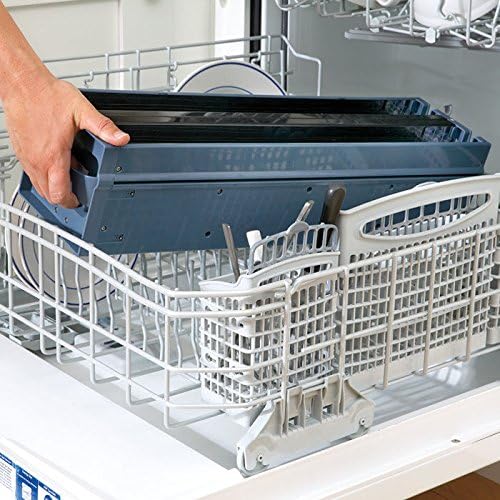
Image: The washable aluminum filter assembly placed inside a dishwasher rack for cleaning.
- Kpochapụ ihe nzacha: Allow the filter to air dry completely before reinserting it into the unit. Ensure no moisture remains.
- Tinyegharịa nzacha ahụ: Carefully slide the dry filter assembly back into its compartment until it clicks securely into place. Close the access panel.

Image: A hand demonstrating the removal of the filter assembly from the top of the air purifier unit.
Nchacha nke mpụga
Jiri nwayọ hichaa mpụta nke ikuku ikuku, damp akwa . Ejila ihe nhicha ma ọ bụ ihe mgbaze, n'ihi na ndị a nwere ike imebi njedebe.
Nchọpụta nsogbu
Rụtụ aka na ngalaba a maka okwu nkịtị na azịza ha.
| Nsogbu | Ihe nwere ike ime | Ngwọta |
|---|---|---|
| Unit anaghị agbanwuo. | No power supply; unit unplugged. | Ensure the power cord is securely plugged into a working electrical outlet. Check the power button. |
| Crackling sound from the unit. | Iyo chọrọ ihicha. | Unplug the unit and clean the washable aluminum filter as described in the Maintenance section. |
| Reduced airflow or purification effectiveness. | Blocked air vents; dirty filter. | Check that air intake and output vents are not obstructed. Clean the aluminum filter. |
| Unusual noises (e.g., sparking, loud buzzing) or burning smell. | Internal malfunction; electrical issue. | Immediately unplug the unit. Do not attempt to operate or repair. Contact Brookstone customer service for assistance. |
Nkọwapụta
- Akara: Brookstone
- Ụdị: PUREIONPRO
- UPC: 883594054440
- CADR (ọnụego nnyefe ikuku dị ọcha):
- Pollen: 153.7 (average)
- Smoke: 179.5 (average)
- Dust: 144.2 (average)
- Oriri ike: As little as 10 watts per hour
- Ozone Emission: Meets UL867 guidelines (less than 50 ppb)
- Agba: Multicolor
Image: The AHAM Certified Clean Air Delivery Rate badge, indicating independent performance testing.
Akwụkwọ ikike na nkwado
For warranty information, please refer to the documentation included with your product at the time of purchase or visit the official Brookstone website. If you require technical support or have questions not covered in this manual, please contact Brookstone customer service.
Ozi mkpọtụrụ: Please refer to the Brookstone official website or your purchase receipt for the most current customer service contact details.