
1. Okwu mmalite
The Surecom SW-102 is a compact and versatile digital VHF/UHF antenna power and SWR meter designed for radio enthusiasts and professionals. It provides direct digital readout of VSWR, forward power, and reflected power without the need for calibration. Its low insertion loss allows for permanent connection within your setup. The device also features a built-in frequency counter and displays comprehensive information including frequency, power, SWR, forward power (FW), reflected power (RW), and battery voltage.
2. Ozi nchekwa
- Ewepụla ngwaọrụ ahụ na oke okpomọkụ, iru mmiri, ma ọ bụ ìhè anyanwụ kpọmkwem.
- Avoid dropping or subjecting the device to severe impacts.
- Do not attempt to disassemble or modify the device. This will void the warranty and may cause damage.
- Use only the specified charger (5V micro USB) to prevent damage to the battery and device.
- Ensure proper connection of all cables and adapters before operation to prevent damage to the meter or connected equipment.
- This device is designed for analog radio systems only and is not compatible with DMR radios.
3. Ihe ngwugwu
Mgbe ịmepechara ngwugwu ahụ, biko chọpụta na ihe niile edepụtara n'okpuru dị ugbu a yana ọ dị mma:
- 1x SURECOM SW-102 Meter
- 1x Charger Cable (Micro USB)
- 1x Users Manual
- SL16 to SMA-F Connector (included)
- SL16 to SMA-M Connector (included)
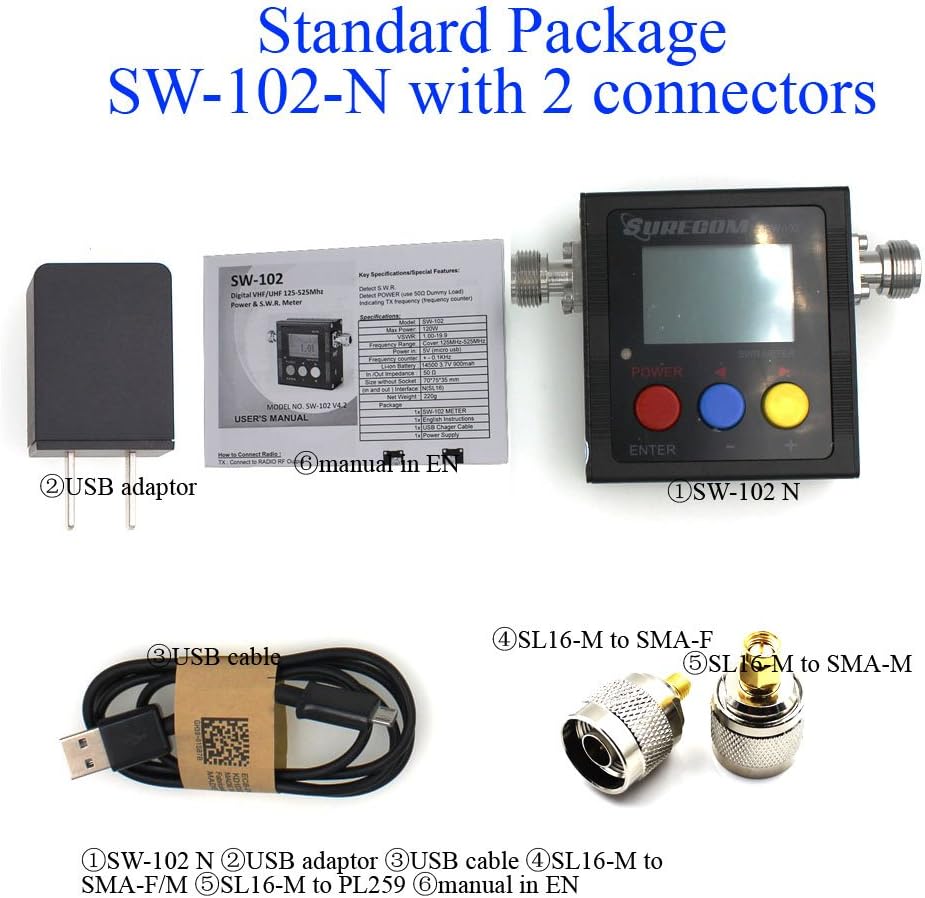
4. Ngwaahịa gafereview
4.1. Atụmatụ igodo
- Direct digital readout of VSWR, Forward Power, and Reflected Power.
- Ọnweghị nhazigharị achọrọ.
- Maximum measurable power range up to 120W.
- Low insertion loss (<0.15dB VHF, <0.25dB UHF) allows permanent connection.
- Built-in Frequency Counter.
- All-function display: Frequency, Power, SWR, FW, RW, Battery voltage.
- Compact and handheld size with large LCD display.
4.2. Ngwa na njikwa


The SW-102 features an N-J Interface for connections. Optional accessories such as SL16 to SMA and SL16 to BNC adapters are available to ensure compatibility with various radio and antenna connectors.

5. Nhazi
5.1. Connecting the Meter
To connect the Surecom SW-102, connect the output of your transceiver to the "TX" port on the meter. Then, connect your antenna or dummy load to the "ANT" port. Ensure proper adapters or cables are used if your device has different connector types. The device ships with SL16 to SMA-F and SL16 to SMA-M connectors for common applications.
Watch the video below for a visual guide on connecting the SW-102 to your radio and antenna:
Video 5.1: Demonstration of unboxing, physical overview, and connecting the Surecom SW-102 to a radio and antenna for SWR measurement.
5.2. Na-agbanye ike
To power on the SW-102, press and hold the bọtịnụ uhie for 2 seconds. To power off, press and hold the bọtịnụ uhie ọzọ maka 2 sekọnd.
6. Ntuziaka ọrụ
6.1. Ịme nha
Once connected and powered on, the SW-102 will display real-time measurements. To measure SWR and power, ensure the meter is in a vertical position and avoid touching the antenna during measurement. Press the PTT (Push-To-Talk) button on your radio to transmit, and the meter will display the VSWR, transmit power, and other relevant data.
Onye Voltage Standing Wave Ratio (VSWR) is an indication of the amount of mismatch between an antenna and the feed line connecting to it. The range of values for VSWR is from 1 to ∞. A VSWR value under 2 is considered suitable for most antenna applications. The antenna can be described as having a good match. So when someone says that the antenna is poorly matched, very often it means that the VSWR value exceeds 2 for a frequency of interest.
Video 6.1: Demonstration of taking SWR measurements with the Surecom SW-102, including proper positioning and interpreting the display.
6.2. Ngosipụta Okwu Mmalite
The LCD display provides comprehensive information at a glance. Key indicators include:
- Ọnọdụ batrị
- Oge ọrụ
- Nyefee ike (W)
- Nbufe ugboro (MHz)
- VSWR (Voltage Standing Wave Ratio)
- Forward Power (FW)
- Reflected Power (RW)
Video 6.2: Detailed introduction to the Surecom SW-102's display, explaining each parameter and its significance.
6.3. Function Memory Save
To save function memory settings:
- Pịa MENU (Blue button).
- Pịa F1 (Red button) to select a function (1-6).
- Adjust values using the Blue button (-) na Yellow button (+).
- Pịa bọtịnụ uhie maka 2 sekọnd iji gosi.
- Pịa Bọtị acha anụnụ anụnụ to SAVE and EXIT.
7. Nlekọta
7.1. Ịchaji batrị
The SW-102 is equipped with a 3.7V Li-ion rechargeable battery (14500 type). To charge the device, connect the provided USB charger cable to the micro USB port on the side of the meter and plug the other end into a 5V (0.5-1A) USB power source.

Video 7.1: Instructions on how to charge the Surecom SW-102 using the provided USB cable.
7.2. Atụmatụ Nchekwa Ike
- The device features an Gbanyụọ ike akpaaka function, configurable from 1 to 9 minutes.
- Nke Ìhè azụ also has an AUTO OFF feature, configurable from 1 to 9 minutes, to conserve battery life.
8. Nchọpụta nsogbu
- If the device does not power on, ensure the battery is charged.
- If readings are inconsistent, check all cable connections for tightness and proper adapter usage.
- Ensure the SW-102 is used with analog radios only. Ọ bụ not compatible with DMR radios.
- For significant discrepancies in SWR readings, verify the antenna's condition and proper installation.
9. Nkọwapụta
| Njirimara | Nkọwapụta |
|---|---|
| Oke ugboro ugboro | 100-520MHz |
| Measurable Power Range | 0 - 120W |
| Ntinye ike kacha | 120W |
| Izi ezi | +/- 5% |
| VSWR nso | 1.00 ~ 19.9 |
| Mgbochi | 50Ω |
| Insertion Loss (VHF) | <0.15dB |
| Insertion Loss (UHF) | <0.25dB |
| Okpomọkụ na-arụ ọrụ | 0 ℃ ~ 60 ℃ |
| Input Frequency Counter | Ee |
| Batrị Voltage Ngosipụta | Ee |
| Ụdị batrị | 3.7V Li-ion Rechargeable Battery (14500) |
| Gbanyụọ ike akpaaka | 1-9 minutes (configurable) |
| Ntinye chaja | 5V (micro USB) |
| Gbanyụọ akpaaka azụ | 1-9 minutes (configurable) |
| Interface (In and Out) | N (SL16) |
| Nha | 66*68*37 (mm) |
| Ibu | 220g |
| Ibu Ibu | 13.4 ounces |
| Akụkụ ngwugwu | 7.76 x 5.43 x 1.81 sentimita asatọ |
10. Akwụkwọ ikike na nkwado
Specific warranty information and detailed support contacts are not provided in this manual. Please refer to the product packaging or the manufacturer's official website for warranty details and customer support options.