
Biconic Bluetooth Tough Weatherproof Portable Wireless Speaker User Manual
Model: ABC-AU-BS-103-BK
Aha: Bytech
1. Ngwaahịa gafereview
The Biconic Bluetooth Tough Weatherproof Portable Wireless Speaker is designed for robust outdoor and indoor use, providing enhanced bass and clear audio. Its wireless capabilities allow for easy connection to various devices, and its durable, weatherproof construction ensures reliable performance in diverse environments.

Foto 1.1: N'ihu view of the Biconic Bluetooth Speaker, showcasing its robust design and speaker grille.
Akụkụ ndị bụ isi:
- Ikuku Njikọ: Seamless Bluetooth pairing with smartphones, tablets, and other compatible devices.
- Ihu igwe anaghị egbochi ya: IPX6 water resistance protects against strong jets of water, making it suitable for outdoor use.
- Bass emelitere: Delivers rich, deep bass for a superior audio experience.
- Enwere ike ibugharị: Compact design with a durable strap for easy transport.
- Ogologo oge egwuregwu: Up to 4 hours of continuous audio playback on a single charge.
2. Ozi nchekwa
Please read all safety warnings and instructions carefully before using this product to ensure safe operation and prevent damage.
- Ekpughela onye na-ekwu okwu n'ọnọdụ okpomọkụ dị oke njọ (ọkụ ma ọ bụ oyi).
- Do not immerse the speaker in water. While it is IPX6 water resistant, it is not designed for submersion.
- Keep the speaker away from direct heat sources, open flames, and flammable liquids.
- Use only the provided charging cable and a compatible power adapter (5V/1A recommended) to charge the device.
- Do not attempt to disassemble, repair, or modify the speaker. This will void the warranty and may cause harm.
- Debe ebe ụmụaka na-apụghị iru.
- Jiri akwa dị nro hichaa ọkà okwu. Ejila ihe nchacha abrasive ma ọ bụ ihe mgbaze.
3. Ihe ngwugwu
Verify that all items are present in the package upon unboxing:
- Biconic Bluetooth Tough Weatherproof Portable Wireless Speaker
- Igwe nchaji USB
- Akwụkwọ ntuziaka (akwụkwọ a)
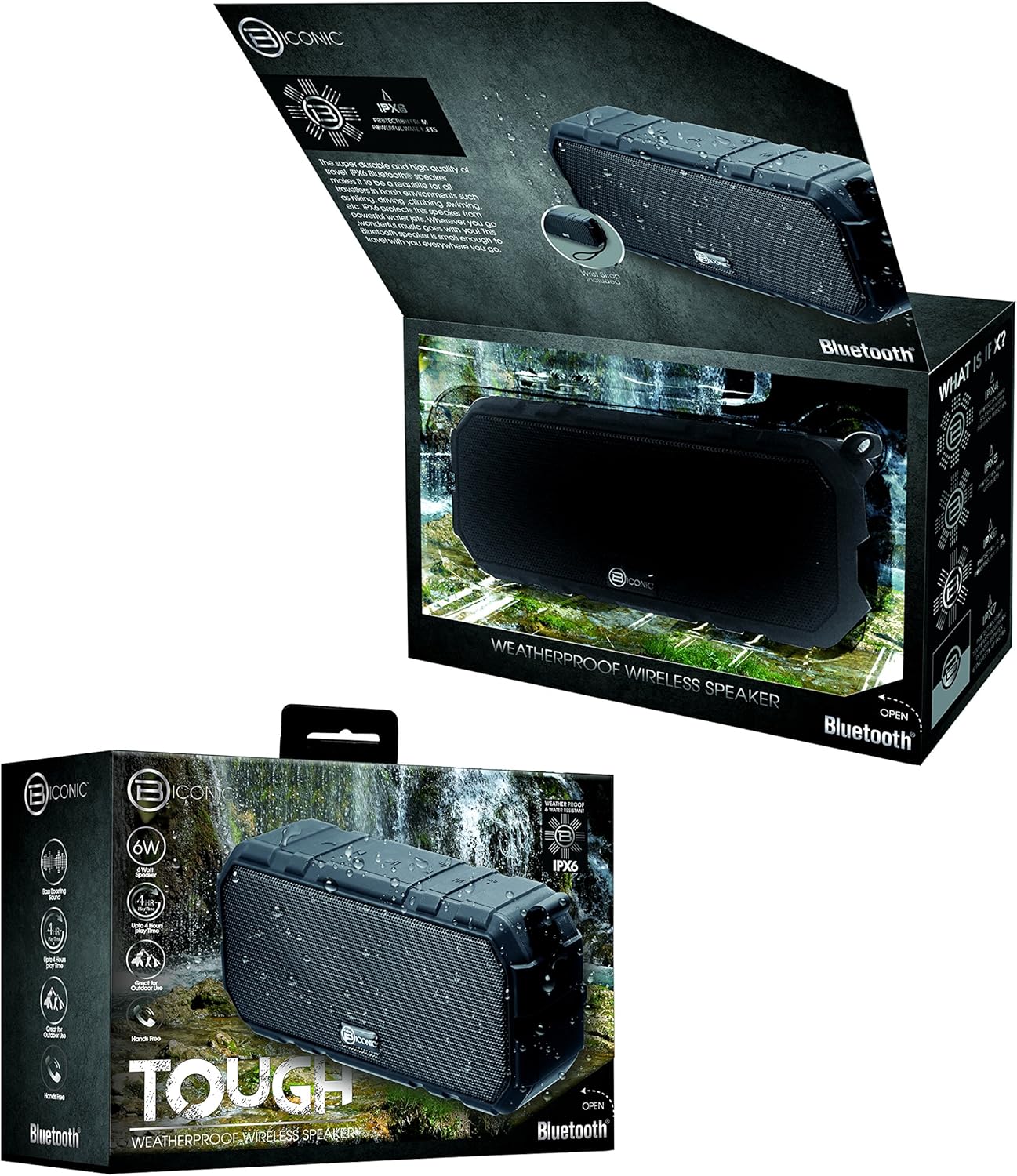
Figure 3.1: The Biconic Bluetooth Speaker shown with its retail packaging, indicating typical package contents.
4. Nhazi
4.1 Ịchaji ọkà okwu
- Locate the charging port on the side of the speaker. This port is typically protected by a rubber flap to maintain water resistance.
- Mepee mkpọ rọba.
- Connect the small end of the provided USB charging cable to the speaker's charging port.
- Jikọọ nsọtụ ka ukwuu nke eriri USB na isi iyi ike USB (dịka ọmụmaatụ, ọdụ ụgbọ USB kọmputa, ihe nkwụnye mgbidi USB).
- Ọkụ ihe ngosi chaja ga-enwu, nke na-abụkarị ọbara ọbara, iji gosi na ọkà okwu na-acha chaja.
- Once fully charged (approximately 2-3 hours), the indicator light will change color (e.g., turn off or turn blue/green). Disconnect the charging cable and close the rubber flap securely to maintain water resistance.
4.2 Gbanyụọ/ gbanyụọ
- Iji gbanye: Press and hold the Power button (usually marked with a power symbol) for a few seconds until you hear an audible tone or see an indicator light illuminate.
- Iji gbanyụọ: Press and hold the Power button again for a few seconds until you hear an audible tone or the indicator light turns off.
5. Ntuziaka ọrụ
5.1 Njikọ Bluetooth
Before first use, you need to pair the speaker with your Bluetooth-enabled device.
- Ensure the speaker is fully charged and powered on. It will automatically enter pairing mode, indicated by a flashing blue LED light.
- On your smartphone, tablet, or other Bluetooth device, go to the Bluetooth settings menu.
- Kwado Bluetooth ma ọ bụrụ na agbabeghị ya.
- Scan for available devices. You should see "Biconic Speaker" or a similar name appear in the list.
- Select "Biconic Speaker" to connect. Once successfully paired, you will hear a confirmation tone, and the blue LED light on the speaker will stop flashing and remain solid.
- Ọ bụrụ na a kpaliri maka paswọọdụ, tinye "0000".
- Ọkà okwu ahụ ga-ejikọghachi na ngwaọrụ ikpeazụ ejikọtara ozugbo mgbe agbanyere ya, ọ bụrụ na ngwaọrụ ahụ dị n'ime oke ma gbanye Bluetooth.
5.2 Nghaghachi egwu
Once paired, you can control music playback directly from your connected device or using the speaker's controls.
- Gwuo/kwụsịtụ: Press the Play/Pause button (often marked with a triangle or || symbol) once to play or pause music.
- Olu elu: Press the Volume Up button (+) to increase the volume.
- Olu ala: Press the Volume Down button (-) to decrease the volume.
- Track na-esote: Press and hold the Volume Up button (+) for a few seconds to skip to the next track.
- Gara aga Track: Press and hold the Volume Down button (-) for a few seconds to go to the previous track.

Foto 5.1: Top view of the Biconic Bluetooth Speaker, highlighting the control buttons for power, volume, and playback.
5.3 Answering Calls (Hands-Free Function)
The speaker supports hands-free calling when connected to a smartphone.
- Oku azaa: When a call comes in, press the Play/Pause button once to answer.
- Oku ngwụcha: During a call, press the Play/Pause button once to end the call.
- Jụ oku: Press and hold the Play/Pause button for a few seconds to reject an incoming call.
6. Nlekọta
Nlekọta kwesịrị ekwesị na-eme ka ọkà okwu gị dị ogologo ndụ ma rụọ ọrụ nke ọma.
- Nhicha: Jiri nwayọ hichaa ọkà okwu, damp cloth. Do not use harsh chemicals, solvents, or abrasive cleaners. Ensure the charging port flap is closed before cleaning with a damp akwa .
- Nchekwa: Chekwaa ọkà okwu n'ebe dị jụụ, kpọrọ nkụ pụọ na ìhè anyanwụ kpọmkwem na oke okpomọkụ mgbe ọ naghị eji ya ogologo oge.
- Nlekọta batrị: To preserve battery life, fully charge the speaker before storing it for long periods. Recharge every 3-6 months if not used regularly.
- Nguzogide mmiri: Always ensure the rubber flap covering the charging port is securely closed to maintain the IPX6 water resistance rating.

Figure 6.1: The Biconic Bluetooth Speaker demonstrating its water-resistant capabilities, highlighting the importance of proper sealing for maintenance.
7. Nchọpụta nsogbu
| Nsogbu | Ihe nwere ike ime | Ngwọta |
|---|---|---|
| Ọkà okwu anaghị agba ọkụ. | Batrị agwụla. | Chajie ọkà okwu zuru ezu. |
| Enweghị ike ijikọ na ngwaọrụ Bluetooth. | Bluetooth is off on your device; speaker is not in pairing mode; device is too far. | Ensure Bluetooth is enabled on your device. Power off and on the speaker to re-enter pairing mode. Move device closer to the speaker (within 10 meters). Forget the device on your phone and try pairing again. |
| Enweghị ụda ma ọ bụ obere olu. | Olu dị oke ala na igwe okwu ma ọ bụ ngwaọrụ; ejikọtaghị igwe okwu. | Increase volume on both the speaker and your connected device. Ensure the speaker is properly paired and connected. |
| Mgbagwoju anya ụda. | Volume too high; interference; low battery. | Reduce volume. Move speaker away from other electronic devices. Charge the speaker. |
8. Nkọwapụta
| Njirimara | Nkọwa |
|---|---|
| Nọmba nlereanya | ABC-AU-BS-103-BK |
| Ụdị | Bytech |
| Teknụzụ Njikọta | Bluetooth |
| Ike Nwepu kacha elu | 3 Watt |
| Ọnọdụ mmepụta ọdịyo | Stereo |
| Ogo Nguzogide Mmiri | IPX6 (Water resistant, not submersible) |
| Ụdị batrị | 1 batrị lithium ion (chọrọ) |
| Oge egwuregwu | Ruo awa iri abụọ |
| Akụkụ ngwaahịa | 2.54 x 2.54 x 2.54 cm |
| Ibu Ibu | 522 g |
| Ụdị nkwụnye | N'elu tebụl |
9. Akwụkwọ ikike na nkwado
For warranty information and technical support, please contact Bytech customer service. Details are typically provided on the product packaging or the official Bytech websaịtị.
Biko dowe akwụkwọ ikike ịzụrụ ihe ọ bụla.
Rịba ama: Usoro akwụkwọ ikike nwere ike ịdị iche site na mpaghara.