
1. Okwu mmalite
Thank you for choosing the Baseus Encok S16 Neck Hung Bluetooth Wireless In-Ear Earphone. This manual provides detailed instructions for setup, operation, and maintenance to ensure optimal performance and longevity of your device. Please read this manual thoroughly before use.
2. Ihe ngwugwu
Chọpụta na ihe niile dị na ngwugwu:
- 1 x Baseus Encok S16 Wireless Earphone
- 1 x eriri nchaji
- 1 x Akwụkwọ ntuziaka onye ọrụ
- 1 x kaadị ikike

Image: Contents of the Baseus Encok S16 earphone package, showing the earphones, charging cable, user manual, and warranty card.
3. Ngwaahịa gafereview
The Baseus Encok S16 earphones feature a neck-hung design for comfortable and secure wear. Key features include:
- Ndozi ndọta: Earbuds can be magnetically joined when not in use, preventing tangling and loss.
- Adjustable Coils: The earphone line length can be adjusted by sliding for a customized fit.
- High Fidelity Sound: Equipped with a dynamic speaker unit, composite diaphragm, and independent tune trope structure for clear audio.
- Ike Dị Irè: Utilizes a British CSR chip and 120mAh battery for low power consumption and extended battery life.
- Ndakọrịta Universal: Smartly matches with smartphones and tablet PCs, compatible with all Bluetooth 4.0 enabled devices.

Image: Close-up of the Baseus Encok S16 earbuds demonstrating their magnetic connection capability.
4. Nhazi
4.1 Ịchaji ekwe ntị
- Connect the provided charging cable to the charging port on the earphone's control unit.
- Jikọọ nsọtụ nke ọzọ nke eriri chaja na isi iyi ike USB (dịka ọmụmaatụ, ọdụ USB kọmputa, ihe nkwụnye mgbidi USB).
- The indicator light will illuminate during charging and turn off or change color when fully charged.
- A full charge typically takes approximately 1.5 to 2 hours.
4.2 Njikọ Bluetooth
- Gbaa mbọ hụ na chajịrị ekwe ntị nke ọma.
- Press and hold the Power button on the control unit until the indicator light flashes red and blue alternately, indicating pairing mode.
- Na ekwentị gị ma ọ bụ ngwaọrụ Bluetooth nyere gị aka, gaa na ntọala Bluetooth.
- Chọọ maka available devices and select "Baseus Encok S16" from the list.
- Once connected, the indicator light will flash blue slowly or turn solid blue.
- Ọ bụrụ na a kpaliri maka paswọọdụ, tinye "0000".
5. Ntuziaka ọrụ
5.1 Njikwa ntọala
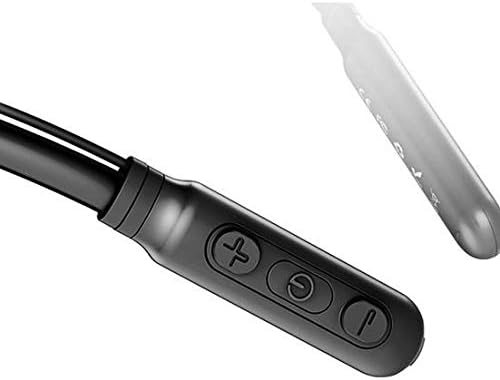
Image: Close-up of the Baseus Encok S16 earphone's inline control unit, showing the power/multi-function button, volume up, and volume down buttons.
| Bọtịnụ | Ọrụ |
|---|---|
| Bọtịnụ ike (Ebe etiti) |
|
| Elu elu (+) |
|
| Olu ala (-) |
|
5.2 Yiri ekwe ntị
Place the neckband around your neck, ensuring the control unit is easily accessible. Insert the earbuds comfortably into your ears. Adjust the earphone line length using the sliding coils for a secure and comfortable fit.
6. Nlekọta
- Clean the earbuds and control unit regularly with a soft, dry cloth.
- Avoid exposing the earphones to extreme temperatures, humidity, or corrosive liquids.
- Store the earphones in a cool, dry place when not in use. The magnetic earbuds can help prevent tangling during storage.
- Do not attempt to disassemble or repair the earphones yourself, as this will void the warranty.
7. Nchọpụta nsogbu
| Nsogbu | Ngwọta |
|---|---|
| Enweghị ike ịgbanye | Ensure the earphones are fully charged. Press and hold the Power button for 3 seconds. |
| Enweghị ike ijikọ na ngwaọrụ |
|
| Enweghị ụda ma ọ bụ olu dị ala |
|
| Njikọ na-adịte aka |
|
8. Nkọwapụta
| Njirimara | Nkọwa |
|---|---|
| Ụdị | Baseus |
| Nọmba nlereanya | FWP-E-S16 |
| Teknụzụ Njikọta | Bluetooth |
| Ụdị Bluetooth | 4.0 (compatible with devices enabling Bluetooth 4.0) |
| Ụdị Ihe | In Ear, Neck Hung |
| Ụdị njikwa | Voice Control, Touch (via buttons) |
| Ike batrị | 120mAh |
| Ibu | 30 grams |
| Ngwa gụnyere | Wireless Earphone, Charging Cable, User Manual, Warranty Card |
9. Akwụkwọ ikike na nkwado
This product comes with a Limited Warranty. Please refer to the included Warranty Card for detailed terms and conditions regarding coverage and duration.
For technical support or warranty claims, please contact your retailer or visit the official Baseus websaịtị maka ozi gbasara ọrụ ndị ahịa.
Nọmba njirimara azụmaahịa zuru ụwa ọnụ (GTIN): 06953156264489