1. Okwu mmalite
The Viecar CY300 is a compact and efficient OBDII car diagnostic scanner designed to retrieve vehicle diagnostic information. This tool supports all OBD II protocols, including the Controller Area Network (CAN) protocol, making it compatible with most 1996 and newer vehicles.
This manual provides detailed instructions for the proper use and maintenance of your CY300 diagnostic scanner.
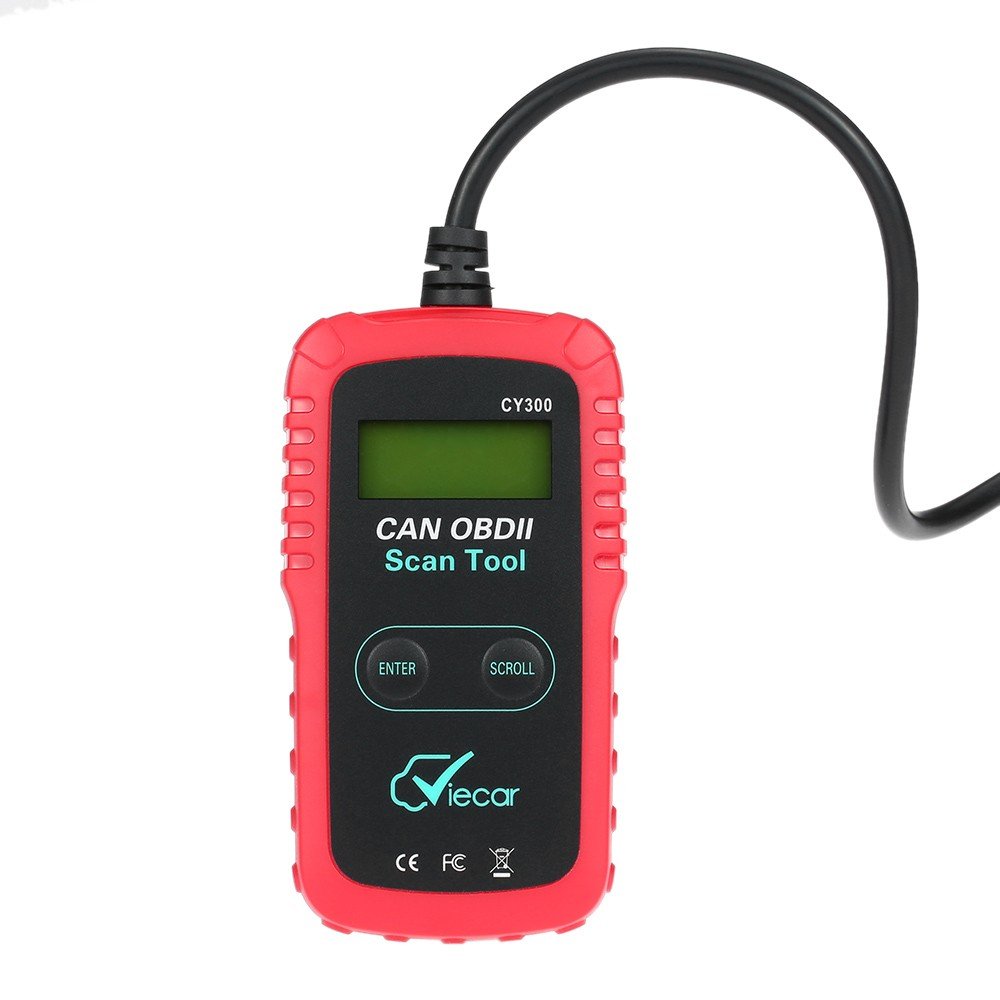
Figure 1.1: Viecar CY300 OBDII Car Diagnostic Scanner. The device is red and black with an integrated cable and OBDII connector.
2. Ozi nchekwa
- Na-eme nnwale ụgbọ ala mgbe niile na gburugburu ebe nchekwa.
- Yiri nchebe anya nke dabara ụkpụrụ ANSI.
- Debe uwe, ntutu, aka, ngwaọrụ, akụrụngwa nnwale, wdg, pụọ na akụkụ injin niile na-akpụ akpụ ma ọ bụ na-ekpo ọkụ.
- Na-arụ ọrụ ụgbọ ala na mpaghara ọrụ ikuku nke ọma; ikuku iyuzucha na-egbu egbu.
- Tinye ihe mgbochi n'ihu wiil ndị draịva ma hapụkwa ụgbọ ala n'echeghị ya mgbe ị na-anwale ule.
- Jiri nlezianya dị oke egwu mgbe ị na-arụ ọrụ gburugburu eriri igwe mgbanye, okpu nkesa, waya mgbanye, na plọg ọkụ. Akụkụ ndị a na-emepụta volta dị ize ndụtages mgbe engine na-agba ọsọ.
- Debe ihe mgbanyụ ọkụ dabara maka mmanụ ọkụ / kemịkalụ/ọkụ eletrik dị nso.
- Ejikọla ma ọ bụ kwupu njikọ ngwa ule ọ bụla mgbe mgbanye dị ma ọ bụ injin na-agba ọsọ.
3. Ngwaahịa gafereview
The Viecar CY300 is designed for ease of use, featuring a clear display and intuitive buttons for navigation.
3.1 Atụmatụ
- Reads and clears generic and manufacturer-specific Diagnostic Trouble Codes (DTCs).
- Turns off the Check Engine Light (MIL).
- Supports multiple trouble code requests: generic, pending, and manufacturer-specific codes.
- Reviews emission readiness status of OBD monitors.
- Determines Malfunction Indicator Lamp (MIL) status.
- Retrieves Vehicle Identification Number (VIN) on 2002 and newer vehicles that support Mode 9.
- Easy plug-and-play operation.
- No internal batteries required; powered directly via the detachable OBD II cable from the vehicle.
3.2 Ngwa ngwaọrụ

Figure 3.1: Labeled components of the Viecar CY300. This image highlights the LCD display, Enter button, Scroll button, and the OBD II connector.
- Ngosipụta LCD: Backlit, 2-line, 8-character display for showing diagnostic information.
- Tinye bọtịnụ: Na-akwado nhọrọ ma ọ bụ omume.
- Pịa bọtịnụ: Na-agagharị site na menu na data.
- Njikọ OBD II: Connects the tool to the vehicle's OBD II port.
4. Nhazi
The Viecar CY300 is designed for simple plug-and-play operation. Follow these steps to set up your device:
- Chọta ọdụ ụgbọ mmiri OBD II: The OBD II port is typically located under the dashboard on the driver's side of the vehicle. Refer to your vehicle's service manual for the exact location if you cannot find it.
- Jikọọ ihe nyocha ahụ: With the vehicle's ignition off, firmly plug the CY300's OBD II connector into the vehicle's OBD II port. Ensure a secure connection.
- Gbanye mgbanye ọkụ: Turn the vehicle's ignition to the "ON" position (do not start the engine). The scanner will automatically power on, drawing power from the vehicle's battery.
- Mmalite sistemu: The scanner will perform a system initialization and link to the vehicle's onboard computer. This may take a few seconds. Once linked, the main menu or a diagnostic screen will appear.
5. Ntuziaka ọrụ
Once the scanner is connected and powered on, you can begin diagnostic operations.
5.1 Reading Diagnostic Trouble Codes (DTCs)
- From the main menu, use the Pịgharịa button to navigate to the "Read Codes" option.
- Pịa Banye bọtịnụ ịhọrọ.
- The scanner will display any stored DTCs. Use the Pịgharịa bọtịnụ ka view multiple codes if present.
5.2 Clearing Diagnostic Trouble Codes (DTCs)
Ịdọ aka ná ntị: Clearing DTCs will erase all diagnostic data from the vehicle's computer. Ensure you have recorded any necessary information before proceeding.
- From the main menu, use the Pịgharịa button to navigate to the "Erase Codes" option.
- Pịa Banye bọtịnụ ịhọrọ.
- Confirm your choice when prompted. The Check Engine Light (MIL) should turn off after successful clearing.
5.3 Checking I/M Readiness Status
This function checks the status of the emission-related monitoring systems to determine if they are ready for an emissions test.
- From the main menu, use the Pịgharịa button to navigate to the "I/M Readiness" option.
- Pịa Banye bọtịnụ ịhọrọ.
- The display will show the status of various monitors (e.g., "OK" for complete, "INC" for incomplete).
5.4 Retrieving Vehicle Information (VIN)
This function allows you to retrieve the Vehicle Identification Number (VIN) for vehicles that support Mode 9.
- From the main menu, use the Pịgharịa button to navigate to the "Vehicle Info" option.
- Pịa Banye bọtịnụ ịhọrọ.
- The VIN will be displayed on the screen.
6. Nlekọta
Proper maintenance ensures the longevity and reliable operation of your Viecar CY300 scanner.
- Nhicha: Use a soft, dry cloth to clean the exterior of the scanner. Do not use abrasive cleaners or solvents.
- Nchekwa: Store the device in a clean, dry environment away from direct sunlight, extreme temperatures, and excessive moisture. Keep it in its original packaging or a protective case when not in use.
- Nlekọta USB: Avoid bending or kinking the OBD II cable excessively. Always grasp the connector when plugging or unplugging, not the cable itself.
- Mmelite ngwanrọ: Lelee onye nrụpụta website periodically for any available software updates to ensure optimal performance and compatibility with newer vehicles.
7. Nchọpụta nsogbu
If you encounter issues with your Viecar CY300, refer to the following common troubleshooting steps:
- Enweghị ike:
- Ensure the OBD II connector is firmly plugged into the vehicle's port.
- Hụ na ọkụ ụgbọala ahụ dị n'ọnọdụ "ON".
- Check the vehicle's fuse for the OBD II port (consult your vehicle's manual).
- Link Error / Communication Error:
- Confirm the vehicle is OBD II compliant (generally 1996 and newer).
- Hụ na agbanyere ọkụ ahụ ma gbanyụọ injin ahụ.
- Check for any loose connections at the OBD II port.
- Try connecting the scanner to a different OBD II compliant vehicle to rule out a scanner issue.
- Screen Freezes:
- Disconnect the scanner from the vehicle, wait a few seconds, and then reconnect it.
- Hụ na batrị ụgbọala ahụ nwere ike ịchaji nke ọma.
- Ọgụgụ na-ezighi ezi:
- Ensure the scanner's software is up to date.
- Verify the vehicle's information (VIN, year, make, model) is correctly recognized by the scanner.
8. Nkọwapụta
The following table outlines the technical specifications for the Viecar CY300 OBDII Car Diagnostic Scanner:

Figure 8.1: Visual representation of Viecar CY300 dimensions and key specifications.
| Nkọwapụta | Nkọwa |
|---|---|
| Nlereanya | Viecar CY300 |
| Agba | Uhie + ojii |
| Ihe onwunwe | Plastic |
| Ngosipụta | Backlit LCD, 2-line, 8 characters |
| Okpomọkụ na-arụ ọrụ | 0°C ruo 50°C (32°F ruo 122°F) |
| Okpomọkụ nchekwa | -20°C ruo 70°C (-4°F ruo 158°F) |
| Isi Iyi Ike | 10 to 15.5 Volts provided via vehicle battery (no internal batteries) |
| Akụkụ ngwaahịa (L x W x H) | 12 cm x 6.5 cm x 2.1 cm (ihe dị ka 4.7 x 2.6 x 0.8 inch) |
| Ibu ngwugwu | 260 g (ihe dị ka 9 oz) |
| UPC | 712383577481, 712383583871, 712383579997 |
| ASIN | B01KSV9GDM |
| Ụbọchị mbụ dị | Ọgọst 17, 2016 |
9. Akwụkwọ ikike na nkwado
For warranty information, please refer to the documentation provided at the time of purchase or contact your retailer. Specific warranty terms may vary by region and seller.
If you require technical support or have questions not covered in this manual, please contact the retailer or manufacturer directly. Keep your purchase receipt and product model number (CY300) available for faster service.
