
1. Okwu mmalite
Thank you for choosing the UNIC UC18 Mini Projector. This compact and portable projector is designed to provide a versatile viewing experience for home entertainment, presentations, and more. Featuring an LED lighting system, built-in speaker, and multiple input options, the UC18 offers convenience and functionality. Please read this manual thoroughly to ensure proper setup, operation, and maintenance of your device.
2. Ozi nchekwa
- Ịnye ọkụ: Jiri naanị ihe nkwụnye ike akọwapụtara. Hụ na vol ahụ dị.tage kwekọrọ na ihe onye na-egosi ihe ahụ chọrọ.
- Igwe ikuku: Ekpuchila oghere ikuku. Hụ na oghere zuru oke gburugburu ihe ngosi ahụ maka ikuku ikuku kwesịrị ekwesị iji gbochie oke okpomọkụ.
- Mmiri: Keep the projector away from water, rain, and excessive humidity. Do not operate with wet hands.
- Nhicha: Disconnect power before cleaning. Use a soft, dry cloth. Avoid liquid or aerosol cleaners.
- Ijikwa: Jiri nlezianya jide ihe ngosi ahụ. Zere ịda ma ọ bụ mee ka ọ daa ma ọ bụ mee ka ọ daa n'ihe ike.
- Nchedo anya: Elela anya ozugbo na oghere projector mgbe lamp is on, as the bright light can cause eye strain or damage.
- Mbupu: Agbalịla ịkwatu ma ọ bụ rụzie ihe onyonyo ahụ n'onwe gị. Nye ndị ọrụ ruru eru ọrụ niile.
3. Ihe ngwugwu
Biko lelee ihe dị n'ime ngwugwu ahụ mgbe ị na-emepe igbe ahụ. Ọ bụrụ na ihe ọ bụla efuola ma ọ bụ mebie, kpọtụrụ onye na-ere ahịa gị.
- UNIC UC18 Mini Projector
- Igwe ọkụ ọkụ
- 3-na-1 eriri AV
- Remote Control (requires lithium battery, not included)
- Akwụkwọ ntuziaka onye ọrụ
4. Ngwaahịa gafereview
Projector Layout
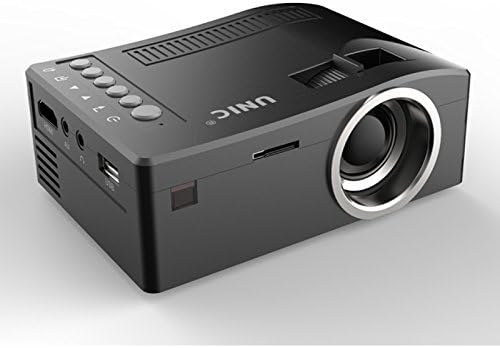
N'ihu na akụkụ view of the UNIC UC18 Mini Projector, showing the lens, ventilation, and various ports.
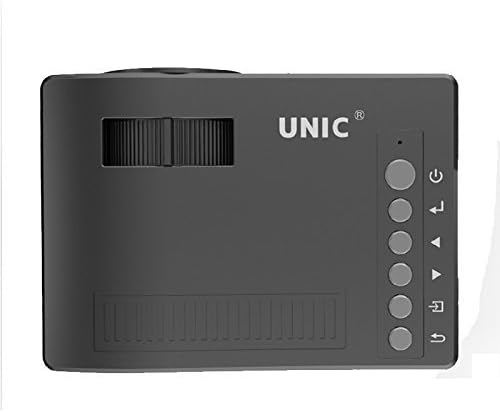
N'elu view of the UNIC UC18 Mini Projector, highlighting the control buttons and focus wheel.
Ọdụ ụgbọ mmiri na njikwa
The UNIC UC18 Mini Projector features a range of ports and controls for easy connectivity and operation:
- oghere: Na-arụ ọrụ onyonyo na ihuenyo.
- Wheel lekwasịrị anya: Manual adjustment for image clarity.
- Bọtịnụ ike: Gbanyụọ ma ọ bụ gbanyụọ projector.
- Bọtịnụ menu: Na-abanye na menu ntọala nke onye na-egosi ihe onyonyo ahụ.
- Bọtịnụ igodo nsoroụzọ (elu/ala/ekpe/aka nri): A na-eji ya agagharị na menus ma gbanwee ntọala.
- OK bọtịnụ: Na-akwado nhọrọ dị na menu.
- Isi mmalite: Selects the input source (HDMI, USB, AV, TF).
- Ọdụ ụgbọ mmiri USB: Na-ejikọ ngwaọrụ nchekwa USB maka ịkpọghachi mgbasa ozi.
- Ọdụ ụgbọ mmiri HDMI: Connects to HDMI-enabled devices like laptops, gaming consoles, or media players.
- Ọdụ ụgbọ mmiri AV: Connects to devices using the included 3-in-1 AV cable.
- Oghere TF Kaadị: Inserts a TF (Micro SD) card for media playback.
- Jack ekweisi 3.5mm: Connects external headphones or speakers.
- Onye nnata IR: Na -enweta akara site na njikwa ime obodo.
5. Nhazi
5.1 Njikọ ike
- Jikọọ eriri ọkụ na ọdụ ụgbọ mmiri ntinye ike nke projector.
- Tinye akụkụ nke ọzọ nke eriri ọkụ n'ime oghere ọkụ kwesịrị ekwesị.
- Ihe ngosi ọkụ na-egosi ọkụ na projector ga-enwu.
5.2 Ngwaọrụ Ntinye Njikọta
- HDMI: Connect an HDMI cable from your source device (e.g., laptop, DVD player) to the projector's HDMI port.
- USB: Fanye eriri USB n'ọdụ ụgbọ mmiri USB.
- Nke: Use the provided 3-in-1 AV cable to connect to devices with AV output. Match the yellow, white, and red connectors.
- Kaadị TF: Insert a TF (Micro SD) card into the TF card slot.
5.3 Positioning the Projector
Place the projector on a stable, flat surface. For optimal image quality, position the projector perpendicular to the projection surface (wall or screen). The throw distance can range from 0.48 to 2.43 meters, producing a picture size from 12 to 66 inches.
6. Ntuziaka ọrụ
6.1 Gbanyụọ/ gbanyụọ
Press the Power button on the projector or the remote control to turn the device on or off.
6.2 Ndozi anya
After powering on, if the image appears blurry, rotate the manual focus wheel located near the lens until the image becomes clear and sharp.

Close-up of the manual focus wheel on the UNIC UC18 Mini Projector, located near the lens.
6.3 Ịhọrọ Isi Iyi Ntinye
Press the 'Source' button on the projector or remote control. Use the navigation buttons to select your desired input source (HDMI, USB, AV, TF) and press 'OK' to confirm.
6.4 Nsorouzọ NchNhr
Press the 'Menu' button to access the projector's settings. Use the navigation buttons to browse options and 'OK' to select. Press 'Menu' again to exit.
6.5 Mmepụta ọdịyo
The projector has a built-in speaker. For private listening or connecting to external audio systems, plug headphones or external speakers into the 3.5mm headphone jack.
7. Nlekọta
7.1 Ihicha oghere
Use a soft, lint-free cloth specifically designed for optical lenses. Gently wipe the lens to remove dust or smudges. Avoid using abrasive materials or harsh chemicals.
7.2 Ịhicha Ahụ Ihe Nlereanya
Jiri ákwà dị nro ma kpọọ nkụ hichaa mpụta ihe e ji egosi ihe. Ejila ihe nhicha mmiri ma ọ bụ ihe mgbaze.
7.3 Nchekwa
When not in use for extended periods, store the projector in a cool, dry place, away from direct sunlight and extreme temperatures. Cover the lens to protect it from dust.
8. Nchọpụta nsogbu
| Nsogbu | Ihe nwere ike ime | Ngwọta |
|---|---|---|
| Ọnweghị onyonyo egosiri | Power not connected; Incorrect input source; Loose cable connection | Check power cable; Select correct input source; Reconnect cables securely |
| Onyonyo na-agba agba | Focus not adjusted; Projector too close/far | Adjust the focus wheel; Reposition the projector within recommended throw distance |
| Enweghị ụda | Volume too low; Muted; Audio cable not connected; Source device audio issue | Increase volume; Unmute; Check audio cable connection; Verify audio output on source device |
| Njikwa anya anaghị arụ ọrụ | Batteries low/incorrectly inserted; Obstruction between remote and projector | Replace batteries (lithium battery required); Ensure clear line of sight to IR receiver |
| Projector na-ekpo oke ọkụ | Blocked ventilation; Prolonged use in hot environment | Ensure ventilation openings are clear; Operate in a well-ventilated area; Allow to cool down |
9. Nkọwapụta
Nkọwa nka nka
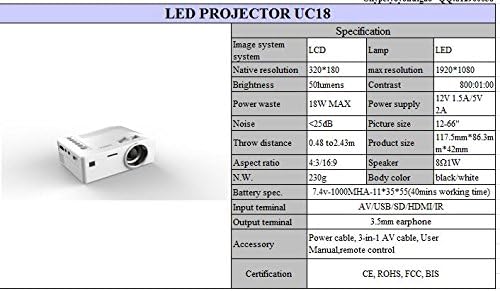
Detailed technical specifications for the UNIC UC18 Mini Projector, including resolution, contrast, and dimensions.
| Njirimara | Nkọwapụta |
|---|---|
| Ụdị | UNIC |
| Aha Nlereanya | UC18 |
| Ngosipụta teknụzụ | QVGA (LCD) |
| Mkpebi obodo | 320 x 240 pikselụ |
| Mkpebi akwadoro kacha | 1920 x 1080 pixels (1080P) |
| Icha ọkụ | 50 Lumen |
| Ọnụọgụ ọdịiche | 500:1 |
| Akụkụ akụkụ | 16:9 (also supports 4:3) |
| Tụfuo Anya | 0.48m - 2.43m (1.57ft - 7.97ft) |
| Nha foto | 12-66 sentimita asatọ |
| Ntinye ntinye | AV, USB, SD (TF), HDMI, IR |
| Mmepụta ọnụ | 3.5mm Jack ntị ntị |
| Atụmatụ pụrụ iche | Ọkà okwu arụnyere n'ime ya, enwere ike ibugharị |
| Oriri ike | 24 Watt (Max 18W) |
| Ịnye ọkụ | 12V 1.5A/5V 2A |
| Ọkwa mkpọtụ | <25dB |
| Akụkụ ngwaahịa (L x W x H) | 117.5mm x 86.3mm x 42mm |
| Nha ịbụ | 230g |
| Ụdị nkwụnye | Ugwu mgbidi |
| Njikwa anya | Yes (battery not included) |
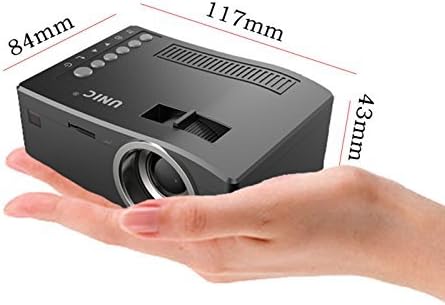
The UNIC UC18 Mini Projector held in a hand, illustrating its compact size and dimensions (117mm x 84mm x 43mm).
10. Akwụkwọ ikike na nkwado
For warranty information or technical support, please refer to the documentation provided at the time of purchase or contact your retailer. Keep your proof of purchase for any warranty claims.