
1. Ngwaahịa gafereview
The Xiaomi Mi Bluetooth Speaker Mini (Model: XMYX02YM) is a compact and portable wireless speaker designed for high-quality audio playback. It features Bluetooth connectivity for seamless pairing with various devices and a durable, waterproof design for versatile use.
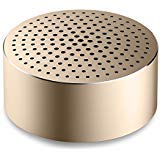
Image: The Xiaomi Mi Bluetooth Speaker Mini, a small, cylindrical black speaker with a mesh grille, showcasing ya kọmpat imewe.
2. Nhazi
2.1 Unboxing
Carefully remove all components from the packaging. The box should contain the Mi Bluetooth Speaker Mini.
2.2 Ịchaji ọkà okwu
The speaker is powered by an internal battery. Before first use, ensure the speaker is fully charged. Connect the appropriate charging cable (not included) to the speaker's charging port and to a compatible USB power source. The charging indicator light will provide status updates.
2.3 Njikọ Bluetooth
- Ike Na: Press and hold the power button on the speaker until you hear an audible prompt or see the indicator light flash, indicating it is in pairing mode.
- Mee ka Bluetooth rụọ ọrụ: On your device (smartphone, tablet, laptop, MP3 player), enable Bluetooth.
- Họrọ Ọkà Okwu: In your device's Bluetooth settings, search for available devices. Select "Mi Bluetooth Speaker Mini" from the list.
- Kwenye njikọ: Once paired, the speaker will provide an audible confirmation, and the indicator light will change to a steady state.
The speaker is now ready for audio playback.
3. Ntuziaka ọrụ
3.1 Gbanyụọ ma ọ bụ gbanyụọ
- Iji gbanye: Pịa ma jide bọtịnụ ike ahụ maka ihe dị ka sekọnd 2-3.
- Iji gbanyụọ: Press and hold the power button for approximately 3-4 seconds until the speaker powers down.
3.2 Ngwugharị ọdịyo
After successful Bluetooth pairing, play audio from your connected device. The sound will be transmitted wirelessly to the Mi Bluetooth Speaker Mini. The speaker supports stereo audio output.
3.3 Njikwa mmetụ
The speaker features touch controls for basic functions. Refer to the specific touch areas on your speaker for volume adjustment, play/pause, and track navigation. (Specific touch control details may vary; consult product packaging or quick start guide for exact touch gestures).
Ntinye inyeaka 3.4
While primarily a Bluetooth speaker, the device may support an auxiliary audio input. If available, connect an audio cable (not included) from your device's audio output to the speaker's auxiliary input port for wired audio playback.
4. Nlekọta
4.1 Nhicha
To clean the speaker, use a soft, dry, lint-free cloth. Do not use abrasive cleaners, solvents, or strong chemicals, as these can damage the speaker's surface or internal components.
4.2 Mmiri Nguzogide
The Xiaomi Mi Bluetooth Speaker Mini is waterproof. While it can withstand splashes and light exposure to water, it is not designed for prolonged submersion. Ensure all ports are securely closed before exposure to water. After exposure, dry the speaker thoroughly before charging or using it again.
4.3 Nchekwa
When not in use for extended periods, store the speaker in a cool, dry place away from direct sunlight and extreme temperatures. It is recommended to charge the speaker periodically to maintain battery health.
5. Nchọpụta nsogbu
- Ọkà okwu adịghị ike: Hụ na batrị ahụ chajị. Jikọọ ọkà okwu ahụ na isi iyi ike wee nwaa ọzọ.
- Enweghị ike ijikọ na ngwaọrụ:
- Ensure the speaker is in pairing mode (indicator light flashing).
- Gbanyụọ ma gbanye Bluetooth na ngwaọrụ gị.
- Bugharịa igwe okwu ahụ nso na ngwaọrụ gị.
- Kpochapụ njikọ Bluetooth gara aga na ngwaọrụ gị wee nwaa ijikọ ọzọ.
- Enweghị ụda mgbe a na-akpọghachi:
- Lelee ọkwa olu na ma ọkà okwu na ngwaọrụ gị ejikọrọ.
- Ensure the speaker is successfully paired and connected to your device.
- Gbalịa ịkpọ ụda sitere na ngwa ma ọ bụ ngwaọrụ dị iche.
- Ogo ọdịyo adịghị mma:
- Hụ na enweghị ihe mgbochi ọ bụla n'etiti igwe okwu na ngwaọrụ gị.
- Wepụ na isi mmalite ndabichi (dịka ọmụmaatụ, ndị na-anya Wi-Fi, ngwaọrụ Bluetooth ndị ọzọ).
- Lelee ogo isi iyi ọdịyo.
6. Nkọwapụta
| Njirimara | Nkọwa |
|---|---|
| Nlereanya | XMYX02YM |
| Ụdị | XIAOMI |
| Ụdị Ọkà Okwu | Shelf akwụkwọ (obere) |
| Teknụzụ Njikọta | Bluetooth, Ikuku |
| Teknụzụ nzikọrịta ozi ikuku | Bluetooth |
| Ngwa dakọtara | Laptọọpụ, MP3 Player, Ama ekwentị, Mbadamba |
| Isi Iyi Ike | Akwanyere batrị |
| Usoro njikwa | Metụ aka |
| Ọnọdụ mmepụta ọdịyo | Stereo |
| Ụdị ọkwọ ụgbọ ala ọdịyo | Ọkwọ ụgbọala dị ike |
| Nhazi ọwa ụda gburugburu | 2.1 |
| Ibu Ibu | 59 g |
| Akụkụ ngwaahịa (LxWxH) | 0.43 x 0.43 x 0.2 cm (4 x 4 x 2 Millimeters) |
| Agba | Nwa |
| Waterproof | Ee |
| Batrị achọrọ | Yes (Internal, rechargeable) |
| Ngwa gụnyere | Mi Bluetooth Speaker Mini |
| Onye nrụpụta | Xiaomi Technology Inc. |
7. Akwụkwọ ikike na nkwado
For warranty information, please refer to the documentation included with your purchase or visit the official Xiaomi website. For technical support or service inquiries, please contact Xiaomi customer service through their official channels.