
Ntuziaka nchekwa dị mkpa
GỤỌ NDỤMỤ NIILE nke ọma tupu eji ya.
- Kwapụ ihe ikuku na-agbapụta mgbe niile site na ihe nkwụnye ọkụ eletrik tupu ị na-ehicha, na-arụzi, ma ọ bụ na-akwagharị.
- Etinyela mkpịsị aka ma ọ bụ ihe ọ bụla ọzọ site na grille mgbe fan ahụ na-arụ ọrụ.
- Ejila eriri ma ọ bụ plọg mebiri emebi rụọ ọrụ fan ọ bụla. Tufuo fan ma ọ bụ laghachi na ebe ọrụ enyere ikike maka nyocha na/ma ọ bụ nrụzi.
- Ejila eriri n'okpuru kapeeti. Ejila akwa akwa, ndị na-agba ọsọ, ma ọ bụ ihe mkpuchi yiri ya kpuchie eriri. Hazie eriri pụọ na mpaghara okporo ụzọ yana ebe ọ na-agaghị akwụsị.
- Ejila fan na mmiri ma ọ bụ damp ebe dịka ụlọ ịsa ahụ ma ọ bụ ebe a na-asa ákwà.
- This fan is intended for indoor use only. Do not use outdoors.
- Keep the fan away from curtains, drapes, or any objects that may get caught in the fan blades.
- Na-elekọta ụmụaka mgbe a na-eji fan ahụ.
Ngwaahịa gafereview
The Optimus 18-inch High Velocity Industrial Floor Fan is designed to provide powerful air circulation in various indoor environments. Its robust construction and high-velocity motor make it suitable for workshops, garages, and large rooms.
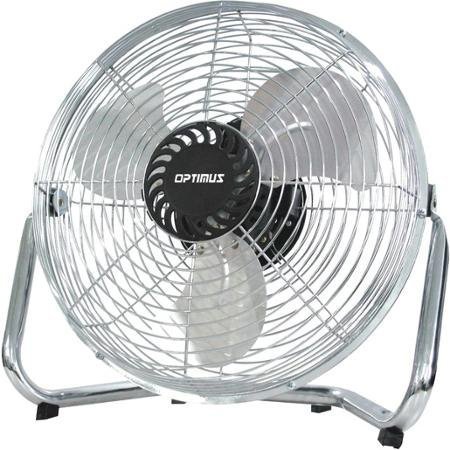
Image: Optimus 18-inch High Velocity Industrial Floor Fan. This image shows the fan with its silver metallic finish and sturdy floor stand.
Akụkụ ndị bụ isi:
- 18-inch diameter for wide air distribution.
- Industrial-grade high velocity airflow.
- Durable metallic finish.
- Floor standing design for stable placement.
- Multiple power levels for adjustable airflow.
Ntuziaka nhazi
- Mepee onye ofufe: Carefully remove the fan and all components from the packaging. Retain packaging for future storage or transport.
- Assemble the Floor Stand:
- Attach the fan head to the floor stand using the provided screws and tools. Ensure all connections are secure.
- Verify the fan head can pivot smoothly on the stand.
- Nkwanye: Place the fan on a firm, level surface. Ensure there is adequate space around the fan for proper air circulation and to prevent obstruction of the air intake/output. Keep the fan at least 3 feet away from walls or furniture.
- Njikọ ike: Ensure the fan is in the "OFF" position before plugging it into a standard 120V AC electrical outlet.
Ntuziaka ọrụ
This fan features push-button controls for easy operation. A remote control may also be included for convenience.
- Gbanyụọ/ Gbanyụọ: Locate the power button on the control panel. Press the button once to turn the fan ON. Press it again to turn the fan OFF.
- Na-emezi ọsọ onye ofufe: The fan has 4 power levels. After turning the fan ON, repeatedly press the speed control button to cycle through the available speed settings (Low, Medium, High, Max). The fan will operate at the selected speed.
- Na-emezi ntụzịaka ikuku: The fan head can be tilted manually to direct airflow upwards or downwards. Gently tilt the fan head to the desired angle. Do not force the fan head beyond its intended range of motion.
Nlekọta
Ịsacha na mmezi mgbe niile ga-eme ka arụmọrụ kacha mma ma mee ka onye na-efe efe gị dịgide ogologo oge.
- Na-ehicha onye ofufe:
- Kwapụ ihe ikuku na-agbapụta mgbe niile site na isi iyi ike tupu ị na-ehicha ya.
- Jiri nwayọọ, damp cloth to wipe the exterior surfaces of the fan. Do not use abrasive cleaners or harsh chemicals, as these may damage the finish.
- To clean the fan blades, carefully remove the front grille (if detachable, refer to assembly instructions for details). Wipe the blades with a soft cloth. Ensure the grille is securely reattached before operating the fan.
- Hụ na akụkụ niile kpọrọ nkụ kpamkpam tupu ị gbanyeghachi fan ahụ.
- Nchekwa: Ọ bụrụ na e jighị ya ruo ogologo oge, debe fan ahụ n'ebe dị jụụ ma kpọọ nkụ. A na-atụ aro ka e debe ya n'ime akpa mbụ ya iji chebe ya pụọ na uzuzu na mmebi.
Nchọpụta nsogbu
| Nsogbu | Ihe nwere ike ime | Ngwọta |
|---|---|---|
| Onye ofufe anaghị agbanwuo. | Akwụnyeghị ya; ebe a na-esi ike anaghị arụ ọrụ; mgbanyụ fan agbanyụrụ. | Ensure fan is securely plugged into a working outlet. Check household fuse/circuit breaker. Press the power button to turn the fan on. |
| Obere ikuku. | Fan speed set too low; obstructed intake/output; dirty blades. | Increase fan speed. Clear any obstructions. Clean fan blades and grilles as per maintenance instructions. |
| Mkpọtụ ma ọ bụ mkpọtụ na-adịghị ahụkebe. | Loose parts; fan not on a level surface; foreign object in blades. | Unplug the fan and check for any loose screws or components. Place the fan on a stable, level surface. Carefully inspect for and remove any foreign objects. |
Nkọwapụta
| Njirimara | Nkọwa |
|---|---|
| Ụdị | Optimus |
| Aha Nlereanya | Ọsọ dị elu |
| Nọmba Nlereanya ihe | 306c1b92-f36b-4ccc-ac62-2ad33d5c9efb |
| Dayameta | 18 sentimita asatọ |
| Agba | Ọlaọcha |
| Ụdị | Ụlọ ọrụ mmepụta ihe |
| Isi Iyi Ike | Igwe ọkụ eletrik |
| Ọnụọgụ nke ọkwa ike | 4 |
| Usoro njikwa | Njikwa bọtịnụ |
| Ojiji ime ime/n'èzí | Ime ụlọ |
| Ngwa gụnyere | Floor Stand, Remote Control |
| Nkọwapụta Met | OSHA |
Akwụkwọ ikike na nkwado
Optimus products are manufactured to high-quality standards. This product is covered by a limited warranty against defects in materials and workmanship from the date of purchase. Please refer to the warranty card included with your product for specific terms and conditions.
For technical support, troubleshooting assistance, or warranty claims, please contact Optimus customer service. Contact information can typically be found on the product packaging or the official Optimus websaịtị.
Biko dowe ihe akaebe nke ịzụrụ ihe maka ebumnuche ikike.