
1. Okwu mmalite
This manual provides essential instructions for the safe and efficient operation of your COMISO Portable Wireless Bluetooth Speaker U832. Please read this manual thoroughly before using the product and retain it for future reference.
2. Ngwaahịa gafereview
The COMISO U832 is a compact and portable wireless Bluetooth speaker designed for high-definition audio playback and hands-free calling. It features a durable construction and versatile connectivity options.

Foto 2.1: N'ihu view of the COMISO U832 Portable Wireless Bluetooth Speaker.

Nyocha 2.2: N'eluview of the COMISO U832 speaker, highlighting its compact dimensions (60.4mm x 90mm x 31.1mm) and key features such as CSR 4.0 Bluetooth, 5W driver, built-in microphone, 5-hour playing time, A2DP support, 33-feet range, IP67 waterproof rating, and dustproof design.
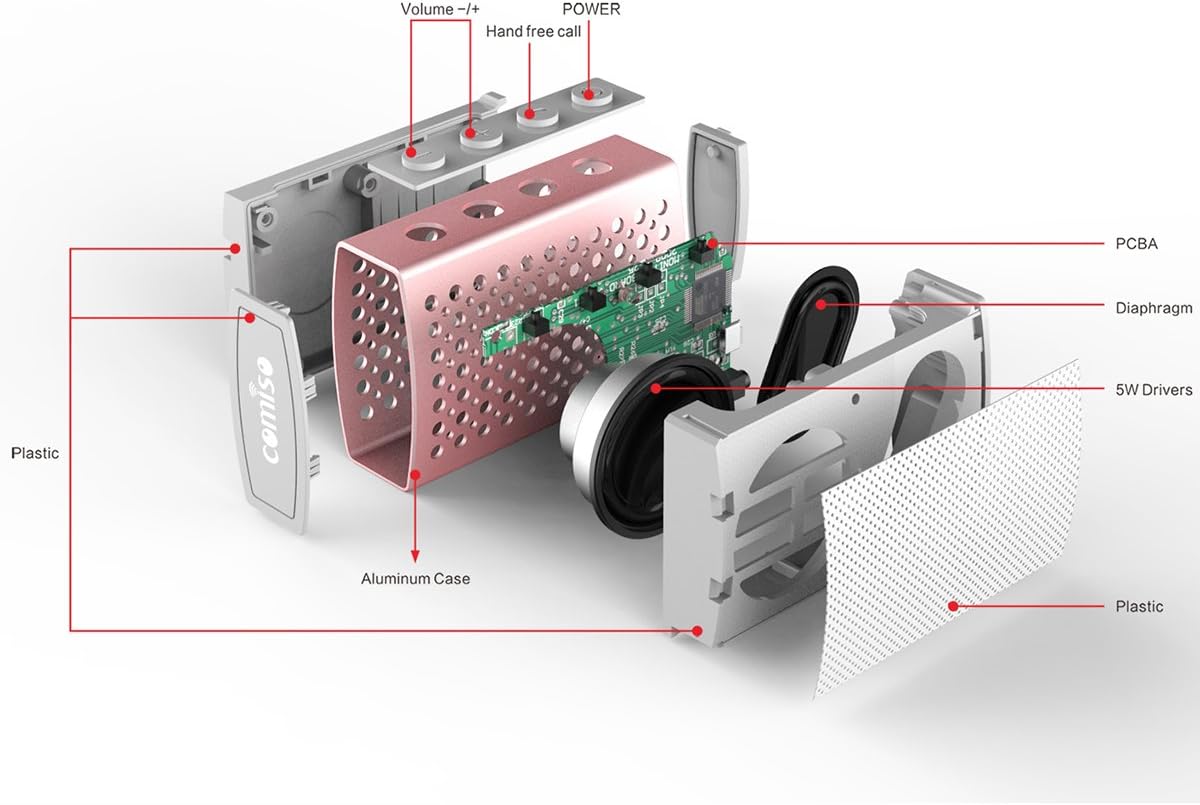
Ọgụgụ 2.3: gbawara view illustrating the internal components of the COMISO U832 speaker, including the aluminum case, PCBA (Printed Circuit Board Assembly), diaphragm, 5W drivers, and plastic housing. Control buttons for Volume -/+, Hand-free call, and Power are also visible.
3. Atụmatụ
- Enwere ike ibugharị: Kọmpat na dị fechaa maka njem dị mfe.
- Njikọ Bluetooth ikuku: Seamless audio streaming from compatible devices.
- Igwe okwu arụnyere n'ime ya: Na-akwado oku na-enweghị aka.
- Ahịrị AUX: For wired audio connections.
- HD Sound and Bass: Optimized audio performance.
- IP67 anaghị egbochi mmiri na uzuzu: Provides protection against water immersion and dust ingress.
- 5W Speaker Output: Na-enye ụda doro anya ma dị ike.
- Ogologo ndụ batrị: Up to 5 hours of playback on a single charge.
4. Nhazi
4.1 Ịchaji ọkà okwu
Before initial use, fully charge the speaker. Connect the provided USB charging cable to the speaker's charging port and the other end to a USB power adapter (not included) or a computer's USB port. The charging indicator light will illuminate during charging and turn off when fully charged.

Figure 4.1: The COMISO U832 speaker connected for charging and AUX audio input.
4.2 Njikọ Bluetooth
- Gbaa mbọ hụ na chajịrị ọkà okwu.
- Press and hold the Power button on the speaker until you hear an audible prompt and the Bluetooth indicator light begins to flash, indicating it is in pairing mode.
- On your mobile device, navigate to the Bluetooth settings and enable Bluetooth.
- Chọọ maka available devices. Select "COMISO U832" from the list.
- Once paired, the speaker will emit an audible confirmation, and the Bluetooth indicator light will stop flashing and remain solid.
The speaker will automatically attempt to reconnect to the last paired device when powered on, if the device is within range and has Bluetooth enabled.
4.3 Njikọ AUX
To connect a device without Bluetooth, use a 3.5mm audio cable (not included). Insert one end of the cable into the speaker's AUX input port and the other end into the audio output jack of your device. The speaker will automatically switch to AUX mode.
5. Ntuziaka ọrụ
5.1 Gbanyụọ ma ọ bụ gbanyụọ
- Ike Na: Pịa ma jide bọtịnụ Ike maka ihe dị ka sekọnd abụọ.
- Gbanyụọ: Pịa ma jide bọtịnụ Ike maka ihe dị ka sekọnd abụọ.
5.2 Njikwa olu
- Dịkwuo Mpịakọta: Pịa bọtịnụ '+'.
- Belata Mpịakọta: Pịa bọtịnụ '-'.
5.3 Playback Control (Bluetooth Mode)
- Gwuo/kwụsịtụ: Press the Play/Pause button (often integrated with the hands-free call button).
- Track na-esote: Pịa ma jide bọtịnụ '+'.
- Gara aga Track: Pịa ma jide bọtịnụ '-'.
5.4 Oku a na-enweghị aka
When connected via Bluetooth, the speaker's built-in microphone allows for hands-free calls.
- Oku azaa: Press the Hands-free Call button once.
- Oku ngwụcha: Press the Hands-free Call button once during a call.
- Jụ oku: Press and hold the Hands-free Call button for approximately 2 seconds.
6. Nlekọta
- Jiri akwa dị nro hichaa ọkà okwu. Ejila ihe nchacha abrasive ma ọ bụ ihe mgbaze.
- Zere ikpughe ọkà okwu na oke okpomọkụ ma ọ bụ ìhè anyanwụ kpọmkwem ruo ogologo oge.
- Chekwaa ọkà okwu n'ebe dị jụụ, kpọrọ nkụ mgbe ọ naghị eji ya.
- Ensure the charging port cover is securely closed to maintain IP67 water and dust resistance.
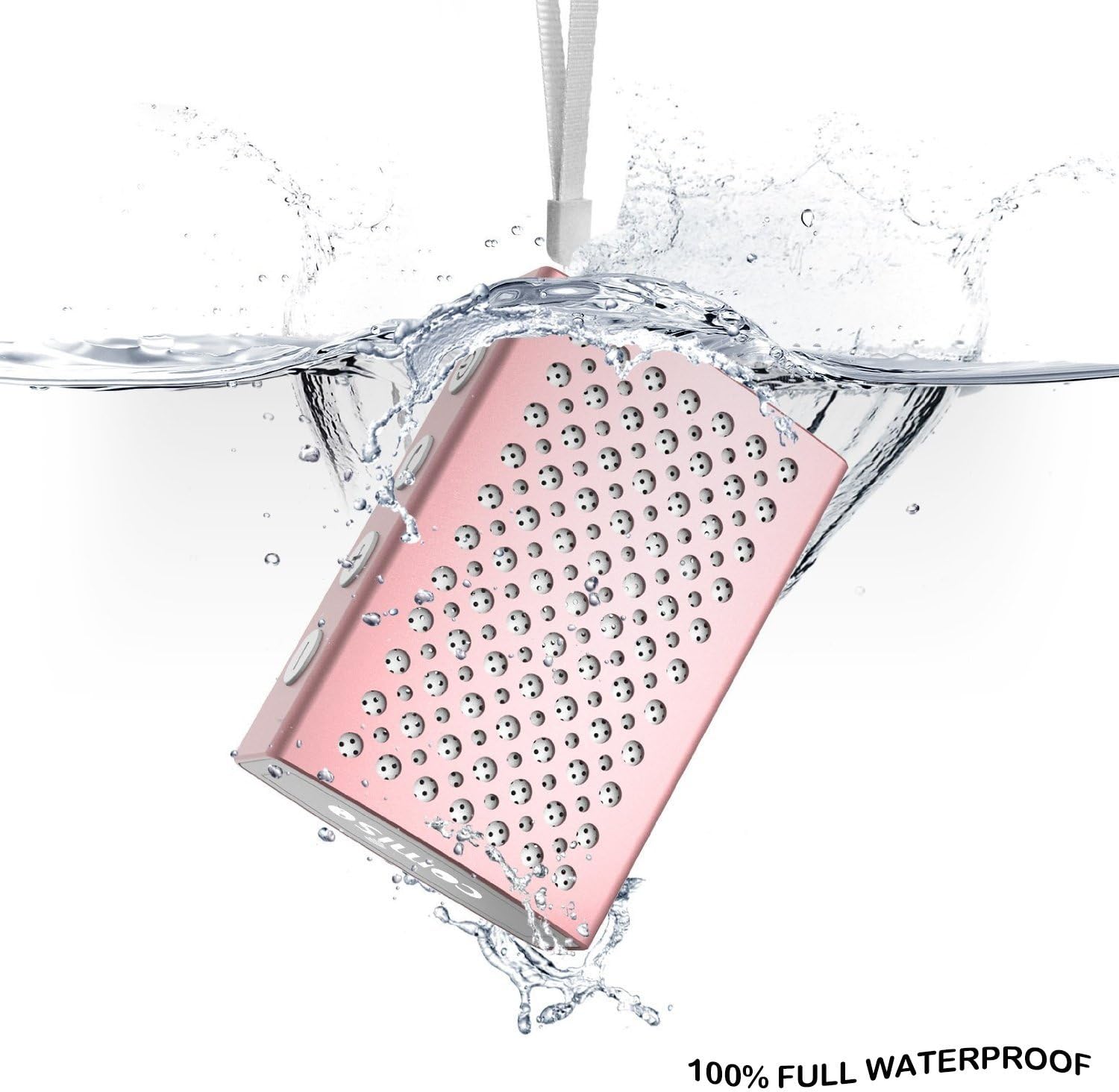
Figure 6.1: The COMISO U832 speaker demonstrating its 100% full waterproof capability, suitable for use in wet environments.
7. Nchọpụta nsogbu
| Nsogbu | Ihe nwere ike ime | Ngwọta |
|---|---|---|
| Ọkà okwu anaghị agba ọkụ. | Batrị dị ala. | Chajie ọkà okwu zuru ezu. |
| Enweghị ike ijikọ site na Bluetooth. | Ọkà okwu adịghị n'ụdị njikọta; gbanyụọ ngwaọrụ Bluetooth; tere aka site n'ikwu okwu. | Ensure speaker is in pairing mode (flashing light). Turn on Bluetooth on your device. Move device closer to speaker (within 33 feet). |
| Enweghị ụda. | Olu dị oke ala; ọnọdụ ntinye na-ezighi ezi; ngwaọrụ anaghị akpọ ọdịyo. | Increase speaker and device volume. Check if speaker is in correct mode (Bluetooth/AUX). Ensure audio is playing on your device. |
| Ụda adịghị mma ma ọ bụ enweghị ike ịkwụsị. | Ntinye aka; ngwaọrụ tere aka; obere batrị. | Move speaker closer to device. Avoid obstacles. Charge speaker. |
8. Nkọwapụta
| Njirimara | Nkọwa |
|---|---|
| Ụdị | COMISO |
| Nọmba nlereanya | U832 |
| Teknụzụ Njikọta | Bluetooth, inyeaka |
| Ike Nwepu kacha elu | 5 Watt |
| Isi Iyi Ike | Akwanyere batrị |
| Usoro njikwa | Metụ aka |
| Akụkụ ngwaahịa | 4.9 x 3.9 x 2.1 sentimita asatọ |
| Ibu Ibu | 0.8 ounces (ihe dị ka 22.68 g) |
| Atụmatụ pụrụ iche | Built-in Microphone, Portable, IP67 Waterproof |
| UPC | 742920066987 |
9. Akwụkwọ ikike na nkwado
For warranty information or technical support, please refer to the documentation included with your purchase or visit the official COMISO websaịtị. Debe ihe akaebe nke ịzụrụ maka akwụkwọ ikike.
10. Ozi nchekwa
- Achịkọtala, rụkwaa, ma ọ bụ gbanwee ọkà okwu.
- Keep the speaker away from heat sources, direct sunlight, and sharp objects.
- Do not expose the speaker to fire or extreme temperatures.
- Jiri naanị chaja akọwapụtara voltage na ugbua.
- Debe ebe ụmụaka na-apụghị iru.