
1. Okwu mmalite
Daalụ maka ịzụrụasing the COBY DTV-700 Digital to Analog TV Converter. This device allows you to receive digital broadcast television signals and convert them for display on older analog televisions. It also functions as a multimedia player, supporting various audio, video, and image formats via its USB port, and offers recording capabilities. Please read this manual thoroughly before operating the device to ensure proper use and to maximize your viewahụmahụ.
2. Ihe ngwugwu
Biko lelee igbe maka ihe ndị a:
- COBY DTV-700 Digital to Analog TV Converter
- Njikwa anya
- Ihe nkwụnye ọkụ AC/DC
- AV Cable (RCA)
- Akwụkwọ ntuziaka (akwụkwọ a)
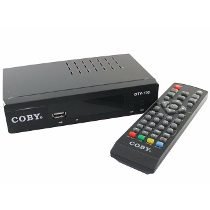
Image 2.1: The COBY DTV-700 Digital to Analog TV Converter. This image shows the compact design of the converter unit, typically black with various ports and indicators.
3. Ozi nchekwa
Iji hụ na ọrụ nchekwa na gbochie mmebi, biko debe ihe ndị a:
- Etinyela igwe ahụ n'ime mmiri ozuzo, mmiri ozuzo, ma ọ bụ oke okpomọkụ.
- Emeghela casing; zigara ndị ọrụ ruru eru ọrụ niile.
- Gbaa mbọ hụ na ikuku ikuku dị na gburugburu unit ahụ iji gbochie ikpo oke ọkụ.
- Jiri naanị ihe nkwụnye ọkụ enyere.
- Debe ihe ahụ ka ọ ghara ịpụta ìhè n'anwụ, ebe okpomọkụ na-esi, na ebe magnet siri ike.
- Tụfuo batrị na ihe mkpofu eletrọniki n'ụzọ kwesịrị ekwesị dịka iwu obodo si dị.
4. Ngwaahịa gafereview
4.1 Ogwe ihu
The front panel typically includes:
- Ihe ngosi ike: Na-enwu mgbe unit ahụ na-agbanye.
- bọtịnụ elu/ala ọwa: For changing channels.
- Bọtịnụ menu: Na-abanye na menu isi.
- Ọdụ ụgbọ mmiri USB: For connecting USB storage devices for media playback and recording.
4.2 Ogwe azụ
Ogwe azụ na-enye ọdụ ụgbọ mmiri njikọ niile dị mkpa:
- ANT na: Connects to your antenna for receiving digital signals.
- HDMI apụ: Connects to an HDMI-compatible TV for high-definition output.
- AV OUT (RCA): Connects to older analog TVs using composite video (yellow) and stereo audio (red/white) cables.
- AKWỤKWỌ: Digital audio output (if available).
- DC N'ime: Connects to the provided AC/DC power adapter.
5. Nhazi
5.1 Ijikọ Ihe Ntụgharị
- Jikọọ Antenna: Connect your digital antenna to the ANT IN port on the rear of the DTV-700.
- Jikọọ na TV:
- For Analog TVs: Use the supplied AV cable. Connect the yellow plug to the video input of your TV, and the red/white plugs to the corresponding audio inputs. Connect the other end to the AV pụọ ports on the DTV-700.
- For Digital/HDTVs: Use an HDMI cable (not included). Connect one end to the HDMI pụọ port on the DTV-700 and the other end to an available HDMI input on your TV.
- Njikọ Ike: Plug the AC/DC power adapter into the DC IN port on the DTV-700, then plug the adapter into a wall outlet.
5.2 Ntọala Mmalite na Nnyocha Ọwa
- Turn on your TV and select the correct input source (e.g., AV1, HDMI1) that corresponds to your connection.
- Power on the DTV-700 using the remote control or the power button on the front panel.
- The first time you power on, an initial setup wizard may appear. Follow the on-screen prompts to select your language and country.
- Initiate an automatic channel scan. This will search for all available digital channels in your area. This process may take several minutes. Do not interrupt the scan.
- Once the scan is complete, the converter will tune to the first available channel.
6. Ntuziaka ọrụ
6.1 Ọrụ njikwa anya
The remote control provides full functionality for your DTV-700. Ensure two AAA batteries are inserted correctly (batteries not included).
- IKE: Gbanyụọ ma ọ bụ gbanyụọ unit ahụ.
- CH +/-: Na-agbanwe ọwa elu ma ọ bụ ala.
- Vol +/-: Na-edozi olu.
- NchNhr: Na-abanye na menu isi.
- ỤZỌ ỌPỤPỤ: Wepụ menu ma ọ bụ ọrụ dị ugbu a.
- Ozi: Na-egosiputa ozi ọwa ugbu a.
- OK / Navigation Buttons: Confirms selections and navigates menus.
- Nyocha: Starts recording the current program.
- PLAY/PAUSE, STOP, FF, REW: Media playback controls.
- USB: Switches to USB media playback mode.
6.2 Channel Navigation
Jiri ihe AK +/- buttons on the remote or front panel to browse channels. You can also directly enter a channel number using the numeric keypad on the remote.
6.3 Isi NchNhr
Pịa MENU button to access settings for Program, Picture, Sound, Time, Option, and System. Use the navigation buttons to select options and OK iji gosi.
7. Mgbasa mgbasa ozi
The DTV-700 supports media playback from a USB storage device (e.g., USB flash drive, external hard drive). Insert your USB device into the USB port on the front panel.
7.1 Ụdị akwadoro
- Egwu: MP3, WMA
- Foto: JPG, BMP, PNG
- Vidiyo: MKV, AVI, DIVX, XVID, MOV, VOB, FLV, DAT, MPEG, MP4, TS
7.2 Na-egwu Mgbasa Ozi
- Fanye ngwaọrụ nchekwa USB n'ọdụ ụgbọ mmiri USB.
- Pịa USB button on the remote control or navigate to the 'Multimedia' section in the main menu.
- Select the desired media type (Music, Photo, Video) and browse your files.
- Jiri bọtịnụ nsoroụzọ ka ịhọrọ a file na pịa OK igwu egwu.
8. Atụmatụ ndekọ
The DTV-700 allows you to record live TV programs to a connected USB storage device.
8.1 Ndekọ ngwa ngwa
Mgbe ị na-ekiri mmemme, pịa bọtịnụ REC button on the remote control to start recording. Press KWỤSỊ iji kwụsị ndekọ ahụ.
8.2 Scheduled Recording (PVR)
Access the PVR (Personal Video Recorder) or Schedule menu via the main menu to set up timed recordings. You will need to specify the channel, start time, end time, and date for the recording.
9. Nchọpụta nsogbu
| Nsogbu | Ihe kpatara/ Ngwọta nwere ike ime |
|---|---|
| Enweghị foto ma ọ bụ ụda |
|
| Poor picture quality / No channels |
|
| Njikwa anya anaghị arụ ọrụ |
|
| Mgbasa ozi USB anaghị egwu |
|
10. Nkọwapụta
- Ụdị: DTV-700
- Akara: Coby
- Ntinye: Digital TV Antenna (ATSC/DVB-T/T2 compatible, depending on region)
- Mpụta: HDMI, AV (RCA Composite Video/Audio)
- Ọdụ ụgbọ mmiri USB: Yes (for media playback and PVR)
- Usoro Mgbasa Ozi Akwadoro:
- Music: MP3, WMA
- Foto: JPG, BMP, PNG
- Video: MKV, AVI, DIVX, XVID, MOV, VOB, FLV, DAT, MPEG, MP4, TS
- Ike: AC/DC Adapter (Input: 100-240V ~ 50/60Hz, Output: typically 5V-12V DC)
- Akụkụ: Approximately 20 x 15.6 x 6.2 cm (Package dimensions)
- Arọ: Approximately 490 g (Package weight)
- Batrị njikwa anya: 2 x AAA (anaghị etinye ya)
11. Nlekọta
To ensure the longevity and optimal performance of your DTV-700 converter:
- Nhicha: Use a soft, dry cloth to clean the exterior of the unit. Do not use liquid cleaners or abrasive chemicals.
- Igwe ikuku: Gbaa mbọ hụ na egbochighị oghere ikuku iji gbochie ikpo oke ọkụ.
- Nchekwa: Ọ bụrụ na ị na-echekwa unit ahụ ruo ogologo oge, kwụpụ ya na ike ma chekwaa ya n'ebe dị jụụ na nkụ.
12. Akwụkwọ ikike na nkwado
For warranty information and technical support, please refer to the warranty card included with your product or visit the official Coby websaịtị. Debe nnata nzụta gị dị ka ihe akaebe nke ịzụrụ ihe maka akwụkwọ ikike ọ bụla.
Coby is committed to providing quality products and customer satisfaction. If you encounter any issues not covered in this manual, please contact Coby customer service for assistance.