
PRORECK PARTY 15
PRORECK Party 15 Portable PA Speaker System
Akwụkwọ ntuziaka onye ọrụ
Model: PARTY 15
Okwu mmalite
Daalụ maka ịzụrụasing the PRORECK Party 15 Portable PA Speaker System. This system is designed to deliver powerful and clear audio for various applications, including parties, DJ events, home studios, and social gatherings. Featuring Bluetooth connectivity, USB/SD card playback, FM radio, and integrated LED lights, the Party 15 offers versatile audio solutions. Please read this manual thoroughly before operating the system to ensure proper use and to maximize its performance and longevity.
Ozi nchekwa dị mkpa
Always follow basic safety precautions when using this product to reduce the risk of fire, electric shock, and injury.
- Do not expose this equipment to rain or moisture.
- Do not open the speaker enclosure. There are no user-serviceable parts inside. Refer all servicing to qualified service personnel.
- Gbaa mbọ hụ na ọkọnọ ọkụ voltage dabara na voltage kpọmkwem na unit.
- Chebe eriri ọkụ ka ị ghara ịgagharị ma ọ bụ tuo ya, ọkachasị na plọg, ebe nchekwa dị mma, na ebe ha si na ngwa ahụ pụta.
- Kwupu ngwa a n'oge oke mmiri ozuzo ma ọ bụ mgbe ejighi ya ogologo oge.
- Akwụsịla oghere ikuku ikuku ọ bụla. Wụnye dị ka ntuziaka onye nrụpụta si dị.
- Jiri naanị ụgbọ ala, nkwụ, tripod, bracket, ma ọ bụ tebụl nke onye nrụpụta akọwapụtara, ma ọ bụ jiri ngwa ree ya.
Kedu ihe dị na Igbe ahụ
Carefully unpack your PRORECK Party 15 system and ensure all items listed below are present and in good condition. If any items are missing or damaged, please contact your retailer immediately.

Image: Complete PRORECK Party 15 system with all included accessories.
- 1 x Ọkà okwu na-arụ ọrụ
- 1 x Ọkà Okwu Na-anaghị Arụ Ọrụ
- 2 x Ọkà okwu guzoro
- 1 x Igwe okwu ikuku
- 1 x Speakon Cable (for connecting active to passive speaker)
- 1 x eriri ọkụ
- 1 x Njikwa anya

Foto: Zuru ezu view of the wired microphone, remote control, and various cables.
Melite
Follow these steps to set up your PRORECK Party 15 speaker system.
1. Speaker Stand Assembly
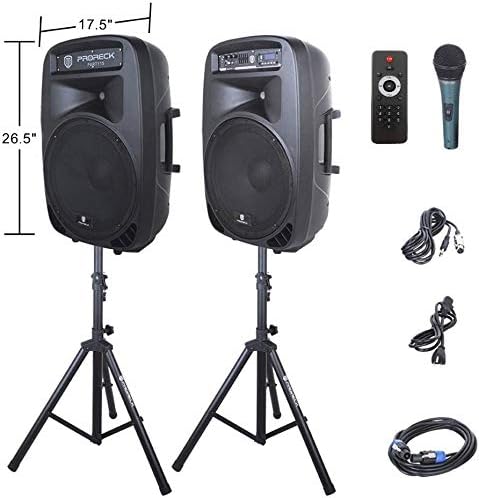
Image: The two included speaker stands.
- Unfold the tripod legs of each speaker stand until they are fully extended and stable.
- Loosen the height adjustment knob on the stand and extend the pole to your desired height. Ensure the safety pin is inserted through the appropriate hole to secure the height.
- Mee ka isi ihe ngbanwe dị elu sie ike.
2. Ntinye okwu
- Carefully lift each speaker and place it onto the top pole of a speaker stand. Ensure the speaker is securely seated.
- Position the active speaker (the one with the control panel) near a power outlet.
- Place the passive speaker within reach of the included Speakon cable from the active speaker.
Image: PRORECK Party 15 speakers set up on their stands.
3. Ijikọ ndị na-ekwu okwu
- Locate the Speakon output on the rear panel of the active speaker and the Speakon input on the rear panel of the passive speaker.
- Connect one end of the Speakon cable to the active speaker's Speakon output and the other end to the passive speaker's Speakon input. Ensure a secure connection.

Image: Rear panels of the active and passive speakers, highlighting the Speakon connection.
4. Njikọ ike
- Ensure the master volume knob on the active speaker is turned down to its minimum setting.
- Connect the power cable to the active speaker's power input and then plug it into a suitable electrical outlet.
Ntuziaka ọrụ
This section details how to operate your PRORECK Party 15 speaker system and utilize its various features.
Ogwe njikwa gafereview

Foto: Zuru ezu view of the active speaker's control panel.
The active speaker features a comprehensive control panel with an LCD display, various input options, volume controls, and an equalizer.
1. Gbanyụọ / gbanyụọ
- After connecting the power cable, locate the power switch on the rear panel of the active speaker.
- Flip the switch to the "ON" position to power on the system. The LCD display will illuminate.
- To power off, flip the switch to the "OFF" position.
2. Nhọrọ mode
Pịa MODE button on the control panel or remote control to cycle through available input modes: Bluetooth, USB, SD Card, FM Radio, and Line Input.
3. Njikọ Bluetooth
- Select "Bluetooth" mode using the MODE button. The LCD display will show "BLUE".
- On your Bluetooth-enabled device (smartphone, tablet, etc.), search for available Bluetooth devices.
- Select "PRORECK PARTY 15" from the list. Once paired, the speaker will emit a confirmation sound.
- You can now play audio from your device through the speakers.
4. USB/SD Kaadị playback
- Insert a USB drive or SD card containing MP3 audio files into the respective slot on the control panel.
- The system will automatically switch to USB or SD mode and begin playing the first compatible audio fileỌ bụrụ na ọ bụghị, pịa MODE bọtịnụ ka ịhọrọ ntinye ziri ezi.
- Jiri ihe KWURU/Kwụsịa, Gburugburu, na OSOTE buttons on the control panel or remote to manage playback.
5. Redio FM
- Select "FM Radio" mode using the MODE bọtịnụ.
- Pịa KWURU/Kwụsịa button to initiate an automatic scan for available FM stations. The system will save detected stations.
- Jiri ihe Gburugburu na OSOTE bọtịnụ ka ịnyagharịa n'ọdụ ụgbọ mmiri echekwara.
6. Eji igwe okwu
- Connect the wired microphone to the 1/4'' MIC input on the control panel.
- Adjust the "MIC VOL" knob to control the microphone's volume level.
- Ensure the main volume is set appropriately to avoid feedback.
7. Ọrụ njikwa anya
Image: The included remote control.
The remote control allows for convenient operation from a distance (up to 20 feet). Functions include:
- Edị: Switch between input modes.
- KWURU/Kwụsịa: Kpọọ ma ọ bụ kwụsịtụ ịkpọghachi ọdịyo.
- Gburugburu/Osote: Skip tracks or navigate FM stations.
- VOL+/VOL-: Gbanwee olu ukwu.
- EQ: Cycle through equalizer presets.
- Numeric buttons for direct track selection (in USB/SD mode).
8. Nhazi nhazi nhata
The control panel features a 5-band graphic equalizer. Adjust the sliders to fine-tune the audio output to your preference. Experiment with different settings to achieve the desired sound for various music genres or vocal performances.
9. Ikanam ọkụ

Image: PRORECK Party 15 speakers demonstrating various LED light colors.
The PRORECK Party 15 speakers are equipped with built-in LED lights that activate with sound. These lights enhance the party atmosphere. There is a dedicated switch on the rear of the active speaker to turn the LED lights on or off.
Nlekọta
Proper maintenance ensures the longevity and optimal performance of your speaker system.
- Nhicha: Use a soft, dry cloth to clean the exterior of the speakers. Do not use abrasive cleaners, waxes, or solvents.
- Nchekwa: Mgbe a naghị eji ya ruo ogologo oge, debe igwe okwu ahụ n'ebe dị jụụ ma kpọọ nkụ, ebe anwụ na-anaghị anwụ kpọmkwem ma ọ bụ oke okpomọkụ.
- Igwe ikuku: Hụ na oghere ikuku dị n'ebe a na-anaghị ekpofu uzuzu na ihe ndị na-emebi ihe agaghị ekpo oke ọkụ.
- Gịnị: Regularly check all cables for signs of wear or damage. Replace any damaged cables immediately.
Nchọpụta nsogbu
If you encounter issues with your PRORECK Party 15 system, refer to the following common problems and solutions.
| Nsogbu | Ihe nwere ike ime | Ngwọta |
|---|---|---|
| Enweghị ike | Ejikọghị eriri ọkụ; Gbanyụọ ọkụ; Nsogbu adịghị na mwepụta. | Ensure power cable is securely connected and plugged into a working outlet. Check power switch on rear panel. |
| Enweghị ụda sitere na ndị ọkà okwu | Volume too low; Incorrect input mode; Speakon cable loose/damaged; Audio source issue. | Increase master volume. Select correct input mode. Check Speakon cable connection between active and passive speakers. Verify audio source is playing. |
| Bluetooth anaghị ejikọta | Speaker not in Bluetooth mode; Device too far; Device already paired to another speaker. | Ensure speaker is in Bluetooth mode ("BLUE" on display). Move device closer to speaker. Disconnect device from other Bluetooth connections. |
| Igwe okwu anaghị arụ ọrụ | Mic volume too low; Microphone not connected properly; Microphone faulty. | Increase "MIC VOL" knob. Ensure microphone is fully inserted into the 1/4'' input. Test with another microphone if available. |
| Ụda agbagọ | Volume too high; Input signal too strong; Equalizer settings. | Reduce master volume or input source volume. Adjust equalizer settings. |
| Igwe ọkụ LED anaghị arụ ọrụ | LED switch off; Volume too low for activation. | Ensure the LED switch on the rear panel is in the "ON" position. Increase volume to activate sound-reactive lights. |
Nkọwapụta
| Aha Nlereanya | OTU 15 |
| Ụdị Ọkà Okwu | Woofer |
| Nha Ọkà Okwu | 15 sentimita asatọ |
| Ike Nwepu kacha elu | 2000 Watts P.M.P.O (Peak Music Power Output) |
| Teknụzụ Njikọta | Waya, Igwe na-enweghị eriri (Bluetooth) |
| Teknụzụ nzikọrịta ozi ikuku | Bluetooth |
| Oke Bluetooth | Mita 10 (ihe dị ka 33 ụkwụ) |
| Atụmatụ pụrụ iche | LED Light, FM Radio, USB Port, SD Card Reader, Digital LCD Display |
| Ntinye | 1/4'' Mic, RCA Line Inputs, USB, SD Card |
| Nsonaazụ | Speakon Output (for passive speaker), RCA Line Output |
| Ihe onwunwe | Acrylonitrile Butadiene Styrene (ABS) |
| Nha Ngwaahịa (ọkà okwu ọ bụla) | 19"D x 30"W x 29"H (approximate, likely including handles/feet) |
| Ibu ihe (mkpokọta) | 81.6 pound |
| Isi Iyi Ike | Igwe ọkụ eletrik |
Akwụkwọ ikike na nkwado
PRORECK products come with a limited warranty. For specific warranty terms and conditions, please refer to the warranty card included with your product or visit the official PRORECK website. For technical support, troubleshooting assistance, or parts inquiries, please contact PRORECK customer service through their official channels.
Manufacturer: PRORECK AUDIO
Ask a question about this manual
Ask about setup, troubleshooting, compatibility, parts, safety, or missing instructions. Manuals+ will review the question and use this page’s manual context to help answer it.