
Okwu mmalite
This manual provides comprehensive instructions for the safe and efficient operation, maintenance, and troubleshooting of your KitchenAid 2.0 cu. ft. Over-the-Range Microwave with Sensor Cooking. Please read all instructions carefully before using the appliance and retain this manual for future reference.

Foto: N'ihu view of the KitchenAid 2.0 cu. ft. Over-the-Range Microwave in Stainless Steel.
Ntuziaka nchekwa dị mkpa
Mgbe ị na-eji ngwa eletriki, ekwesịrị ịgbaso ihe nchekwa nchekwa bụ isi, gụnyere ihe ndị a:
- Gụọ ntuziaka niile tupu i jiri ngwa.
- Ejila oven rụọ ọrụ ma ọ bụrụ na emebiwo ụzọ ma ọ bụ akara ọnụ ụzọ.
- Do not heat liquids or other foods in closed containers as they are liable to explode.
- Anwala tampnwere ma ọ bụ mee mgbanwe ọ bụla ma ọ bụ rụkwaa ọnụ ụzọ, ogwe njikwa, mgbanaka mkpọchi nchekwa, ma ọ bụ akụkụ ọ bụla ọzọ nke oven.
- Naanị hapụ ụmụaka ka ha jiri oven na-enweghị nlekọta mgbe enyerela ntụziaka zuru oke ka nwatakịrị ahụ nwee ike iji oven n'ụzọ dị nchebe ma ghọta ihe ize ndụ nke iji na-ekwesịghị ekwesị.
- Ejila kemịkalụ ma ọ bụ vapors na-emebi emebi na ngwa a.
- Always ensure proper ventilation during operation.
Melite
Iwepu na ntinye
Carefully remove all packaging materials. Ensure the microwave is placed on a flat, stable surface or properly installed over a range. Refer to the separate installation instructions for detailed mounting procedures. Ensure adequate clearance around the appliance for proper ventilation.

Image: KitchenAid microwave installed above a range in a kitchen setting.
Ntughari ntụgharị
Place the turntable support ring in the center of the microwave oven cavity. Position the glass turntable plate securely on the support ring. Ensure the turntable rotates freely.
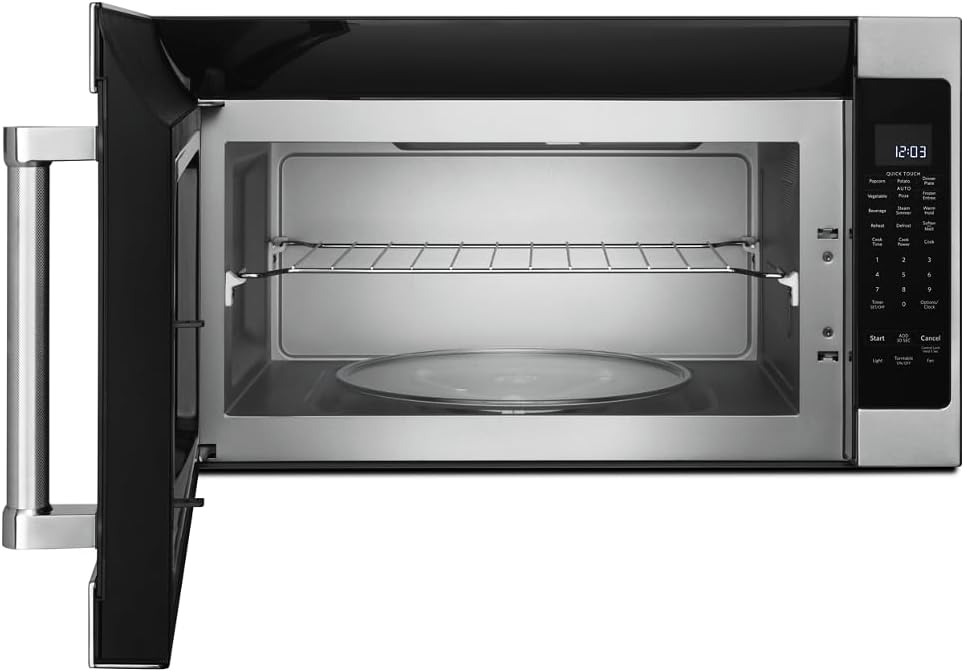
Foto: Ime view of the microwave showing the glass turntable and support ring.
Ntuziaka ọrụ
Isi ọrụ
- Ịtọ elekere: Press 'Options/Clock', then enter the current time using the number pad. Press 'Options/Clock' again to confirm.
- Mmalite ngwa ngwa: Press 'Start' to begin cooking immediately for 30 seconds at 100% power. Press 'Add 30 Sec' to add 30 seconds to the cooking time.
- Oge nri: Press 'Cook Time', enter the desired cooking time, then press 'Start'.
- Cook Power: After setting 'Cook Time', press 'Cook Power', enter the desired power level (1-10, 10 being 100%), then press 'Start'.
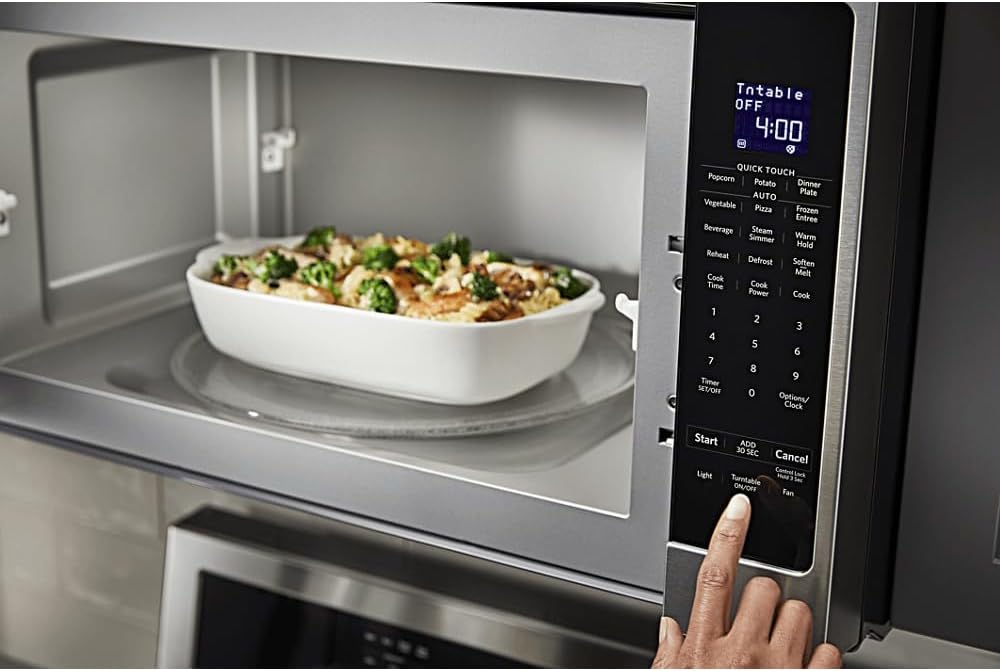
Foto: Zuru ezu view of the microwave's control panel with various cooking options.
Quick Touch Functions
The microwave features several one-touch cooking options:
- Ọka agbara agba: For automatic popcorn popping.
- Nduku: Maka ịsa poteto.
- Pizza: Maka ịkpo ọkụ ọzọ na mpekere pizza.
- Ihe ọṅụṅụ: Maka ihe ọṅụṅụ kpo oku.
- Tinyegharịa: For reheating various food items.
- Ntughari: Maka ịgbaze nri site na ibu ma ọ bụ oge.
Ihe mmetụta sensọ
The sensor cooking feature automatically adjusts cooking time and power levels based on the food's moisture content. Select the desired sensor cooking option (e.g., 'Vegetable', 'Frozen Entree', 'Dinner Plate') and press 'Start'. The microwave will detect when the food is cooked.

Image: Interior of the microwave showing food items on the turntable and a removable rack.
Atụmatụ pụrụ iche
- Steam Simmer: For steaming or simmering foods.
- Jide ọkụ: Keeps cooked food warm for an extended period.
- Mee nro/gbazekwa: For softening butter, melting chocolate, or other similar tasks.
- Ìhè: Controls the under-cabinet light.
- Mgbanwu/Mgbanyụọ nke a na-agbanwe agbanwe: Allows you to stop the turntable rotation for larger dishes.
- Onye ofufe: Controls the exhaust fan speed.

Image: A person's hand operating the control panel of the KitchenAid microwave.
Nlekọta
Na-ehicha ime ime
Clean the interior of the microwave regularly with a mild detergent and a soft cloth. For stubborn food splatters, place a bowl of water with lemon slices inside and microwave for a few minutes to loosen residue, then wipe clean.
Na-ehicha Mpụga
Wipe the exterior surfaces, including the control panel and door, with a soft cloth and mild detergent. For stainless steel surfaces, use a stainless steel cleaner and polish in the direction of the grain.
Nlekọta ihe nzacha
The microwave is equipped with grease filters and may have a charcoal filter. Clean the grease filters monthly by washing them in hot, soapy water or in a dishwasher. Replace the charcoal filter (if present) approximately every 6 to 12 months, depending on usage.
Nchọpụta nsogbu
If you experience issues with your microwave, consult the following common problems and solutions:
| Nsogbu | Ihe nwere ike ime | Ngwọta |
|---|---|---|
| Microwave anaghị ebido | E mechighị ụzọ nke ọma; E wepụrụ eriri ọkụ eletrik; ihe mgbawa sekit e tinyere na fuse/gbajie. | Ensure door is securely closed; Check power connection; Reset circuit breaker or replace fuse. |
| Nri anaghị ekpo ọkụ nke ọma | Food not stirred/rotated; Incorrect power level; Turntable not rotating. | Stir or rotate food during cooking; Adjust power level; Ensure turntable is correctly placed and functioning. |
| Mkpọtụ na-adịghị ahụkebe n'oge arụ ọrụ | A naghị etinye ihe ntụgharị nke ọma; Ihe mba ọzọ nọ n'ime oghere. | Re-seat turntable; Check for and remove any obstructions. |
Ọ bụrụ na nsogbu ahụ dịgidere mgbe ị nwara azịza ndị a, biko kpọtụrụ nkwado ndị ahịa.
Nkọwapụta
| Njirimara | Nkọwa |
|---|---|
| Ụdị | KitchenAid |
| Nọmba nlereanya | KMHS120ESS |
| Akụkụ ngwaahịa (D x W x H) | 16.13" x 30" x 17.13" |
| Ike | 2.0 Cubic ụkwụ |
| Wattage | 1000 watt |
| Ihe onwunwe | Igwe anaghị agba nchara |
| Ụdị nwụnye | N'elu-na-Range |
| Njirimara Pụrụ Iche | Turntable, Sensor Cooking |
| Ụdị njikwa | Bọtịnụ |
| Ọnụọgụ nke Mmemme | 10 |
| Ọrụ ngụ oge | Dị |
| Ngwa gụnyere | Glass Turntable, Turntable Support Ring, Removable Rack |
Akwụkwọ ikike na nkwado
Ozi akwụkwọ ikike
This KitchenAid appliance comes with a limited warranty. Please refer to the warranty card included with your product for specific terms, conditions, and duration of coverage. Keep your proof of purchase for warranty claims.
Nkwado ndị ahịa
For technical assistance, service, or to order replacement parts, please contact KitchenAid Customer Service. Contact details can typically be found on the manufacturer's websaịtị ma ọ bụ na kaadị ndebanye aha ngwaahịa gị.
Nkwado n'ịntanetị: Visit the official KitchenAid website for FAQs, product registration, and service scheduling.
Nkwado ekwentị: Refer to your product documentation for the appropriate customer service phone number in your region.