
1. Ngwaahịa gafereview
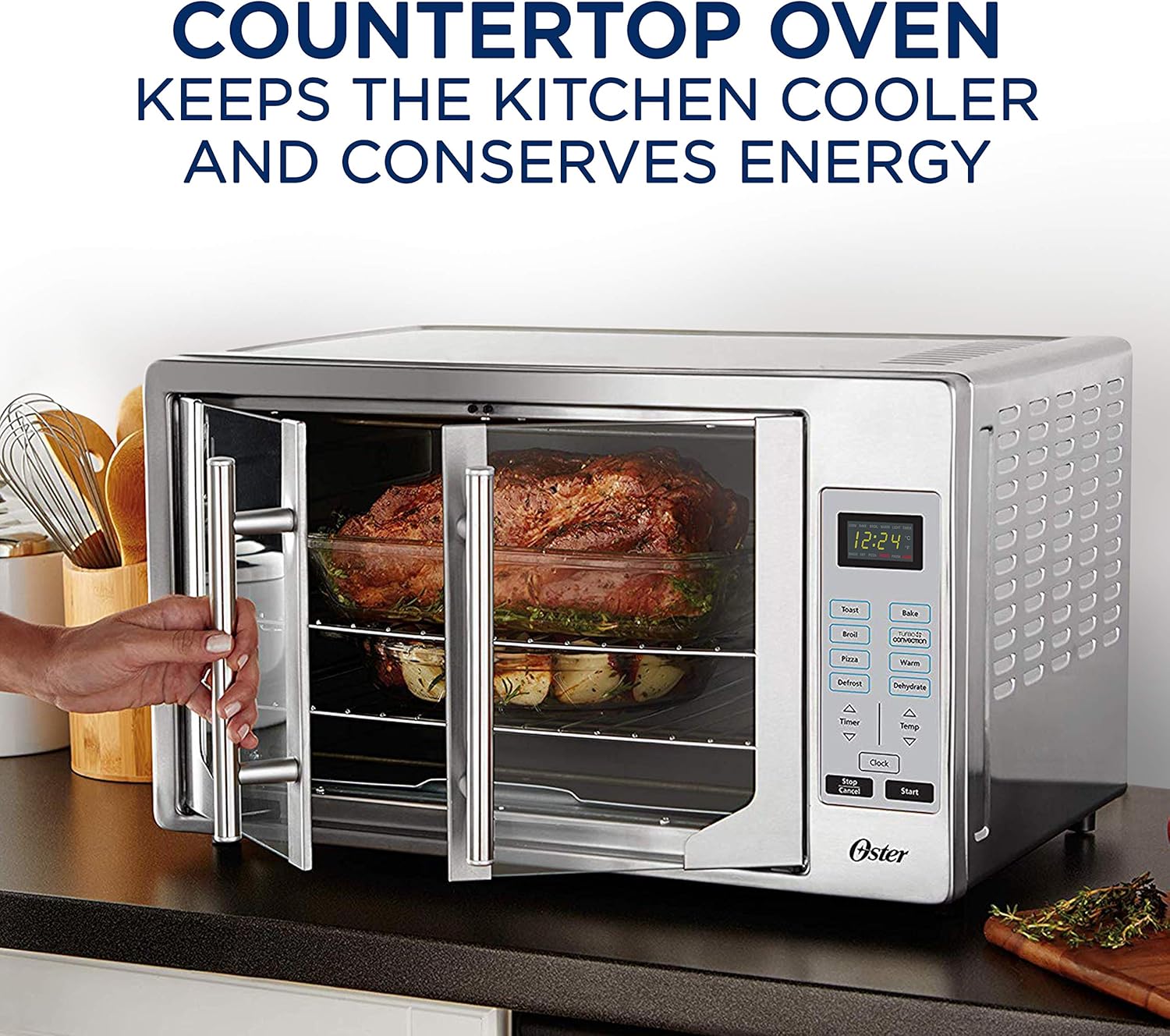
The Oster Digital French Door Oven is a versatile 8-in-1 countertop appliance designed to simplify your cooking experience. Its elegant stainless steel finish and unique French door mechanism, which allows both doors to open with a single pull, make it a convenient addition to any kitchen. Equipped with digital controls, this oven offers precise temperature and time settings for various cooking functions.
This extra-large convection oven is capable of accommodating two 16-inch pizzas, making it ideal for family meals or entertaining. It utilizes Turbo Convection baking technology to cook food faster and brown more evenly, while consuming up to 50% less energy compared to traditional ovens. The integrated 90-minute timer ensures your food cooks for the desired duration, with an automatic shut-off feature for safety and convenience.
Akụkụ ndị bụ isi:
- Single Door Pull: Opens both French doors with one hand for ease of use.
- Njikwa dijitalụ: Provides precise cooking time and temperature settings.
- Turbo Convection Baking Technology: Cooks faster and browns more evenly.
- Dual Racks: Offers maximum cooking flexibility with two included racks.
- Extra-Large Interior: Accommodates up to two 16-inch pizzas.
- Preheat Setting: Ensures precise cooking by reaching the desired temperature before cooking begins.
- Oge nkeji 90: Automatically shuts off the oven when cooking is complete.
- Ọrụ 8-n'ime-1: Includes Toast, Bake, Broil, Pizza, Defrost, Warm, Dehydrate, and Convection.

Foto 1: N'ihu view of the Oster Digital French Door Convection Oven.
2. Ngwa na Ngwa
Your Oster Convection Oven comes with essential accessories to enhance your cooking versatility.
Ngwa gụnyere:
- Oven Unit
- Abụọ waya Racks
- Pan na-eme achịcha
- Tray Crumb nke mbughari

Figure 2: Included accessories: baking pan and wire racks.
3. Nhazi
Before using your new Oster Convection Oven, please follow these setup instructions carefully.
Mwepu na idobe:
- Remove all packaging materials, including any internal packing and protective films.
- Place the oven on a flat, stable, heat-resistant surface. Ensure there is adequate clearance (at least 6 inches) on all sides and above the oven for proper ventilation. Do not place the oven directly against a wall or under cabinets.
- Ensure the power cord is not pinched or in contact with hot surfaces.
Nhicha izizi:
- Before first use, wipe the interior of the oven, racks, and baking pan with a damp akwa na ncha dị nro. Kpọọ nke ọma.
- It is recommended to run the oven empty on the 'Bake' setting at 450°F (232°C) for approximately 15 minutes to burn off any manufacturing residues. A slight odor or smoke may be present during this initial operation; this is normal. Ensure the area is well-ventilated.
4. Ntuziaka ọrụ
Your Oster Convection Oven features intuitive digital controls for easy operation. Familiarize yourself with the control panel before use.
Nyocha 3: N'eluview of oven features and digital control panel.
Ogwe njikwa gafereview:
- Ngosipụta Digital: Na-egosi oge, okpomọkụ na ọrụ ahọpụtara.
- Bọtịnụ ọrụ: Toast, Broil, Pizza, Defrost, Bake, Turbo Convection, Warm, Dehydrate.
- Timer Arrows (Up/Down): Hazie oge nri.
- Temp Arrows (Up/Down): Gbanwee okpomọkụ isi nri.
- Bọtịnụ elekere: Tọọ oge ugbu a.
- Bọtịnụ mmalite: Begins the selected cooking cycle.
- Bọtịnụ Nkwụsị/Kagbuo: Stops or cancels the current operation.
Usoro ọrụ izugbe:
- Place food on the appropriate rack or baking pan.
- Close the French doors by pulling the single handle.
- Select the desired cooking function (e.g., Bake, Toast, Broil).
- Adjust the temperature using the 'Temp' arrows.
- Adjust the cooking time using the 'Timer' arrows.
- Pịa bọtịnụ 'Malite' ka ịmalite isi nri.
- The oven will automatically shut off when the timer expires.
Ọrụ Ndị A Kpọrọ Iche:
- Toast: Ideal for bread, bagels, and frozen waffles. Adjust shade level as desired.
- Ime: For general baking needs like cakes, cookies, and casseroles.
- Broil: Use for browning, grilling, or toasting open-faced sandwiches.
- Pizza: Ntọala kachasị mma maka isi nri pizza ruo n'ókè zuru oke.
- Ntughari: Jiri nwayọọ gbazee nri ndị kpọnwụrụ akpọnwụ.
- Ọkụ: Keeps cooked food warm until ready to serve.
- Mmiri mmiri mmiri: Low-temperature setting for dehydrating fruits, vegetables, and jerky.
- Njikọ Turbo: Activates a fan to circulate hot air, cooking food faster and more evenly. This is particularly useful for roasting and baking.

Figure 4: Turbo Convection technology circulates hot air for even cooking.

Figure 5: The French door design allows easy access to the oven interior.
5. Nlekọta na nhicha
Regular cleaning and maintenance will ensure the longevity and optimal performance of your Oster Convection Oven.
Ntuziaka nhicha:
- Mgbe niile, gbanyụọ oven ahụ ma hapụ ya ka ọ jụọ oyi kpamkpam tupu e hichaa ya.
- Ime: Jiri mgbasa ozi hichaa mgbidi dị n'imeamp cloth and mild, non-abrasive detergent. For stubborn stains, a paste of baking soda and water can be used. Avoid using steel wool or abrasive cleaners.
- Mputa: Jiri nwayọ hichaa elu mpụta, damp ákwà. Maka ígwè anaghị agba nchara, jiri ihe nhicha ígwè anaghị agba nchara pụrụ iche iji mee ka ọ na-egbuke egbuke.
- Ọnụ ụzọ enyo: Wipe the glass doors with a soft cloth and glass cleaner.
- Racks and Pan: The wire racks and baking pan can be washed in warm, soapy water or placed in a dishwasher.
- Akara Crumb: Pull out the removable crumb tray from the bottom front of the oven. Empty crumbs and wash the tray in warm, soapy water. Ensure it is dry before reinserting.
Note: Do not immerse the oven unit in water or any other liquid.
6. Nchọpụta nsogbu
If you encounter issues with your Oster Convection Oven, refer to the following common problems and solutions.
Okwu na azịza ndị nkịtị:
| Nsogbu | Ihe nwere ike ime | Ngwọta |
|---|---|---|
| Igwe ọkụ anaghị agbanwu. | A naghị etinye ya; ike gitage; ihe mgbawa sekit ahụ gbajiri agbaji. | Hụ na e tinyere oven ahụ n'ime oghere ọrụ nke ọma. Lelee ihe mgbochi sekit nke ụlọ gị. |
| Control buttons are unresponsive. | Temporary electronic glitch; buttons require firm press. | Unplug the oven for 5 minutes, then plug it back in to reset. Ensure you are pressing the touch-sensitive buttons firmly and directly. |
| A naghị esi nri nke ọma. | Improper rack position; overcrowding; convection fan issue. | Adjust rack position for optimal heat distribution. Avoid overcrowding the oven. Ensure the convection fan is operating (if using convection mode). |
| Anwụrụ ọkụ ma ọ bụ isi ọjọọ gabigara ókè mgbe a na-arụ ọrụ. | Food residue; initial burn-off. | Clean the interior thoroughly, especially the crumb tray and heating elements. If it's the first use, this is normal and will dissipate. Ensure good ventilation. |
| French doors do not stay open. | Doors not opened fully. | Ensure the doors are pushed open completely until they lock into their open position. |
If the problem persists after attempting these solutions, please contact Oster customer support.
7. Nkọwapụta
Detailed technical specifications for the Oster Digital French Door Convection Oven.
| Nkọwapụta | Nkọwa |
|---|---|
| Ụdị | Oster |
| Aha Nlereanya | French Door Convection Countertop and Toaster Oven |
| Nọmba Nlereanya ihe | TSSTTVFDG |
| Agba | Igwe anaghị agba nchara |
| Nha | Oke ukwuu |
| Akụkụ ngwaahịa (D x W x H) | 20.15"D x 23.8"W x 15.1"H |
| Ibu Ibu | 18.1 pound |
| Njirimara Pụrụ Iche | Dijitalụ |
| Ụdị njikwa | Njikwa aka |
| Ụdị ụzọ | Ọnụ ụzọ French |
| Ụdị mmecha | Achachapụrụ |
| Ụdị ihe eji eme ọnụ ụzọ | Igwe anaghị agba nchara |
| Isi Iyi Ike | Eletriki |
| UPC | 034264477735 |
8. Akwụkwọ ikike na nkwado
For detailed warranty information, please refer to the warranty card included with your product or visit the official Oster websaịtị. Debe nnata nzụta gị dị ka ihe akaebe nke ịzụrụ ihe maka akwụkwọ ikike ọ bụla.
Nkwado ndị ahịa:
If you require further assistance, have questions about your product, or need to report a defect, please contact Oster customer support. You may also find additional resources and FAQs on the Oster brand websaịtị.
A digital version of the User Manual is available for download: Oster Convection Oven User Manual (PDF)