
1. Okwu mmalite
This manual provides essential information for the setup, operation, and maintenance of your Proscan PLDED3280A 32-Inch 720p LED TV. Please read this manual thoroughly before operating your television and retain it for future reference.
Akụkụ ndị bụ isi:
- 32-Inch LED HD TV with Built-in ATSC Tuner
- Multiple Connectivity Options: HDMI, VGA, YPbPr, AV Audio/Video, PC Audio, Headphone, Coaxial Out, RF
- 60Hz Refresh Rate for smooth motion
- 16:9 Aspect Ratio for widescreen viewing
- Slim Bezel Design for a modern aesthetic
2. Kedu ihe dị na Igbe ahụ
Mgbe ị meghere ngwugwu ahụ, hụ na ihe niile dị:
- Proscan PLDED3280A 32-Inch 720p LED TV
- Njikwa anya
- Ihe nkwụnye TV (2 iberibe)
- Akwụkwọ ntuziaka (akwụkwọ a)

Figure 2.1: Proscan PLDED3280A 32-Inch 720p LED TV.
3. Nhazi
3.1 Na-agbakwunye nkwụnye ahụ
- Jiri nlezianya dobe ihuenyo TV n'elu ala dị nro ma dị ọcha iji gbochie ncha.
- Align the stand pieces with the mounting holes on the bottom of the TV.
- Jiri skru ndị enyere gị sie ike. Ejila ya ike karịa.
3.2 Ijikọ ike
Plug the power cord into the AC IN port on the back of the TV, then plug the other end into a standard electrical outlet (AC 120V, 60Hz).
3.3 Ijikọ ngwaọrụ mpụga
Your Proscan TV offers various input ports for connecting external devices such as cable boxes, DVD/Blu-ray players, gaming consoles, and computers.
- HDMI: For high-definition audio and video. Connect up to three HDMI devices.
- VGA: For connecting a PC.
- YPbPr (Component): Maka vidiyo analog dị elu.
- AV (Composite): For standard definition video and stereo audio.
- RF (Antenna/Cable): Maka ijikọ erimeri ma ọ bụ eriri TV.
- PC Audio: For audio input from a PC.
- Igwe ekweisi: Maka ijikọ ekweisi.
- Coaxial Out: Maka mmepụta ọdịyo dijitalụ.
Ensure all cables are securely connected to the correct ports on both the TV and the external device.
4. Na-arụ ọrụ na TV
4.1 Gbanyụọ ma ọ bụ gbanyụọ
Pịa IKE button on the remote control or the power button on the side of the TV to turn the television on or off. A blue indicator light on the front of the TV signifies it is powered on.
4.2 Nhọrọ Isi mmalite ntinye
To switch between connected devices, press the Ntinye button on the remote control or the side of the TV. A menu will appear on screen, allowing you to select from available inputs such as TV, AV, Component, HDMI1, HDMI2, HDMI3, PC, or USB Media Player.
4.3 Njikwa olu
Jiri ihe VOL+ na Vol- buttons on the remote control or the side of the TV to adjust the volume level. A volume bar with a numerical indicator will appear on the screen.
4.4 Nhọrọ ọwa
If an antenna or cable is connected to the RF input, use the CH+ na CH- buttons on the remote control or the side of the TV to change channels.
4.5 Nsorouzọ NchNhr
Pịa MENU button on the remote control or the side of the TV to access the on-screen display (OSD) menu. Use the arrow buttons to navigate through options and the OK or Banye bọtịnụ iji kwado nhọrọ.
5. Nlekọta
Proper care ensures the longevity of your Proscan TV:
- Na-ehicha ihuenyo: Jiri nwayọ hichaa ihuenyo ahụ site na iji akwa dị nro na-enweghị lint. Maka akara ndị isi ike, ntakịrị dampen akwa na mmiri ma ọ bụ pụrụ iche ihuenyo Cleaner. Zere kemịkalụ siri ike ma ọ bụ ihe na-emebi emebi.
- Na-ehicha kabinet: Jiri ákwà dị nro ma kpọọ nkụ hichaa kabọd TV ahụ.
- Igwe ikuku: Hụ na ikuku na-abata nke ọma n'akụkụ TV ahụ. Ekpuchila oghere ikuku.
- eriri ike: Lelee eriri ọkụ mgbe niile maka mmebi ọ bụla. Ọ bụrụ na mebiri emebi, dochie ya ozugbo.
- Nchekwa: If storing the TV for an extended period, disconnect it from power and store it in a cool, dry place.
6. Nchọpụta nsogbu
Tupu ịkpọtụrụ nkwado ndị ahịa, nwaa azịza ndị a maka okwu nkịtị:
| Nsogbu | Ihe kpatara/ Ngwọta nwere ike ime |
|---|---|
| Enweghị ike | Ensure the power cord is securely plugged into both the TV and the outlet. Check if the outlet is working. |
| Enweghị foto / Enweghị akara ngosi | Verify the correct input source is selected (e.g., HDMI1, AV). Check all cable connections between the TV and external devices. |
| Enweghị ụda | Check the volume level and ensure the TV is not muted. Verify audio cable connections. |
| Njikwa Remote anaghị arụ ọrụ | Dochie batrị ndị dị na njikwa anya. Gbaa mbọ hụ na onweghị ihe mgbochi n'etiti ime ime na ihe mmetụta IR nke TV. |
| Ogo Foto adịghị mma | Adjust picture settings (brightness, contrast, color). Ensure the input source is providing a high-quality signal. |
7. Nkọwapụta
| Njirimara | Nkọwa |
|---|---|
| Ụdị | PROSCAN |
| Nọmba nlereanya | PLDED3280A |
| Nha ihuenyo | 32 sentimita asatọ |
| Ngosipụta teknụzụ | Ikanam |
| Mkpebi | 720p |
| Ọnụego ume ọhụrụ | 60Hz |
| Akụkụ akụkụ | 16:9 |
| Teknụzụ Njikọta | HDMI, VGA, YPbPr, AV, PC Audio, Headphone, Coaxial Out, RF |
| Ibu Ibu | 13.7 pound |
| Akụkụ ngwaahịa | 8"D x 28.8"W x 19.1"H |
| Agba | Nwa |
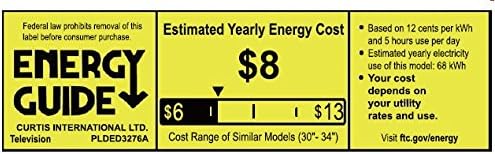
Figure 7.1: Estimated Yearly Energy Cost for similar models.
8. Akwụkwọ ikike na nkwado
For detailed warranty information and customer support, please refer to the official Proscan website or the full User Manual PDF.
Ị nwere ike ibudata akwụkwọ ntuziaka onye ọrụ (PDF) zuru ezu. Ebe a.
Maka enyemaka ọzọ, gaa na PROSCAN Store on Amazon.