
1. Okwu mmalite
Daalụ maka ịzụrụasing the Marvo G904 6D Optical Wired Gaming Mouse. This manual provides essential information for the proper setup, operation, and maintenance of your new gaming mouse. Please read this manual thoroughly before use to ensure optimal performance and longevity of the product.
2. Ngwaahịa gafereview
The Marvo G904 is a high-performance 6D optical wired gaming mouse designed for precision and comfort. It features an AVago3050 sensor, adjustable DPI settings, and programmable buttons to enhance your gaming experience.

Figure 1: Marvo G904 Gaming Mouse with blue LED lighting, showcasing its ergonomic design and illuminated accents.

Figure 2: Marvo G904 Gaming Mouse displaying green LED lighting, indicating different lighting modes or DPI settings.
3. Nhazi
Follow these steps to set up your Marvo G904 gaming mouse:
- Mepee òké ahụ: Carefully remove the mouse and any accessories from its packaging.
- Jikọọ na Kọmputa: Plug the USB connector of the mouse into an available USB port on your computer. The mouse is plug-and-play for basic functionality.
- Install Driver (Optional for Advanced Features): For full functionality, including macro programming and advanced DPI settings, insert the provided CD driver into your computer's optical drive and follow the on-screen instructions to install the software. If your computer does not have an optical drive, please visit the official Marvo websaịtị maka nbudata ọkwọ ụgbọala.

Figure 3: Marvo G904 Gaming Mouse packaging, which includes the driver CD.
4. Ntuziaka ọrụ
The Marvo G904 mouse features 6 buttons and adjustable DPI settings for versatile control.
4.1 bọtịnụ Ọrụ
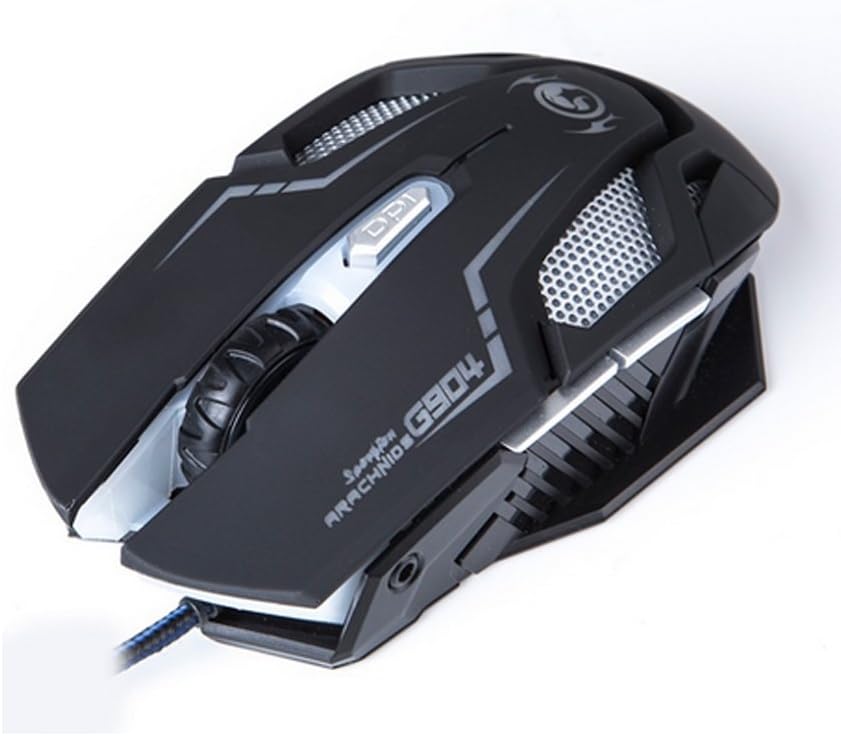
Foto 4: Top view of the Marvo G904 Gaming Mouse, highlighting the placement of its 6 buttons.
- Bọtịnụ Pịa aka ekpe: Standard isi pịa ọrụ.
- Pịa aka nri bọtịnụ: Ọkọlọtọ nke abụọ pịa ọrụ.
- Mpempe akwụkwọ mpịakọta: Scrolls up/down. Can also be pressed for a middle click function.
- DPI Shift Button: Cycles through DPI settings (1000, 2000, 3000, 4000).
- Bọtịnụ Akụkụ (2): Typically function as 'Forward' and 'Back' in web ihe nchọgharị na file explorers. These can be programmed using the driver software.
4.2 DPI mmezi
Pịa DPI Shift Button (located behind the scroll wheel) to cycle through the available DPI settings: 1000, 2000, 3000, and 4000 DPI. Each DPI level may be indicated by a change in the mouse's LED lighting color or pattern, depending on the current light mode.
4.3 Macro Programming (with Light Mode)
Utilize the included CD driver software to customize button functions and create macros. The software also allows you to configure the mouse's LED lighting modes. Refer to the software's help section for detailed instructions on macro creation and light mode customization.
5. Nlekọta
Proper maintenance ensures the longevity and optimal performance of your gaming mouse.
- Nhicha: Jiri akwa dị nro, kpọrọ nkụ hichapụ elu òké ahụ. Maka unyi isi ike, ntakịrị dampen akwa na mmiri ma ọ bụ a nwayọọ ihicha ngwọta. Zere iji kemịkalụ siri ike ma ọ bụ ihe na-emebi emebi.
- Nlekọta ihe mmetụta: Debe ihe mmetụta anya dị n'ala òké ahụ ọcha ma ghara ịpụ na uzuzu ma ọ bụ ihe ruru unyi. Jiri ákwà owu ma ọ bụ ikuku a kpọchiri akpọchi ma ọ bụrụ na ọ dị mkpa.
- Njikwa USB: Zenarị nrịgọ dị nkọ ma ọ bụ ịdọrọ eriri USB gabiga ókè iji gbochie mmebi.
- Nchekwa: Mgbe ejighị ya, chekwaa òké na ebe dị ọcha, kpọrọ nkụ pụọ na oke okpomọkụ.
6. Nchọpụta nsogbu
If you encounter issues with your Marvo G904 mouse, refer to the following common problems and solutions:
| Nsogbu | Ngwọta |
|---|---|
| Òké anaghị aza. |
|
| Ntọala DPI anaghị agbanwe agbanwe. |
|
| Bọtịnụ anaghị arụ ọrụ nke ọma. |
|
| Mouse cursor movement is erratic or jumpy. |
|
7. Nkọwapụta
Detailed technical specifications for the Marvo G904 Gaming Mouse:

Onyonyo 5: N'okpuru view of the Marvo G904 Gaming Mouse, displaying model number, DPI range, and certification marks.
| Njirimara | Nkọwa |
|---|---|
| Nlereanya | G904 |
| Ụdị ihe mmetụta | Optical (AVago3050) |
| Ntọala DPI | 1000/2000/3000/4000 DPI |
| Bọtịnụ | 6D (6 Buttons) |
| Ọnụego mkpesa | 1000 Hz |
| Ịdịgide Isi | 10 nde pịa |
| Ogologo eriri USB | 1.5 mita |
| Akụkụ (L*W*H) | 143 * 76 * 42 mm |
| Ogo Voltage | 5V |
| Enyere aha ugbu a | 10 mA |
| Ndakọrịta | PC |
| Agba | Nwa |
8. Akwụkwọ ikike na nkwado
For warranty information and technical support, please refer to the documentation provided with your purchase or contact your retailer. You may also visit the official MARVO website for further assistance and updated driver software.