
Okwu mmalite
This manual provides detailed instructions for the setup, operation, and maintenance of your Coby CBCR-103-BLK AM/FM Digital Dual Alarm Clock Radio. Please read this manual thoroughly before using the device to ensure proper function and to maximize your user experience. Keep this manual for future reference.
Ntuziaka nchekwa dị mkpa
- Do not expose this appliance to dripping or splashing liquids.
- Akwụsịla oghere ikuku ikuku ọ bụla. Wụnye dị ka ntuziaka onye nrụpụta si dị.
- Awụnyela n'akụkụ ebe okpomọkụ ọ bụla dị ka radiators, ndekọ okpomọkụ, stovu, ma ọ bụ ngwa ndị ọzọ (gụnyere amplifiers) nke na-emepụta okpomọkụ.
- Chebe eriri ọkụ ka ị ghara ịbanye na ya ma ọ bụ tuo ya, ọkachasị na plọg, ebe nchekwa dị mma, na ebe ha si na ngwa ahụ pụta.
- Jiri naanị mgbakwunye / ngwa ndị nrụpụta akọwapụtara.
- Kwupu ngwa a n'oge oke mmiri ozuzo ma ọ bụ mgbe ejighi ya ogologo oge.
- Tụtụ aka n'aka ndị ọrụ ruru eru. Achọrọ ọrụ mgbe akụrụngwa mebiri emebi n'ụzọ ọ bụla.
Ngwaahịa gafereview
Familiarize yourself with the components of your Coby CBCR-103-BLK clock radio.
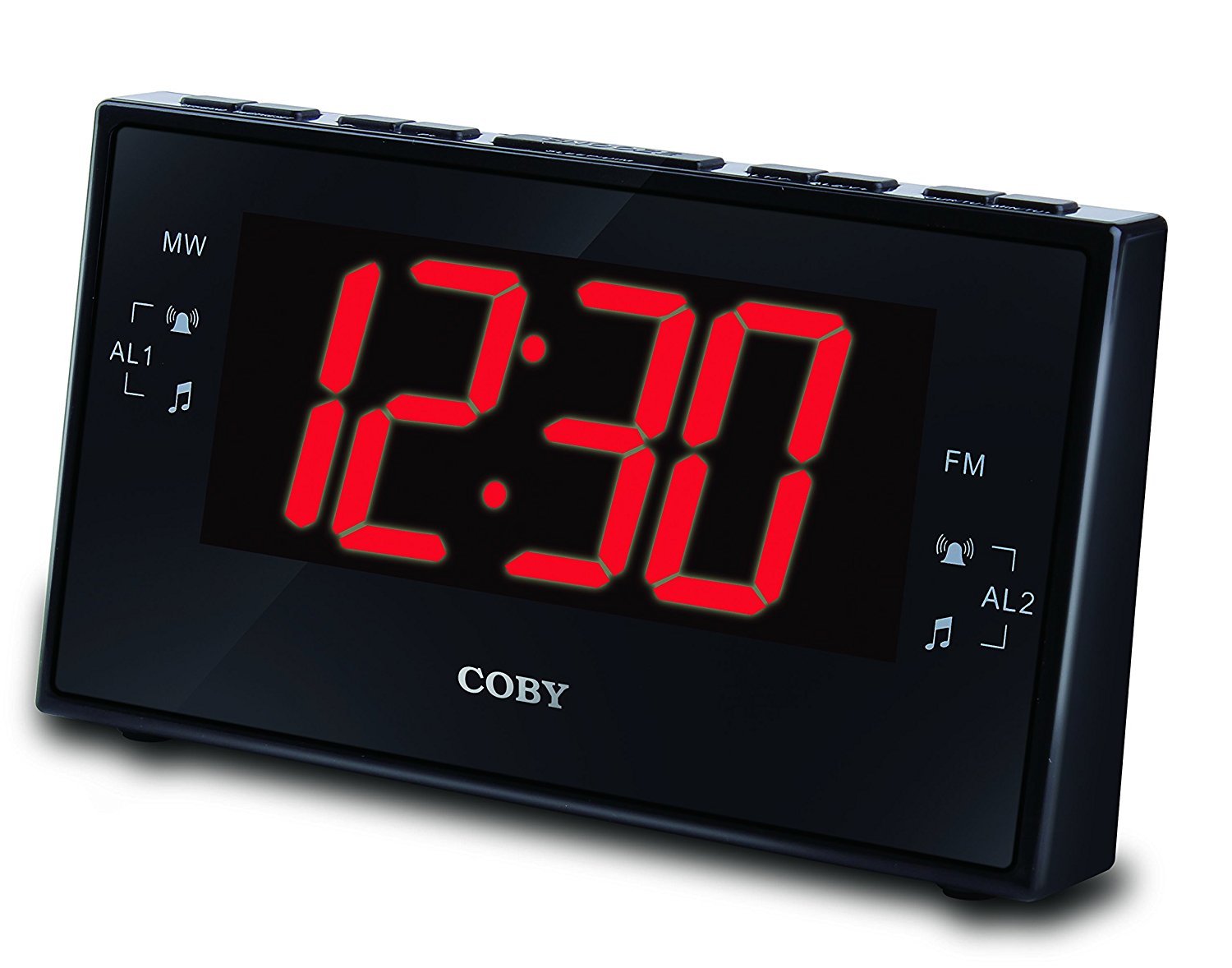
Figure 1: Coby CBCR-103-BLK AM/FM Digital Dual Alarm Clock Radio. This image displays the clock radio in its retail packaging. The clock itself is black with a large red LED display showing '12:30'. The packaging highlights key features such as AM/FM radio, dual alarm, and sleep timer.
Njikwa na egosi:
- Ikanam Display: Shows time, alarm status, and radio frequency.
- Bọtịnụ Ntọala Oge: Ejiri iji tọọ oge dị ugbu a.
- Alarm 1 Set Button: Used to set the first alarm time.
- Alarm 2 Set Button: Used to set the second alarm time.
- Snooze/Sleep Button: Activates snooze during an alarm or sets the sleep timer.
- Radio On/Off Button: Gbanyụọ ma ọ bụ gbanyụọ redio.
- Tuning Buttons (Up/Down): Na-emezi ugboro redio.
- Njikwa olu: Adjusts radio volume.
- AM/FM Selector: Mgbanwe n'etiti redio AM na FM.
Melite
1. Njikọ ike
- Unpack the clock radio and place it on a stable, flat surface.
- Plug the AC power cord into a standard wall outlet. The display will light up, indicating power is connected.
2. Nwụnye ndabere batrị
The clock radio uses 2 AAA batteries (not included) for backup power. These batteries maintain time and alarm settings during a power outage but do not power the display or alarm functions.
- Mepee mkpuchi batrị nke dị na ala nke otu.
- Insert 2 new AAA batteries, observing the correct polarity (+ and -) as marked inside the compartment.
- Mechie mkpuchi nke batrị batrị nke ọma.
3. Ntọala antenna
For optimal FM radio reception, fully extend the wire antenna located at the back of the unit. For AM reception, rotate the unit for the best signal.
Ntuziaka ọrụ
Ịtọ oge
- Pịa ma jide Oge setịpụrụ bọtịnụ. Ọnụọgụ elekere ga-amalite ịgba ọkụ.
- Mgbe ijide Oge setịpụrụ, pịa Awa button repeatedly to adjust the hour. Observe the PM indicator if setting PM hours.
- Hapụ ya Oge setịpụrụ button, then press and hold it again. The minute digits will begin to flash.
- Mgbe ijide Oge setịpụrụ, pịa nkeji button repeatedly to adjust the minutes.
- Hapụ ya Oge setịpụrụ button to save the current time.
Setting the Alarms (Alarm 1 and Alarm 2)
This unit features two independent alarms.
- Pịa ma jide Mkpu 1 Nhazi bọtịnụ (ma ọ bụ Mkpu 2 Nhazi button). The alarm hour digits will flash.
- While holding the respective AKWARKWỌ NDAR ỌRAR bọtịnụ, pịa bọtịnụ Awa bọtịnụ ka ịtọọ oge oti mkpu chọrọ.
- Hapụ ya AKWARKWỌ NDAR ỌRAR button, then press and hold it again. The alarm minute digits will flash.
- While holding the respective AKWARKWỌ NDAR ỌRAR bọtịnụ, pịa bọtịnụ nkeji bọtịnụ iji tọọ nkeji mkpu achọrọ.
- Hapụ ya AKWARKWỌ NDAR ỌRAR button to save the alarm time.
- Iji mee ka oti mkpu, pịa Mkpuchi 1 GBANYE/ Gbanyụọ bọtịnụ (ma ọ bụ Mkpuchi 2 GBANYE/ Gbanyụọ button) repeatedly to cycle through alarm modes: Gbanyụọ, Buzzzer, ma ọ bụ RADIO. An indicator light on the display will show the active alarm mode.
Ọrụ snooze
Mgbe oti mkpu na-ada, pịa Ụra/Ụra bọtịnụ ka mechie oti mkpu nwa oge ihe dịka nkeji 9. Oti mkpu ga-ada ọzọ ka oge snooze gachara.
Ọrụ redio
- Pịa Mgbanyụ/ Gbanyụọ redio bọtịnụ ka ịgbanwuo redio.
- Pịa AM/FM button to select either AM or FM band.
- Jiri ihe Ịchọgharị or TUNGBU ala buttons to tune to your desired station. Press and hold to auto-scan for the next available station.
- Gbanwee olu site na iji Mpịakọta njikwa.
- To turn the radio off, press the Mgbanyụ/ Gbanyụọ redio bọtịnụ ọzọ.
Oge ihi ụra
Ngụ oge ihi ụra na-enye ohere ka redio kpọọ maka oge a kara aka tupu agbanyụọ ya ozugbo.
- Mgbe redio na-akpọ, pịa Ụra/Ụra button repeatedly to cycle through available sleep times (e.g., 90, 60, 30, 15 minutes, or OFF).
- The radio will automatically turn off after the selected time duration.
Nlekọta
Na-ehicha Ngalaba
- Jiri akwa dị nro hichaa mpụta nke unit ahụ.
- Ejila ihe nchacha, waxes, ma ọ bụ ihe mgbaze ka ha nwere ike imebi njedebe.
- Ensure the unit is unplugged from the power outlet before cleaning.
Ngbanwe batrị
Replace the backup batteries annually or when the battery low indicator appears (if applicable) to ensure time and alarm settings are retained during power interruptions.
Nchọpụta nsogbu
| Nsogbu | Ihe nwere ike ime | Ngwọta |
|---|---|---|
| Enweghị ike/Ngosipụta | Agbanyeghi eriri ike; Ike gitage. | Ensure AC cord is securely plugged into a working outlet. Check household circuit breaker. |
| Oti mkpu anaghị ada ụda | Alarm not set or not activated; Volume too low (for radio alarm). | Verify alarm time is set correctly and alarm mode (Buzzer/Radio) is selected. Increase radio volume if using radio alarm. |
| Nnabata redio adịghị mma | Antenna not extended; Interference; Unit position. | Fully extend the FM wire antenna. For AM, rotate the unit. Move unit away from other electronic devices. |
| Time/Alarm settings lost after power outage | Batrị ndabere anwụọla ma ọ bụ na etinyebeghị ya. | Install new AAA batteries or replace existing ones. |
Nkọwapụta
- Ụdị: CBCR-103-BLK
- Ụdị ngosi: Digital LED (Red, 3 inch)
- Otu egwu redio: AM/FM
- Ụdị mkpu: Dual Alarm (Buzzer or Radio)
- Ogologo oge snoo: Ihe dị ka nkeji iri
- Oge ụra: Ee
- Isi mmalite ike: AC 120V, 60 Hz
- Ndabere batrị: Batrị 2 x AAA (anaghị etinye ya)
- Onye nrụpụta: Summit Electronics, US
Ozi akwụkwọ ikike
Coby products are designed and manufactured to the highest quality standards. For specific warranty details, please refer to the warranty card included with your purchase or visit the official Coby websaịtị. Debe ihe akaebe nke ịzụrụ ihe maka akwụkwọ ikike ọ bụla.
Nkwado ndị ahịa
If you encounter any issues not covered in this manual or require further assistance, please contact Coby customer support. Contact information can typically be found on the product packaging or the official Coby websaịtị.