
Coby CD191
Coby Portable CD Player User Manual
Ụdị: CD191
Akara: Coby
Okwu mmalite
Thank you for choosing the Coby Portable CD Player CD191. This device is designed to provide a versatile and enjoyable audio experience, combining classic CD playback with modern features like FM radio and MP3 compatibility. Its compact and shockproof design makes it ideal for both home use and on-the-go listening. Please read this manual thoroughly to understand the proper operation and maintenance of your new CD player.

A n'ihu view of the Coby Portable CD Player, showcasing its compact design, LCD display, control buttons, and the included wired earbuds and Micro USB charging cable.
Ozi nchekwa
Iji hụ na ọrụ nchekwa na gbochie mmebi, biko debe ihe ndị a:
- Etinyela igwe ahụ n'ime mmiri ozuzo, mmiri ozuzo, ma ọ bụ oke okpomọkụ.
- Avoid dropping or subjecting the unit to strong impacts, as this may damage internal components.
- Akpọsakwala otu ahụ. Kpọtụrụ ndị ọrụ ruru eru ọrụ niile.
- Use only the specified battery type (2 AA batteries) and ensure correct polarity.
- Zere ige ntị n'olu dị oke elu ruo ogologo oge iji gbochie mmebi ntị.
- Keep the CD compartment clean and free of dust or debris.
Ihe ngwugwu
Chọpụta na ihe niile dị na ngwugwu:
- Coby Portable CD Player CD191
- Earbuds Stereo
- Igwe USB USB

The high-fidelity wired stereo earbuds that come with the CD player, providing a personal listening experience.
Ngwaahịa gafereview
Ngwa na njikwa
Familiarize yourself with the main components and controls of your CD player:
- Ngosipụta LCD: Shows track number, time, mode, and battery status.
- Ngalaba CD: Where the CD is inserted.
- Bọtịnụ Kwụsị/Kwụsị: Na-amalite ma ọ bụ kwụsịtụ ọkpụkpọ.
- Kwụsị bọtịnụ: Kwụsị ịkpọghachi ya.
- Wụpụ/Chọọ bọtịnụ (◀◀ / ▶▶): Na-awụlikwa egwu ma ọ bụ na-aga n'ihu/na-alaghachi azụ.
- Bọtịnụ ụkpụrụ: Switches between CD, FM, and MP3 modes.
- Bọtịnụ mmemme: Used for programming track order.
- Mpịakọta +/- bọtịnụ: Na-emezi ọkwa mmepụta ọdịyo.
- Jack ekweisi (3.5mm): For connecting headphones or external audio devices.
- Micro USB Port: Maka ike mpụga.
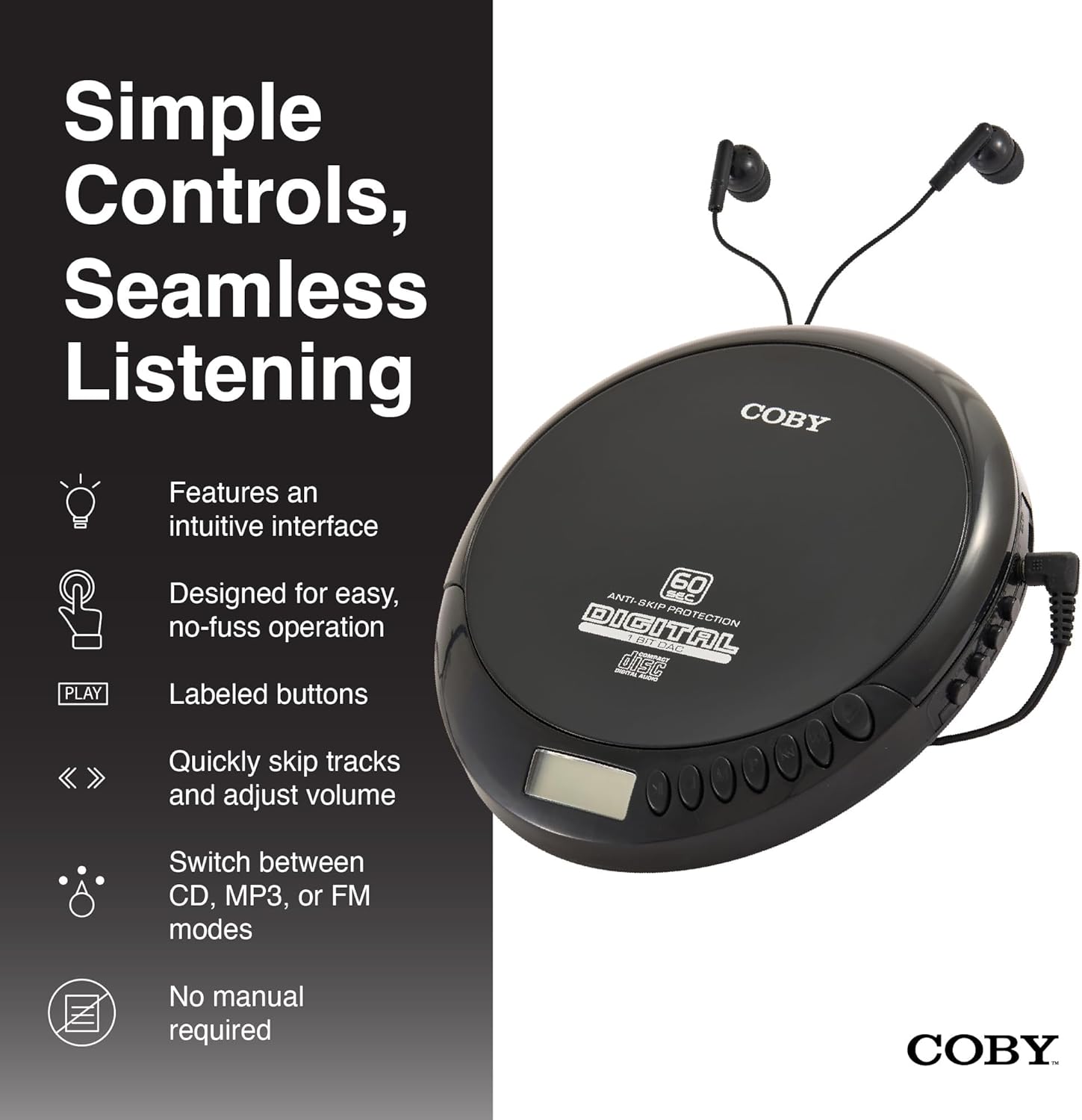
An illustration of the Coby CD Player highlighting its simple controls and intuitive interface.

A zuru ezu view of the player's LCD screen, which displays the current track number, elapsed time, and battery status.

A close-up of the player's intuitive control buttons, including Play/Pause, Stop, Skip/Search, Mode, and Program functions, designed for easy operation.
Melite
Ịkwanye ngwaọrụ
The Coby CD Player can be powered by 2 AA batteries (not included) or via the included Micro USB cable.
- Nwụnye batrị: Open the battery compartment cover on the back of the unit. Insert 2 AA batteries, ensuring correct polarity (+/-). Close the cover securely.
- Ike USB: Connect the Micro USB cable to the Micro USB port on the CD player and the other end to a USB power source (e.g., USB wall adapter, computer USB port).

An image showing a user enjoying music with the Coby CD player, highlighting its versatility with both battery and USB power options.

The included Micro USB cable, used for powering the CD player when not using batteries.
Ijikọ ekweisi
Insert the 3.5mm plug of your headphones into the headphone jack on the side of the CD player.
Ịtinye CD
- Pịa bọtịnụ MEPE iji mepee mkpuchi nke CD ahụ.
- Carefully place the CD onto the center spindle with the label side facing up.
- Jiri nwayọ pịa CD ahụ ruo mgbe ọ pịara ebe ọ nọ.
- Mechie mkpuchi nke CD ahụ nke ọma ruo mgbe ọ ga-ejide ya.
Ntuziaka ọrụ
Ịkpọghachi CD
- Insert a CD (CD, CD-R, CD-RW, or CD-MP3).
- Pịa KWURU/Kwụsịa button to begin playback. The LCD display will show the track number and elapsed time.
- Ka ịkwụsịtụ ọkpụkpọ, pịa KWURU/Kwụsịa ọzọ. Pịa ya ọzọ ka ịmaliteghachi.
- Iji kwụsị igwu egwu, pịa KWỤSỊ bọtịnụ.
The player features 60-second anti-skip protection to ensure continuous audio during movement.
Sochie igodo
- Pịa ▶▶ ịgafe na egwu na-esote.
- Pịa ◀◀ to return to the beginning of the current track. Press it twice quickly to go to the previous track.
- Pịa ma jide ▶▶ to fast-forward through the current track.
- Pịa ma jide ◀◀ to rewind through the current track.
Njikwa olu
Jiri ihe Olu + na Mpịakọta - buttons to adjust the listening volume to a comfortable level.
FM Radio arụ ọrụ
- Pịa MODE button until 'FM' appears on the LCD display.
- The player will automatically scan and tune to available FM stations.
- Jiri ihe ◀◀ na ▶▶ buttons to manually tune to specific frequencies or to scan for the next/previous strong station.

This image illustrates the built-in FM radio feature of the Coby CD player, allowing users to tune into their favorite radio stations.
MP3 playback
The Coby CD Player supports MP3 files burned onto CD-R or CD-RW discs. When an MP3 CD is inserted, the player will automatically detect the format and begin playback.
Connecting to External Audio Systems
You can connect your Coby CD Player to external speakers or a car audio system using a 3.5mm AUX cable (not included).
- Connect one end of the 3.5mm AUX cable to the headphone jack on the CD player.
- Connect the other end to the AUX input of your external speaker or car audio system.
- Ensure the external device is set to its AUX input mode.

The CD player connected to an external speaker, demonstrating its ability to deliver enhanced sound with features like Super Bass and Crystal Clear Sound when connected to compatible audio systems.

The portable CD player integrated into a car's audio system via an AUX connection, allowing for on-the-go music playback through car speakers.
Nlekọta
Na-ehicha Ngalaba
- Jiri ákwà dị nro ma kpọọ nkụ hichaa mpụta nke ngwaọrụ ahụ. Ejila ihe nhicha ma ọ bụ ihe mgbaze.
- To clean the CD lens, use a specialized CD lens cleaning disc (not included).
Nlekọta batrị na nchekwa
- Wepu batrị ma ọ bụrụ na agaghị eji nkeji ahụ ruo ogologo oge iji gbochie ntapu.
- Debe ihe dị n'ime ya n'ebe dị jụụ ma kpọọ nkụ, ebe anwụ na-anaghị anwụ kpọmkwem na oke okpomọkụ dị oke njọ.
Nchọpụta nsogbu
| Nsogbu | Ihe nwere ike ime | Ngwọta |
|---|---|---|
| Unit anaghị agbanye ọkụ. | Batteries are dead or incorrectly inserted. USB cable not connected properly. | Replace batteries with new ones, ensuring correct polarity. Check USB cable connection. |
| Disc skipping or distorted sound. | Disc is dirty, scratched, or damaged. Unit is subjected to excessive vibration. | Clean the disc with a soft, lint-free cloth. Try a different disc. Ensure the anti-skip protection is active. Avoid strong impacts. |
| Enweghị ụda sitere na ekweisi. | Headphones not fully plugged in. Volume is too low. Headphones are faulty. | Ensure headphones are fully inserted into the jack. Increase the volume. Try a different pair of headphones. |
| FM radio static or poor reception. | Mgbama adịghị ike. Ntinye aka. | Adjust the position of the unit. Try moving to a different location. |
| MP3 CD not recognized. | Disc format not supported or disc is corrupted. | Gbaa mbọ hụ na MP3 files are properly encoded and the disc is finalized. Try a different MP3 CD. |
Nkọwapụta
| Njirimara | Nkọwa |
|---|---|
| Akụkụ ngwaahịa | 5.5 x 1 x 5 sentimita asatọ |
| Ibu Ibu | 7 ounces |
| Nọmba nlereanya | CD-191-BLK |
| Isi Iyi Ike | 2 AA batteries (not included), Micro USB |
| Teknụzụ Njikọta | Enyemaka, USB |
| Njirimara Pụrụ Iche | Portable, FM Radio, MP3 Compatible |
| Mgbochi Mwụpụ | 60 sekọnd |
| Ụdị diski dakọtara | CD, CD-R, CD-RW, CD-MP3 |
Vidiyo ngwaahịa ngwaahịa
An official product video showcasing the features and benefits of the Coby Portable CD Player with Stereo Earbuds.
Akwụkwọ ikike na nkwado
For warranty information and customer support, please refer to the documentation included with your purchase or visit the official Coby website. Contact details for support are typically found on the manufacturer's product page or in the warranty card.
Coby Official Websaịtị: Visit the Coby Store on Amazon
Ask a question about this manual
Ask about setup, troubleshooting, compatibility, parts, safety, or missing instructions. Manuals+ will review the question and use this page’s manual context to help answer it.