
1. Okwu mmalite
Thank you for choosing the EDM 03006 Compact Daily Programmable Timer. This device is designed to automatically control the power supply to your electrical appliances, helping you save energy and manage your daily routines efficiently. Please read this manual carefully before use to ensure proper operation and safety.
Ozi nchekwa
- Do not exceed the maximum load capacity of 3500W (16A, 250V).
- This timer is intended for indoor use only.
- Do not immerse the timer in water or expose it to excessive moisture.
- Ensure the timer is securely plugged into a grounded wall socket.
- Do not attempt to disassemble or repair the timer yourself. Contact qualified personnel for service.
2. Ngwaahịa gafereview
The EDM 03006 timer features a mechanical dial for setting daily programs. Familiarize yourself with its components:
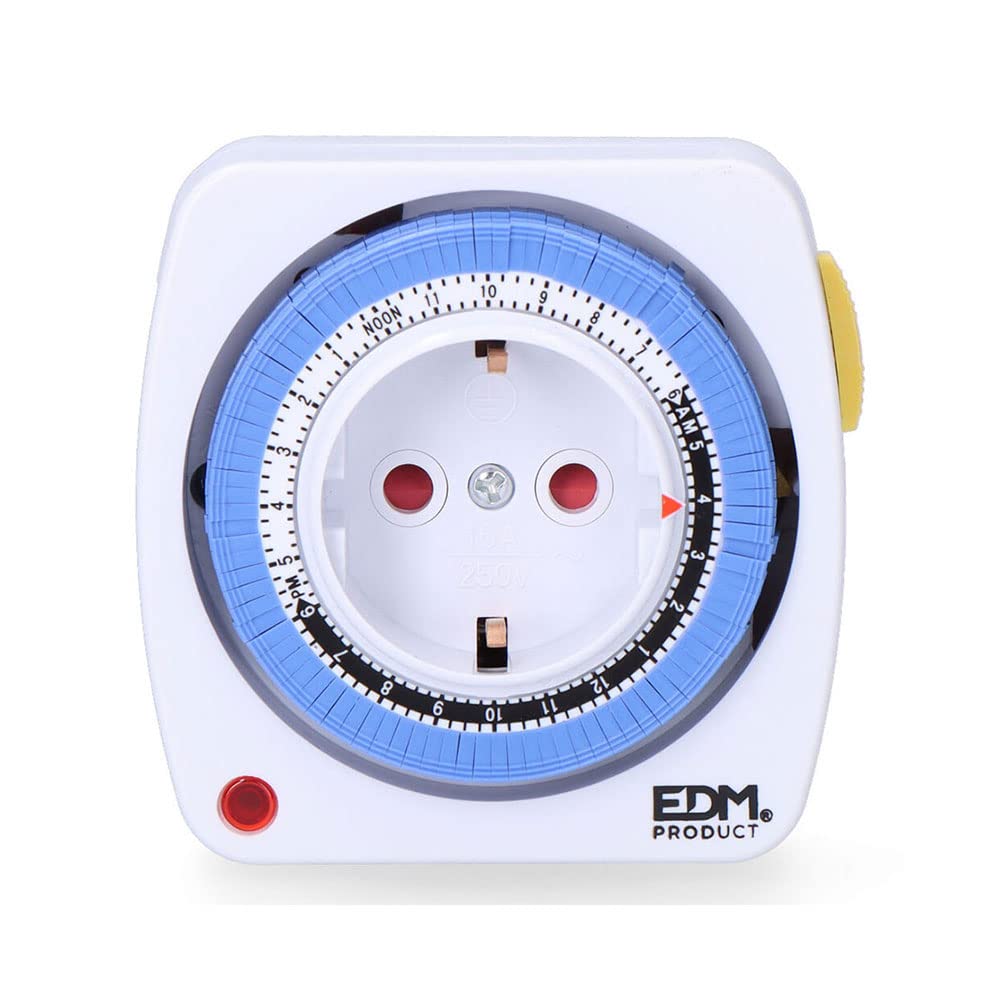
This image displays the EDM 03006 daily programmable timer. Key features visible include the central European Type F socket, a rotating dial with hour markings (AM/PM, NOON), and blue segments for setting program times. A red triangle indicates the current time, and a red LED light signifies power status.
- Central Socket: European Type F socket for connecting your appliance.
- Rotating Dial: Marked with 24 hours (1-12 AM, NOON, 1-12 PM).
- Blue Segments: Each segment represents a 15-minute interval. These are pushed in or pulled out to set ON/OFF times.
- Red Triangle Indicator: Shows the current time on the dial.
- Ọkụ na-acha uhie uhie: Illuminates when the timer is receiving power and the connected appliance is in an 'ON' state according to the program.
3. Nhazi
- Ịkwapu: Jiri nlezianya wepụ ihe na-egosi oge ahụ n'ime ngwugwu ya.
- Steeti izizi: Ensure all blue segments around the dial are in the 'OUT' position. This means the timer is initially set to OFF for all intervals.
- Tọọ oge ugbu a: Rotate the entire dial clockwise until the red triangle indicator points to the current time. For example, if it is 3:00 PM, align the red triangle with '3 PM'.
- Tinye: Insert the timer into a standard 250V AC wall socket. The red LED light should illuminate if the timer is currently in an 'ON' period or if the internal clock is running.
4. Ntuziaka ọrụ
Ịtọ oge mmemme
The timer allows you to set multiple ON/OFF periods throughout a 24-hour cycle using the blue segments.
- Each blue segment represents a 15-minute interval.
- To set an 'ON' period, push the corresponding blue segments inwards towards the center of the dial.
- To set an 'OFF' period, leave the corresponding blue segments in the outwards ọnọdụ.
- Maka example, to have an appliance turn ON from 6:00 PM to 7:00 PM, push in the four blue segments that correspond to 6:00 PM, 6:15 PM, 6:30 PM, and 6:45 PM.
- Once programmed, the timer will automatically switch the connected appliance ON and OFF according to your settings as the dial rotates with the current time.
Connecting an Appliance
Plug the appliance you wish to control into the central socket of the timer. Ensure the appliance's power switch is set to the 'ON' position if it has one, so the timer can control its power supply.
5. Nlekọta
- Always unplug the timer from the wall socket before cleaning.
- Wipe the exterior of the timer with a soft, dry cloth.
- Do not use abrasive cleaners, solvents, or immerse the timer in water.
- Keep the timer free from dust and debris to ensure proper ventilation and operation.
6. Nchọpụta nsogbu
| Nsogbu | Ihe nwere ike ime | Ngwọta |
|---|---|---|
| Ngwaọrụ anaghị agbanyụ/gbanyụọ dịka e si hazie ya. | Incorrect program settings (blue segments). Edobeghị oge ugbu a nke ọma. Appliance switch is OFF. | Ensure blue segments are pushed IN for ON times and OUT for OFF times. Verify the red triangle indicator is aligned with the current time. Check that the appliance's power switch is in the 'ON' position. |
| Timer is not receiving power (Red LED is off). | Wall socket is not active. Timer is in an 'OFF' period. | Test the wall socket with another appliance. Check the blue segments around the current time; if they are all 'OUT', the timer is in an OFF state. |
| Timer makes a slight humming noise. | Normal operation of mechanical timers. | This is typically normal for mechanical timers and indicates the internal clock mechanism is functioning. |
7. Nkọwapụta
- Akara: EDM
- Ụdị: 03006
- Ogo ike: 3500W (Max), 16A, 250V AC
- Dimensions (Parcel): 17.3 x 9.4 x 7.9 cm
- Ibu ihe: 180 g
- Isi mmalite ike: AC (nke dị ugbu a)
- Programmable Intervals: 15 nkeji
- Daily Cycles: awa 24
- Ụdị oghere: European Type F
8. Akwụkwọ ikike na nkwado
Maka ozi gbasara akwụkwọ ikike ma ọ bụ nkwado teknụzụ, biko lee akwụkwọ enyere gị mgbe ị zụtara ya ma ọ bụ kpọtụrụ onye na-ere ahịa gị. Debe ihe akaebe nke ịzụrụ ya maka akwụkwọ ikike ọ bụla.


