
1. Okwu mmalite
The Extron DTP HDMI 230 Rx is a digital twisted pair receiver designed to extend HDMI, audio, and bidirectional RS-232 and IR signals. It operates with Extron DTP-enabled products, transmitting signals up to 230 feet (70 meters) over a shielded CATx cable. This device provides an efficient solution for extending HDMI with embedded multi-channel audio from HDMI-equipped sources. Additionally, the DTP HDMI 230 Rx supports analog stereo audio signals from a DTP-enabled product via the same shielded twisted pair cable. It is compatible with computer video resolutions up to 2560x1600, 1080p/60 Deep Color, and 4K resolutions. Its compact design and remote power capability allow for flexible placement, such as in lecterns or behind flat-panel displays.
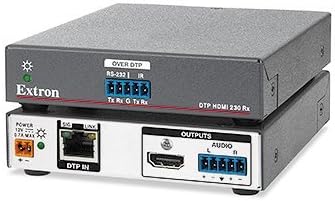
Foto 1: The Extron DTP HDMI 230 Rx unit. The top view shows the 'OVER DTP' RS-232 and IR connections. The bottom view displays the 'DTP IN' port, 'POWER' input, 'HDMI' output, and 'AUDIO' output connections.
2. Atụmatụ igodo
- Receives HDMI plus control and analog audio up to 230 feet (70 meters) over a shielded CATx cable.
- Supports computer video up to 2560x1600, HDTV 1080p/60 Deep Color, and 4K resolutions.
- Compatible with CATx shielded twisted pair cable.
- Extron XTP DTP 24 na-atụ aro eriri abụọ gbagọrọ agbagọ maka ịrụ ọrụ kacha mma.
- Accepts additional analog stereo audio signals.
3. Ihe ngwugwu
Please verify that all items are present and in good condition upon opening the package. The standard package for the Extron DTP HDMI 230 Rx typically includes:
- Extron DTP HDMI 230 Rx unit
- Setup Guide / Instruction Manual
- Terminal blocks for RS-232/IR and Audio connections
- Mounting accessories (e.g., small blue connectors, zip ties)
- Power supply (not explicitly shown but required for operation)
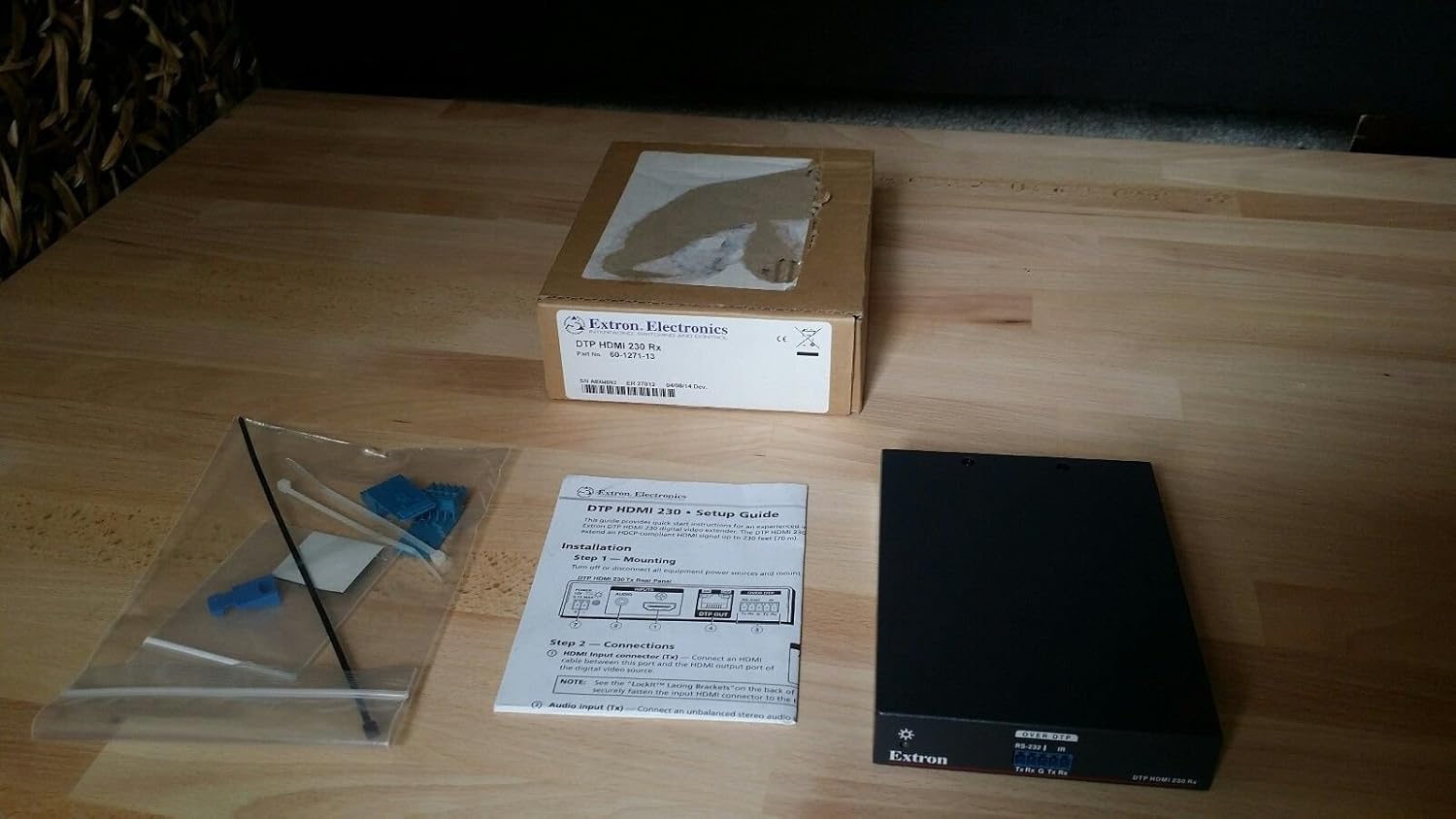
Foto 2: Contents of the Extron DTP HDMI 230 Rx package, showing the receiver unit, setup guide, and a bag containing small connectors and zip ties.
4. Nhazi ntuziaka
Follow these steps to set up your Extron DTP HDMI 230 Rx:
- Mwepu na nyocha: Carefully remove all components from the packaging. Inspect each item for any signs of damage.
- Ịkwanye: Secure the DTP HDMI 230 Rx unit in your desired location. Its compact size allows for discreet placement behind displays or within lecterns.
- Njikọ ike: Jikọọ ọkọnọ ike enyere na IKE input on the DTP HDMI 230 Rx unit. Ensure the power adapter is connected to a suitable power outlet.
- DTP Input Connection: Connect a shielded CATx cable from a compatible Extron DTP-enabled transmitter to the DTP IN port on the DTP HDMI 230 Rx. For optimal performance, Extron XTP DTP 24 shielded twisted pair cable is recommended.
- HDMI Output Connection: Jikọọ eriri HDMI site na eriri HDMI HDMI output port on the DTP HDMI 230 Rx to the HDMI input of your display device (e.g., TV, projector).
- Audio Output Connection (Optional): If using analog stereo audio, connect the audio output from the DTP HDMI 230 Rx to your audio system using the provided terminal blocks.
- Control Connections (Optional - RS-232/IR): If bidirectional control is required, connect your RS-232 or IR control cables to the respective ports on the DTP HDMI 230 Rx using the provided terminal blocks.
5. Ntuziaka ọrụ
Once all connections are made, operate the DTP HDMI 230 Rx as follows:
- Ike Na: Ensure all connected devices, including the source, the DTP transmitter, the DTP HDMI 230 Rx, and the display, are powered on.
- Mbufe mgbaàmà: The DTP HDMI 230 Rx will automatically detect and process the HDMI, audio, and control signals transmitted from the DTP transmitter.
- Ndị Na-egosi Ọnọdụ: Observe the LED indicators on the unit:
- SIG (Akara): Illuminates when a valid HDMI signal is detected.
- njikọ: Illuminates when a stable DTP link is established with the transmitter.
- Resolution and Deep Color: The unit supports automatic resolution scaling and Deep Color passthrough up to its maximum specified capabilities.
6. Nlekọta
To ensure the longevity and optimal performance of your Extron DTP HDMI 230 Rx, follow these maintenance guidelines:
- Keep the unit clean and free from dust accumulation. Use a soft, dry cloth for cleaning.
- Gbaa mbọ hụ na ikuku ikuku zuru oke gburugburu unit ahụ iji gbochie ikpo oke ọkụ.
- Avoid exposing the unit to moisture, liquids, or extreme temperatures.
- Na-elele njikọ niile nke eriri mgbe niile iji hụ na echekwara ha na enweghị mmebi.
- Do not attempt to open or service the unit yourself. Refer all servicing to qualified Extron personnel.
7. Nchọpụta nsogbu
If you encounter issues with your DTP HDMI 230 Rx, refer to the following troubleshooting steps:
- Enweghị Vidiyo/Ọdịyo:
- Verify that all power connections are secure and the unit is receiving power.
- Check the integrity and connection of the DTP shielded CATx cable between the transmitter and receiver.
- Ensure all HDMI cables are securely connected at both the source, receiver, and display ends.
- Confirm that the source device is powered on and outputting a signal.
- Check the input selection on your display device to ensure it is set to the correct HDMI input.
- Poor Video Quality or Intermittent Signal:
- Ensure that a kpuchie CATx cable is being used. Unshielded cables can lead to signal degradation.
- Verify that the cable length is within the specified maximum of 230 feet (70 meters).
- For optimal performance, consider using Extron XTP DTP 24 shielded twisted pair cable.
- Check for potential sources of electromagnetic interference (EMI) near the cable run.
- Control Signals (RS-232/IR) Not Working:
- Verify all RS-232/IR cable connections and ensure they are correctly wired using the terminal blocks.
- Confirm that the DTP transmitter is correctly configured for control signal passthrough.
8. Nkọwapụta
| Nọmba nlereanya | DTP HDMI 230 RX |
| Onye nrụpụta | Extron |
| Akụkụ ngwaahịa | 0.39 x 0.39 x 0.39 sentimita asatọ |
| Ibu Ibu | 12.8 ounces |
| Ngwa dakọtara | Igwe onyonyo |
| Ihe eji eme ihe maka ngwaahịa | TV |
| Ụdị njikọ | HDMI |
| Ụbọchị mbụ dị | Disemba 5, 2014 |
9. Akwụkwọ ikike na nkwado
For warranty information, technical support, or service inquiries regarding your Extron DTP HDMI 230 Rx, please refer to the official Extron website or contact Extron customer support directly. Keep your purchase receipt for warranty validation.