
1. Okwu mmalite
Daalụ maka ịzụrụasing the Mastech MS8230B Digital Multimeter. This device is a compact, battery-operated, handheld digital multimeter designed for measuring DC and AC voltage, DC current, resistance, diode, and transistor (hFE) tests. It features a large LCD display for easy reading and is built to international safety standards.
Please read this instruction manual thoroughly before using the multimeter to ensure safe and proper operation. Keep this manual for future reference.
2. Ozi nchekwa
This multimeter is designed according to IEC 1010-1 international safety standards for electronic measuring instruments. It complies with CAT III 600V and CAT II 1000V overvoltage categories. Always adhere to the following safety precautions:
- Never exceed the maximum input limits for any function.
- Do not use the meter if the case is damaged or open.
- Ensure the test leads are in good condition, without any damaged insulation.
- Always turn off the circuit power and discharge all high-voltage capacitors before measuring resistance, diodes, or hFE.
- Jiri nlezianya dị oke egwu mgbe ị na-arụ ọrụ na voltagọ dị elu karịa 60V DC ma ọ bụ 30V AC RMS, ebe ọ bụ na ihe ndị a na-akpata ihe egwu dị egwu.
- Remove test leads from the circuit before changing functions or ranges.
- Dochie batrị ahụ ozugbo mgbe ihe ngosi batrị dị ala pụtara iji hụ na agụpụtara ya nke ọma.
- Ejila mita ahụ rụọ ọrụ n'ime ihe mgbawa gas, vepo, ma ọ bụ uzuzu.
3. Ihe ngwugwu
Verify that all items listed below are present and undamaged:
- Mastech MS8230B Digital Multimeter
- Test Leads (one pair)
- 9V Battery (pre-installed or included separately)
- Akwụkwọ ntuziaka onye ọrụ
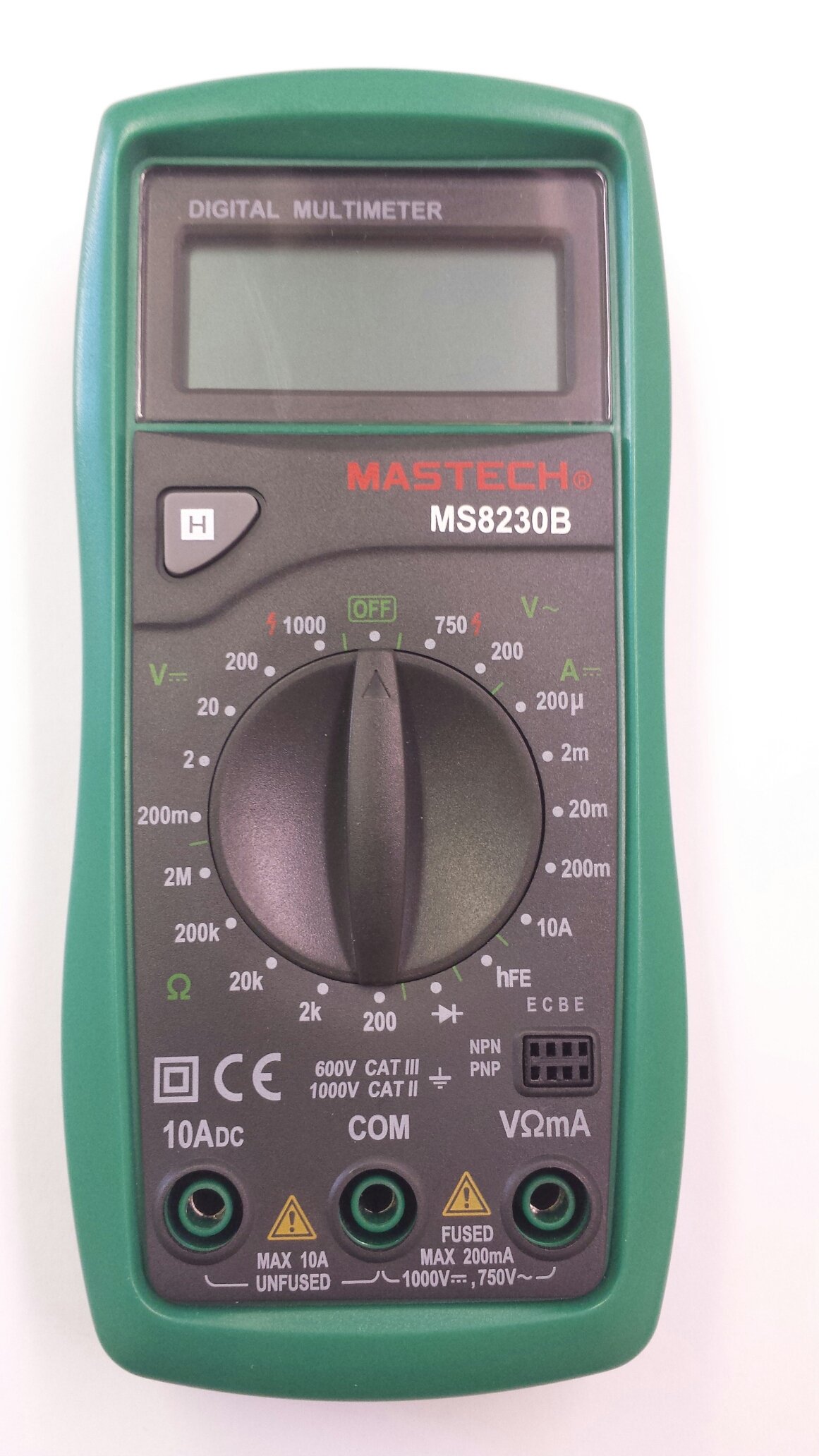
Image 1: Contents of the Mastech MS8230B package, including the multimeter, test leads, batteries, and user manual.
4. Nhazi
4.1 Ntinye batrị
The MS8230B multimeter requires one 9V battery for operation. If the battery is not pre-installed or needs replacement:
- Hụ na agbanyụrụ multimeter ahụ ma wepụ ihe niile e ji anwale ya.
- Chọta ebe mkpuchi batrị n'azụ unit ahụ.
- Loosen the screw(s) on the battery cover and remove the cover.
- Connect the 9V battery to the battery connector, observing correct polarity.
- Tinye batrị ahụ n'ime ebe nchekwa ahụ wee dochie mkpuchi ahụ, jiri skru(s) jide ya.
4.2 Njikọ Ndị Nnwale Nlele
Always connect the test leads correctly for the desired measurement:
- Insert the red test lead into the "VΩmA" jack for voltage, resistance, and low current measurements.
- Insert the red test lead into the "10ADC" jack for high DC current measurements (up to 10A).
- Always insert the black test lead into the "COM" (common) jack.
5. Ntuziaka ọrụ
Before taking any measurement, ensure the test leads are correctly connected and the function switch is set to the appropriate range.
5.1 DC Voltage nha (DCV)
- Connect the red test lead to the "VΩmA" jack and the black test lead to the "COM" jack.
- Set the rotary switch to the desired DCV range (e.g., 200mV, 2V, 20V, 200V, 1000V). If the voltage is unknown, start with the highest range and decrease as necessary.
- Jikọọ ụzọ ule n'ofe akụrụngwa ma ọ bụ sekit a ga-atụ.
- Gụọ voltage value on the LCD display. Observe the polarity indication.
5.2 AC Voltage Melement (ACV)
- Connect the red test lead to the "VΩmA" jack and the black test lead to the "COM" jack.
- Set the rotary switch to the desired ACV range (e.g., 200V, 750V). Start with the highest range if the voltage amaghi.
- Jikọọ ụzọ ule n'ofe akụrụngwa ma ọ bụ sekit a ga-atụ.
- Gụọ voltage uru na LCD ngosi.
5.3 DC Current Measurement (DCA)
Ịkpachara anya: Never attempt to measure current on a circuit with voltage present by connecting the meter in parallel. Always connect the meter in series with the load.
- Determine the expected current. For currents up to 200mA, connect the red lead to "VΩmA". For currents up to 10A, connect the red lead to "10ADC". The black lead always goes to "COM".
- Set the rotary switch to the appropriate DCA range (e.g., 200µA, 2mA, 20mA, 200mA, 10A).
- Turn off the power to the circuit. Open the circuit where the current is to be measured.
- Connect the multimeter in series with the circuit.
- Apply power to the circuit and read the current value on the LCD display.
5.4 Nledo Nguzogide
Ịkpachara anya: Ensure the circuit under test is completely de-energized and all capacitors are discharged before measuring resistance.
- Connect the red test lead to the "VΩmA" jack and the black test lead to the "COM" jack.
- Set the rotary switch to the desired Resistance (Ω) range (e.g., 200Ω, 2kΩ, 20kΩ, 200kΩ, 2MΩ).
- Jikọọ ihe nlele ndị a ga-eji tụọ.
- Gụọ uru iguzogide na ngosipụta LCD.
5.5 Diode Ule
Ịkpachara anya: Ensure the circuit under test is completely de-energized and all capacitors are discharged before performing a diode test.
- Connect the red test lead to the "VΩmA" jack and the black test lead to the "COM" jack.
- Set the rotary switch to the Diode symbol (→|).
- Connect the red test lead to the anode and the black test lead to the cathode of the diode. The display will show the forward voltage drop (typically 0.5V to 0.8V for silicon diodes).
- Reverse the test leads. The display should show "OL" (Open Loop) for a good diode. A reading in both directions or "0" indicates a shorted diode.
5.6 Transistor hFE Test
Ịkpachara anya: Ensure the transistor is not connected to a live circuit.
- Set the rotary switch to the "hFE" position.
- Identify if the transistor is NPN or PNP.
- Insert the transistor's emitter, base, and collector leads into the corresponding holes in the hFE socket on the multimeter.
- Gụọ uru hFE (DC current gain) na ihuenyo LCD.
5.7 Data Jide Ọrụ
Press the "H" button to hold the current reading on the display. Press it again to release the hold function and resume live readings.
6. Nlekọta
6.1 Nhicha
Jiri mgbasa ozi hichapụ ikpe ahụamp cloth and mild detergent. Do not use abrasives or solvents. Keep the jacks free of dust and debris.
6.2 nnọchi batrị
When the battery symbol appears on the LCD, the 9V battery needs to be replaced. Refer to section 4.1 for battery installation instructions.
6.3 Mgbanwe Fuse
The multimeter is protected by a fuse. If the current measurement function stops working, the fuse may need replacement. This should only be performed by qualified personnel. The fuse specifications are typically printed near the fuse holder or in the specifications section.
7. Nchọpụta nsogbu
If the multimeter does not function correctly, check the following:
- Enweghị ngosipụta ma ọ bụ ngosipụta dị nro: Lelee batrị ahụ. Dochie ya ma ọ bụrụ na ọ dị mkpa.
- Ọgụgụ na-ezighi ezi: Ensure the test leads are properly connected, the function switch is on the correct range, and the battery is not low.
- "OL" (Overload) displayed: Uru a tụrụ gafere oke ahọpụtara. Gbanwee gaa na oke dị elu.
- Nha nha ugbu a anaghị arụ ọrụ: Lelee fuse.
Ọ bụrụ na nsogbu ka dị, kpọtụrụ nkwado ndị ahịa.
8. Nkọwapụta
The Mastech MS8230B Digital Multimeter offers the following technical specifications:

Image 2: Detailed specifications for the Mastech MS8230B Multimeter, including display, range, and accuracy.
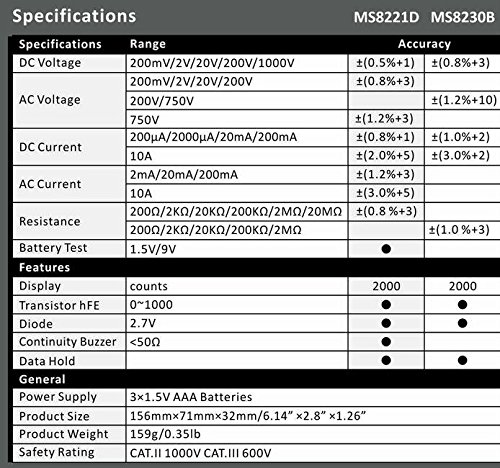
Image 3: Comparison table of specifications for Mastech MS8230B and MS8221D multimeters.
| Nkọwapụta | Uru |
|---|---|
| Ngosipụta | 1999 counts, 15mm digit height |
| DC Voltage (DCV) | 200mV, 2V, 20V, 200V, 1000V (Accuracy: 0.5% to 0.8%) |
| AC Voltage (ACV) | 200V, 750V (Accuracy: 1.2%) |
| DC Ugbu a (DCA) | 200µA, 2mA, 20mA, 200mA, 10A (Accuracy: 1.0% to 2.0%) |
| Nguzogide (Ω) | 200Ω, 2kΩ, 20kΩ, 200kΩ, 2MΩ (Accuracy: 0.8% to 1.0%) |
| Nnwale Diode | Gaa n'ihu voltage dobe |
| Nnwale transistor hFE | 1 ruo 1000 |
| Jide data | Ee |
| Ngosipụta batrị dị ala | Ee |
| Nchekwa oke ibu | Ee |
| Isi Iyi Ike | 1 x 9V batrị |
| Akụkụ (L x W x H) | 15.2 x 7.6 x 2.5 cm (ihe dị ka 6 x 3 x 1 sentimita) |
| Ibu | Ihe ruru. 158.76g (5.6 ounces) |
| Ogo nchekwa | IEC 1010-1 CAT III 600V, CAT II 1000V |
| Okpomọkụ na-arụ ọrụ | 0°C ruo 40°C (32°F ruo 104°F) |
| Okpomọkụ nchekwa | -10°C ruo 50°C (14°F ruo 122°F) |
9. Akwụkwọ ikike na nkwado
Mastech products are designed for reliability and performance. For specific warranty details, please refer to the warranty card included with your product or contact your local Mastech distributor.
For technical support or service inquiries, please contact Mastech customer service through their official websaịtị ma ọ bụ ozi kọntaktị enyere na akwụkwọ ịzụrụ ihe gị.