
1. Okwu mmalite
This manual provides essential information for the proper setup, operation, and maintenance of your Sony SLV-FT5 VHS Video Cassette Recorder (VCR). Please read these instructions thoroughly before using the unit to ensure optimal performance and safety.
2. Ozi nchekwa
Always follow basic safety precautions when using this product to reduce the risk of fire, electric shock, and injury.
- Ewepụla unit ahụ na mmiri ozuzo ma ọ bụ mmiri.
- Emeghela kabinet. Tụtụ aka na naanị ndị ọrụ ruru eru.
- Gbaa mbọ hụ na ikuku ikuku kwesịrị ekwesị; egbochila oghere ikuku.
- Jiri naanị ike ọkọnọ akọwapụtara maka ngwaọrụ a.
- Debe unit ahụ site na isi mmalite okpomọkụ na ìhè anyanwụ kpọmkwem.
3. Nhazi
3.1 Nwepu
Carefully remove the VCR and all accessories from the packaging. Verify that all components are present: the SLV-FT5 VCR unit, remote control, and necessary connection cables (e.g., RCA audio/video cables).
3.2 Ijikọ na TV
To connect the VCR to your television, use the provided RCA audio/video cables. Match the colored plugs to the corresponding colored jacks on both the VCR and your TV (Yellow for Video, White for Left Audio, Red for Right Audio).

Foto 1: Rear panel of the Sony SLV-FT5 VCR. This image displays the various input and output ports, including RCA jacks for audio and video, and the power input. The product label with model number SLV-FT5 and power specifications (100V 18W 50/60Hz) is also visible.
3.3 Njikọ ike
Plug the VCR's power cord into a standard electrical outlet (AC 100V, 50/60Hz). Ensure the power outlet is easily accessible.
3.4 Ntọala njikwa anya
Open the battery compartment on the back of the remote control and insert two AA batteries, observing the correct polarity (+/-). Close the compartment securely.

Foto 2: The Sony RMT-V219 remote control, designed for the SLV-FT5 VCR. This image also shows the included RCA audio/video cables, which are typically used for connecting the VCR to a television.
4. Operating the VCR
4.1 Gbanyụọ/ gbanyụọ
Pịa IKE button on the VCR's front panel or the remote control to turn the unit on or off.
4.2 Loading and Unloading a VHS Tape
- Na-ebu: Insert a VHS cassette into the tape slot on the front of the VCR with the tape window facing forward. The VCR will automatically pull the tape in.
- Na-ebutu: Pịa KPỤTA button on the VCR or remote control. The tape will be ejected.
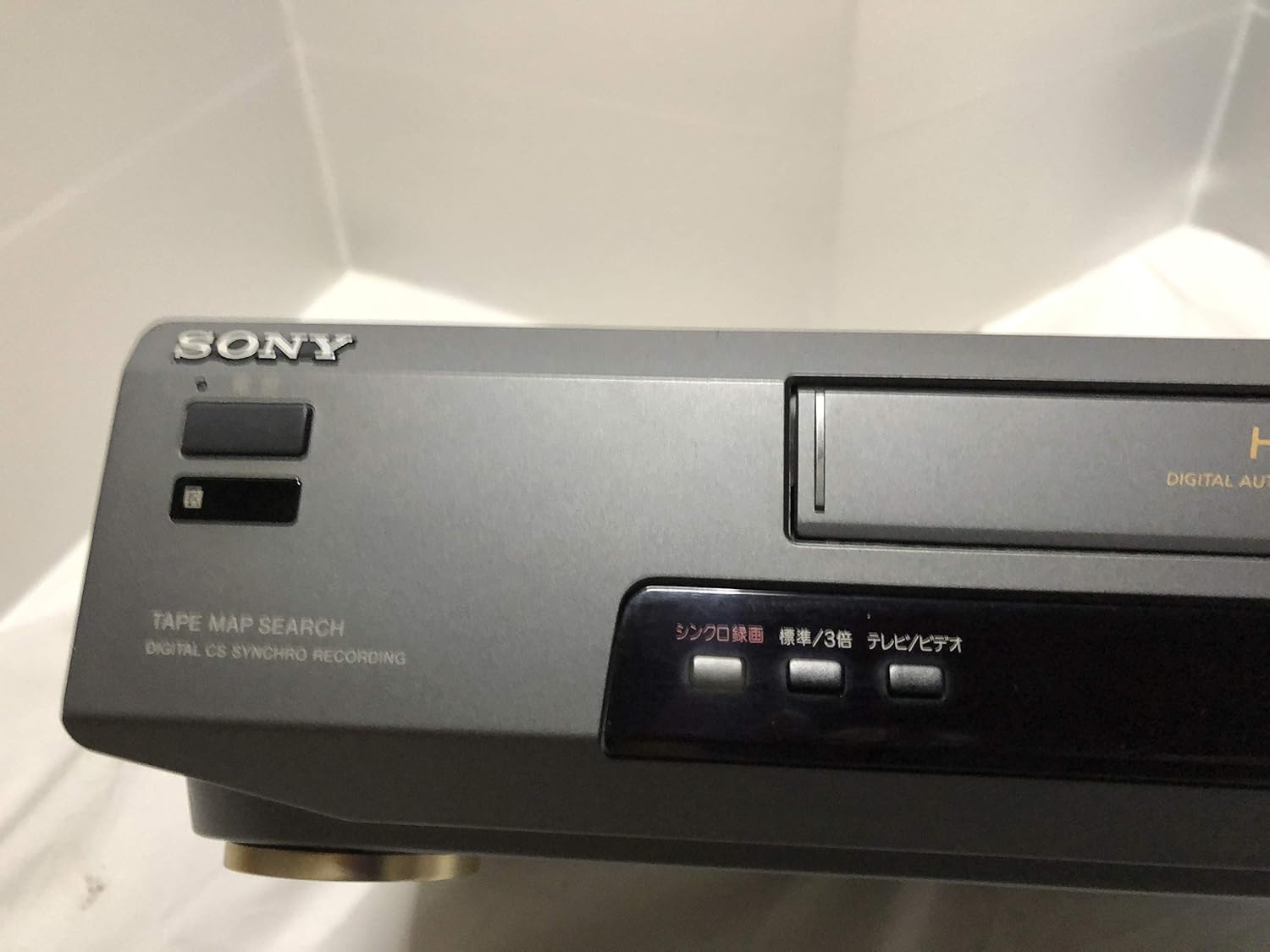
Foto 3: Front left section of the Sony SLV-FT5 VCR. This view highlights the tape loading slot and the 'TAPE MAP SEARCH' feature, which assists in navigating recorded content on a tape.
4.3 Nghaghachi
After loading a tape, press the KWURU button (►) on the VCR or remote control to begin playback. Use the Kwụsịtụ (∥), KWỤSỊ (■), KWESỊRỊ (◀◀), and Ọsọ n'iru (►►) buttons to control playback.

Foto 4: Front right section of the Sony SLV-FT5 VCR. This image displays the main playback controls (Play, Stop, Rewind, Fast Forward, Pause) and additional buttons for 'Quick Timer' and 'Tracking' adjustments.
4.4 Ndekọ
To record, ensure a blank or recordable tape is inserted. Select the desired input source (e.g., TV channel). Press the REC (●) button on the VCR or remote control. Press KWỤSỊ (■) to end recording.
4.5 Tracking Adjustment
If the picture quality during playback is poor (e.g., horizontal lines or noise), use the Nchọgharị buttons on the front panel or remote control to fine-tune the tape's alignment with the VCR's heads.
5. Nlekọta
5.1 Na-ehicha ngalaba ahụ
Wipe the exterior of the VCR with a soft, dry cloth. For stubborn stains, use a cloth lightly dampwere ihe ngwọta dị nro kpuchiri ya, wee hichaa nkụ. Ejila ihe nchacha abrasive ma ọ bụ ihe mgbaze.
5.2 Isi nhicha
Over time, VCR heads can accumulate dirt, leading to poor picture and sound quality. Use a commercially available dry-type VHS head cleaning cassette according to its instructions. Avoid wet-type cleaners as they can damage the heads.
5.3 Nchekwa
When not in use for extended periods, disconnect the VCR from the power outlet. Store the unit in a cool, dry place, away from dust and direct sunlight.
6. Nchọpụta nsogbu
If you encounter issues with your VCR, refer to the following common problems and solutions before seeking professional service.
| Nsogbu | Ihe nwere ike ime | Ngwọta |
|---|---|---|
| Enweghị ike | Akwụsịla eriri ike; okwu mgbapụta ike | Lelee njikọ eriri ọkụ eletrik; nwaa oghere dị iche. |
| Enweghị foto/ụda | Incorrect TV input; loose A/V cables | Select correct TV input (e.g., Video 1, AV); ensure A/V cables are securely connected. |
| Poor picture quality (snowy, lines) | Dirty VCR heads; tracking issue; old/damaged tape | Clean VCR heads; adjust tracking; try a different tape. |
| Tape won't eject | Power issue; mechanical malfunction | Ensure power is on; try pressing EJECT multiple times. If issue persists, seek service. |
| Njikwa anya anaghị arụ ọrụ | Dead batteries; obstructed sensor | Replace batteries; ensure no obstacles between remote and VCR sensor. |
7. Nkọwapụta
| Njirimara | Nkọwapụta |
|---|---|
| Ụdị | Sony |
| Nọmba nlereanya | SLV-FT5 |
| Ụdị mgbasa ozi | VHS |
| Mkpebi | 720 x 480 pikselụ |
| Ibu ngwaahịa | 4160 grams |
| Ọnọdụ mmepụta ọdịyo | Stereo |
| Ụdị ọdịyo akwadoro | Monaural, Stereo |
| Ndekọ vidiyo | Analọg |
| Ngwa dakọtara | Igwe onyonyo |
| Ndakọrịta Vidiyo Ntinye | NTSC |
| Ihe achọrọ ike | 100V, 18W, 50/60Hz |
8. Akwụkwọ ikike na nkwado
For warranty information and customer support, please refer to the documentation included with your purchase or visit the official Sony websaịtị. Debe ihe akaebe nke ịzụrụ maka akwụkwọ ikike.