
Okwu mmalite
The Samson Concert 288 Handheld Wireless System is a high-performance UHF wireless solution designed for vocal performances, presentations, educational applications, and other scenarios requiring two users. This system offers easy setup, reliable operation, and premium sound quality.
Kedu ihe dị na Igbe ahụ
Carefully unpack your Concert 288 system and ensure all components are present:
- CR288 onye nnata
- (2) CH288 Handheld Transmitters (Q6 Dynamic Microphone capsules)
- 1/4" audio cable
- Ihe nkwụnye ọkụ AC
- Ogbe ugwu kit
Melite
Follow these steps to set up your Samson Concert 288 Wireless System:
- Nkwanye nnata: Position the CR288 receiver in a location that provides a clear line of sight to the area where the handheld transmitters will be used. Avoid placing it near large metal objects or other wireless devices that could cause interference.
- Njikọ antenna: Attach the two antennas to the antenna connectors on the rear of the CR288 receiver. Ensure they are securely tightened and positioned for optimal reception.
- Njikọ ike: Connect the supplied AC adapter to the POWER DC IN jack on the rear of the receiver and plug it into an appropriate power outlet.
- Mmepụta ọdịyo: Connect the CR288 receiver to your mixer or amplifier using the appropriate audio cables. The receiver offers balanced XLR outputs (CH A OUT, CH B OUT) for individual channels and an unbalanced 1/4" MIX OUT for a combined signal.
- Nwụnye batrị nnyefe: Open the battery compartment of each CH288 handheld transmitter and insert two fresh AA batteries, observing correct polarity.
- Ike Na: Power on the receiver and then each handheld transmitter. The receiver's display should show the selected channel.
- Njikọ ugboro ugboro: The system is designed for easy pairing. If necessary, use the IR sync function to match the transmitter frequencies with the receiver channels. Refer to the detailed instructions in the full manual for specific frequency selection and syncing procedures.
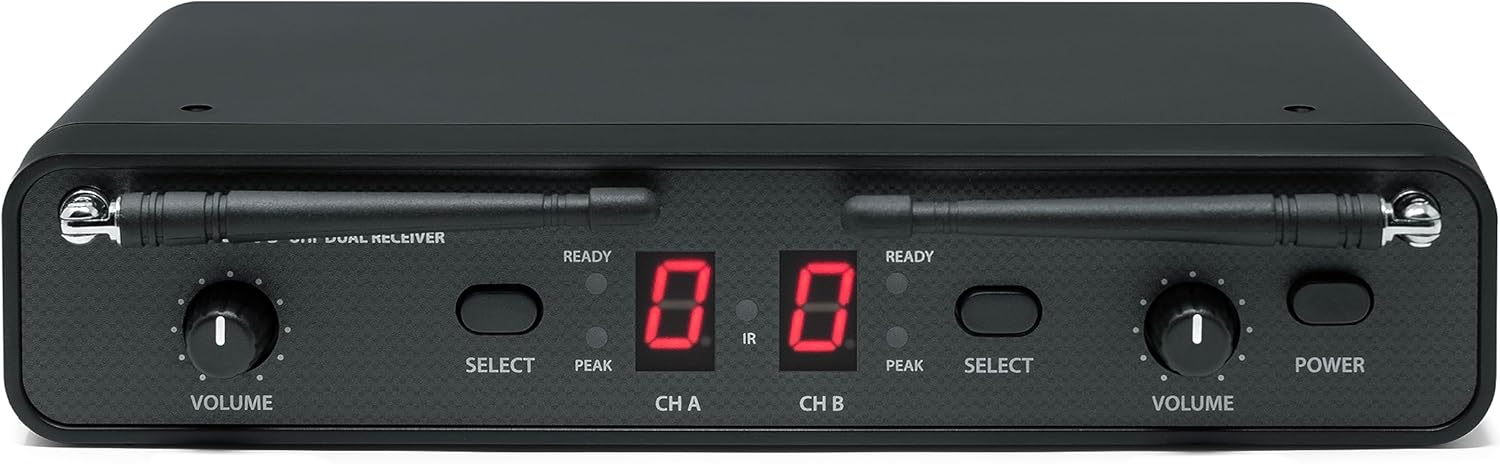
N'ihu view of the Samson CR288 Dual UHF Receiver, showing volume controls, channel displays, and power button.

Si elu gbadata view of the Samson CR288 Dual UHF Receiver with antennas extended, indicating optimal setup for signal reception.

N'azụ view of the Samson CR288 Dual UHF Receiver, showing power input, balanced XLR outputs for channels A and B, and an unbalanced 1/4" mix output.
Na-arụ ọrụ
Once the system is set up, follow these guidelines for operation:
- Ojiji igweokwu: Hold the CH288 handheld microphone approximately 2-6 inches from your mouth for optimal sound capture.
- Njikwa olu: Adjust the individual volume controls on the CR288 receiver for each channel (CH A and CH B) to achieve the desired audio level.
- Mechie ọrụ: Each handheld transmitter features a mute button. Press it to temporarily silence the microphone without powering it off.
- Nleba anya: Listen to the audio output through your sound system to ensure clear sound and proper levels.
- Oke: Maintain a reasonable distance between the transmitters and the receiver to ensure a stable wireless connection. The effective range can vary based on environmental conditions.

Two Samson CH288 handheld wireless microphones, featuring power/mute buttons and durable construction.
Nlekọta
Proper maintenance ensures the longevity and performance of your wireless system:
- Nhicha: Use a soft, dry cloth to clean the exterior of the receiver and transmitters. Avoid using abrasive cleaners or solvents.
- Ngbanwe batrị: Replace batteries in the handheld transmitters when the low battery indicator appears or when performance degrades. Always use fresh, high-quality AA batteries.
- Nchekwa: Mgbe a naghị eji ya ruo ogologo oge, wepụ batrị ndị na-ebuga ya ma debe sistemụ ahụ n'ebe dị jụụ ma kpọọ nkụ, ebe anwụ na-anaghị apụta kpọmkwem ma ọ bụ oke okpomọkụ.
- Nlekọta Antenna: Handle antennas carefully to avoid bending or breaking. Ensure they are properly secured during operation and storage.
Nchọpụta nsogbu
If you encounter issues with your Concert 288 system, refer to the following common solutions:
| Nsogbu | Ihe nwere ike ime | Ngwọta |
|---|---|---|
| Enweghị ụda sitere na igwe okwu | Microphone muted, batteries dead, receiver not powered, incorrect channel selected, audio cable disconnected. | Check mute button, replace batteries, ensure receiver is powered, verify channel pairing, check audio cable connections. |
| Intermittent signal or dropouts | Out of range, interference from other devices, weak batteries, obstructed line of sight. | Reduce distance to receiver, identify and eliminate interference sources, replace batteries, ensure clear line of sight. |
| Hissing or static noise | Interference, gain levels too high, faulty cable. | Adjust receiver/mixer gain, check for interference, try a different audio cable. |
| Ogo ụda adịghị mma | Incorrect microphone placement, low battery, interference. | Adjust microphone position, replace batteries, check for interference. |
For more detailed troubleshooting or persistent issues, consult the full product manual or contact Samson support.
Nkọwapụta
| Njirimara | Nkọwa |
|---|---|
| Ụdị | SAMSON |
| Nọmba nlereanya | SWC288HQ6-H (Concert 288 Handheld) |
| Teknụzụ Njikọta | Wireless (UHF) |
| Ọnụọgụ nke ọwa | 2 |
| Ntinye ọdịyo | Wireless microphones (Q6 Dynamic Microphone capsule) |
| Isi Iyi Ike | Battery Powered (Transmitters), AC Adapter (Receiver) |
| Ụdị nkwụnye | Tabletop (Rack mount kit included) |
| Akụkụ ihe (L x W x H) | 13 x 4 x 14 sentimita asatọ |
| Ibu Ibu | 4 pound |
| Ihe mkpuchi | Ọla, plastik |
| UPC | 809164213178 |
Ozi akwụkwọ ikike
The Samson Concert 288 Handheld Dual-Channel Wireless System is covered by a 1-afọ akụkụ na ọrụ akwụkwọ ikike from the date of purchase. Please retain your proof of purchase for warranty claims. This warranty covers manufacturing defects and malfunctions under normal use. It does not cover damage caused by misuse, accidents, unauthorized modifications, or improper installation.
Nkwado
For further assistance, technical support, or warranty inquiries, please visit the official Samson website or contact their customer service department. You can find more information and resources at the Samson Store on Amazon.