
1. Okwu mmalite
This manual provides comprehensive instructions for the Adesso AKB-132UY Luminous Large Print Multimedia Desktop USB Keyboard. This keyboard is designed with large, high-contrast keys to enhance readability, particularly for users with visual impairments. It also integrates multimedia controls for convenience.

Figure 1: Adesso AKB-132UY Luminous Large Print Multimedia Desktop USB Keyboard. This image displays the full keyboard with its black frame and bright yellow keys, featuring large black characters.
2. Ihe ngwugwu
Chọpụta na ihe niile dị na ngwugwu:
- Adesso EasyTouch 132 - Florescent Yellow Multimedia Desktop Keyboard
- Ntuziaka mmalite ngwa ngwa
3. Nhazi ntuziaka
3.1 Jikọọ ahụigodo
- Chọta ọdụ ụgbọ mmiri USB dị na kọmputa gị.
- Plug the USB connector of the Adesso AKB-132UY keyboard into the USB port.
- Sistemụ arụmọrụ ahụ ga-achọpụta ma wụnye draịva dị mkpa na akpaghị aka. A naghị achọkarị nrụnye ngwanrọ ọzọ.
The keyboard is powered via the USB connection.
4. Na-arụ ọrụ ahụigodo
4.1 Atụmatụ
- Fluorescent 4X Large Print Keys: The keyboard features black characters printed in a large 4X size on bright fluorescent yellow keys. This design provides high contrast for improved visibility and readability, particularly beneficial for users with visual impairments.

Ọgụgụ 2: nso nso view of the keyboard's QWERTY section, highlighting the large black characters on fluorescent yellow keys.
- Njikwa mgbasa ozi: Dedicated hotkeys allow for one-touch control of media functions. These include:
- Ihe ọkpụkpọ mgbasa ozi
- Mpịakọta ọnụ
- Elu elu
- Ogbi
- Gwuo/kwụsịtụ
- Egwu gara aga
- Track na-esote
- Kwụsị

Ọgụgụ 3: nso nso view of the numeric keypad and dedicated multimedia control keys located on the upper right side of the keyboard.
- Windows One-Touch Controls: Access common Windows applications directly with dedicated hotkeys:
- Kọmputa m
- ọchụchọ
- Ihe mgbako
- Ozi
- Ụlọ (nchọgharị)
- Favorites (Browser)
- Quiet Membrane Key Switches: The keyboard utilizes membrane key switches designed to provide a responsive and quiet typing experience. These switches are rated for a lifespan of up to five million keystrokes.
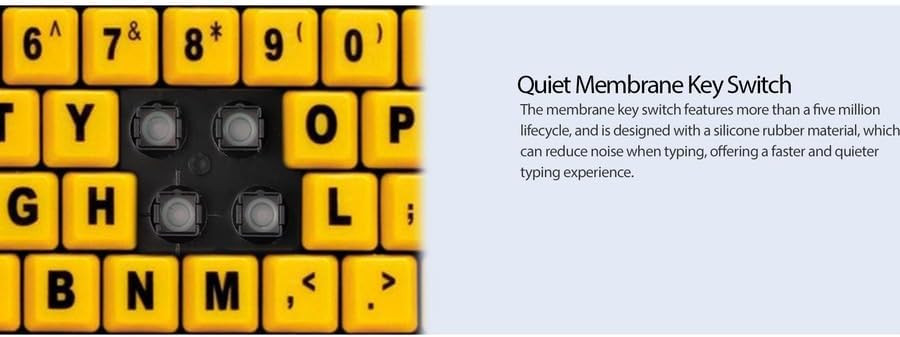
Ọgụgụ 4: Zuru ezu view showing the internal membrane key switch mechanism beneath a keycap.
- 104-Key US Layout: The keyboard features a standard 104-key US layout, providing a familiar typing experience.
5. Nlekọta
5.1 Ihicha ahụigodo
Iji nọgide na-enwe ọdịdị na ọrụ nke keyboard ahụ:
- Kwụpụ kiiboodu na kọmputa gị tupu ihicha.
- Jiri nro dị nro damp cloth to wipe the surface of the keys and the keyboard body.
- For stubborn dirt or debris between keys, use compressed air or a soft brush.
- Avoid using harsh chemicals, abrasive cleaners, or excessive moisture, as these can damage the keyboard's finish or internal components.
6. Nchọpụta nsogbu
If you encounter issues with your Adesso AKB-132UY keyboard, refer to the following troubleshooting steps:
6.1 Ahụigodo anaghị azaghachi
- Lelee njikọ USB: Ensure the keyboard's USB cable is securely plugged into a functioning USB port on your computer. Try unplugging and re-plugging the cable.
- Try a Different USB Port: Connect the keyboard to another USB port on your computer to rule out a faulty port.
- Malitegharịa kọmputa: Mgbe ụfọdụ, ịmalitegharịa sistemụ dị mfe nwere ike idozi nsogbu njikọ.
- Nwalee na Kọmputa ọzọ: If possible, test the keyboard on a different computer to determine if the issue is with the keyboard or your computer's setup.
6.2 Keys Sticking or Not Registering
- Clean Under Keys: Dust, crumbs, or debris can get lodged under keys. Use compressed air to clear any obstructions.
- Zenarị Mwụfu: Liquid spills can cause keys to stick or malfunction. If a spill occurs, disconnect the keyboard immediately and allow it to dry completely before reconnecting.
7. Nkọwapụta
| Njirimara | Nkọwa |
|---|---|
| Ụdị | Adesso |
| Nọmba nlereanya | AKB-132UY |
| Aha Nlereanya | EasyTouch 132 |
| Teknụzụ Njikọta | USB |
| Nkọwa ahụigodo | Membrane |
| Njirimara Pụrụ Iche | Large Print Keys |
| Agba | Oji na-acha odo odo |
| Ihe onwunwe | Plastic |
| Ọnụọgụ igodo | 104 |
| Nhazi ahụigodo | QWERTY (US Layout) |
| Isi Iyi Ike | Ike USB |
| Ibu Ibu | 1.5 pound |
| Ngwa dakọtara | PC |
8. Akwụkwọ ikike Ozi
The Adesso AKB-132UY keyboard comes with a Akwụkwọ ikike dị afọ 1 from the date of purchase. This warranty covers defects in materials and workmanship under normal use. For specific terms and conditions, please refer to the warranty card included in your package or visit the official Adesso websaịtị.
9. Nkwado
For technical support, product registration, or additional information, please visit the official Adesso websaịtị na www.adesso.com. You may also find FAQs and driver downloads on their support pages.