
1. Okwu mmalite
The Cooler Master CM Storm QuickFire Rapid-i is a mechanical gaming keyboard designed for performance and durability. It features full LED backlighting with ActivLite Technology, allowing for dynamic lighting effects and per-key customization. This keyboard is equipped with a 32-bit ARM processor for advanced lighting control without the need for software. Its tenkeyless form factor provides a compact design, ideal for gaming setups and travel.
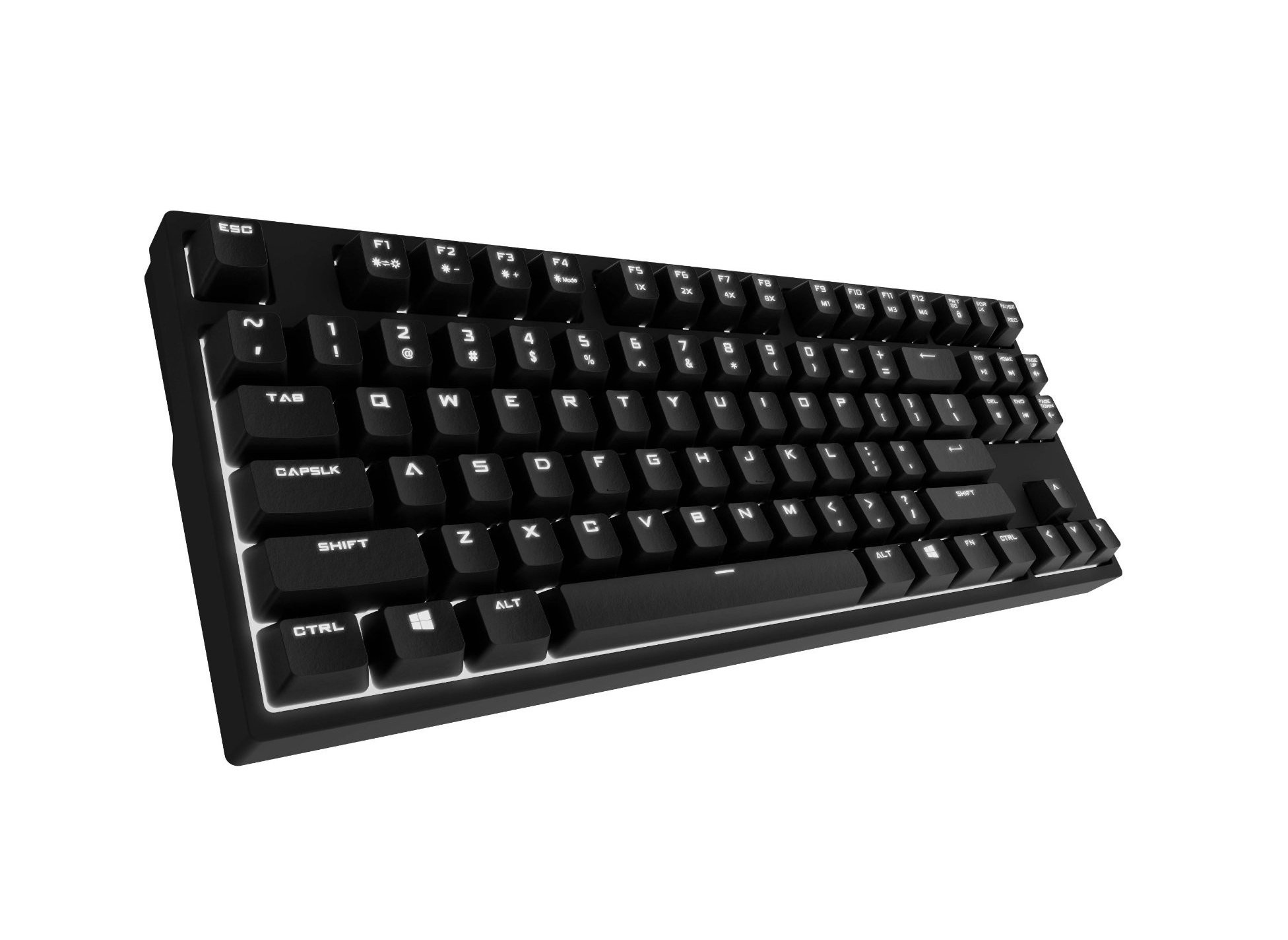
Image 1.1: Cooler Master CM Storm QuickFire Rapid-i Mechanical Gaming Keyboard.
2. Ihe ngwugwu
Chọpụta na ihe niile dị na ngwugwu gị:
- Cooler Master CM Storm QuickFire Rapid-i Keyboard
- 1.8m Detachable Braided USB Cable
- Akwụkwọ ntuziaka (akwụkwọ a)
3. Akụrụngwa Ngwaahịa
- Fully Mechanical CHERRY MX Brown Keyswitches: Provides tactile feedback with low noise, optimized for gaming.
- Tenkeyless Form Factor: Compact and ergonomic design for portability and improved mouse positioning.
- Fully White LED Backlit: Ensures visibility in low-light environments.
- ActivLite Technology: Features instant response and trailing light effects, powered by a 32-bit ARM processor.
- Individual Key Lighting: Allows saving up to 4 different lighting profiles maka ngwa dị iche iche ma ọ bụ egwuregwu.
- 1.8m Detachable Braided Cable: Durable and convenient for transport.
- N-Key Rollover: Registers an unlimited number of simultaneous keypresses, preventing ghosting.
4. Nhazi
4.1 Jikọọ ahụigodo
- Locate the detachable 1.8m braided USB cable.
- Connect the micro-USB end of the cable to the port on the back of the QuickFire Rapid-i keyboard.
- Connect the standard USB-A end of the cable to an available USB port on your computer.
- The keyboard is plug-and-play compatible with Windows operating systems and should be recognized automatically.

Image 4.1: Connecting the detachable USB cable to the keyboard.
5. Ntuziaka ọrụ
5.1 Ọrụ ahụigodo bụ isi
The QuickFire Rapid-i functions as a standard QWERTY keyboard. All keys perform their labeled actions. Special functions are typically accessed via the Function (Fn) key combined with other keys.
5.2 ActivLite Technology and LED Backlighting
The keyboard features fully white LED backlighting with ActivLite Technology, offering various lighting modes and effects. These effects are controlled directly from the keyboard using key combinations, without requiring software.
- Nzaghachi ozugbo: Keys light up immediately upon press.
- Trailing Effect: Keys remain lit for a short duration after being pressed, creating a trailing light effect.
- Ndozi ihie: Jiri Fn + F1 (welata nchapụta) na Fn + F2 (increase brightness) to adjust the LED intensity.
- Ụdị ọkụ: Cycle through various pre-programmed lighting modes using Fn + F3 ka Fn + F8. Refer to the keyboard's keycap legends for specific mode indicators.

Foto 5.1: Ọpụample of LED backlighting on the QuickFire Rapid-i.
5.3 Per-Key Lighting and Profiles
The QuickFire Rapid-i allows users to customize individual key lighting and save up to 4 different profiles directly on the keyboard's onboard memory.
- Entering Customization Mode: Pịa Fn + F9 to enter the per-key lighting customization mode. The keyboard LEDs may flash to indicate this mode.
- Selecting Keys: Press any key you wish to toggle its LED on or off.
- Saving a Profile: Once your desired lighting pattern is set, press Fn + F10, Fn + F11, Fn + F12, ma ọ bụ Fn + Print Screen to save the current lighting pattern to one of the four available profiles. The keyboard will confirm the save.
- Na-ebu Profile: To load a saved profile, naanị pịa Fn + F10, Fn + F11, Fn + F12, ma ọ bụ Fn + Print Screen kwekọrọ na pro chọrọfile.
- Exiting Customization Mode: Pịa Fn + F9 again to exit customization mode.

Image 5.2: Customizing individual key lighting for a personalized profile.
5.4 N-Key Rollover (NKRO)
The QuickFire Rapid-i supports N-Key Rollover, meaning every single keypress is registered accurately, regardless of how many keys are pressed simultaneously. This feature is crucial for fast-paced gaming where multiple commands might be executed at once.
6. Nlekọta
6.1 Ihicha ahụigodo
- Kwụpụ kiiboodu na kọmputa gị tupu ihicha.
- Jiri akwa dị nro na-enweghị ntụpọ dampejiri mmiri tinye ma ọ bụ ihe ngwọta dị nro iji hichaa igodo igodo na chassis.
- Zenarị ịfesa mmiri mmiri ozugbo na ahụigodo.
- Maka uzuzu na irighiri ihe n'etiti igodo, jiri ikuku abịakọrọ.
- Do not use harsh chemicals, abrasives, or solvents as they may damage the keyboard's finish or keycap legends.
6.2 Nlekọta USB
- Avoid sharp bends or kinks in the detachable braided cable.
- When disconnecting, pull from the connector head, not the cable itself.
7. Nchọpụta nsogbu
7.1 Ahụigodo anaghị azaghachi
- Gbaa mbọ hụ na ejikọrọ eriri USB na nchekwa na ma ahụigodo ma kọmputa.
- Gbalịa ijikọ ahụigodo na ọdụ ụgbọ USB dị iche na kọmputa gị.
- Nwalee ahụigodo na kọmpụta ọzọ ka ịwepụ ihe gbasara sistemụ.
- Malitegharịa ekwentị gị na kọmputa.
7.2 LED Backlighting Not Working or Flickering
- Check if the brightness is set to minimum using Fn + F1. Increase brightness with Fn + F2.
- Jiri usoro ọkụ mee okirikiri Fn + F3 ka Fn + F8 to see if other modes function.
- Ensure you are not in a custom profile with all LEDs turned off. Try loading a different profile or resetting the lighting.
- Kwupu ma jikọọ ahụigodo.
7.3 Keys Not Registering Correctly (Ghosting)
- The QuickFire Rapid-i features N-Key Rollover, which should prevent ghosting. If you experience this, ensure the keyboard is connected directly to a USB port on your computer, not through a hub.
- Clean the affected keys as described in the Maintenance section.
- If the issue persists, contact Cooler Master support.
8. Nkọwapụta
| Ụdị | Nna-ukwu oyi |
| Aha Nlereanya | SGK-4040-GKCB1 (CHERRY MX Brown switch) |
| Nọmba nlereanya | SGK-4040-GKCM1-US |
| Ngbanwe Ụdị | CHERRY MX Brown (Tactile) |
| Teknụzụ Njikọta | Wired (Detachable USB Cable) |
| Nhazi ahụigodo | QWERTY, Tenkeyless Form Factor |
| Ịkụ azụ azụ | Fully White LED, ActivLite Technology, Per-Key Lighting |
| Nhazi | 32-bit ARM Processor |
| N-Key Rollover | Akwadoro |
| Ogologo eriri USB | 1.8 meters (Braided, Detachable) |
| Sistemu eji arụ ọrụ dakọtara | Windows |
| Akụkụ ngwaahịa (L x W x H) | 14.13" x 5.43" x 1.54" (35.89cm x 13.79cm x 3.91cm) |
| Ibu Ibu | Pound 2.05 (0.93 n'arọ) |
| Ihe mkpuchi | Plastic |
9. Akwụkwọ ikike na nkwado
9.1 Ozi akwụkwọ ikike
The Cooler Master CM Storm QuickFire Rapid-i Mechanical Gaming Keyboard comes with a Akwụkwọ ikike nke ọnwa 12 site na ụbọchị ịzụrụ. Akwụkwọ ikike a na-ekpuchi ntụpọ nrụpụta yana nsogbu na-esite na iji nkịtị. Ọ naghị ekpuchi mmebi nke n'ụzọ na-ezighị ezi, ihe mberede, mgbanwe na-akwadoghị, ma ọ bụ mmezi na-adịghị mma.
Biko dowe ihe akaebe nke ịzụrụ ihe maka akwụkwọ ikike.
9.2 Nkwado nka na ụzụ
Maka enyemaka teknụzụ, nchọpụta nsogbu gafere akwụkwọ ntuziaka a, ma ọ bụ ajụjụ akwụkwọ ikike, biko gaa na nkwado Cooler Master nke gọọmentị website or contact their customer service department. Contact information can typically be found on the Cooler Master official websaịtị.
Note: Product specifications and warranty terms are subject to change without prior notice.