
PROSCAN PKCR2713_AMZ
PROSCAN ELITE PKCR2713AMZ Under Counter CD Player with Clock Radio and Bluetooth
Model: PKCR2713_AMZ
Okwu mmalite
The PROSCAN ELITE PKCR2713AMZ is a versatile under-counter audio system designed to provide entertainment and convenience in your kitchen or workspace. Featuring a CD player, FM radio, and Bluetooth connectivity, this unit allows you to enjoy your favorite music from various sources. Its space-saving design and intuitive controls make it a practical addition to any home.
Kedu ihe dị na Igbe ahụ
Verify that all items are present before beginning installation:
- PROSCAN ELITE PKCR2713AMZ Under Counter CD Player
- Mounting Kit (includes template and hardware)
- Njikwa anya ọrụ zuru oke
- Ada Ada AC
Ntọala na nwụnye
Follow these steps to properly install your under-counter CD player:
- Họrọ ebe: Select a flat, sturdy surface under a kitchen cabinet. Ensure there is adequate space for the unit and access to a power outlet.
- Kwadebe maka mgbakwasa: Use the provided mounting template to mark the drilling locations under your cabinet. Note: Some users have reported the template may not be perfectly accurate; verify measurements before drilling.
- Oghere pilot: Carefully drill pilot holes at the marked locations.
- Tinye efere nkwụnye: Secure the mounting plate to the underside of the cabinet using the provided screws.
- Ugwu Unit: Slide the PROSCAN ELITE unit onto the mounting plate until it clicks securely into place.
- Njikọ Ike: Plug the AC power adapter into the unit and then into a wall outlet.
- Install Backup Batteries: For clock and preset memory retention during power outages, install 2 x AA batteries (not included) into the battery compartment.
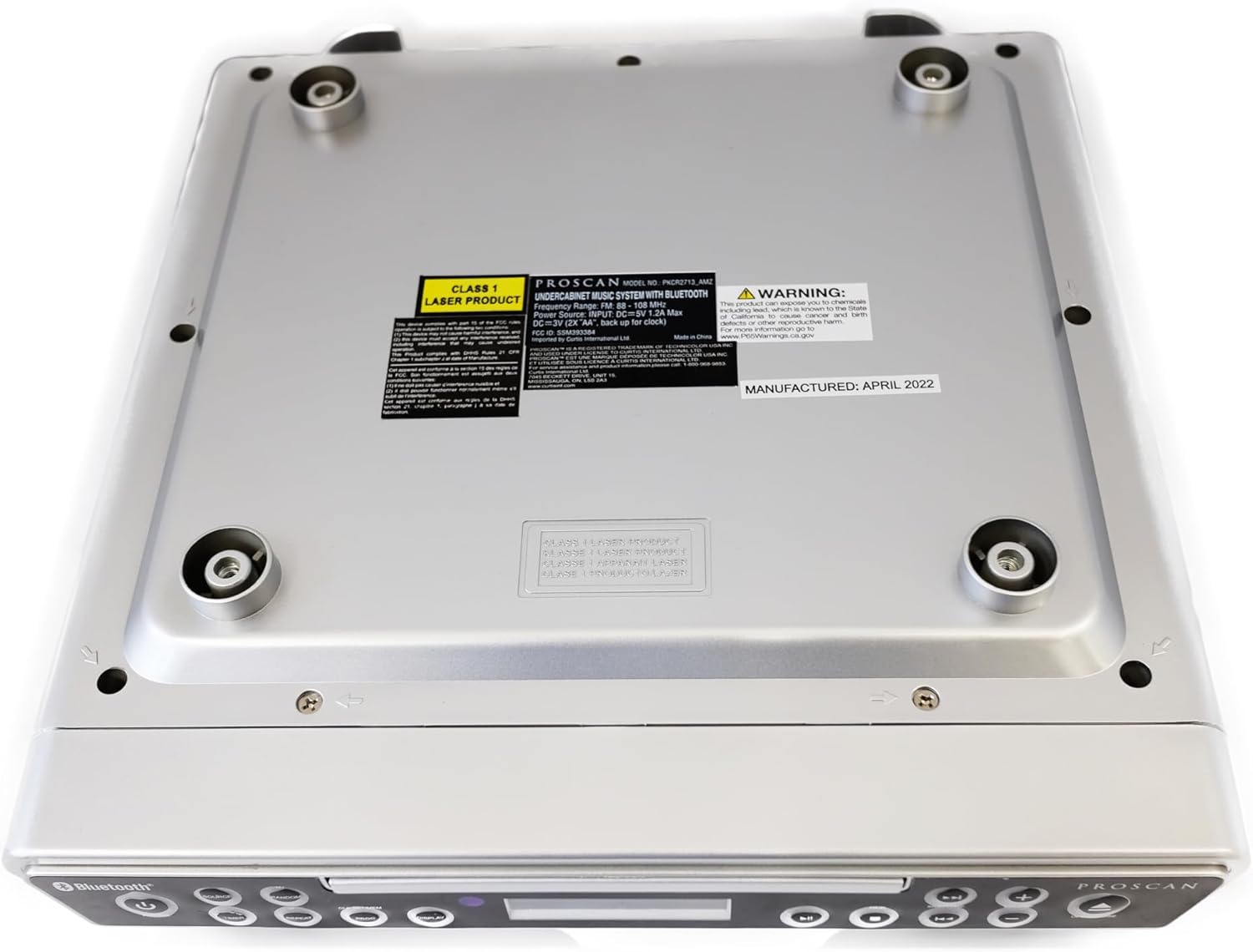
Foto: N'okpuru view of the unit, illustrating the mounting points and product information label.
Ntuziaka ọrụ
Njikwa Ogwe ihu

Image: Front panel of the unit, showing the display, CD tray, and various control buttons.
- Bọtịnụ IKE: Pịa ka ịgbanwuo ma ọ bụ gbanyụọ unit ahụ.
- Bọtịnụ isi mmalite: Cycle through available modes: CD, FM Radio, Bluetooth.
- VOLUME +/- Buttons: Hazie ọkwa mmepụta ọdịyo.
- Bọtịnụ Meghee/Mechie: Eject or retract the CD tray.
- SKIP/TUNE Buttons:
- In CD mode: Skip to the next/previous track.
- In FM mode: Tune to the next/previous radio station.
- Bọtịnụ Kwụsị/ Kwụsị: Play or pause CD playback.
- Bọtịnụ PAIR: Malite ụdị njikọta Bluetooth.
- DISPLAY Button: Adjust display brightness or cycle through display information.
- CLK SET/MEM Button: Set the clock or save/recall radio presets.
- Bọtịnụ TIMER: Set sleep timer or alarm functions.
- Bọtịnụ ikwughachi: Repeat current track or entire CD.
- Bọtịnụ PROG: Program CD playback order.
- RANDOM Button: Play CD tracks in random order.
CD Player arụ ọrụ
- Pịa Mepee/mechie bọtịnụ imepe tray CD.
- Tinye CD n'elu tray ahụ ka akụkụ akara ahụ chee ihu elu.
- Pịa Mepee/mechie button again to close the tray. The unit will automatically begin playing the CD.
- Jiri ihe KWURU/Kwụsịa, SKIP/TUNE, Tinyegharịa, ỌRỤ, na AZỤ bọtịnụ iji jikwaa ịkpọghachi.
FM Radio arụ ọrụ
- Pịa Isi mmalite bọtịnụ ruo mgbe "FM" pụtara na ngosipụta ahụ.
- Jiri ihe SKIP/TUNE buttons to manually tune to a desired frequency or press and hold to auto-scan for the next available station.
- To save a preset: Tune to the desired station, then press and hold the CLK SET/MEM bọtịnụ ruo mgbe nọmba edobere na-egbukepụ egbukepụ. SKIP/TUNE bọtịnụ iji họrọ nọmba edobere, wee pịa CLK SET/MEM ọzọ iji gosi.
- To recall a preset: Briefly press the CLK SET/MEM bọtịnụ ma jiri ya SKIP/TUNE buttons to select the desired preset.
Ọrụ Bluetooth
- Pịa Isi mmalite button until "BT" or "Bluetooth" appears on the display. The unit will enter pairing mode, indicated by a flashing Bluetooth icon.
- Na ngwaọrụ Bluetooth gị (smartphone, tabletị, wdg), gbanye Bluetooth wee chọọ ngwaọrụ dịnụ.
- Select "PROSCAN ELITE" or similar from the list of devices.
- Once paired, the Bluetooth icon on the unit's display will stop flashing, and you can stream audio from your device to the unit.
- To disconnect, either turn off Bluetooth on your device or press and hold the Mmakọ bọtịnụ dị na unit ahụ.

Foto: Akụkụ view of the unit, highlighting the 'LINE IN' auxiliary input port.
Nlekọta
- Nhicha: Jiri akwa dị nro hichaa otu ahụ. Ejila ihe nchacha abrasive ma ọ bụ ihe mgbaze.
- Nlekọta CD: Handle CDs by the edges. Keep them clean and free of scratches to ensure optimal playback.
- Ngbanwe batrị: Replace backup batteries (AA) annually or when the clock/presets are not retained during power outages.
Nchọpụta nsogbu
| Nsogbu | Ihe nwere ike ime | Ngwọta |
|---|---|---|
| Unit anaghị agbanye ọkụ. | No power, AC adapter not connected. | Hụ na e tinyere ihe nkwụnye AC n'ime ngwaọrụ ahụ nke ọma yana oghere mgbidi na-arụ ọrụ. |
| Enweghị ụda sitere na ndị ọkà okwu. | Volume too low, incorrect source selected, muted. | Increase volume. Press SOURCE to select correct mode (CD, FM, BT). Check if unit is muted. |
| CD na-awụli elu ma ọ bụ anaghị egwu egwu. | Dirty or scratched CD, CD inserted incorrectly. | Clean the CD with a soft cloth. Ensure CD is inserted label-side up. Try a different CD. |
| Nnabata redio FM na-adịghị mma. | Weak signal, internal antenna position. | Reposition the unit for better reception. Note: This unit does not have an AM feature. |
| Nsogbu njikọta Bluetooth. | Device too far, Bluetooth not enabled on device, unit not in pairing mode. | Ensure device is within range. Enable Bluetooth on your device. Press PAIR button on unit. |
Nkọwapụta
- Akụkụ ngwaahịa: 14 x 4 x 12.5 sentimita (L x W x H)
- Ibu ihe: 0.035 ounces
- Akara: PROSCAN
- Nọmba nlereanya: PCCR2713_AMZ
- Teknụzụ Njikọta: Bluetooth
- Agba: Ọlaọcha
- Ụdị ọkà okwu: Stereo
- Mpụta ike: 2 x 1.2 W
- Isi mmalite ike: AC Adapter with Battery Backup (2 x AA, not included)
- Atụmatụ: Under-cabinet mounting, CD player, FM radio, Bluetooth 3.0, LED display, remote control.
Akwụkwọ ikike na nkwado
For warranty information and technical support, please refer to the documentation included with your purchase or visit the official PROSCAN websaịtị. Debe ihe akaebe nke ịzụrụ maka akwụkwọ ikike.
Akụrụngwa dị n'ịntanetị:
- Official PROSCAN Store: PROSCAN ELITE Store
- Akwụkwọ ntuziaka onye ọrụ (PDF): Budata akwụkwọ ntuziaka PDF
Ask a question about this manual
Ask about setup, troubleshooting, compatibility, parts, safety, or missing instructions. Manuals+ will review the question and use this page’s manual context to help answer it.