
Okwu mmalite
Thank you for choosing the SoundBot SB510 HD Water Resistant Bluetooth Shower Speaker. This manual provides essential information for setting up, operating, and maintaining your speaker to ensure optimal performance and longevity. Designed for convenience and durability, this speaker allows you to enjoy your favorite audio content in various environments, including the shower, without concern for water exposure.
Atụmatụ gụnyere:
- Nhazi Na-eguzogide Mmiri: Built to withstand steam, splashes, and humidity, ideal for bathroom use.
- Oku na-anaghị aka: Integrated microphone and control buttons for answering and ending calls.
- Enwere ike ibugharị ma dị fechaa: Compact design for easy transport and use on the go.
- Ogologo oge egwuregwu: Up to 6 hours of continuous audio playback on a single charge.
- Njikọ Bluetooth kwụsiri ike: Reliable streaming up to 33 feet from your device.
- Njikwa dị mfe iji: Tactile buttons designed for operation even with wet hands.

The SoundBot SB510 HD speaker, showcasing its water-resistant design.
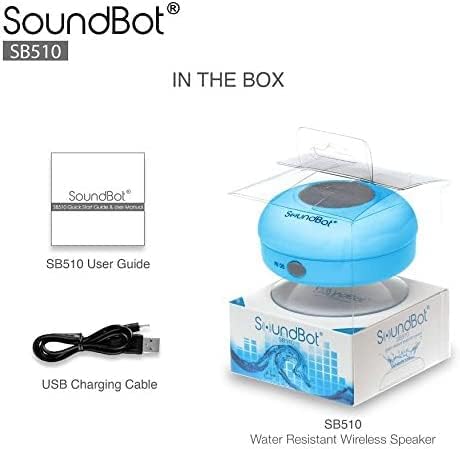
Kedu ihe dị na Igbe ahụ
Your SoundBot SB510 HD package includes the following items:
- 1 x SoundBot SB510 Water Resistant Bluetooth Shower Speaker
- 1 x Ntuziaka onye ọrụ
- 1 x eriri USB

Included components: speaker, USB charging cable, and user guide.
Melite
Ịchaji Ọkà Okwu
Before first use, fully charge your SoundBot SB510 HD speaker. A full charge takes approximately 3 hours and provides up to 6 hours of playtime.
- Locate the charging port on the side of the speaker, usually protected by a rubber flap.
- Connect the small end of the included USB charging cable to the speaker's charging port.
- Jikọọ nsọtụ ka ukwuu nke eriri USB na isi iyi ike USB (dịka ọmụmaatụ, ọdụ ụgbọ USB kọmputa, ihe nkwụnye mgbidi USB).
- The LED indicator light will illuminate during charging and turn off or change color when fully charged.

The speaker connected to its USB charging cable.
Njikọ Bluetooth
Pair your speaker with your Bluetooth-enabled device (smartphone, tablet, laptop) to begin wireless audio streaming.
- Ensure the speaker is charged and turned off.
- Pịa ma jide bọtịnụ ike (⏻) on the speaker until the LED indicator light begins to flash rapidly, indicating it is in pairing mode.
- Na ngwaọrụ gị, gbanye Bluetooth ma chọọ ngwaọrụ dịnụ.
- Select "SB510" from the list of found devices.
- Once successfully paired, the LED indicator light on the speaker will stop flashing and remain solid blue. You will also hear an audible confirmation.
- Igwe okwu a nwere ike iru mita 10 (ụkwụ 33).
The speaker's control panel, used for initiating Bluetooth pairing.
Ntuziaka ọrụ
Njikwa Okwu
The SoundBot SB510 HD features intuitive buttons for easy control of your audio and calls:
| Bọtịnụ | Ọrụ (Short Press) | Ọrụ (Long Press) |
|---|---|---|
| ⏻ (Ike) | N/A | Gbanyụọ/ Gbanyụọ |
| ⏵⏸ (Kpọọ/Kwụsị) | Kpọọ/kwụsịtụ egwu | N/A |
| ⏮ (Previous/Volume Down) | Abụ gara aga | Olu ala (-) |
| ⏭ (Next/Volume Up) | Abụ na-abịa | Elu elu (+) |
| 📞 (ekwentị) | Zaa/Kwụsị Oku ekwentị | N/A |

Zuru ezu view of the speaker's control buttons and their functions.
Ịkpọ na ịnata oku
The built-in microphone allows for hands-free communication:
- Na-aza oku: Mgbe oku batara, pịa 📞 bọtịnụ otu ugboro iji zaa.
- Ịkwụsị oku: Mgbe oku na-aga, pịa 📞 button once to end the conversation.
- Na-emegharị: Pịa ugboro abụọ 📞 bọtịnụ ka ịkpọgharịa nọmba ikpeazụ.
Nlekọta
To ensure the longevity and optimal performance of your SoundBot SB510 HD speaker, follow these maintenance guidelines:
- Nguzogide mmiri: The speaker is IPX4 water resistant, meaning it is protected against splashing water from any direction. It is suitable for use in showers or near pools, but it should ọ bụghị be submerged in water. Ensure the charging port cover is securely closed when not charging to maintain water resistance.
- Nhicha: Jiri nwayọ hichaa ọkà okwu, damp cloth. Do not use abrasive cleaners or solvents, as these may damage the surface or internal components.
- Nchekwa: Chekwaa ọkà okwu n'ebe dị jụụ, kpọrọ nkụ mgbe ọ naghị eji ya. Zere oke okpomọkụ.
- Nlekọta iko mmiri ara: For best adhesion, ensure the surface where you attach the suction cup is clean, smooth, and dry. Periodically clean the suction cup with water to remove any dust or residue.

The speaker's water-resistant design allows for use in wet environments.
Nchọpụta nsogbu
If you encounter any issues with your SoundBot SB510 HD speaker, please refer to the following common troubleshooting steps:
| Nsogbu | Ihe nwere ike ime | Ngwọta |
|---|---|---|
| Ọkà okwu anaghị agbanwuo. | Batrị dị ala. | Charge the speaker fully (approx. 3 hours). |
| Enweghị ike ijikọ na ngwaọrụ. | Speaker not in pairing mode; Bluetooth off on device; device too far. | Ensure speaker is in pairing mode (flashing LED). Turn on Bluetooth on your device. Move device closer to speaker (within 33 ft). Forget previous pairings on your device and try again. |
| Enweghị ụda ma ọ bụ obere olu. | Olu dị oke ala na igwe okwu ma ọ bụ ngwaọrụ; ejikọtaghị igwe okwu. | Increase volume on both the speaker and your connected device. Ensure speaker is successfully paired and connected. |
| Mgbagwoju anya ụda. | Ngwaọrụ dị oke anya; nnyonye anya. | Move your device closer to the speaker. Avoid obstacles between the speaker and device. Reduce interference from other wireless devices. |
| Suction cup not sticking. | Surface is dirty, wet, or not smooth. | Clean and dry the surface thoroughly. Ensure the surface is smooth (e.g., tile, glass). Clean the suction cup itself. |
Nkọwapụta
Detailed technical specifications for the SoundBot SB510 HD speaker:
| Njirimara | Nkọwa |
|---|---|
| Aha Nlereanya | SB510 HD |
| Nọmba Nlereanya ihe | SB510-BLU |
| Teknụzụ Njikọta | Bluetooth, USB |
| Teknụzụ nzikọrịta ozi ikuku | Bluetooth |
| Oke Bluetooth | Ruo 33 ụkwụ (mita 10) |
| Ọkwa Nguzogide mmiri | IPX4 (mmiri na-eguzogide) |
| Ụdị Ọkà Okwu | Desktop / Portable |
| Ike Nwepu kacha elu | 3 Watt |
| Ọnọdụ mmepụta ọdịyo | Stereo |
| Ndụ batrị | Awa 6 |
| Oge Nchaji | Awa 3 |
| Ụdị batrị | 1 Lithium ion batrị achọrọ |
| Igwe okwu arụnyere n'ime ya | Ee |
| Akụkụ ngwaahịa | 3.5"D x 3.5"W x 2.3"H |
| Ibu Ibu | 1.59 ounces |
| Ihe onwunwe | Plastic, rọba |
Akwụkwọ ikike & Nkwado
The SoundBot SB510 HD Water Resistant Bluetooth Shower Speaker comes with a Limited Warranty. For specific details regarding warranty coverage, duration, and terms, please refer to the warranty information provided in the original product packaging or contact SoundBot customer support directly.
For technical assistance, troubleshooting beyond this manual, or warranty claims, please visit the official SoundBot website or contact their customer service department. Contact information can typically be found on the product packaging or the SoundBot websaịtị.