
1. Okwu mmalite
The Connection SLI 2.2 is a 2-channel speaker level interface designed to convert high-level speaker outputs from an OEM (Original Equipment Manufacturer) source or amplifier into a low-level RCA signal suitable for aftermarket amplifiers. This device ensures optimal audio quality and seamless integration with various car audio systems.
2. Atụmatụ igodo
- Excellent Audio Quality: Utilizes high-quality transformers and STOP NOISE technology for full bandwidth preservation and total rejection of electrical interference through galvanic separation.
- Nwụnye dị mfe: Features a robust, compact, and shielded aluminum chassis with a clear connection diagram and side-mounted connection panel.
- Single Connector Wiring: Labeled wiring terminated with a Molex connector and tear-proof plastic strip for secure and easy connections.
- Total OEM Integration (DSR): Double Step-Down Ratio (DSR) offers selectable 8:1 (High-Power) and 4:1 (Low-Power) conversion ratios via DIP switches for each input (front and rear), supporting outputs up to 35V RMS.
- Universal Speakers Simulator (USS): Simulates speaker load on all 4 input channels (front and rear) for compatibility with OEM sources that detect original speaker impedance.
- Automatic Remote Turn-On (ARTTM): Generates a 12V output for amplifier remote control, compatible with all OEM sources, including latest generation units.
3. Ihe ngwugwu
Please ensure all items are present before installation:
- Connection SLI 2.2 Speaker Level Interface unit
- Wiring harness with Molex connector
- Akwụkwọ ntuziaka (akwụkwọ a)

Image: The Connection SLI 2.2 unit shown with its protective cover and part of the packaging.
4. Ntọala na nwụnye
Nchekwa Mbụ: Disconnect the vehicle's battery before beginning any electrical installation to prevent short circuits and damage to components.
- Mounting the SLI 2.2:
Choose a secure, dry location for mounting the SLI 2.2 unit, away from excessive heat or moisture. The robust aluminum chassis is designed for durability. Use appropriate fasteners (not included) to secure the unit.
- Connecting Speaker Level Inputs:
Identify the speaker output wires from your OEM head unit or amplifier. Connect these high-level outputs to the corresponding input wires on the SLI 2.2 wiring harness. Ensure correct polarity (positive to positive, negative to negative) for each channel.

Image: Detail of the SLI 2.2 showing input/output labels and DIP switches for ratio selection.
- Setting the Double Step-Down Ratio (DSR) DIP Switches:
The SLI 2.2 features DIP switches to select the appropriate step-down ratio for each input channel independently. Refer to the diagram on the unit or the table below:
Ntọala mgbanwe DIP Oke mgbanwe Ngwa OFF (Low-Power) 4:1 Traditional OEM sources (lower voltage outputs) ON (High-Power) 8:1 OEM amplifiers with high-voltage outputs (up to 35V RMS) Adjust the DIP switches according to the output voltage of your OEM source. Incorrect settings may result in distorted audio or insufficient signal to your aftermarket ampna -emegharị ihe.
- Connecting RCA Outputs:
Connect the RCA output cables from the SLI 2.2 to the RCA input jacks on your aftermarket amplifịa. Hụ na ọwa aka ekpe na aka nri kwekọrọ nke ọma.
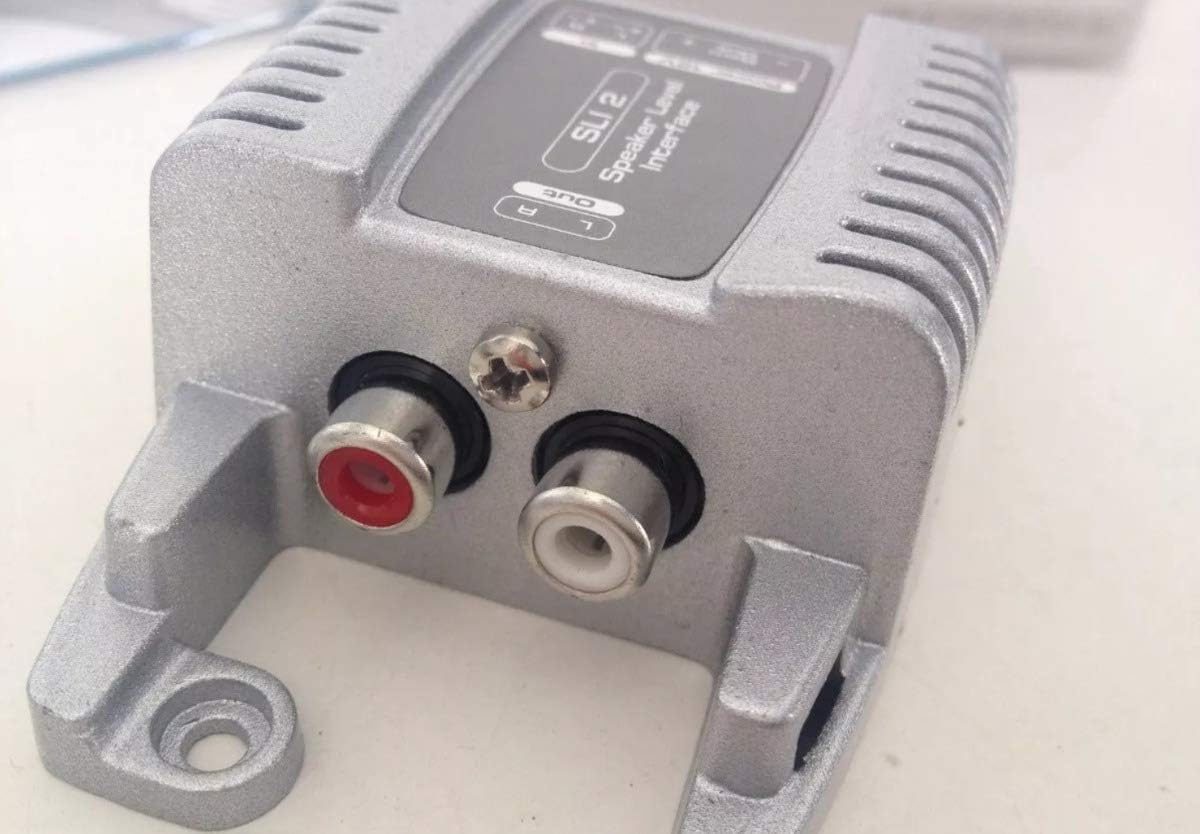
Image: Detail of the SLI 2.2 showing the Left (white) and Right (red) RCA output connectors.
- Connecting Remote Turn-On (ARTTM):
The SLI 2.2 provides an Automatic Remote Turn-On (ARTTM) output. Connect the remote output wire from the SLI 2.2 to the remote input terminal on your aftermarket amplifier. This will automatically turn on your amplifier when the OEM source is active.
- Njikọ ike:
Connect the power and ground wires of the SLI 2.2 wiring harness to appropriate power sources in your vehicle. Typically, the positive wire connects to a switched 12V source (or constant 12V if preferred, but switched is recommended to prevent battery drain), and the negative wire connects to a solid chassis ground point.
5. Ụkpụrụ ọrụ
The Connection SLI 2.2 operates by taking the high-voltage speaker output from your vehicle's factory audio system and safely converting it into a low-voltage RCA signal. This process is critical for integrating aftermarket amplifiers, which typically require a low-level input signal.
- Ngbanwe akara: High-quality transformers within the unit perform the voltage step-down, ensuring minimal signal degradation.
- Ọjụjụ mkpọtụ: STOP NOISE technology and galvanic isolation prevent electrical interference from affecting the audio signal, resulting in a clean output.
- Speaker Load Simulation (USS): The Universal Speakers Simulator ensures that the OEM head unit detects a proper speaker load, preventing it from shutting down or altering its output due to the absence of connected speakers.
- Automatic Activation (ARTTM): The Automatic Remote Turn-On feature simplifies system operation by automatically activating the connected amplifier when the OEM audio system is turned on, eliminating the need for a separate remote wire from the head unit.
6. Nlekọta
The Connection SLI 2.2 is designed for maintenance-free operation. To ensure longevity and optimal performance:
- Debe unit ahụ pụọ na uzuzu na irighiri ihe.
- Ensure all connections remain secure. Periodically check wiring for any signs of wear or corrosion.
- Zere ikpughe akụkụ ahụ na oke okpomọkụ ma ọ bụ mmiri mmiri.
7. Nchọpụta nsogbu
| Nsogbu | Ihe nwere ike ime | Ngwọta |
|---|---|---|
| No audio output from ampna -emegharị ihe. |
|
|
| Distorted or low audio. |
|
|
| Amplifier does not turn on automatically. |
|
|
8. Nkọwapụta
- Ụdị: 02026SLI2
- Ọwa: 2-ọwa
- Step-Down Ratios (DSR): 4:1 (Low-Power), 8:1 (High-Power) selectable via DIP switch
- Oke Ntinye Voltage: Up to 35V RMS (with 8:1 ratio)
- Atụmatụ: STOP NOISE technology, USS (Universal Speakers Simulator), ARTTM (Automatic Remote Turn-On)
- Ihe Chassis: Shielded Aluminium
- Ụdị njikọ: RCA (Output), Molex (Input harness), Mini USB (Note: Product images show RCA, Mini USB might refer to an internal component or a different model variant. Please refer to physical product for exact connector types.)
- Ngwa dakọtara: Amponye na-ekwu okwu, ọkà okwu
- Ibu ihe: 9.2 ounces (ihe dị ka gram 260)
- Akụkụ ngwugwu: 5.2 x 4.72 x 1.5 sentimita (ihe dịka 13.2 x 12 x 3.8 cm)
9. Akwụkwọ ikike na nkwado
For warranty information and technical support, please refer to the official Connection websaịtị ma ọ bụ kpọtụrụ onye na-ere gị ikike. Debe nnata nzụta gị ka ihe akaebe nke ịzụrụ.
Onye nrụpụta: Njikọ


