
1. Okwu mmalite
This manual provides essential information for the safe and efficient operation of your AXI Model Motors Gold Line 5320/28 Outrunner Brushless Motor. Please read this manual thoroughly before installation and use to ensure optimal performance and longevity of your motor.
The AXI Gold Line 5320/28 is a high-performance outrunner brushless motor designed for RC hobby applications. Key features include:
- Max. 32 Ni-CD or 10s Li-Poly cells compatibility.
- Current capacity: 65A / 30s.
- RPM/V: 249.
- Max. efficiency: 92%.
- Max. efficiency current: 10 - 36A (>85%).
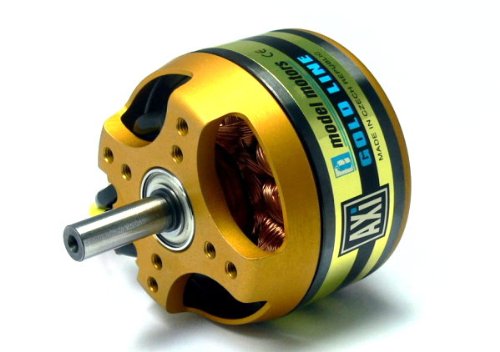
Figure 1: AXI Model Motors Gold Line 5320/28 Outrunner Brushless Motor. This image shows the main view of the motor, highlighting its gold and black casing and exposed copper windings.
2. Understanding Your Motor Model
The model designation provides important information about the motor's characteristics. For the AXI 5320/28, the numbers indicate specific design parameters:
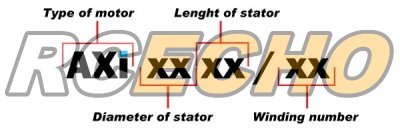
Figure 2: Diagram illustrating the AXI motor naming convention. "AXI" denotes the brand, "XX" for diameter of stator, "XX" for length of stator, and "/XX" for winding number.
3. Ntọala na nwụnye
Proper installation is crucial for the motor's performance and safety.
3.1 Ịkwanye moto
The AXI 5320/28 motor typically mounts using the included hardware. Ensure the motor is securely fastened to the airframe's motor mount using appropriate screws. Use thread-locking compound on screws to prevent loosening due to vibration.
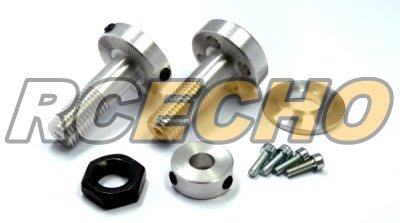
Figure 3: Included mounting hardware and accessories for the AXI motor. This image displays various screws, nuts, and adapters used for securing the motor and propeller.
3.2 Njikọ eletrik
Connect the motor to a compatible Electronic Speed Controller (ESC) according to the ESC's instructions. The three motor wires can be connected in any order; if the motor spins in the wrong direction, swap any two of the three wires.
- Gbaa mbọ hụ na njikọ niile echekwabara na mkpuchi mkpuchi iji gbochie obere sekit.
- Verify that your ESC is rated for the motor's current draw (65A / 30s peak).
- Use appropriate battery packs (max. 32 Ni-CD or 10s Li-Poly) that can supply the required current.
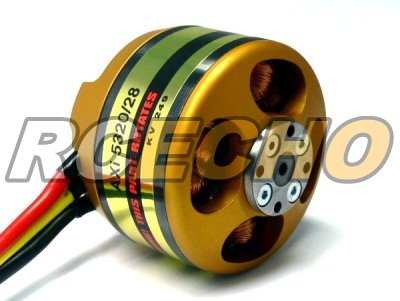
Ọgụgụ 4: N'azụ view of the AXI motor showing the three electrical connection wires. This view also highlights the rotating outer casing and the fixed stator with copper windings.
4. Ntuziaka ọrụ
Before operating, ensure all components are correctly installed and secured. Always perform a pre-flight check.
4.1 Propeller Selection
Choosing the correct propeller is vital for efficiency and to prevent motor overload. Refer to the table below for recommended propeller sizes based on aircraft type and battery configuration. Exceeding recommended propeller sizes can lead to overheating and damage.
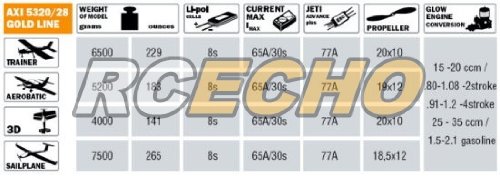
Figure 5: Performance chart for the AXI 5320/28 Gold Line motor, detailing recommended propeller sizes, model weight, cell count, current, and efficiency for various aircraft types (Trainer, Aerobatic, 3D, Sailplane).
4.2 Initial Run and Calibration
After installation, perform a low-power test run to confirm correct motor rotation and ESC calibration. Gradually increase throttle to check for smooth operation and unusual noises. Monitor motor temperature during initial flights.
5. Nlekọta
Regular maintenance ensures the longevity and reliability of your AXI motor.
- Nhicha: Keep the motor free from dirt, dust, and debris. Use compressed air or a soft brush to clean the motor, especially around the bearings and windings.
- Agba: The motor's bearings are sealed and generally maintenance-free. However, if you notice excessive noise or play, the bearings may need replacement.
- Nyocha: Periodically inspect all wiring for fraying or damage. Check motor mounts and propeller adapters for tightness.
- Okpomọkụ: Avoid operating the motor at excessively high temperatures. If the motor is too hot to touch after a flight, review your propeller choice, battery, or ESC settings.
6. Nchọpụta nsogbu
Akụkụ a na-ekwu maka nsogbu ndị ị nwere ike izute.
- Moto anaghị agbagharị agbagharị:
- Lelee njikọ batrị na ọkwa chajị.
- Verify ESC is armed and connected correctly.
- Inspect motor wires for breaks or loose connections.
- Ensure propeller is not obstructed.
- Motor spinning in wrong direction:
- Gbanwee waya moto abụọ ọ bụla ejikọtara na ESC.
- Ịkpọ oke moto:
- Propeller may be too large or too aggressive for the motor/battery combination. Refer to the propeller chart.
- Insufficient airflow for cooling.
- ESC timing settings may be incorrect (refer to ESC manual).
- Damaged bearings or internal short.
- Loss of power/intermittent operation:
- Loose connections between motor, ESC, or battery.
- Batrị voltage sag or low charge.
- ESC thermal shutdown or faulty.
7. Nkọwapụta
Detailed technical specifications for the AXI Model Motors Gold Line 5320/28.
| Oke | Uru |
|---|---|
| Nọmba nlereanya | OM698 |
| No. of Cells (Ni-CD) | Oke. 32 |
| No. of Cells (Li-Poly) | Oke. 10s |
| Ike dị ugbu a | 65A / 30s |
| RPM/V (Kv) | 249 |
| Oke. Ịrụ ọrụ | 92% |
| Max. Efficiency Current | 10 - 36A (>85%) |
| Ibu Ibu | 670 g |
| Ihe onwunwe | Plastic (referring to casing/insulation) |
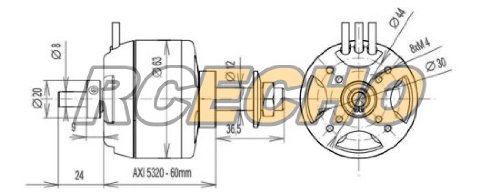
Figure 6: Technical drawing of the AXI 5320-60mm motor, showing key dimensions such as diameter, length, shaft diameter, and mounting hole patterns.
8. Akwụkwọ ikike na nkwado
For warranty information and technical support, please refer to the official AXI Model Motors webma ọ bụ kpọtụrụ onye na-ere ahịa gị ikike. Debe ihe akaebe nke nzụta gị maka akwụkwọ ikike ọ bụla.
It is recommended to register your product if such an option is available from the manufacturer to receive updates and support.